Google Nest Thermostat Manual: Setup, Wiring, and Troubleshooting
Learn how to locate, read, and apply the Google Nest thermostat manual for safe installation, wiring, and troubleshooting. This guide covers model-specific instructions, app setup, safety notes, and common issues with practical tips from Thermostat Care.


According to Thermostat Care, this quick guide helps you locate the official google nest thermostat manual for your exact model, understand setup steps, and troubleshoot common issues. You’ll learn to interpret wiring diagrams, safety notes, and app integration. Use this path to verify compatibility, access model-specific instructions, and avoid miswiring. Thermostat Care provides practical best practices to prevent damage.
What is the google nest thermostat manual
The google nest thermostat manual is the official documentation for your specific Nest thermostat model. It includes installation steps, wiring diagrams, compatibility notes, and safety warnings. According to Thermostat Care, following the manual ensures you wire correctly and configure settings to avoid damage or energy waste. For homeowners, the manual is your primary reference when replacing or upgrading a thermostat in a busy home. The manual also outlines app integration, power requirements, and how to interpret error codes.
Where to find the official manual
Find the official manual by model name on Google’s support site, in the Nest app, or on the product box. Use your exact model number (for example, T3007) to locate the correct guide. The Nest support portal hosts PDFs, interactive setup guides, and troubleshooting flowcharts. Always verify you’re using the latest version of the manual to reflect firmware updates and new wiring options.
Understanding common Nest thermostat models
Nest offers several models with varying wiring needs and compatibility. The google nest thermostat manual for each model highlights differences in power options, sensor placements, and support for heat pumps or other HVAC configurations. Thermostat Care notes that while newer models often simplify installation, you still need to confirm wiring and power requirements before proceeding. Always cross-check model-specific diagrams and safety warnings in the official manual.
Step-by-step: common setup basics
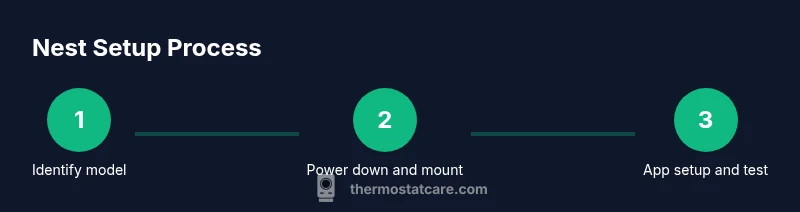
A well-documented manual outlines the sequence: shut off power, map your wires, mount the base, attach the thermostat, and complete app configuration. The google nest thermostat manual emphasizes verifying the C-wire presence for reliable power and confirms compatibility with your HVAC system. Use the Nest app to link your account and import settings from the old thermostat. This ensures seamless control and energy reporting.
Troubleshooting common issues
Common problems covered in the google nest thermostat manual include a blank screen, unresponsive touch controls, or miscommunication with the HVAC system. The manual provides wiring diagrams, error codes, and reset procedures. If codes appear, reference the exact flowchart for your model. Thermostat Care suggests verifying the power supply, checking wire connections, and ensuring the HVAC fan is operational before diving into complex repairs.
Maintenance and safety tips
Regular maintenance helps preserve accuracy and efficiency. The google nest thermostat manual recommends periodic cleaning of vents and ensuring the thermostat sits away from direct sunlight or heat sources. Keep the wiring dry and dry hands while handling terminals. Follow the safety notes about power isolation and professional service if you’re uncertain about wiring or if the system is wired to a heat pump or multi-stage configuration.
Tools & Materials
- Phillips-head screwdriver(for thermostat mounting screws)
- Smartphone with Google Home/Nest app(for setup and app configuration)
- Voltage tester or non-contact tester(optional for safe power verification)
- Spare 2-3 wires or wire caps(handy if wiring adjustments are needed)
- Power shut-off access (breaker)(turn off power to HVAC before work)
Steps
Estimated time: 30-60 minutes
- 1
Identify model and power down
Locate your Nest thermostat model on the device or packaging. Before touching wiring, switch off the power at the breaker to prevent shock. Keep a photo of existing wiring for reference when wiring the new base.
Tip: Taking a photo helps ensure correct reattachment. - 2
Check wires and C-wire compatibility
Inspect the wiring harness to confirm the presence of a C-wire, which provides reliable power. If there’s no C-wire, review the manual’s guidance for power options or consider a thermostat that supports power-sharing.
Tip: If wiring is unfamiliar, pause and consult the model's diagram. - 3
Mount base and connect wires
Mount the base plate on the wall, attach wires to the corresponding terminals as shown in the manual, and secure the display. Ensure conductors are fully inserted and not frayed.
Tip: Double-check wire color-to-terminal mapping per model. - 4
Configure in the Nest app
Power the system, then open the Nest app and follow setup prompts. Import any settings from the old thermostat and verify HVAC compatibility within the app flow.
Tip: Enable notifications to monitor energy usage. - 5
Test heating and cooling
Run a test cycle for heat and cool to confirm the thermostat controls the HVAC properly. Listen for relay clicks and verify responsive changes in the app.
Tip: If a stage doesn’t respond, re-check wire connections. - 6
Finalize and review safety notes
Review the manual’s safety guidance and re-secure the faceplate. Confirm that all power is stable in the system and that the app shows current readings.
Tip: Keep a wiring diagram for future reference.
Questions & Answers
Where can I find the official Google Nest thermostat manual?
The official manual is on Google's support site, the Nest app, and the product packaging. Use your exact model number to locate the correct guide.
You can find the official Nest thermostat manual on Google support, in the Nest app, or on the product box.
Do I need to power off the HVAC before wiring?
Yes. Always switch off power at the breaker before touching thermostat wiring to prevent shocks or damage.
Power off the HVAC at the breaker before wiring.
Can I install a Nest thermostat myself?
Many homeowners can install, but confirm compatibility, wiring, and safety requirements in the manual. If you’re unsure, consider a professional.
DIY is possible if you follow the manual and stay safe; otherwise, hire a pro.
What is a C-wire and why do I need it?
A C-wire provides continuous power to the thermostat. The manual explains where to connect it and what to do if your system lacks one.
A C-wire is the common power wire your thermostat needs for reliable operation.
How do I reset the Nest thermostat?
Reset options are available in the app and on-device menus. The manual provides step-by-step reset instructions for different models.
Reset options are in the Nest app or on the device; the manual has model-specific steps.
Where can I find model-specific diagrams?
Model-specific diagrams appear in the official manual and Google support pages for your Nest model.
Look up your model's diagrams in Google’s manual and support pages.
Watch Video
What to Remember
- Identify your Nest model before starting.
- Follow the official manual to ensure safe wiring.
- Use the Nest app for setup and energy insights.
- Test both heating and cooling after installation.