Fan vs AC on Thermostat: An Analytical Comparison
An analytical guide comparing fan vs AC on thermostat usage, with practical tips to optimize comfort, humidity control, and energy efficiency.


TL;DR: For most homes, set the thermostat to Auto with the fan also Auto to balance comfort and efficiency. The fan-on setting circulates air but wastes energy when cooling isn’t needed. Use Fan-Only only to improve air movement without cooling. On very hot days, running AC with Auto fan often delivers faster relief and better humidity control.
Understanding the Basics of Fan and AC on Thermostat
If you’re trying to decipher the common terms around thermostat operation, the topic fan vs ac on thermostat covers two core capabilities: the blower (the fan) and the cooling cycle (the air conditioner). In most systems, the blower can run in Auto or On modes. Auto means the fan runs only when cooling is needed, while On keeps the blower circulating air continuously, independent of cooling. This distinction matters because it affects energy use, temperature stability, and humidity. For homeowners, recognizing that the two controls act in tandem but serve different purposes helps in choosing a mode that aligns with climate, occupancy patterns, and comfort goals. According to Thermostat Care, testing both modes in your home reveals how each setting changes perceived comfort and air distribution over a typical day.
In practical terms, you’ll often see three knobs to consider: Fan (On vs Auto), System (Cool vs Heat), and Mode (Auto vs Cool). When you select Auto with Fan Auto, the system will cool on demand and circulate air only as needed. If you choose Fan On, the blower runs continuously, even when the AC isn’t actively cooling, which can improve air movement but add energy use. This section sets the stage for deeper exploration of the trade-offs involved in fan vs ac on thermostat.
Thermostat Care’s guidance emphasizes testing in real-world conditions to observe how humidity, temperature stability, and air freshness respond to each configuration, especially during shoulder seasons when cooling demand fluctuates.
How Modes Affect Comfort, Humidity, and Air Quality
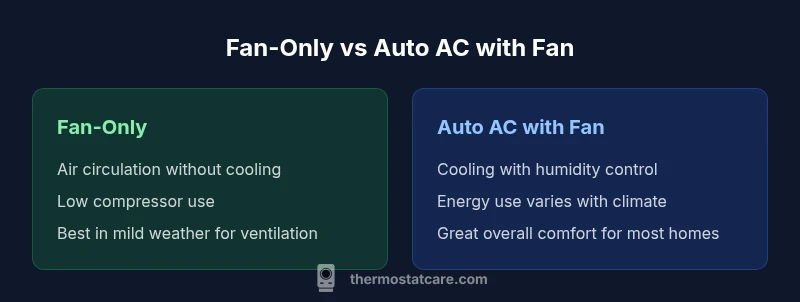
The choice between Fan-Only and Auto AC with fan can influence comfort in several ways. When you run only the fan, you circulate indoor air, which can reduce stagnant feeling and help distribute heat more evenly in rooms that are poorly mixed. However, because the compressor isn’t actively cooling, spaces may feel warmer, and humidity can rise since cooling also dehumidifies. Conversely, enabling the AC along with Auto fan ensures cooling is paired with air movement, improving indoor comfort, lowering relative humidity, and stabilizing temperatures more quickly after a warm spell. This tends to be the preferred setup for most homes in warm climates or households with higher humidity levels. Thermostat Care notes that humidity control is a critical factor in perceived comfort, especially in regions with hot, muggy summers. The decision should be tailored to room usage patterns and occupancy, ensuring the air you feel is both cool and breathable.
In practice, test how humidity levels respond in the rooms you use most. If you notice damp patches or a muggy feel, prefer Auto AC with fan to help dehumidify. If the goal is energy savings and you’re okay with warmer evenings indoors, Fan-Only can work in shoulder seasons when cooling demand is low.
Energy Use and Cost Implications
Energy use in thermostat configurations hinges on whether the system is cooling, circulating air, or both. The fan motor itself consumes energy, but this is typically less than the energy required to run the compressor for cooling. When you set Fan-Only, you reduce compressor usage and may see energy savings in mild conditions; when you enable AC with Auto fan, the compressor runs as needed to maintain the target temperature, and the fan aids distribution. In many homes, Auto with fan is the best balance between comfort and energy efficiency because you can cool rooms on demand while avoiding excessive fan operation when cooling isn’t required. Thermostat Care Analysis, 2026, emphasizes that the most efficient configurations vary by climate, home insulation, and occupancy patterns, so a personalized test plan yields the best results.
To maximize efficiency, avoid leaving the fan On during hot spells when you don’t need constant air movement, and consider using Auto mode with a well-calibrated setpoint. Regularly cleaning filters and ensuring proper airflow can further reduce energy consumption and improve cooling effectiveness. In milder climates, fans serve as a low-energy circulation method, but you won’t get significant cooling or humidity control without the AC running.
Humidity and Air Quality Considerations
Humidity control is one of the central reasons to run the AC along with Auto fan. Cooling typically reduces indoor humidity by removing moisture from the air, a benefit not provided by Fan-Only operation. If you live in a humid climate or have sensitive occupants, relying on Auto AC with a well-orchestrated fan cycle tends to improve air quality and comfort. On the other hand, running the fan alone can still improve perceived air freshness by circulating stale air and helping to normalize temperatures across rooms with uneven insulation. In this sense, Fan-Only is a useful tool for spot air movement in rooms that comfort-seekers might describe as stuffy, while Auto with AC offers a more complete humidity management strategy. Thermostat Care’s approach suggests evaluating humidity readings in the spaces you use most and adjusting settings to match your comfort targets.
If you’re dealing with dampness after showers or cooking, using the AC with Auto fan will generally reduce humidity more effectively than fan-only operation alone. In addition, consider upgrading to a thermostat with humidity sensing or dehumidification modes if your HVAC supports them.
Real-World Scenarios and Recommended Settings
While there is no one-size-fits-all solution, several common scenarios help homeowners choose between Fan-Only, Auto with Fan, or Auto with AC. Scenario 1: You work from home in a mixed-use space with several rooms. Start with Auto and Fan Auto to balance cooling needs with air distribution. Scenario 2: Sleeping in a hot climate. Auto with AC can stabilize the temperature more consistently during the night, promoting better sleep quality and lower humidity. Scenario 3: Humidity spikes due to cooking or showering. Engage AC with Auto fan for rapid humidity reduction and faster comfort recovery. Scenario 4: Budget-conscious weeks when outdoor temperatures are mild. Fan-Only can keep air moving in the short term while avoiding cooling energy costs. In all cases, monitor how long cooling cycles last and how much air movement is achieved. Thermostat Care’s practical testing plan helps you verify the best mode for your home.
Remember to account for occupancy: unoccupied zones should not unnecessarily run the fan; consider using zoning if your system supports it.
Common Mistakes and How to Avoid Them
Common mistakes include leaving the fan On all day without cooling during peak heating hours, which wastes energy and can accelerate wear on the blower. Another frequent misstep is relying solely on Fan-Only in hot climates, leading to persistent heat and humidity issues. People also overlook proper thermostat placement and air filter maintenance, which can reduce system efficiency regardless of mode. To avoid these issues, set expectations based on climate and usage, and run regular checks on airflow, filter cleanliness, and thermostat calibration. Thermostat Care suggests a short, weekly check-in during seasonal transitions to fine-tune settings and ensure the system isn’t fighting a hidden airflow constraint.
An additional pitfall is not differentiating between rooms with high solar gain and others that stay cooler. If you have a sun-exposed room, the Auto AC setting may need a slightly lower temperature target in those zones, while the fan alone may suffice for rooms with better insulation. Finally, ensure your thermostat wiring is healthy; a loose wire can cause mode switching issues that misrepresent your intended settings.
How to Configure Your Thermostat for Best Results
Configuration starts with understanding your climate and home design. In warm, humid climates, Auto with AC is typically the most reliable for comfort and humidity control. In drier, milder climates, Auto with fan Auto can be more energy-conscious while keeping air moving. If you prefer additional humidity control without constant cooling, use a smart thermostat with humidity-aware modes and schedule cooling during peak heat periods. The setup process generally involves choosing a mode, setting the target temperature, and enabling a fan control option (Auto vs On). For those with multi-zone homes or more advanced equipment, explore zoning capabilities to limit fan activity to occupied rooms only. Thermostat Care recommends starting with Auto mode and testing both fan settings for a full week to understand how your living patterns align with energy use and comfort.
Additionally, consider sensor-based thermostats that adjust based on occupancy or temperature gradients. A properly calibrated system minimizes unnecessary cycling and ensures that the fan and compressor cooperate efficiently to deliver consistent comfort. If you’re new to thermostat programming, start with a basic baseline and gradually introduce more nuanced rules as you observe real-world results over a few weeks.
Quick Reference: Baseline Recommendations by Use Case
- Mild, dry climates: Auto with Fan Auto for balanced efficiency and comfort.
- Humid summers: Auto with AC and Auto Fan to maximize humidity removal.
- Hot nights with no occupancy: Auto with AC and lower target temperatures for sleeping comfort.
- Air circulation priority (stuffy rooms): Fan-Only in unoccupied zones, then switch to Auto as needed.
- Regular maintenance days: Clean filters, verify air leaks, and confirm thermostat calibration to maintain efficiency.
Comparison
| Feature | Fan-Only (Fan mode) | AC with Auto Fan |
|---|---|---|
| Energy Use | Low to moderate (blower only) | Moderate to higher (cooling active) |
| Air Distribution | Continuous air circulation in rooms | Cooling plus air movement when needed |
| Humidity Control | Limited without cooling | Improved with cooling and dehumidification |
| System Wear | Less compressor cycling | Increased compressor cycling during cooling |
| Best For | Air movement and ventilation when cooling isn’t desired | Hot days needing rapid cooling and humidity control |
| Noise Level | Fan hum varies by model | AC compressor noise with fan operation |
Upsides
- Improved air circulation without cooling when needed
- Lower compressor wear during fans-only operation
- Potential energy savings in mild climates when cooling isn’t required
- Flexible options for occupancy-based scheduling
The Bad
- Humidity may rise without active cooling
- Fan-only cannot reduce room temperature
- Continuous fan-on increases energy use if cooling isn’t necessary
- Not all homes experience the same benefits due to insulation and layout
Auto mode with the fan is the baseline winner for most homes
Auto with a well-tuned fan yields a good balance of comfort and efficiency. Use Fan-Only when air movement matters more than cooling, and switch to AC with Auto Fan on hot or humid days for best humidity control and temperature stability.
Questions & Answers
Should I keep the fan on all the time?
Keep the fan On only if you need constant air movement. For energy efficiency and temperature stability, Auto is usually best. If a room feels stuffy, try Fan-Only for targeted circulation before resorting to cooling.
Keep the fan on only if you want continuous air movement; otherwise, Auto is typically more efficient and comfortable.
Is fan-on with the AC necessary for humidity control?
Yes, running the AC with the fan helps remove humidity more effectively than the fan alone. For best humidity management, rely on Auto AC with the fan cycling as needed rather than continuous fan-on.
Auto AC with the fan is best for humidity control; fan-only helps circulation but won’t dehumidify as effectively.
Does running the fan increase compressor wear?
Running the fan without cooling reduces compressor activity, which can lower wear. However, if you keep cooling on, the compressor will cycle as needed, which is normal. Neither mode should cause unusual wear when used as intended.
Fan-only reduces compressor use, but normal cooling cycles are expected when cooling is needed.
What’s the best setting for sleeping?
Many people sleep better with Auto AC and Auto Fan, which maintains a stable temperature and comfortable humidity. If you dislike night-time fan noise, you can switch to Fan-Only for circulation after cooling has stabilized the room.
Auto AC with Auto Fan is usually best for sleep stability and humidity control.
Will turning the fan on affect power consumption?
Yes, running the fan (On) consumes electricity beyond the compressor. If the space is comfortable without cooling, Fan-Only can save energy; otherwise, Auto with cooling keeps efficiency in balance.
Fan-on uses more electricity than Auto; use it only when you need continuous air movement.
How do I switch between modes on a typical thermostat?
Most thermostats have a mode dial or menu to select Auto, On, or Cool with a separate Fan control. Start in Auto with Fan Auto, then experiment with Fan On and Fan-Only for a few days to observe impact on comfort and energy use.
Use the mode and fan controls on your thermostat to test Auto, On, and Fan-Only settings.
What to Remember
- Use Auto with fan Auto for most days
- Fan-Only improves circulation but not cooling
- Humidity control benefits from Auto AC when needed
- Test settings seasonally to optimize comfort and energy use
- Maintain filters and verify thermostat wiring for reliability