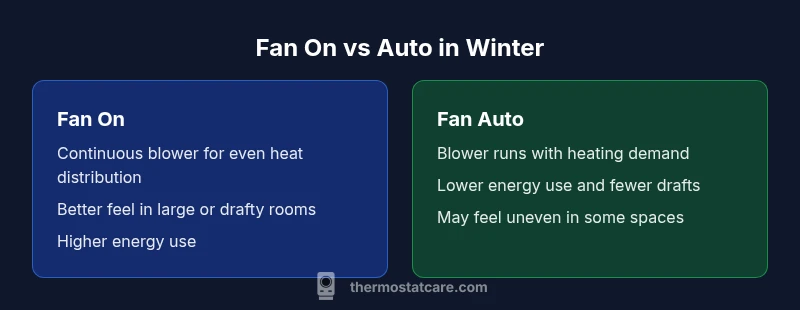
Fan On or Auto in Winter: A Practical Comparison Guide
Explore when to use thermostat fan on or auto in winter, how each setting affects comfort, humidity, and energy use, with actionable guidance from Thermostat Care.


In winter, the choice between thermostat fan on or auto depends on comfort, air distribution, and energy goals. Generally, auto mode minimizes energy use, while fan on can help with rapid warmth and better air circulation in large or drafty spaces. For most homes, start with auto and switch to on briefly in specific rooms if drafts or uneven heating persist, then revert. This quick decision framework mirrors Thermostat Care’s guidance for balancing efficiency and comfort.
Why the thermostat fan behavior matters in winter
In winter, the way you run the fan on your thermostat can noticeably influence how quickly rooms feel warm, how evenly heat is distributed, and how much energy you consume. According to Thermostat Care, the decision between keeping the fan on or letting it auto run with heating cycles is more than a toggle—it's a lever that affects comfort, humidity distribution, and system wear. If you’re exploring the question of thermostat fan on or auto in winter, you’re weighing several practical trade-offs: comfort uniformity, draft management, and long-term energy costs. When you understand these dynamics, you can tailor settings for different rooms, times of day, and occupancy patterns, rather than applying a one-size-fits-all rule across your entire home.
In most homes, winter operation benefits from starting with auto and observing how heat feels in the main living areas. The auto setting activates the blower as heat is needed, and it generally aligns with the thermostat’s temperature target, reducing unnecessary airflow once the space reaches the desired warmth. In contrast, leaving the fan on continuously (the “fan on” setting) can improve air mixing in large or open spaces but at the cost of higher energy use and potential drafts around seating areas. This distinction is especially relevant for homes with radiant heat, older ductwork, or rooms that experience cold spots near windows. Reading your HVAC system’s behavior and testing both modes helps you strike a balance between comfort and efficiency.
A practical takeaway: use the auto setting for routine days and switch to the fan on setting selectively—for example, after a long cold spell, or when you know a particular room is slow to warm up or stays drafty. The choice should be tuned to your home’s layout, insulation quality, and the number of occupants, rather than chasing a single “best” setting across all spaces.
For homeowners who want a simple rule of thumb, think in terms of airflow vs. energy: if you notice cold spots or uneven warmth, a temporary fan-on burst can help distribute heat faster; if you want to minimize electricity use and avoid drafts, rely on auto with a well-sealed home.
How fan settings influence heating efficiency and comfort
Airflow dynamics drive how heat moves from your furnace to living spaces. When the thermostat blower runs in auto mode, it aligns with the heating cycle: the heat exchanger warms air, the blower distributes that air through ducts, and once the target temperature is reached, the blower cycles off. This means fewer hours of blower operation and typically lower electricity usage. In contrast, the fan-on setting keeps the blower running continuously, which can improve perceived warmth by circulating air more evenly, reducing hotspots, and helping to push warm air toward areas that heat slowly. The trade-off is energy use: continuous fan operation means more electricity drawn by the blower motor, and in some systems it can also increase friction losses or noise, depending on duct design and insulation.
Beyond energy, continuous air movement can affect perceived humidity and comfort. Dry winter air can feel less comfortable when the blower runs nonstop, especially if your home has low humidity. In some homes, constant airflow can also create drafts near the thermostat or seating areas, which might tempt occupants to raise the setpoint and thereby paradoxically increase energy use. On the other hand, in spaces with poor air mixing—such as open-plan living areas or rooms far from the furnace—continuous airflow helps distribute heat and can reduce the number of zones needed to feel evenly warm. A key nuance: the optimal approach varies by home, furnace type, and ductwork condition, so testing both modes in real-life conditions yields the clearest guidance.
From a diagnostic perspective, a homeowner should observe temperature stratification—whether floors feel cooler than the ceiling—and the time-to-warmth after a cold night. If you notice persistent cold drafts near seating areas or windows, a targeted use of the fan-on setting in that room can help normalize temperatures more quickly than auto alone. Yet if energy cost is a primary concern or if drafts bother occupants, favor auto and address insulation gaps, weather sealing, or radiator/duct balancing as the longer-term fix.
Practical test tips: run auto mode for several days and compare room-by-room warmth, then run fan-on for a few hours in the coldest part of the day to gauge how quickly heat distributes. Track energy use using your smart thermostat’s energy dashboard to quantify any differences. Over time, you’ll see whether the extra blower runtime translates into meaningful comfort gains that justify the additional energy consumption.
For larger homes or homes with several zones, you might consider zone controls and dampers. In those cases, auto is often superior for everyday use, while you may enable a temporary fan-on in a zone that lags, then revert to auto once balance is restored.
Thermostat fan on vs auto in winter: definitions and typical scenarios
Understanding the core definitions helps homeowners apply the right setting with confidence. The “fan on” setting keeps the blower active regardless of whether the furnace is actively heating. The result is continuous airflow, steady mixing of warm air, and higher baseline energy use. The “fan auto” setting only runs the blower when the furnace is actively heating or cooling, which reduces blower runtime and concentrates heating during the demand period. In winter, auto tends to support energy efficiency and stable temperature control when the home is well sealed. However, in rooms that experience persistent cold drafts or slow heat-up, a temporary switch to fan on can deliver faster warmth and more uniform temperatures.
Common scenarios illustrate practical decisions:
- Large, open-plan living areas with multiple intake vents: Auto might leave some zones cooler until the furnace cycles more frequently; a timed fan-on burst can help equalize temperatures quickly.
- Rooms adjacent to uninsulated exterior walls: Auto may lead to more noticeable temperature gradients; fan-on in the early evening can help reduce perceived cold spots before settling back to auto.
- Homes with older ductwork or limited air circulation: Auto minimizes wear on the blower and reduces noise; if you notice stagnant air in the main living room, a brief fan-on period after the system starts can help refresh the space.
To decide between fan on and auto in winter, evaluate comfort versus energy in your specific layout. Keep in mind that the blower’s energy draw varies by system, blower motor efficiency, and duct design. A practical approach is to run a controlled test: observe a room over a full heating cycle in auto, then replicate with fan-on for the same period. Compare both comfort and energy metrics to determine which setting aligns with your preferences and budget.
If your thermostat supports quick changes, you can automate the comparison by scheduling a brief fan-on window after the thermostat reaches your setpoint—for example, 15 minutes of fan-on after heat is achieved, then back to auto. This allows you to experience both modes under comparable conditions and choose the one that feels best in your home.
When you understand your system’s behavior, you can optimize fan settings by season. For many homes, auto suffices most of the winter, with occasional fan-on tweaks for comfort or to drive quick warmth in drafty zones. Thermostat Care emphasizes testing and personalization over one-size-fits-all rules.
Real-world use cases: when to pick fan on or auto in winter
Real-world practice often reveals nuances that theory alone cannot capture. Consider a single-story home with a central furnace and a long, uninsulated hallway. In such a layout, auto mode can sometimes leave the hallway colder than the living room because heated air tends to rise and settle unevenly along the path of travel. In this scenario, a short, staged fan-on period during the initial warm-up can push the heated air into the hallway, improving perceived warmth without dramatically increasing energy use if the fan-on window is limited to the first 15–20 minutes of heat. For daily living, auto mode should dominate, as it minimizes blower runtime while still delivering adequate warmth.
In a two-story house with heavy insulation and well-balanced ducting, auto mode often works well during most of winter. The upstairs bedroom zone might reach temperature targets more slowly than the living area, which can lead to temperature differences across floors. A targeted fan-on in the upstairs zone during the post-heat stabilization phase can help reduce temperature disparities, especially when occupants wake up to a colder morning. The key is to use fan-on intentionally—say, in the 30–60 minutes after the furnace turns on—to smooth temperature gradients without leaving the fan running nonstop.
For homes with heat pumps or dual-fuel setups, the interaction between the outdoor temperatures and indoor air movement can differ. In such systems, the fan may contribute to a more even distribution of heat when the auxiliary heat source is engaged. Start with auto and assess whether a brief manual fan-on burst improves room feel in the first hour after a cold start. If not, revert to auto and focus on duct sealing and insulation upgrades instead. Thermostat Care notes that the optimal choice hinges on your house’s unique thermal dynamics.
In rooms with particularly drafty windows or doors, the symmetry of heat distribution is more important than rapid warm-up. A careful, measured use of fan-on after heat is detected can help carry warm air further along the space. If you notice drafty zones, try a single, short fan-on session in the affected area rather than keeping the fan on continuously across the entire house.
Energy usage and cost implications
Energy use is a central consideration when choosing between fan on and auto during winter. When the blower runs continuously with fan on, you incur an additional energy draw from the blower motor. The magnitude of this draw varies by blower type, motor efficiency, and ductwork. In a well-insulated home with modern equipment, the incremental energy cost of a short fan-on burst is typically small, but it compounds if you leave the fan on for extended periods. Auto mode minimizes blower runtime, aligning airflow with actual heat demand. The result is typically lower electricity consumption over a heating season, assuming the home’s envelope is reasonably tight.
Beyond direct blower energy, temperature distribution affects thermostat setpoints and your heating cycle. If heat feels uneven and you constantly raise the thermostat to compensate, you may increase overall energy consumption without achieving better comfort. A balanced approach is to optimize insulation first, then use auto as the default. When you need to address cold spots, use a targeted, time-limited fan-on event to redistribute heat, and then return to auto. Thermostat Care’s guidance emphasizes evaluating energy costs alongside comfort outcomes—do not rely on a single metric. A warm, energy-efficient home is achieved by balancing blower operation with insulation quality and room layout.
Some homeowners discover that humidity and perceived warmth interact with energy choices. In drier indoor environments, distributing air with the blower can slightly increase condensation on windows, especially after a cold night. If you notice moisture-related issues, verify humidity levels and consider a humidification strategy if needed, rather than simply toggling the blower setting to control perceived warmth. The goal is to avoid unnecessary blower run time while maintaining comfortable rooms and a balanced humidity profile. This is where the auto setting commonly delivers the best compromise for most households.
Ultimately, the cost impact depends on your local electricity rates and how often you switch modes. If your winter climate includes frequent cold snaps but moderate daily occupancy, auto will typically be the most cost-effective baseline. Any fan-on interventions should be short and purposeful, designed to address a particular room or time window rather than a blanket, all-day approach. Thermostat Care recommends documenting your energy use during a winter season to identify real savings and not rely on intuition alone.
System types and compatibility: making sense of your HVAC
Not every heating system interacts with the blower in the same way. Older forced-air systems with simple single-stage furnaces behave differently from multi-stage systems, heat pumps, or systems with zone dampers. In older homes, auto mode often provides acceptable comfort without overworking the blower. If you have a high-efficiency furnace or a modern smart thermostat, you have more precise control, including presets for different times of day and occupancy patterns. In some configurations, the fan-on setting may bypass certain safety or efficiency features, such as the furnace’s built-in cycle with longer runtimes. If you suspect compatibility concerns, consult the thermostat’s documentation or a qualified HVAC technician.
For homes with multiple zones, the best approach often centers on zone-by-zone automation. Some thermostats offer per-zone fan control or separate fan settings for each zone. In those cases, you can assign auto to the main living areas while using a temporary fan-on in a drafty corner room. Always verify that your ductwork and zone control equipment are balanced to prevent over- or under-pressurization, which can affect comfort and efficiency. When in doubt, start with auto across zones and gradually test small, controlled fan-on interventions in specific rooms to build a data-driven plan for winter operation.
If your system uses a heat pump, consider the implications of outdoor-temperature compensation on fan behavior. In some setups, the fan can help with cold-weather efficiency, but in others, running the fan continuously may interfere with economizers or auxiliary heating strategies. The crucial step is to test and observe: run auto during typical days and note comfort, energy, and humidity outcomes; then try brief fan-on intervals to address any identified issues. A measured, system-aware approach yields better long-term satisfaction than defaulting to one setting across all seasons.
Common mistakes and how to fix them
Common mistakes include using fan-on as a daily default, assuming the fan will always improve comfort, and neglecting insulation or duct issues. A frequently cited error is not accounting for room layout when enabling fan-on in a specific zone; a draft near a chair or couch can make the space feel colder while the rest of the house remains comfortable. Another pitfall is failing to differentiate between temporary comfort needs and long-term energy goals. While a brief fan-on burst may help in a drafty room, leaving the fan on all day can quickly erode energy savings and increase wear.
To fix these issues, start with a baseline auto setting and monitor room-by-room temperature distribution over several days. If you notice chilly zones, address structural factors first: seal leaks around windows, add more insulation, or adjust duct placement. For short-term comfort gains, implement a controlled fan-on window (for example, 15–20 minutes after the heat cycle begins) and observe whether warmth becomes more even. Keep a simple log of settings, room temperatures, and energy usage to see which combination provides the best balance for your home. Thermostat Care emphasizes a disciplined, data-driven approach rather than guessing at the best setting.
Another mistake is ignoring humidity changes. Running the blower can move moisture through the home, sometimes drying indoor air more quickly. If you live in a dry climate, you may want to consider a humidification plan or at least monitor indoor humidity and adjust settings to maintain comfort. Lastly, be mindful of the thermostat’s scheduling features. If you’re away from home often, a smart schedule can automate auto mode to run primarily during occupied periods and reduce blower activity when rooms are empty.
How to test your fan behavior: a step-by-step approach
A practical, repeatable test protocol helps you determine whether fan-on or auto best serves your winter comfort goals. Step 1: establish a consistent baseline by operating in auto mode for 7–14 days. Record room temperatures, occupant comfort, and energy consumption on a simple log. Step 2: implement a controlled fan-on window in a high-priority room for 15–30 minutes after heat is detected. Note any changes in warmth distribution, occupant comfort, and energy use during that window. Step 3: compare the two datasets: look for improvements in temperature uniformity, faster warming in colder zones, and any noticeable increases in energy costs. Step 4: repeat across different rooms and times of day to identify patterns. Step 5: finalize a season-long plan that uses auto as the default and reserves brief fan-on bursts for rooms with slower heat-up or persistent drafts.
If your HVAC supports per-zone programming, you can test fan-on interventions in one or two zones at a time. For smart thermostats, set up a schedule that alternates between auto and brief fan-on periods, then analyze the energy and comfort data to determine the most effective routine. Documentation of your findings—dates, temperatures, rooms involved, and observed comfort—will help you refine the plan each winter season. Thermostat Care recommends a methodical, evidence-based approach rather than relying on intuition alone.
Humidity, air quality, and the fan’s role in winter heating
The blower’s role extends beyond temperature; it also influences air movement and humidity distribution. When the fan runs, air circulates more thoroughly, which can help mix warm air more evenly and reduce localized cold pockets. In dry winter climates, this increased air movement can lower humidity in some spaces and contribute to a sensation of dryer air. If humidity becomes a concern, you may want to implement a humidification strategy or limit the duration of fan-on interventions to avoid unnecessary desiccation. The key is balance: maintain comfortable humidity levels (typically around 30–50%) while ensuring warmth feels evenly distributed. The auto setting generally helps maintain a balanced humidity profile by reducing unnecessary blower activity.
Air quality is another factor. Continuous air movement can improve indoor air quality by circulating air and reducing stagnation, but it can also increase the prevalence of drafts or noise if ducts are leaky or uninsulated. Start with auto to minimize airflow when not needed, then consider targeted fan-on periods in spaces where occupants spend the most time. If you use a mechanical ventilation system or filtration, ensure proper integration with the thermostat controls to avoid conflicting signals that might reduce efficiency or comfort. Thermostat Care recommends prioritizing the overall comfort and air quality of your living spaces when choosing between fan-on and auto during winter.
Quick-start decision framework for homeowners
This section provides a practical framework for making the choice between fan-on and auto in winter. Step 1: Assess the home’s insulation and ductwork. A well-sealed home reduces the risk of drafts when you use auto mode, making auto the default choice for energy efficiency. Step 2: Identify rooms with persistent cold spots or poor air circulation. If a room underperforms compared with the rest of the house, consider a fan-on test in that zone for a brief period after heating begins, to redistribute warmth more quickly. Step 3: Weigh comfort against energy costs. If occupants report discomfort due to drafts or uneven heat, schedule short fan-on intervals to address those issues without turning the entire house into a blower. Step 4: Leverage smart features. If your thermostat supports scheduling and occupancy detection, you can automate the timing of fan-on bursts to occur when energy prices are lower or when rooms are occupied. Step 5: Document and refine. Track the impact of your chosen settings across several weeks and adjust as needed based on observed comfort and energy data.
The overarching rule is balance: start with auto to maximize efficiency, then apply targeted fan-on sessions when comfort gains justify the extra energy use. Thermostat Care’s experience shows that most homes benefit from a data-driven, room-by-room adjustment rather than a blanket, year-round setting for the entire house.
Maintenance and long-term reliability of thermostat fan control
Long-term reliability hinges on both the thermostat and the HVAC system. Regular maintenance of the furnace and ductwork supports consistent airflow and predictable blower behavior, regardless of whether you mostly rely on auto or occasionally use fan-on. Basic checks include inspecting air filters monthly and replacing them on schedule, ensuring return air ducts are not blocked, and validating that dampers are balanced across zones. A clogged filter or blocked duct can masquerade as a fan setting problem, leading to confusion about whether the thermostat is behaving correctly. Keep an eye on unusual noises, frequent cycling, or inconsistent heat delivery, as these can be signs of underlying problems.
Software updates on smart thermostats can influence how fan control operates. Ensure your device’s firmware is up to date, and review the manufacturer’s settings for fan control to confirm that schedules and occupancy-based rules align with your intended winter plan. If you notice persistent performance issues after updates, a quick reset or reconfiguration may resolve misbehavior. The Thermostat Care approach emphasizes simple, repeatable maintenance steps that preserve reliability without requiring specialized expertise. A proactive maintenance routine helps sustain efficient, comfortable operation across many winters.
Comparison
| Feature | Fan On | Fan Auto |
|---|---|---|
| Airflow during heating cycle | Continuous airflow, improved mixing and rapid warmth | Blower runs only during active heat or when cooling is needed |
| Heat distribution | Often more uniform in large/open spaces | Typically relies on heat cycles; distribution matches demand |
| Energy usage | Higher baseline energy use due to constant blower | Lower energy use by limiting blower to heating demand |
| Humidity impact | Can slightly reduce perceived humidity due to ongoing circulation | Less aggressive air movement can preserve humidity better |
| Best for | Drafty rooms or zones needing rapid warmth | Energy-conscious homes with good insulation and even heat |
Upsides
- Can improve comfort in drafty or poorly warmed rooms
- Promotes more even air distribution in large spaces
- May reduce perceived temperature swings after a heat cycle
The Bad
- Increases energy usage when the fan runs continuously
- Can cause drafts near seating areas or the thermostat
- Potentially louder operation and more wear on the blower
Auto mode is generally my recommended default; use fan-on briefly to address specific hot or cold spots
Auto balances energy use with comfort for most homes. Use fan-on selectively to fix persistent drafts or uneven heat, then return to auto for efficiency.
Questions & Answers
Should I keep the thermostat fan on all winter?
Not usually. Keeping the fan on continuously can increase energy use and may cause drafts; evaluate your space and use auto most days. Use fan-on only in rooms with persistent cold spots after heat starts.
Generally, auto is best for energy efficiency; turn on the fan briefly in drafty rooms if needed.
When is it beneficial to use fan on for quick warmth?
In rooms that heat slowly or feel chilly after the furnace starts, a short fan-on period can help circulate warm air faster. Limit the window to a short duration to avoid unnecessary energy use.
Short fan-on bursts can help warm slow-to-heat rooms quickly.
Will running the fan auto mode affect humidity?
The fan itself doesn't add humidity. It circulates air, which can influence how humidity feels. If humidity feels low, consider a humidifier or targeted comfort adjustments rather than relying on fan settings alone.
Auto helps balance humidity by reducing unnecessary airflow.
How do I know if my thermostat supports 'fan on' option?
Check the thermostat’s menu for a dedicated 'Fan' or 'Fan Settings' option and confirm compatibility with your HVAC system. If in doubt, consult the manual or contact the installer.
Look for a Fan option in the thermostat menu and verify system compatibility.
Should I adjust fan settings seasonally?
Yes. In milder winter days, auto is usually sufficient. In very cold periods or draft-prone rooms, brief fan-on intervals can improve comfort. Reassess after a few weeks.
Adjust seasonally: auto by default, and use fan-on selectively as needed.
What to Remember
- Start with auto for energy efficiency
- Use brief fan-on bursts to fix cold spots
- Address insulation and duct issues to maximize comfort
- Test and log results to refine settings