Thermostat Fan On vs Auto: Energy and Comfort Guide
An analytical comparison of thermostat fan on vs auto modes, detailing energy use, airflow, humidity, and comfort. Learn when to switch modes and how to test for best results in your home.


Fan auto generally saves energy by cycling with the compressor, while fan on offers continuous air and more consistent humidity control. For a concise takeaway, see our detailed comparison. Click through to read the full analysis.
Understanding thermostat fan on vs auto
When you adjust your thermostat, you typically see two fan settings: On and Auto. These labels describe how the circulating blower inside your HVAC system operates during cooling or heating. In the Fan On mode, the blower runs continuously, circulating air regardless of whether the compressor is actively cooling or warming. In Auto mode, the blower only runs when the system is actively cycling. This distinction matters for energy use, indoor air distribution, and humidity control. According to Thermostat Care, most homes benefit from starting with Auto for efficiency, then evaluating comfort in winter and humidity in humid regions. The choice also depends on the type of HVAC system you have and how well your home is insulated. Poorly sealed envelopes can make Fan On feel more effective for comfort, but at a cost to electricity usage. Understanding these mechanics helps you tailor the setting to climate, occupancy patterns, and personal tolerance for temperature swings.
How the fan setting affects comfort and energy use
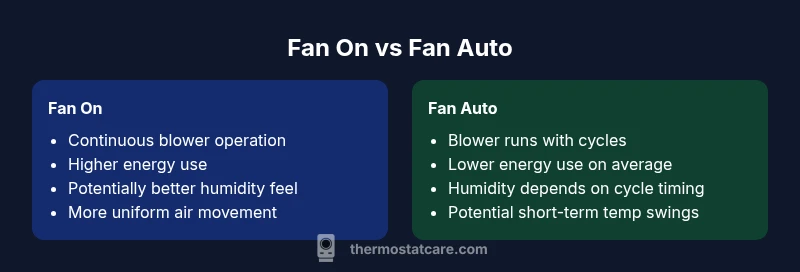
Air moves differently depending on whether the blower is always on or only when cooling or heating happens. Fan On maintains continuous circulation, which can reduce temperature variance between rooms and prevent hot or cold pockets. This steady air flow can also assist with humidity distribution, making the air feel drier or more comfortable depending on the season. However, the trade-off is that the blower runs longer, increasing electricity use and potentially shortening equipment life if it cycles unnecessarily. Fan Auto ties blower operation to actual cooling or heating cycles, so you generally use less energy over a given day. The downside is that you may notice short-lived temperature fluctuations as the system starts and stops. In many homes, the right balance depends on insulation quality, air leakage, and occupancy patterns; in others, a temporary switch to On during seasons of high humidity or very uneven rooms can improve perceived comfort.
Seasonal guidance: when to use each setting
In hot, humid climates during the cooling season, Auto usually provides adequate comfort while keeping energy use reasonable. If humidity remains stubborn, homeowners might opt to run the fan On for longer periods to improve air circulation and humidity perception, especially in rooms far from the HVAC return vents. In winter, Auto still makes sense if you want to minimize drafts and heat loss from unnecessary fan time, but some builders and homeowners appreciate Fan On for continuous air movement, which can reduce stale air and keep the living space feeling fresh. If your home has known cold spots, running the fan On occasionally can help even out temperature distribution, though at a modest energy cost. Always consider whether your thermostat is paired with a heat pump or conventional furnace, since some systems behave differently when in heat pump two-stage modes.
Common myths and misconceptions
Myth 1: "Fan On cools the house faster." Myth 2: "Auto disables humidity control." Myth 3: "Switching modes wears the system out faster." Debunk: Running the blower longer doesn't cool faster; humidity handling depends on moisture removal by the cooling cycle; Auto uses less energy; Frequent switching doesn't cause dramatic wear if the system is sized correctly; Understanding the system's behavior matters more.
Step-by-step guide to choose and test the right mode
- Identify climate and insulation quality. 2. Run a 24-hour test in Auto to observe comfort and humidity levels. 3. Compare energy consumption on your bill for Auto versus On over the same period. 4. Repeat the test in On for a few days to measure differences in air movement and perceived comfort. 5. Consider whether any rooms feel stuffy or drafty and adjust accordingly. 6. Document results and switch to the mode that provides the best balance of comfort and efficiency for your home.
How to adjust fan settings on common thermostat interfaces
Most older thermostats route to Fan control via Menu > Climate > Fan > Auto or On. For many modern or smart thermostats, use the companion app: Climate or Equipment, then select Fan Auto or Fan On and, if available, schedule periods of elevated airflow during peak occupancy. If you have a heat pump, check whether the setting interacts with auxiliary heat or emergency heat modes. Always consult your user manual if the labels differ, as manufacturers sometimes rename options or group them under advanced settings.
Energy impact and long-term considerations
Choosing Fan Auto typically aligns blower operation with actual cooling or heating cycles, which reduces unnecessary energy use and lowers running costs over time. In climates with high humidity or in homes with uneven insulation, Premium upkeep (insulation improvements, duct sealing) can enhance the effectiveness of either setting by improving distribution and reducing leakage. The broader takeaway is that the mode should be chosen based on climate, home design, and comfort priorities rather than a one-size-fits-all rule. This section underscores the value of testing both modes during different seasons to determine the best default for your household operations. Thermostat Care analysis shows many homes can achieve noticeable improvements in comfort by optimizing fan behavior as part of a comprehensive energy strategy.
Authoritative sources
- Energy.gov: Thermostats and energy-saving guidelines
- EnergyStar: Heating and cooling thermostats guidance
- EPA: Indoor air quality and air circulation basics
Authoritative sources (continued)
- https://www.energy.gov/energysaver/thermostats
- https://www.energystar.gov/products/heating_cooling/thermostats
- https://www.epa.gov/iaq
Comparison
| Feature | Fan On | Fan Auto |
|---|---|---|
| Energy usage | Higher energy consumption | Lower energy consumption |
| Air circulation | Continuous airflow | Airflow tied to cooling/heating cycles |
| Humidity control | Can feel drier with constant circulation | Humidity depends on cooling/dehumidification cycles |
| Comfort consistency | Steady airflow in all rooms | Potential gradual temperature swings during cycling |
| System wear | Potentially more wear if blower runs longer | Less blower run time with cycling |
| Best use case | Always-on comfort and humidity control in specific layouts | Energy-conscious operation with balanced comfort |
Upsides
- Improved air circulation for cooling comfort
- Better control of perceived humidity in some climates
- Lower energy use with mode-auto behavior
The Bad
- Higher energy consumption with fan on in many homes
- Potential for less even air distribution in very uneven homes when cycled
- Humidity control may vary by system and insulation
Fan Auto is the balanced default for most homes; Fan On is useful for specific humidity or air-quality needs
Use Auto to minimize energy use while maintaining comfort. Switch to On temporarily if you need steady air flow or improved humidity handling in tricky spaces.
Questions & Answers
What is the main difference between thermostat fan On and Auto modes?
Fan On runs the blower continuously, circulating air at all times. Auto runs the blower only during cooling or heating cycles, which saves energy in most homes. The choice affects comfort, humidity, and energy costs.
Fan On means the blower runs all the time, while Auto runs only when the system cycles. This impacts comfort and energy use.
Will using Fan On always save me energy?
No. Fan On generally uses more energy because the blower stays active, even when cooling or heating isn't actively changing air temperature. Auto tends to be more energy-efficient over typical daily use.
Fan On usually costs more energy because the fan runs continuously.
Can I use Fan On during humid seasons for better humidity control?
Yes, in some homes Fan On can help with humidity perception by circulating air, but this depends on your system and insulation. If humidity remains high, consider short-term Auto with targeted ventilation or dehumidification.
If humidity is the main concern, you can test On for a period, but watch energy use.
How do I change the fan setting on a thermostat?
On most thermostats, go to Menu or Climate, select Fan, then choose Auto or On. For smart thermostats, use the mobile app under Climate or Fan controls and save any changes.
Open your thermostat menu, select Fan, and switch between Auto and On.
Should I switch modes seasonally or keep one setting year-round?
Many homeowners switch seasonally: Auto in spring and fall for efficiency, On temporarily during peak humidity in summer or cooling-dominated periods. Monitor comfort and energy to decide.
Seasonally switching can balance comfort and energy, based on your climate.
What signs indicate I should review my fan setting?
Constantly running fan, uneven room comfort, unexpected energy costs, or unusual thermostat behavior are signs to re-evaluate Auto versus On and consider insulation or duct issues.
If the fan seems to run nonstop or you notice cold spots, recheck your settings and home insulation.
What to Remember
- Test both modes across seasons to learn comfort/energy impact.
- Auto is typically the energy-efficient default for most homes.
- Consider insulation and ductwork quality when evaluating modes.
- Smart thermostats can automate switching for efficiency and comfort.