Auto vs On: Should Your Thermostat Be in Auto or On?
Explore when to choose Auto or On on your thermostat. This analytical comparison covers comfort, energy use, fan behavior, and practical setup tips to help homeowners decide the best mode for reliable climate control.


For most homes, Auto mode is the preferred default because it continuously adjusts heating and cooling to maintain target temperatures with minimal manual tweaks. On (manual) can be useful when you want a fixed temperature or want the fan to run continuously for air circulation, but it generally uses more energy. In short: start with Auto and switch to On only if you have a specific, steady requirement that Auto cannot meet.
Why Auto Mode Matters
Auto mode is designed to manage year‑round comfort by letting the thermostat handle transitions between heating and cooling. When you choose Auto, the system uses sensor data, occupancy signals, and the target temperature to decide when to start heating, when to cool, and when to stop. The practical benefit is a smoother, more consistent indoor climate with less manual intervention. According to Thermostat Care, Auto mode aligns with typical homeowner patterns, reducing the need to constantly intervene during the day or night. For households that value convenience and predictable temperatures, Auto is often the better default choice. The downside is that Auto can feel less responsive to a sudden, short spike in outdoor temperature if the system prioritizes stability over rapid changes. The key takeaway is that Auto is designed to balance comfort with energy use, while minimizing the need for constant tweaks.
Understanding Auto vs On: What each setting does
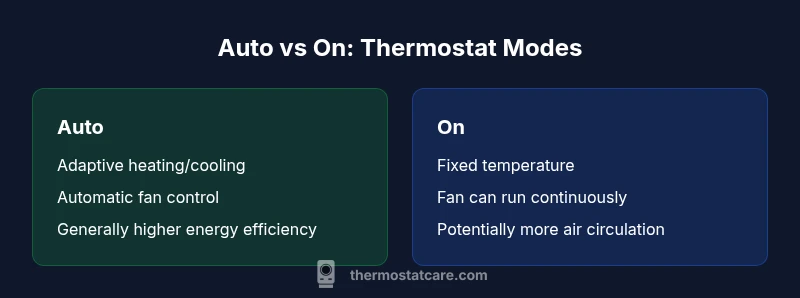
Auto mode lets the thermostat switch between heating and cooling as needed to hit the set point. The thermostat evaluates indoor temperature, outdoor conditions, and system performance to determine whether it should heat, cool, or hold. In contrast, On mode keeps the heating or cooling element active (and often keeps the fan running) at a fixed level, regardless of whether the target temperature has been reached. Some thermostats also offer an On setting for the fan that runs continuously, which can improve air mixing but increases energy use. This fundamental difference affects comfort, air quality, and energy costs. For homeowners, the distinction is simple: Auto adapts to changing conditions; On maintains a fixed condition. The Thermostat Care team emphasizes that Auto generally yields better overall efficiency, especially when occupancy varies or temperatures swing throughout the day.
How Auto Mode Affects Comfort and Efficiency
Auto mode supports gradual temperature changes, which reduces the likelihood of drafts or abrupt swings. Comfort tends to feel steadier because the system responds to both the indoor environment and occupancy patterns. Efficiency benefits come from fewer “hot spots” and less wasted energy from overshooting targets. When the fan is left on (in some On configurations), air circulation improves, which can feel nicer in certain rooms but adds to energy use. It’s important to note that the actual energy impact depends on your climate, insulation, and how well your system is maintained. Thermostat Care’s guidance highlights that Auto is typically the safer default for most homes, with On reserved for specific needs such as rapid air mixing or fixed-temperature scenes during certain activities.
When to Use Auto: Seasonal and Occupancy Considerations
Winter and summer bring distinct heating and cooling demands. Auto shines when occupancy varies or schedules change, because the system can automatically adjust to changing conditions without manual resets. If you work from home, Auto helps maintain comfort without constant tweaking. For households with consistent occupancy and fixed comfort preferences, Auto still preserves energy efficiency while offering reliable climate control. If you travel or have irregular patterns, Auto can adapt to partial-day presence, reducing energy use during unoccupied periods. The Thermostat Care approach favors Auto as the baseline because it accommodates fluctuations and supports routine energy savings without sacrificing comfort.
When You Might Prefer 'On' or Manual
There are legitimate reasons to choose On in specific scenarios. If you need a fixed temperature for a particular purpose—such as keeping a nursery at a precise level during sleep—or if you prefer continuous fan activity for enhanced air circulation in a space with poor air mixing, On can be useful. Some homeowners also use On during extreme weather events to stabilize indoor conditions when outdoor swings are frequent and rapid adjustments are desired. In these cases, be mindful that leaving the system in On more often can raise energy use and reduce the automatic balancing benefits that Auto provides. The takeaway is to reserve On for precise, non-variable conditions and revert to Auto for daily comfort and efficiency.
Step-by-Step Guide: Setting Auto on Common Thermostats
Start by selecting Auto on your thermostat interface; you may see options like Auto, Heat, Cool, and Fan. Set your desired target temperature for both heating and cooling, then ensure the fan is set to Auto if you want it to run only when actively heating or cooling. If your thermostat supports occupancy or learning features, enable them to optimize changes while you’re away. Confirm that the outdoor sensor or shared outdoor temperature reading is enabled if your unit uses outdoor data to adjust indoor temperature. Finally, run a quick test by scheduling a minor change and observing how Auto responds. If you have a multi-zone system, duplicate Auto across zones or set a zone-specific target that matches each space’s needs. Thermostat Care recommends starting with Auto and only switching to On in rooms that require deliberate air circulation or steady temperatures for specific activities, after evaluating energy impact and comfort.
Common Pitfalls and Troubleshooting Auto Mode
Auto mode can feel inconsistent if sensors are miscalibrated, if there are large temperature deltas between rooms, or if the thermostat misreads occupancy. If Auto seems slow to respond, check the thermostat’s sensor placement and verify that there are no drafts near the unit. Ensure that the system’s stage limits are set correctly for your furnace or heat pump. In some homes, older equipment may not respond as quickly to Auto adjustments, requiring a more gradual set-point change. If you notice persistent cold or hot spots, consider adding zoning, improving insulation, or placing a smart sensor in problem areas. Thermostat Care emphasizes that Auto mode works best when sensors are accurate and the equipment is well-maintained, with routine checkups to ensure calibration and airflow are functioning properly.
Practical Tips to Maximize Comfort in Auto Mode
Use occupancy scheduling to align Auto with when you’re home. Pair Auto with a sensible setback schedule to maintain comfort while reducing energy use during unoccupied hours. If your home experiences seasonal swings, set slightly different target temperatures for day and night that align with your comfort preferences. Regularly replace air filters and ensure vents are open for optimal airflow. Consider enabling related features like adaptive or learning modes if your thermostat offers them, but test a few cycles to confirm the mode behaves as you expect. Thermostat Care’s guidance suggests that maintaining Auto as the default and only using On for specific exceptions is the balanced approach for most households.
Quick Decision Framework: Auto vs On in 3 Questions
- Do you want a stable temperature across daily cycles without manual tweaks? Auto is typically best.
- Do you need enhanced air mixing or a fixed temperature for a dedicated space? On can be appropriate for that scenario.
- Will occupancy vary or schedules change often? Auto adapts, offering consistent comfort and potential energy savings.
Comparison
| Feature | Auto | On (Manual) |
|---|---|---|
| Energy Efficiency | high (adaptive cooling/heating) | medium to low (fixed operation) |
| Comfort Stability | steady with automatic adjustments | fixed temperatures; potential drafts if set wrong |
| Fan Behavior | auto fan runs only as needed | fan may run continuously if configured |
| Response to Changes | adjusts to occupancy and conditions | requires manual tweaks for changes |
| Maintenance Touchpoints | sensor calibration and maintenance keep Auto reliable | less automatic adjustment; check settings manually |
| Best For | homes with varying schedules and comfort needs | rooms requiring fixed temperature or controlled air flow |
Upsides
- Minimizes manual adjustments for daily comfort
- Tends to save energy through adaptive control
- Reduces temperature swings and drafts
- Improves overall climate consistency across zones
The Bad
- May feel less responsive to sudden changes
- Requires properly calibrated sensors and well-sealed spaces
- Some systems may not perfectly track every room with auto changes
- On can be preferred for fixed-temperature needs in select scenarios
Auto mode generally provides better comfort with balanced energy use
Choose Auto for most homes to optimize comfort and efficiency. Switch to On only if you have a fixed temperature requirement or need constant air circulation in specific zones.
Questions & Answers
Should I always use Auto mode?
Auto mode is generally recommended for energy efficiency and consistent comfort, but there are cases where a fixed temperature or continuous fan is needed. Evaluate your daily routine and comfort preferences before deciding. Thermostat Care suggests starting with Auto and switching to On only if you have a specific requirement that Auto cannot meet.
Auto mode is usually best for comfort and efficiency, unless you need a fixed temperature or constant fan in a certain room.
Is it better to keep the fan on Auto or On?
Fan Auto turns on only when heating or cooling runs, saving energy. Fan On keeps air circulating continuously, which can improve air mixing but adds energy use. For most homes, Auto is the preferred default for energy efficiency, with On used for specific needs.
Auto is typically best for energy efficiency; use On only if you need constant air mixing in a space.
Can Auto mode save energy during holidays or when away?
Auto mode adapts to occupancy and temperature patterns, which often reduces energy use when spaces are unoccupied. If your schedule is predictable, Auto helps maintain comfort without manual adjustments. The key is to pair Auto with a sensible vacation or away setting when you won’t be home for extended periods.
Auto can help save energy when you’re away, by reducing unnecessary heating or cooling.
How do I switch to Auto mode on a typical thermostat?
Look for the mode options on the thermostat display or app, select Auto, and set your preferred heat and cool targets. If you have a multi-zone setup, apply Auto to each zone. If you’re unsure, consult the manual or Thermostat Care guidance for general steps that apply across many models.
Tap Auto in the mode options and confirm your targets; repeat per zone if needed.
What should I do if Auto isn’t keeping the home comfortable?
First, check sensor placement and ensure doors and windows aren’t causing unwanted heat gain or loss. Clean or replace air filters and verify that the thermostat is calibrated correctly. If problems persist, inspect for HVAC airflow restrictions or consider upgrading sensors or zoning. Thermostat Care recommends seeking professional help if the issue remains unresolved.
Check sensors, seals, and airflow; recalibrate or seek help if needed.
Can Auto mode work with a manual Fan setting?
Some thermostats allow Auto mode with a separate fan setting. Using Auto for heating and cooling while leaving the fan on can improve air circulation in certain spaces, but it may increase energy use. Evaluate whether improved air distribution justifies the extra energy cost in your home.
Auto for climate control with a manual fan can help air flow—consider energy use.
What to Remember
- Start with Auto for baseline comfort and efficiency
- Use On only for fixed-temperature needs or continuous fan scenarios
- Ensure sensors and airflow are well-maintained for Auto accuracy
- Regularly review and adjust settings as seasons change
- Consider zoning or sensors in larger homes for best Auto performance