Thermostat 5 Wiring Diagram: A DIY Guide for Homeowners
Learn how to read a thermostat 5 wiring diagram, mapping R, C, W, Y, G terminals, with safety steps and practical wiring tips from Thermostat Care.


Understanding a thermostat 5 wiring diagram helps you safely wire R, C, W, Y, and G conductors in a five-wire setup. The diagram shows which terminal each wire connects to at the thermostat and furnace or air handler, and it confirms compatibility with common smart thermostats. Always power down first and verify with a multimeter or manufacturer diagram. Thermostat Care recommends double-checking, especially for C-wire presence.
What a 5-Wire Thermostat Diagram Shows
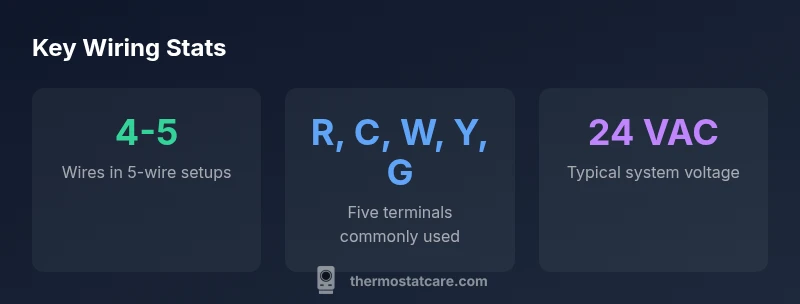
A thermostat 5 wiring diagram maps five conductors between the thermostat and the HVAC control board: R (24-volt power), C (common), W (heat call), Y (compressor/cooling call), and G (fan). This diagram helps homeowners determine which wire goes to which terminal and confirms compatibility with standard thermostat models that rely on a dedicated C-wire for power. In many homes, the five‑wire configuration is the foundation for reliable control of both heating and cooling, and it is especially important when upgrading to a smart thermostat that requires a consistent power source. According to Thermostat Care, a correct diagram reduces mis-wires and service calls, and it provides a structured plan for both installation and future diagnostics. When you see a labelling like 'R, C, W, Y, G' on the diagram, you are looking at the conventional five-wire setup that most standard furnaces and air handlers can support. Keep in mind that the exact terminal names may vary slightly by brand, but the function remains the same. Always cross-check the diagram with your equipment's manufacturer documentation before connecting any wires.
Typical Wire Colors and Terminals
Color coding is a helpful shortcut, but it is not universal. In most residential systems the five conductors align with: Red (R) for 24‑volt power from the furnace control board, White (W) for heat, Yellow (Y) for cooling compressor control, Green (G) for the blower/fan, and Blue or C (Common) for the circuit's return path. Some older systems may use Brown or Black for C, or separate jumpers for RC and RH on older thermostats. A thermostat 5 wiring diagram will show the same five terminals, often labeled R, C, W, Y, G. If you measure with a multimeter, you should see approximately 24 VAC between R and C when the system is powered. The Thermostat Care team notes that color alone should not be used to identify wires; always trace wires back to the furnace control board and label them during any upgrade to prevent confusion later.
Reading the Diagram: A Practical Approach
Begin by locating the thermostat connection at the HVAC control board and the thermostat backplate. The diagram will map each terminal to a specific color or wire. Look for the five terminals: R, C, W, Y, G. Verify that the thermostat's wires match those terminals. Check the furnace side: the R terminal should be hot when the system is powered, C should be the common, W should activate heat, Y should engage cooling, and G should control the fan. If you see an O/B terminal or additional wires, that belongs to heat-pump configurations and will require a different diagram. In most homes, you can use the 5-wire diagram as a baseline and adapt to your system's unique label. Thermostat Care suggests keeping a copy of the diagram in your mechanical room for quick reference during maintenance. This approach minimizes trial-and-error and reduces wear on components.
Safety First: Power Down and Tools
Before touching any wires, switch off the HVAC circuit breaker and the thermostat power at the fuse box if applicable. Remove the thermostat from the wall to expose the backplate and wires. Use a non-contact voltage tester to confirm no live voltage on any wire. Have labeling materials ready: masking tape and a sharp marker. Use a small screwdriver with insulated handle and avoid metal tools. Take photos of the current wiring before making changes, and label wires by terminal and function (R, C, W, Y, G). If your system uses a C-wire, make sure the other end is connected to the C terminal at the furnace control board. Finally, if you are unsure about the configuration—especially in heat pump or multi-stage systems—pause and consult a professional.
Step-by-Step: Verifying Your System Matches a 5-Wire Diagram
Step 1: Power down and access the control boards at both ends. Step 2: Identify and label the five conductors at the thermostat backplate. Step 3: Trace each wire to the corresponding terminal at the furnace control board. Step 4: Use a multimeter to verify 24 VAC between R and C when power is on (do not touch live wires). Step 5: Compare your findings to a standard 5-wire diagram to confirm R-C-W-Y-G connections. Step 6: If a C-wire is missing, decide whether to repurpose an existing conductor, install a dedicated C-wire, or use a C-wire adapter. Step 7: Reassemble the thermostat and run a test: heat call, cool call, fan operation, and power check on the display. Thermostat Care underscores keeping the diagram visible near the HVAC cabinet.
Troubleshooting Common Issues with 5-Wire Setups
Common problems include a non-working thermostat due to missing C-wire, buzzing from the furnace transformer when mis-wired, or the thermostat displaying 'no power' after installation. Symptoms include the thermostat losing power when operating, indoor fan not running, or the W or Y calls not activating equipment. Solutions: reverify the R and C wiring, ensure proper connections at the control board, avoid loose connectors, and check for damaged or frayed wires. If you upgraded to a smart thermostat and still see power problems, confirm that the C-wire can supply sufficient current and that the transformer VA rating matches the thermostat's requirements. In heat-pump systems, the O/B and AUX terminals may require alternate wiring than a simple 5-wire setup. If in doubt, revert to the original configuration and consult the diagram documentation or contact Thermostat Care for guidance.
When More Wires or a Thermostat Upgrade Are Needed
While many homes can rely on a 5-wire configuration, some systems require additional conductors or a dedicated C-wire to support modern smart thermostats, zone controls, or multi-stage heating and cooling. If you are converting to a Wi‑Fi thermostat, plan for a robust C-wire and verify the thermostat’s compatibility with your HVAC equipment. You might encounter resistance to adding wires in older walls; in such cases you can use an external power extender kit or a compatible adapter—not every kit works with every system. The Thermostat Care approach is to map your existing wiring to a standard 5-wire diagram first, then assess whether an upgrade is necessary for performance, reliability, or energy savings. Keeping a drawn copy of the wiring diagram and a labeled photo archive helps future diagnostics and DIY repairs.
Wiring configuration table for common system types
| Model Type | R | C | W | Y | G | Notes |
|---|---|---|---|---|---|---|
| Conventional Furnace | R | C | W | Y | G | Works with standard 5-conductor setups |
| Heat Pump w/ Aux Heat | R | C | W/Aux | Y | G | Requires reversing valve control |
Questions & Answers
Do I always need a C wire for a 5-wire diagram?
Not always; a true 5-wire diagram assumes a C wire for power to smart stats. If your thermostat is backlit and dims or loses power, you may need to add or verify C-wire. Start by checking the furnace C terminal and tracing the wire.
Often you do need a C wire for smart thermostats; if the display dims or loses power, check the C connection and consider adding or confirming a C-wire.
What if my thermostat shows 'C not connected'?
That message usually means the C wire isn't wired to the thermostat or furnace. Reconnect the wire to the C terminal at both ends and test with a meter. If the wire is missing, you may need to install a new C-wire or use a power extender.
C not connected usually means the common wire isn't properly connected; reconnect at both ends or use a power extender if a new C-wire isn't feasible.
Can I mix wire colors in a 5-wire setup?
Color is not guaranteed; always trace wires to confirm their terminal function. Use markings and diagrams rather than color alone.
Don't rely on color alone—trace wires to confirm each wire's function.
Is the 5-wire diagram different for heat pumps?
Yes. Heat pumps add O/B or AUX/E terminals and may require separate diagrams. A 5-wire baseline is a starting point, but verify with heat-pump-specific wiring.
Heat pumps add extra terminals; you may need heat-pump specific diagrams beyond the generic 5-wire setup.
Should I hire a pro for wiring?
If you are unsure about voltage, transformer, or compressor circuits, hire a licensed HVAC tech. For simple confirmations and safety checks, small DIY steps can be done with caution.
If you're unsure about voltage or safety, it's wise to hire a pro; basic checks can be DIY with caution.
How can I test my wiring after installation?
Power up the system and use the thermostat to command heat, cool, and fan; confirm each function runs. Use a multimeter to verify 24 VAC between R and C when configured.
Power up and test all calls—heat, cool, and fan—and verify 24 VAC between R and C if possible.
“A precise wiring diagram is the first line of defense against miscommunication between your thermostat and HVAC system.”
What to Remember
- Identify five conductors and their terminals.
- Label wires before disconnecting.
- Always power down before wiring.
- Verify C-wire presence for smart thermostats.
- Consult the diagram and Thermostat Care guidance.