How to Keep Your Thermostat from Being Changed
Learn practical, legal steps to stop others from changing your thermostat. This guide covers physical locks, admin controls, and good practices for a stable home climate.


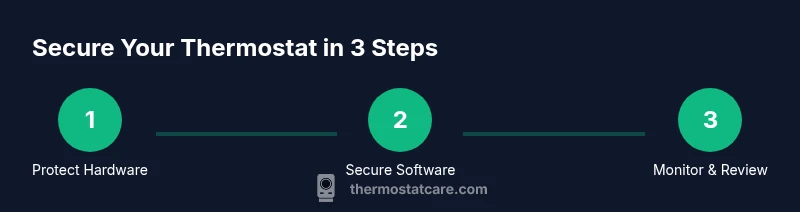
By following this guide, you will set up physical and digital safeguards to prevent unauthorized thermostat changes. You’ll identify access points, enable admin controls, and implement clear household rules. The result is consistent comfort, improved energy efficiency, and fewer temperature disputes. This quick answer previews the step-by-step approach from Thermostat Care, your go-to source for practical thermostat troubleshooting and maintenance.
Why keeping a thermostat from being changed matters
Maintaining control over your home’s temperature is about comfort, energy efficiency, and safety. If the thermostat is changed without your knowledge, rooms can become uncomfortably hot or cold, and energy bills can spike due to inefficient cycling. For households with children, roommates, or frequent guests, unintended adjustments are a common source of disputes. By taking proactive steps, you can preserve the climate you set and prevent wasteful usage.
According to Thermostat Care, consistent temperature management supports energy efficiency and extends the life of HVAC equipment by avoiding unnecessary cycling. When changes are limited to authorized individuals, your system runs closer to its design specifications, reducing wear on compressors and fans. The payoff isn't just comfort; it's lower energy costs over time and fewer weather-related complaints. This article guides homeowners through practical, step-by-step safeguards—combining physical security, digital controls, and clear household expectations—so you can keep your thermostat from being changed without your consent.
Before you begin, map out every thermostat in your home, who typically interacts with it, and what kind of access they have. This is your baseline for securing each device. While some thermostats are plug-and-play, others require more nuanced configurations; the key is to start with a simple plan and then layer on protections as needed.
Identify access points and common culprits
There are several ways a thermostat can be changed, and understanding all the access points is the first step toward prevention. Physical access is the most obvious vector: a wall-mounted unit in a busy hallway or a thermostat in a shared living space can be tweaked by anyone who can reach it. Digital access is another major route: mobile apps, shared home assistants, and even temporary guest codes can grant someone the ability to alter setpoints remotely. Voice assistants tied to the home network can also trigger changes if misconfigured or left without proper safeguards.
Common culprits include family members who want a different comfort level, guests or roommates who forget to reset after use, service technicians, and even teenagers experimenting with the settings. Start by listing every person who can access each device, including service providers who may visit periodically. For each thermostat, note whether a mobile app login exists, whether remote access is enabled, and if any voice assistant features are linked. This creates a clear map you can reference when deciding which controls to tighten.
You should also check for legacy setups that might bypass modern safeguards. Some older thermostats don’t support password protection or granular permissions, making changes easier for curious hands. If you uncover such devices, plan to upgrade or isolate them from critical zones like bedrooms or nurseries. The goal is to minimize the number of potential actors who can alter temperature settings.
Physical security options you can implement today
Physical security is the fastest way to deter casual changes. Start with a tamper-resistant cover that fits your model and keeps prying hands from adjusting the wheel or touchscreen. Pair this with secure mounting hardware—tamper-proof screws prevent easy removal. If your device is in a high-traffic area, consider relocating it to a more controlled location or adding a small lockable enclosure that allows manual adjustments only by authorized users.
Dedicated, lockable enclosures are especially useful in rental homes where guests or service staff rotate in and out. When selecting hardware, verify compatibility with your thermostat’s size and mounting pattern, and avoid obstructing display readability or sensor locations. After installation, test that the cover remains in place during normal use and that any emergency override still functions as intended. If you live in a multi-unit building or a home with contractors, place a note near the device indicating that changes require permission from a designated household member or administrator.
Another option is to physically secure the location by placing the thermostat behind a door or in a cabinet with a controlled access latch. In spaces where you cannot move the device, a simple wall-mounted shield can provide a barrier that deters casual manipulation while still preserving visibility and temperature sensing.
Software controls and admin settings to enable
Many modern thermostats offer password protection, administrator roles, and permission-based controls. The first step is to set a strong admin password or PIN and disable guest or temporary access unless explicitly needed. If your device supports multi-user accounts, assign a dedicated “adult” account for changes and restrict updates from any shared account. For some models, you can require confirmation on the app before a setpoint change is accepted, adding an extra layer of verification.
Next, enable logging and change history if available. Regularly review who made recent changes and when they occurred. If the thermostat supports a hold or permanent hold feature, configure it so changes take effect only after explicit approval. For voice integrations, disable or password-protect voice control where possible, and consider unlinking voice assistants from the thermostat if you don’t actively use that capability.
If you rent or share your living space, document the approved users and their access windows. Store these settings in a secure password manager or a shared household document that only trusted residents can view. Regularly audit app permissions and remove access for anyone who no longer needs it. This reduces the risk of accidental or unauthorized adjustments.
Household communication and policy for temperature changes
Clear communication is a cornerstone of preventing unwanted changes. Establish a simple temperature policy that outlines preferred ranges for each room and circumstances when adjustments are allowed. Create a quick reference card or digital note that lists who can modify settings and under what conditions. Place this near the thermostat or in a central household hub where everyone can see it.
Hold discussions with all residents and visitors—explain why stable temperatures matter for comfort, energy costs, and HVAC longevity. Emphasize the consequences of frequent changes, such as disrupted sleep or higher utility bills. Encourage a culture of asking for approval before altering the thermostat, and set expectations for when exceptions are permitted (e.g., extreme weather, medical needs).
If you have guests staying for an extended period, provide a short orientation about the thermostat features and remind them of the policy. Over time, consistent messaging reduces the likelihood of unauthorized changes and makes the home climate easier to manage for everyone.
Ongoing monitoring and what to do if changes continue
Even with safeguards, some changes may still occur. Establish a routine to monitor thermostat activity. Review the device’s change history (if supported) at least weekly during the first month, then monthly once you’re confident no unauthorized changes are happening. If you notice changes without permission, document the dates and times, re-secure access, and consider temporarily increasing the level of protection.
Keep an energy diary or use a home-automation dashboard to compare setpoints with energy consumption. Sudden shifts in usage can indicate unauthorized access or a malfunctioning device. If you suspect tampering, reset the admin password, re-enable any disabled protections, and replace any compromised hardware. In persistent cases, consult the manufacturer’s support resources or a licensed HVAC technician to review the setup and ensure there are no integrity issues with the thermostat or network.
Finally, review and update your access plan after any emergency or major household change. A quick re-audit can prevent a small lapse from turning into a recurring problem.
Quick-start checklist to secure your thermostat
- Inventory all thermostats and access points
- Install tamper-resistant covers and secure mounting
- Set strong admin passwords and disable unnecessary access
- Enable change logs and review history regularly
- Create and post a simple household policy for temperature changes
- Establish a log or spreadsheet of authorized users and access windows
- Test the protections by attempting a supervised change
- Schedule quarterly reviews of security settings and access
Common mistakes to avoid when securing a thermostat
- Relying on a single layer of protection (physical or digital only) – combine both for best results.
- Sharing admin credentials or passwords across devices or family members without regular updates.
- Neglecting to review access after changes in household composition (new roommates, contractors, or guests).
- Disabling emergency overrides or essential safety features for convenience.
Final checks before you call it done
Confirm that all protective measures are in place, that the change history shows only authorized events, and that the policy is visible to all household members. Ensure that all installers or service staff understand the access policy and that any exceptions are documented. Re-test after any major home changes (moving, renovations, new devices) to verify continued protection.
Tools & Materials
- Tamper-resistant thermostat cover(Choose a model compatible with your thermostat and ensure screws match)
- Tamper-proof screws and driver(Phillips #2 or appropriate size; secure cover without damaging device)
- Strong admin password or PIN(Create a unique password; store in a password manager)
- Lockable thermostat enclosure (optional)(Useful for high-traffic areas or rental units)
- Clear labeling/signage near thermostat(Indicate that changes require approval)
- Household access policy document(List authorized users and change rules)
- Change-log notebook or digital log(Track adjustments and by whom)
Steps
Estimated time: 60-90 minutes
- 1
Audit access and inventory thermostats
Create a complete list of all thermostats, their locations, and who has physical or digital access. Note any existing passwords or app connections.
Tip: Begin with a quick diagram mapping rooms to devices and people. - 2
Install tamper-resistant hardware
Mount covers or enclosures using tamper-proof screws. Verify that panels still allow sensor readings and display visibility.
Tip: Test the cover by attempting a gentle pull to ensure it stays secured. - 3
Set strong admin passwords
Create a unique, long password or PIN for admin access and disable guest or easy-access modes.
Tip: Use a password manager and avoid reusing credentials. - 4
Limit or disable guest overrides
If your model supports it, disable automatic holds or overrides from guest accounts or apps.
Tip: Document who can override and under what conditions. - 5
Label and notify household
Place a sign near the thermostat explaining the change policy and whom to contact for adjustments.
Tip: Keep the policy short and action-focused. - 6
Enable change logs and monitoring
Turn on history tracking and set up alerts for unexpected changes.
Tip: Review logs during the first 30 days to catch patterns. - 7
Document changes and access plan
Maintain a record of authorized users, access windows, and any exceptions granted.
Tip: Store securely; update after any household changes. - 8
Schedule periodic reviews
Set reminders to re-evaluate protections every 3–6 months or after major changes.
Tip: Treat this like HVAC maintenance—regular care pays off. - 9
Review emergency override policies
Ensure essential overrides are preserved for safety while still limiting unnecessary changes.
Tip: Test emergency features to confirm they function correctly.
Questions & Answers
Can I keep my thermostat from being changed without professional installation?
Yes. You can combine physical locks, admin-level protections, and a household policy to minimize changes. Some devices support PINs or app permissions, which can be configured by the homeowner. If any step feels risky, consult the manufacturer’s support resources before proceeding.
You can lock down your thermostat with physical and digital protections and a household policy; if unsure, consult the device manual.
What if someone bypasses the lock or password?
If a bypass occurs, re-secure access immediately: change the admin password, re-enable protections, and check connected apps for unusual activity. Consider moving the device or upgrading to a model with stronger security features.
If a bypass happens, reset credentials and re-check all security settings.
Will tamper-resistant covers void my thermostat's warranty?
Warranty policies vary by manufacturer. Check the user agreement for your model. In many cases, properly installed protective hardware does not void warranties, but avoid alterations that damage the device or its sensors.
Check the warranty terms for your model; use manufacturer-approved protective hardware.
Is this approach compatible with smart thermostats like Nest or Ecobee?
Yes. Most smart thermostats support admin protections, app-based controls, and login management. You can enable PINs or require app permissions to limit changes. Always review the manufacturer’s security settings for your specific model.
Smart thermostats usually offer admin controls and app permissions to limit changes.
How can I tell if someone changed my thermostat?
Check the device’s change history or energy usage patterns. If your model supports an activity log, review it for unexpected adjustments. Compare these readings with invoices or energy bills for consistency.
Look at the change history or energy spikes to detect unauthorized adjustments.
What should I do if the changes continue after implementing safeguards?
Reassess access points, re-secure devices, and consider professional evaluation of your HVAC system and network. Persistent issues may indicate a compromised device or a misconfiguration that requires in-depth troubleshooting.
If changes persist, recheck access and consider a professional check.
Watch Video
What to Remember
- Secure both physical and digital access to your thermostat
- Document who can change settings and when
- Regularly review and update access and protections
- Use clear household policies to minimize conflicts
- Monitor changes to catch and correct issues quickly