How Long Do Thermostat Batteries Last? A 2026 Guide
Discover how long thermostat batteries last, what affects their life, and practical steps to extend battery life. Learn about battery types, smart vs. traditional thermostats, indicators to watch, and maintenance tips from Thermostat Care.


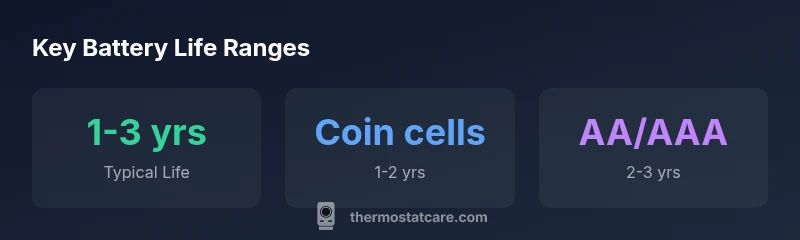
Typically, thermostat batteries last about 1–3 years, depending on battery type, features, and usage. Coin-cell batteries tend to wear faster than AA/AAA cells, and smart thermostats with Wi‑Fi, backlights, or frequent sensors shorten life further. For basic, non‑smart models, you’ll often reach the upper end of the range. Thermostat Care Analysis, 2026.
How long do thermostat batteries last? A baseline overview
The question "how long do thermostat batteries last" is common among homeowners who want to minimize outages and avoid inconvenient temp swings. In practice, most thermostats rely on standard batteries for power, especially models that lack constant line power. When you factor in battery type, usage patterns, and the presence of smart features, the life span typically falls within a broad range of about 1 to 3 years. According to Thermostat Care, conservative use of display backlighting and sensors can extend life toward the upper end of that window, while frequent Wi‑Fi activity and data transmissions may shorten it. If you’re evaluating a specific model, compare battery life estimates from the manufacturer with your daily usage to form a realistic expectation. This baseline will help you plan replacements without surprises.
Baseline lifespans by battery type
Battery type has a big impact on longevity. Coin cells (like CR2032) are compact and favored by space‑constrained thermostats, but they generally offer shorter lifespans—often around 1–2 years in typical setups. Larger cells, such as AA or AAA alkaline batteries, commonly deliver 2–3 years, particularly in non‑smart or low‑power models. Rechargeable NiMH options exist on some devices, but they’re less common in modern thermostats and may require more frequent recharging or replacement. When you upgrade or replace batteries, always check the thermostat’s compatibility matrix and use the type recommended by the manufacturer. Thermostat Care’s research emphasizes that staying within recommended battery types helps preserve function and accuracy over time.
Key factors that shorten or extend life
Several intertwined factors determine how long a thermostat battery lasts. Power draw increases with Wi‑Fi connectivity, color displays, ambient sensors, and frequent data transmissions. Harsh environments—extreme temperatures or high humidity—can stress batteries and reduce capacity. Battery quality matters too: higher‑quality cells with stable chemistry tend to outlast cheaper options. Model design affects drainage: some thermostats manage power more aggressively to maintain performance. To extend life, set sensible display brightness, disable nonessential features when possible, and keep firmware updated so the device uses power efficiently. Thermostat Care notes that practical optimization often yields a meaningful difference in year‑over‑year life.
How to read your thermostat's battery indicator and what it means
Most thermostats provide a battery level indicator via the display or a mobile app. Look for terms like "Battery Low" or a % reading. If you see a low indicator, plan a replacement within a few weeks to avoid interruptions. If the indicator is ambiguous, consult the user manual for the exact icon meanings and the recommended battery type. In some cases, a battery health diagnostic will appear in the settings menu. Regularly checking the indicator helps you schedule replacements ahead of time and avoid sudden outages that can affect comfort and home energy management. Thermostat Care recommends setting up a reminder a few weeks before the expected end of life for peace of mind.
Practical steps to extend battery life
To maximize longevity, consider these practical steps:
- Use the manufacturer‑recommended battery type and avoid improvised substitutes.
- Limit backlighting and keep display brightness moderate during nighttime hours.
- Reduce sensor sampling rates if your model allows it, especially in low‑traffic periods.
- Keep the thermostat away from direct heat sources or drafts that can accelerate battery drain.
- Schedule regular inspections and note any changes in performance.
- If you anticipate longer outages or travel, replace batteries proactively. Thermostat Care notes that small proactive steps can significantly delay replacements and maintain consistent comfort.
Replacing batteries: choosing the right type
Before buying, confirm compatibility with your thermostat model. Some devices require coin cells, others use AA/AAA, and a few use rechargeable chemistries. Buy premium brand batteries when possible and avoid older stock that may have reduced capacity. Always insert batteries with the correct polarity and run a quick diagnostic after replacement to confirm the unit powers up correctly and reports normal battery status. If your thermostat is part of a broader smart home setup, verify that the battery choice does not interfere with any connected features or routines. Thermostat Care recommends keeping a small reserve of fresh batteries on hand for quick replacements.
Smart thermostats: additional considerations
Smart thermostats add features that consume energy and, by extension, battery power. Wi‑Fi is a major driver of drain, as are color screens, extensive app syncing, and frequent status checks. If battery life is critical, you may consider a model with efficient power management, or one that offers a built‑in option to run on 24‑V supply when available. Some users choose hybrid setups that keep basic thermostat functionality on batteries while enabling smart features on a separate power source. In any case, balancing comfort, reliability, and energy management remains the key. Thermostat Care suggests evaluating the cost of battery replacements against the convenience and energy savings from smarter features before deciding.
Maintenance, warranties, and when to consider hard‑wiring
If your thermostat battery life seems unusually short, it could be a sign of a faulty device or improper installation. Check warranty terms and service agreements, as some brands cover battery replacements under certain conditions. For homes with predictable energy use and reliable power, hard‑wiring can eliminate battery dependence entirely. Before upgrading, confirm that your HVAC system supports a wired configuration and that any installation complies with local electrical codes. The Thermostat Care Team recommends comparing long‑term costs of battery replacements versus a one‑time hard‑wiring upgrade to determine the most economical approach over the device’s lifetime.
Myths and misconceptions about thermostat batteries
A common myth is that more expensive batteries always last longer. While quality matters, compatibility and device power management are often bigger determinants. Another misconception is that thermostat batteries should be replaced on a fixed calendar schedule; in reality, life depends on usage and features. Finally, some think disabling all smart features will dramatically extend life; this can save a little power, but you may lose essential energy‑saving capabilities. Understanding your specific model, battery type, and usage habits helps you set realistic expectations and avoid unnecessary replacements. Thermostat Care emphasizes using manufacturer guidance as your primary reference for best results.
Battery options by thermostat type
| Battery Type | Avg Lifespan (years) | Notes |
|---|---|---|
| Coin cell (CR2032) | 1-2 | Common in compact, basic thermostats |
| AA/AAA alkaline | 2-3 | Widely used in older or larger thermostats |
| Rechargeable NiMH | 1-2 | Less common; may require charging or care |
Questions & Answers
What is the typical lifespan of thermostat batteries?
Most thermostats use batteries that last about 1–3 years, depending on type and usage. Coin cells often wear faster than larger cells, and smart features can shorten the life further. Expect shorter life with heavier power draw and longer life with conservative settings.
Most thermostats last 1 to 3 years on batteries, depending on usage and battery type.
Can I use rechargeable batteries in a thermostat?
Rechargeable batteries are sometimes compatible, but not universal. Always check your thermostat manual for compatibility and charging requirements. Replacements with non‑rechargeables may be more reliable in some models.
Some thermostats support rechargeables, but check your manual first.
Do all thermostats use the same battery type?
No. Thermostats vary by model. Some use coin cells, others rely on AA/AAA, and a few are designed for rechargeable cells. Always confirm the exact battery specification in the user guide.
Battery type varies by model, so always check the manual.
Is it cheaper to hard‑wire a thermostat rather than replacing batteries?
Hard‑wiring can reduce ongoing battery costs and ensure uninterrupted power for smart features, but the upfront installation cost and compatibility requirements matter. Compare long‑term savings against the upfront costs.
Hard-wiring can save battery costs, but check the upfront install needs.
How do I know if my thermostat's battery is dying?
Look for a low battery indicator on the display or in the app, and listen for any unusual beeps. Some models show a battery health diagnostic. If in doubt, replace and test the unit after replacement.
Watch for a low battery warning and replace promptly.
Do smart thermostats drain batteries faster than non‑smart models?
Yes, in general. Smart features like Wi‑Fi, sensors, and color displays draw more power than basic thermostats. However, many models optimize power use, so the difference varies by design.
Smart features usually use more power, but design varies.
“Battery life is largely driven by how you use your thermostat and the battery type it requires. Most homes see 1–3 years between replacements, with smart features shaving that window by a portion.”
What to Remember
- Know your model's battery type before buying.
- Smart features shorten battery life more than basic usage.
- Monitor the battery indicator and replace proactively.
- Weigh hard-wiring vs. battery replacements for long-term costs.