What batteries.do thermostat use
Discover which batteries thermostats use, how power sources interact, and practical tips to extend battery life. A Thermostat Care guide for homeowners troubleshooting thermostats.


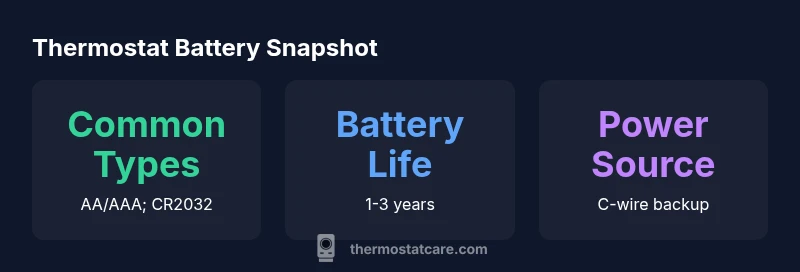
The batteries your thermostat uses typically fall into two families: alkaline AA/AAA cells and coin cells such as CR2032. In many newer models, the thermostat runs primarily on a C-wire power supply with battery backup, while others rely entirely on batteries. Battery type and backup power influence replacement frequency and performance in extreme temperatures. For most homes, knowing your model's power options helps prevent outages.
What batteries.do thermostat use
Thermostats have evolved from purely battery-powered devices to smart control hubs that integrate with home HVAC systems. The most common battery types found in residential thermostats are alkaline AA or AAA cells and CR2032 coin cells. Some older or budget models rely on a single battery, while modern units may combine a primary battery with backup power supplied by a C-wire when available. The key distinction is how the device is powered overall, and how long it can operate during a power outage or when a C-wire is not present. According to Thermostat Care, the choice between battery types often depends on the thermostat’s design, the HVAC system, and regional temperatures. When you understand your model, you can plan replacements more effectively and minimize downtime during critical weather conditions.
Battery types explained: alkaline, lithium, and coin cells
Alkaline AA and AAA batteries are the most widespread because they’re inexpensive and easy to replace. Coin cells, such as CR2032, are popular in compact or low-drain thermostat designs. Some thermostats use small lithium primary cells for longer life in challenging environments, but these are less common in entry-level models. Rechargeable options exist in some newer units, but compatibility varies by firmware and hardware design. For most homeowners, the simplest path is to stock standard alkaline batteries and a spare CR2032 coin cell for model-specific needs. Thermostat Care analyses indicate that the battery chemistry chosen by your thermostat will influence how often you need to open the cover and replace cells, especially in homes with extreme temperatures.
Power sources: C-wire vs battery backup
The modern thermostat landscape includes models powered by a C-wire (common wire) that provides continuous power from your HVAC system, reducing or eliminating the need for frequent battery changes. In many cases, the batteries still serve as a backup during minor power fluctuations or when the C-wire isn’t present. This arrangement not only improves reliability but can also protect sensitive settings and smart features during outages. If your home is wired for a C-wire, aim to have it connected by a professional or follow manufacturer guidelines to ensure proper voltage and safety. Thermostat Care notes that C-wire compatibility is increasingly common among mid- to high-end thermostats, but always verify your specific model’s requirements before installation.
Model-specific considerations when choosing batteries
Model design dictates battery type and replacement intervals. Some brands emphasize long-life CR2032 coin cells because of compact electronics, while others favor AA or AAA alkalines for easier replacement and cheaper upfront costs. If your thermostat supports lithium coin cells, these can offer higher energy density and longer life in cold climates, but often come at a higher price. Always consult the user manual or the manufacturer’s online resources to confirm the exact battery type, orientation, and contact cleanliness. Thermostat Care recommends identifying whether your unit uses a primary battery with a backup C-wire or if it relies on the C-wire entirely, as this determines procurement and maintenance plans.
Replacing batteries safely: steps and precautions
Begin by turning off power to the thermostat or shutting off the HVAC thermostat circuit at the furnace to prevent electrical shocks or sensor malfunctions. Remove the thermostat cover and take note of battery orientation (positive and negative terminals). Use fresh, same-type batteries as specified by the manufacturer, insert them with correct polarity, and reseal the cover. If your thermostat has a C-wire, ensure it remains undisturbed during battery replacement. After reseating, turn the power back on and run a quick system test to verify that heating and cooling respond as expected. If the screen flickers or reports a battery error, recheck contact terminals and battery seating. Thermostat Care highlights that battery replacements are typically quick, but never force components that resist easy seating.
Temperature and placement effects on battery life
Extreme temperatures can accelerate battery discharge, especially with alkaline cells. In very cold environments, batteries may deliver lower voltage, causing the thermostat to work harder or report low-battery warnings sooner. On hot days, higher HVAC demand can also drain batteries faster if a C-wire isn’t consistently powering the unit. To minimize drain, position the thermostat away from direct sunlight, drafts, or heat registers. Maintain clean terminals and avoid covering vents or obstructing the thermostat’s air intake. Regularly inspecting the interior battery compartment helps prevent corrosion and ensures contacts remain reliable.
How to extend battery life and when to upgrade to C-wire
If your area experiences frequent outages or intense seasonal swings, upgrading to a C-wire-powered setup can dramatically reduce battery changes and improve reliability. Ensure your furnace or air handler has an accessible C-wire at the thermostat location, and consider professional wiring if your current setup lacks a common conductor. Choose high-quality alkaline batteries with a known shelf life and store spares in a cool, dry place. For models that support lithium coin cells or rechargeable packs, follow the manufacturer’s guidelines for charging and replacement. Thermostat Care’s practical guidance emphasizes balancing cost, convenience, and resilience when planning a transition to a mostly powered-by-C-wire system.
Quick maintenance plan and checklists
Create a simple annual maintenance checklist: verify model compatibility, inspect hardware and wiring for corrosion, replace batteries per manufacturer lifetime estimates, and confirm the C-wire connection if available. Keep spare batteries of the exact type your thermostat requires, and note the replacement date in a home maintenance log. If you live in a climate with extreme temperatures, consider scheduling a professional HVAC check to ensure that the thermostat and control board are operating within recommended tolerances. Regular checks reduce the risk of unexpected outages and extend the life of your system. At Thermostat Care, we recommend documenting battery types and replacement intervals to simplify future troubleshooting.
Thermostat power sources and typical battery configurations
| Thermostat Type | Battery Type | Backup Battery Life (years) |
|---|---|---|
| Battery-powered only | AA/AAA alkaline or CR2032 coin cell | 1-3 |
| C-wire powered with backup | Coin cell CR2032 or none | 1-3 |
| Rechargeable battery models | Built-in rechargeable cells | N/A |
Questions & Answers
What batteries do thermostats use?
Most thermostats use AA/AAA alkaline batteries or CR2032 coin cells. Some models rely on a C-wire for continuous power and only use batteries as a backup. Check your manual to confirm the exact type for your unit.
Most thermostats use AA/AAA or a CR2032 coin cell, with some models using a C-wire for power and batteries as backup.
Do all thermostats need batteries?
No. Many thermostats are powered by a C-wire from your HVAC system and only use batteries as a backup. Others operate entirely on batteries. Model-specific guidance is essential.
No—many thermostats are powered by the C-wire, with batteries only as backup. Some are battery-powered, depending on the model.
How can I tell if my thermostat battery is dying?
Look for a dim display, sluggish touch response, or a warning icon indicating low battery. If in doubt, replace with fresh batteries of the correct type and test the system.
If the screen dims or the controls feel sluggish, replace the battery and test.
Can I upgrade to a battery-free thermostat?
If your thermostat supports a C-wire, upgrading to a C-wire-enabled model can reduce battery changes. Ensure your wiring is compatible and follow installation guidelines.
If you have a C-wire, you can consider models that rely on it for power to reduce battery changes.
How do I replace thermostat batteries safely?
Turn off power, remove the cover, insert new batteries with correct polarity, reseal, and test the system. Keep spare batteries handy and check for corrosion in the terminal contacts.
Turn off power, replace the batteries in the right orientation, and test.
Are rechargeable batteries good for thermostats?
Rechargeable options exist for some models, but compatibility varies. Check the manual for supported chemistries and charging requirements before using rechargeables.
Rechargeables can work in some cases, but you’ll want to verify compatibility first.
“Battery management is a quiet but critical part of reliable thermostat operation. Favor C-wire power where feasible and carry the right spare batteries for your model.”
What to Remember
- Know your model’s power options to avoid outages
- Keep a spare battery of the exact type your thermostat uses
- Prioritize C-wire compatibility to reduce battery replacements
- Regularly check the battery compartment and contacts for corrosion
- Choose battery types based on climate and maintenance willingness