How to Know If a Smart Thermostat Is Compatible
Learn how to confirm a smart thermostat will work with your HVAC system, wiring, and power needs. This step-by-step guide explains compatibility checks, wiring tests, and how to use official lists to avoid buying the wrong model.


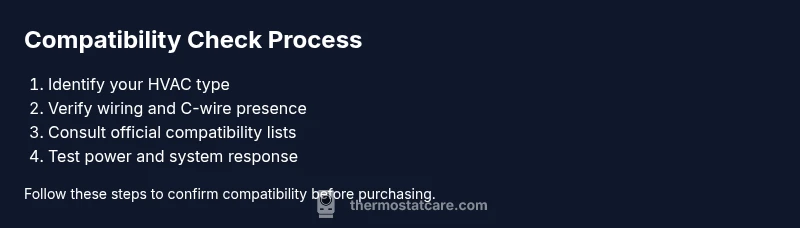
By the end of this guide, you’ll know how to verify smart thermostat compatibility with your home. Start by identifying your HVAC type, confirm you have the required wiring (especially a functioning C-wire), check 24-volt power, and review the manufacturer’s compatibility lists. Follow these steps to avoid buying a model that won’t work with your system.
What compatibility means for a smart thermostat
Compatibility for a smart thermostat goes beyond features like learning schedules or voice control. It ensures the thermostat can safely control your HVAC system, receive proper power, and connect to your home network without causing improper cycling or damage to equipment. The Thermostat Care team stresses that true compatibility combines three pillars: wiring and power, HVAC type, and manufacturer-approved operation. If any pillar is weak, you may experience intermittent connectivity, inaccurate temperature readings, or an unstable system. Keep in mind that a device might be feature-rich but completely incompatible with your system’s wiring or control logic. This is why a quick pre-purchase check beats after-purchase frustration. In this guide we’ll walk through practical checks, simple tests, and how to read compatibility notes so you can shop with confidence.
What compatibility means for a smart thermostat
Compatibility for a smart thermostat goes beyond features like learning schedules or voice control. It ensures the thermostat can safely control your HVAC system, receive proper power, and connect to your home network without causing improper cycling or damage to equipment. The Thermostat Care team stresses that true compatibility combines three pillars: wiring and power, HVAC type, and manufacturer-approved operation. If any pillar is weak, you may experience intermittent connectivity, inaccurate temperature readings, or an unstable system. Keep in mind that a device might be feature-rich but completely incompatible with your system’s wiring or control logic. This is why a quick pre-purchase check beats after-purchase frustration. In this guide we’ll walk through practical checks, simple tests, and how to read compatibility notes so you can shop with confidence.
Tools & Materials
- Owner's manual for current HVAC system(Useful for confirming wiring type and power specs)
- Thermostat compatibility list from manufacturer(s)(Check for your exact model and system type)
- Voltage tester or multimeter(To verify supply voltage at the thermostat location)
- Non-contact voltage detector(Extra safety when inspecting wiring)
- Notepad or digital device(Record wiring configurations and compatibility notes)
- C-wire adapter (optional)(If your system lacks a C-wire but needs one)
Steps
Estimated time: 30-60 minutes
- 1
Identify your HVAC system type
Begin by locating the furnace or air handler and noting whether you have a gas, electric, or heat-pump system. Look for labels on the unit that indicate voltage, stage count (single-stage, multi-stage), and whether a heat pump is present. This step establishes which thermostat features are needed and which compatibility lists apply.
Tip: If you’re unsure, photograph the control board and note model numbers for later lookup. - 2
Check existing wiring and the C-wire
Open the thermostat panel and identify the wires attached to R, C, W, Y, and G terminals. A healthy C-wire is often a dedicated blue or brown conductor. If the C-wire is missing, determine whether your thermostat supports power sharing or consider running a new C-wire.
Tip: Use a multimeter to confirm 24V between R and C when the system is powered off, then back on to verify readings. - 3
Review official compatibility lists
Visit the manufacturer’s site for your thermostat model and check the exact HVAC type and wiring configurations they approve. Note any caveats for heat pumps, multiple stages, or gas furnaces, and watch for notes about C-wire requirements.
Tip: Print or save the page so you can compare it side-by-side with your wiring diagram. - 4
Assess power and network needs
Confirm that your home has reliable Wi‑Fi and that the thermostat supports your router’s frequency (2.4 GHz is common). If the thermostat relies on power from the HVAC circuit, ensure your C-wire and transformer can supply it without browning out other loads.
Tip: If you have a dual-band router, prioritize a model with proven stability on older networks. - 5
Plan a safe install and test
Before swapping devices, power down the HVAC system, wire the new thermostat to the identified terminals, and power up. Run a basic test: command heat, cool, and fan operations to confirm appropriate responses and timing.
Tip: If anything trips a breaker or displays odd behavior, power down and re-check connections.
Questions & Answers
How do I know if my HVAC system is compatible with a smart thermostat?
Start by identifying whether you have a gas, electric, or heat-pump system and confirm a C-wire. Then compare your system to the thermostat’s official compatibility list and notes. If the HVAC type and wiring match the listed configurations, you’re likely compatible.
Check your HVAC type and wiring, then compare to the thermostat's compatibility list. If they match, you’re likely compatible.
What if my system has two-stage heating or a heat pump?
Two-stage or heat-pump setups often require specific wiring or a compatible heat-pump setting on the thermostat. Always review the thermostat’s notes for multi-stage or heat-pump support and confirm with the manufacturer’s list.
Two-stage or heat pumps may need particular wiring and settings. Check the manufacturer’s notes and compatibility list.
Can I install a smart thermostat without a C-wire?
Some models can operate without a C-wire using power-stealing methods, but reliability varies. Prefer a model that explicitly supports a C-wire, or install a C-wire adapter if recommended by the manufacturer.
Some models work without a C-wire, but reliability isn’t guaranteed. Use a model that supports C-wire or install an approved adapter.
Do I need a professional to confirm compatibility?
Not always, but if you’re unsure about wiring or there are unusual components (older control boards, nonstandard wires), a professional can confirm compatibility and perform a safe installation.
You can check compatibility yourself, but call a pro if wiring looks unusual.
Where can I find official compatibility lists?
Refer to the thermostat manufacturer’s website for model-specific compatibility notes. You can also cross-check with your HVAC brand’s documentation and any installers’ guides.
Check the manufacturer’s site for compatibility notes, and cross-check with your HVAC documentation.
Watch Video
What to Remember
- Identify HVAC type and wiring before selecting a thermostat.
- Always confirm the C-wire and 24V power availability.
- Use official compatibility lists for exact model support.
- Test operations (heat, cool, fan) after wiring.
- Consult a professional if you encounter unfamiliar wiring or safety concerns.