Can You Buy a Thermostat? A Practical DIY Buying Guide
Learn where to buy a thermostat, what features matter, and how to choose the right model for your home. A practical guide for homeowners and DIY enthusiasts from Thermostat Care.


Can you buy a thermostat? Yes—thermostats are widely sold at hardware stores, big-box retailers, and online marketplaces. Before buying, confirm your HVAC compatibility, wiring needs, and the features you want (basic programmable, smart Wi‑Fi, or learning automation). This quick guide outlines what to check and how to choose the right model for your home.
Can You Buy a Thermostat: Quick Reality Check
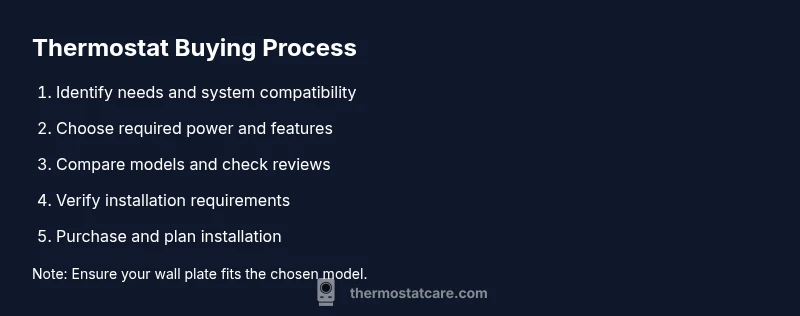
If you’re asking can you buy a thermostat, the answer is an unequivocal yes. Thermostats are readily available at hardware stores, home improvement chains, and online marketplaces, giving homeowners options for in-person shopping or doorstep delivery. The Thermostat Care team emphasizes that successful purchases start with understanding your current system and your goals for comfort, control, and energy savings. Consider whether you want a basic programmable unit, a mid-range model with app access, or a fully integrated smart thermostat that works with your smart home ecosystem. Remember, the cheapest device isn’t always the best fit if it lacks compatibility with your HVAC setup. In this guide, we’ll cover compatibility checks, feature considerations, where to buy, and practical steps to make a confident purchase. A thoughtful approach saves time, avoids returns, and helps you unlock energy savings over time.
According to Thermostat Care, the core question behind can you buy a thermostat is not just price but compatibility and ease of use. Planning ahead with a short list of must-have features will streamline the search and reduce decision fatigue. By the end, you’ll know where to shop, what to compare, and how to install or upgrade with confidence.
Tools & Materials
- Internet-enabled device (phone or computer)(Needed to compare models, read reviews, and check compatibility details)
- HVAC system model and current thermostat info(Having the furnace/AC type and current wiring handy speeds up decisions)
- Notepad or notes app(Use to record model options, features, and price ranges)
- Pen and measuring tape(Helpful for noting dim measurements if you’re replacing a wall plate)
- Optional: C-wire tester(If your system is older, testing may help confirm wiring needs before purchase)
Steps
Estimated time: 15-25 minutes
- 1
Identify your goals
Clarify what you want from a thermostat: basic scheduling, remote control, or full smart-home integration. Understanding your priorities makes feature selection faster and reduces buyer’s regret.
Tip: Write down three must-have features and two nice-to-have features before you start shopping. - 2
Check your HVAC compatibility
Confirm whether your system is compatible with programmable, Wi‑Fi, or smart thermostats. Some older systems may require a C-wire or specific wiring adapters to power the device.
Tip: If you’re unsure, check the furnace/air handler label or the installation manual for thermostat compatibility. - 3
Decide on power needs
Determine if your current setup has a C-wire and whether the thermostat will draw power from the wiring or batteries. Smart models typically require a constant power source.
Tip: If there’s no C-wire, look for models advertised as compatible with power stealing or plan to run a C-wire with professional help. - 4
Evaluate features and ecosystems
Consider features such as geofencing, energy reports, voice assistant compatibility, and mobile app quality. If you use other smart devices, pick a thermostat that plays well with your ecosystem (Alexa, Google Assistant, or Apple HomeKit).
Tip: Read at least two independent reviews focusing on app reliability and firmware updates. - 5
Set a realistic budget
Thermostats span a range from budget programmable units to premium smart models. Plan for the install cost if you hire a pro, and factor in potential energy savings over time.
Tip: Prepare a price ceiling for yourself and compare models within that range to avoid overspending. - 6
Compare reputable sources
Shop at major retailers, manufacturer websites, and trusted independents. Compare warranty terms, return policies, and customer support options.
Tip: Bookmark the model numbers you like and check for seasonal promotions or bundle deals. - 7
Verify installation requirements
Review the installation instructions for wiring diagrams, mount dimensions, and compatibility notes. If you’re replacing a large or unusual wall plate, ensure the new unit fits the opening.
Tip: Measure the existing wall plate to avoid buying a unit that won’t fit the opening. - 8
Make the purchase
Choose a retailer with clear return terms and confirm shipping times. Save your order confirmation and keep a note of any firmware updates released after purchase.
Tip: Opt for free returns if available in case your thermostat doesn’t fit or work as expected. - 9
Prepare for installation or hire a pro
Decide whether you’ll install the thermostat yourself or hire a licensed technician. Reading the manual ahead of time reduces surprises during the install.
Tip: If you feel uncertain about wiring, scheduling a professional install is the safest choice. - 10
Test and finalize setup
After installation, run a full system test, confirm app connectivity, and adjust schedules. Verify energy-saving claims by checking the thermostat’s reports over a few days.
Tip: Document your final settings and keep a copy of the installation notes for future reference.
Questions & Answers
Can you buy a thermostat without professional help?
Yes, many homeowners install thermostats themselves, especially simpler programmable models. For smart thermostats with complex wiring or C-wires, a professional installation can prevent damage or errors.
Yes, you can, but if your system uses a C-wire or has unusual wiring, consider a professional install for safety and reliability.
Do I need a C-wire for a thermostat?
Most smart thermostats require a constant power source, often via a C-wire. If your current thermostat lacks one, look for power-sharing options or consider running a new C-wire with professional help.
A C-wire is commonly needed for smart models. If you don’t have one, you may need a power connector or a professional wiring job.
Are smart thermostats worth it for energy savings?
Smart thermostats offer scheduling, geofencing, and energy reports that can save energy over time. Savings depend on usage patterns and climate, but many homes see noticeable reductions with smart models.
Smart thermostats can save energy, but results vary by home and habits.
How do I verify thermostat compatibility with my system?
Check your HVAC system type (gas, electric, or heat pump) and wiring (C-wire, number of wires, thermostat mounting). Refer to the installation manual or contact the manufacturer for a compatibility list.
Look at your HVAC type and wiring to confirm compatibility with the thermostat you want.
What’s the typical price range for thermostats?
Thermostat prices vary by features, from budget programmable models to mid-range smart systems. Expect a broad range, and factor in installation costs if you hire a pro.
Prices vary widely by features; budget for core needs and any installation costs.
What should I do after purchasing a thermostat?
Register the product, update firmware, connect to Wi-Fi, and run a system test. Keep receipts and note the model number for future support.
Register, update, connect, and test the thermostat after installation.
Watch Video
What to Remember
- Can you buy a thermostat? Yes, from multiple channels, with careful compatibility checks.
- Start with goals and HVAC compatibility to narrow feature choices quickly.
- Power needs (C-wire) and ecosystem compatibility are critical decision points.
- Compare sources, warranties, and returns before buying.
- Whether DIY or pro-installed, test the system and document settings after setup.