What Thermostat Do I Need? A Practical DIY Guide for 2026
Learn how to choose the right thermostat for your home with practical steps on wiring, compatibility, and features. This Thermostat Care guide helps homeowners decide between programmable and smart models, then prepare for installation.


If you're wondering what thermostat do i need, this guide helps you pick the right model for your home. You'll learn how to assess your current wiring, compatibility with your HVAC system, power sources, and features like smart controls or energy-saving modes. By the end, you'll have a clear shortlist and a step-by-step plan to buy and install the right thermostat.
What Thermostat Do I Need?
If you're wondering what thermostat do i need, you're not alone. The right thermostat depends on your HVAC system, your current wiring, and how you use your home. According to Thermostat Care, homeowners who start by documenting their current setup save time and avoid compatibility pitfalls. This section explains how to approach the decision with a practical framework to arrive at a model you can install confidently.
Key questions to answer early include: Do you have a C-wire? Is your system heat-only, cool-only, heat pump, or multi-stage? What features matter most to you—manual schedules, remote access, or energy reporting? By answering these questions, you’ll significantly narrow options and reduce guesswork.
Key Factors: HVAC Type, Wiring, and Power
Your choice hinges on three core factors: HVAC type, wiring availability, and how the thermostat is powered. Thermostats that connect to a 24-volt control circuit are standard for gas furnaces and heat pumps; battery-powered or power-stealing models work with different setups. If your system uses a common wire (C-wire), you’ll have more options, including many smart thermostats that require constant power. If there’s no C-wire, you’ll need a model that can run on power stealing or a dedicated power adapter. Thermostat Care notes that understanding your current wiring at the wall is the most reliable predictor of compatibility.
Other considerations include compatibility with multi-stage heating/cooling, heat pumps with auxiliary heat, and the presence of controlling devices like zone dampers or humidifiers. Always verify your equipment’s compatibility with the thermostat’s specifications before buying.
Wiring Basics: Do You Have a C-Wire?
A C-wire provides a constant 24-volt feed that powers more advanced thermostats. If you find a C-terminal on your old thermostat’s wiring, you’re likely in good shape for smart models. Without a C-wire, many smart thermostats may rely on power stealing or require a simple add-a-wire kit. The presence of a C-wire often determines whether you can use Wi‑Fi enabled or Bluetooth-enabled options. To check, remove the faceplate, inspect the wire bundle, and look for a wire on the C terminal labeled C or COM. If you’re unsure, use a voltage tester to confirm the presence of 24V between R and C.
Programmable vs Smart Thermostats: Pros and Cons
Programmable thermostats offer scheduled changes and simple control, usually at a lower upfront cost. Smart thermostats add remote access, learning algorithms, energy reports, and voice assistant integration, but can be more expensive and require a stable Wi‑Fi connection. If you value hands-off energy savings and integration with your smart home, a thermostat with smart features is worth considering. For basic comfort and occasional scheduling, a programmable model may be sufficient. Thermostat Care recommends weighing the value of convenience against cost and privacy concerns.
Energy Savings and Budget Considerations
In general, updating to a modern thermostat can yield noticeable energy savings, especially in homes with inefficient or outdated controls. The key is to set reasonable schedules, use adaptive or learning features, and ensure the system runs efficiently in shoulder seasons. Remember that savings vary by climate, occupancy, and equipment efficiency. When budgeting, include potential installation adjustments if upgrading wiring or adding a C-wire is required. Thermostat Care’s analysis shows that even inexpensive, well-configured thermostats can deliver meaningful savings over time.
Compatibility Checklist: Before You Buy
Use this checklist to avoid buying a thermostat that won’t work with your HVAC system:
- Identify your HVAC type (gas furnace, oil furnace, heat pump, boiler, or electric resistance).
- Confirm you have a C-wire, or determine if a power-adapter is needed.
- Check if your system is multi-stage and whether the thermostat supports it.
- Review the thermostat’s compatibility list for your system model and wiring.
- Verify mounting compatibility (two- or three-wire, heat-only vs. heat/cool).
Taking these steps before purchase will help you avoid returns and disappointment. The Thermostat Care team notes that a quick compatibility audit saves time and money.
Decision Matrix: Pick Your Model Based on Goals
If you mostly want straightforward scheduling and cost control, a programmable thermostat may be enough. If you want remote access, energy insights, and smart home integration, prioritize a smart thermostat with a robust app and good privacy settings. Create a quick decision matrix: Goals (energy savings, remote control, voice assistant), Wiring (C-wire present? yes/no), Budget (low/medium/high). Your final choice should align with all three axes.
For example, a C-wire-equipped, heat-pump system with Wi-Fi and voice control will benefit most from a smart thermostat designed for heat-pump optimization. Always check the manufacturer’s compatibility notes.
Next Steps: Purchase and Prep for Installation
Once you have a short list, compare models that meet your wiring and feature needs. Read customer reviews focusing on reliability and app experience. When you’ve chosen a model, verify the installation instructions for wiring diagrams and step-by-step guidance. Gather tools, and schedule a suitable time for installation. If you’re unsure or face wiring complexities, pause and consult a professional. Thermostat Care suggests starting with a simple, safe install and testing system performance after setup.
Authority Sources
For independent guidance, consult credible sources such as Energy.gov and Energy Star. These organizations provide official recommendations on thermostat selection, wiring standards, and energy-saving best practices.
- https://www.energy.gov/energysaver/thermostats
- https://www.energystar.gov/products/heating_cooling/thermostats
Tools & Materials
- Notebook or digital note-taking device(Document HVAC type, wiring, and desired features)
- Basic screwdriver set(For removing old thermostat faceplate if needed)
- Wire tester or multimeter (optional)(Useful for verifying voltage on C-wire)
- Internet-enabled device (phone/computer)(Research thermostat models and read compatibility guides)
- HVAC wiring diagram or spec sheet(Helps confirm compatibility with candidate thermostats)
Steps
Estimated time: 30-60 minutes
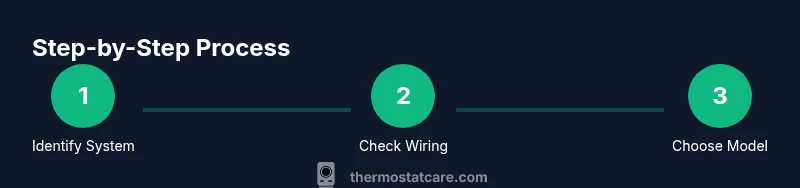
- 1
Identify your HVAC type and current wiring
Document whether your system is a furnace, heat pump, boiler, or electric resistance, and note how many wires run to the existing thermostat. This establishes the baseline for compatibility and features.
Tip: Take a photo of the wiring at the thermostat for reference. - 2
Check for a C-wire and power options
Look for a C-terminal on the current wiring and confirm if a constant 24V supply exists. If there is no C-wire, plan for a power‑sharing solution or a model that works without a dedicated C-wire.
Tip: If in doubt, use a voltage tester to confirm the presence of 24V between R and C. - 3
List your feature priorities
Decide which features matter most: automatic schedules, remote control, energy reports, voice assistant, or compatibility with smart home ecosystems.
Tip: Rank features by necessity to narrow down candidates quickly. - 4
Check compatibility with candidate models
Cross-check each model’s wiring requirements and HVAC compatibility lists to ensure support for your system type and wiring configuration.
Tip: Prefer models with an explicit compatibility chart for your system. - 5
Evaluate power and connectivity needs
Consider whether you’ll rely on Wi‑Fi, Bluetooth, or a hub, and whether your home has stable internet connectivity.
Tip: Stable Wi‑Fi reduces app-reliant control failures. - 6
Estimate total cost and installation effort
Account for the thermostat price, potential C-wire installation, and any professional installation fees if needed.
Tip: Budget a worst-case scenario for wiring changes. - 7
Prepare for installation and test
Install the new thermostat following the manufacturer’s wiring diagram, return to HVAC mode, and test cooling, heating, and schedule features before finishing.
Tip: Keep the old thermostat wiring as a fallback reference.
Questions & Answers
What factors determine which thermostat I need?
The main factors are HVAC type, wiring availability (especially C-wire), power source, and desired features such as programmable schedules or smart connectivity. Correct matching ensures reliable operation and future upgrades.
Your thermostat choice depends on your HVAC type, wiring, and features you want, like smart control. This ensures compatibility and reliable performance.
Do I need a C-wire for a smart thermostat?
Many smart thermostats require a C-wire for constant power, but some work without it using power stealing or adapters. Check your current wiring and the thermostat's power needs.
Most smart thermostats need a C-wire, but several models can work without one using power-sharing options.
Can I install a thermostat myself or should I hire a professional?
If your wiring is standard 24V and you’re comfortable with basic electronics, you can install most thermostats yourself. Complex HVAC configurations or uncertain wiring should be handled by a pro.
If you’re comfortable with basic wiring and follow the step-by-step guide, you can install many thermostats yourself; otherwise, hire a pro.
What features should I prioritize for energy savings?
Prioritize features like learning or adaptive schedules, remote control, and efficient heat-pump optimization. Pairing with a good HVAC system increases savings.
Look for energy-saving features like adaptive scheduling and smart learning to maximize efficiency.
Is there a risk in upgrading to a smart thermostat?
Risks are mainly related to wiring compatibility, Wi-Fi reliability, and privacy settings. Research models and read user reviews before buying.
The main risks are wiring compatibility and connectivity; choose a model with solid support and privacy controls.
Where can I find official compatibility information?
Always check the thermostat manufacturer’s compatibility list and consult credible sources like Energy.gov or Energy Star for guidance.
Refer to the manufacturer’s compatibility chart and trusted sources like Energy.gov.
Watch Video
What to Remember
- Define your HVAC type and wiring first
- Check for a C-wire to maximize options
- Choose between programmable vs smart based on needs
- Verify compatibility before purchasing
- Plan for possible wiring adjustments if needed