What Does Stuck Thermostat Look Like? Troubleshooting Guide
Discover the telltale signs of a stuck thermostat, why it happens, and a safe, step-by-step plan to diagnose and fix it. Practical tips from Thermostat Care for homeowners and DIY enthusiasts.


What does stuck thermostat look like? Common signs include a fixed display reading, the HVAC running nonstop, and no response when you adjust the setpoint. Quick fixes: verify thermostat power (breaker/fuse), replace batteries if applicable, and perform a reset. If the display remains unresponsive, replacement or professional inspection is advised.
What does stuck thermostat look like
If you're trying to identify the issue, start with the most visible clue: what does stuck thermostat look like? According to Thermostat Care, homeowners commonly report a thermostat that appears frozen on a single temperature, while the HVAC system keeps running regardless of changes to the setting. Other telltale signs include a constant fan, a display that won’t respond to button presses, or a blank/flickering screen. These symptoms point to potential faults in the thermostat itself, the wiring, or the power supply to the control board. Beyond the obvious display behavior, you may notice the room never reaches the target comfort, or the system ignores special modes like hold or adaptive schedule. In some cases, the thermostat will show LO or HI on the screen, indicating it cannot read a valid temperature. If several of these signs show up together, the problem is more likely a stuck thermostat rather than a simple programming error.
Common signs you’re dealing with a stuck thermostat
You adjust the dial or slider and nothing changes, or the system still runs even when you lower the setpoint. The display may go dim, freeze, or show error codes that aren’t part of normal operation. In some cases the thermostat appears to lose power, the screen goes blank, or you notice a delay between the moment you change the setting and the moment the HVAC responds. These patterns strongly suggest the device isn’t reading the room correctly or won’t relay commands to the furnace or air conditioner. Thermostat Care analysis, 2026, emphasizes that recognizing these signs early helps prevent energy waste and comfort loss.
Causes of a thermostat that won’t move
There are several plausible culprits when a thermostat seems stuck. Power supply issues (a tripped breaker, blown fuse, or failing 24-volt transformer) can leave the thermostat effectively dead. Sensor or calibration faults may cause the unit to misread room temperature, producing a fixed reading. Loose or damaged wiring, especially at the thermostat or furnace control board, is another common cause. Placement matters too: locating the thermostat near heat sources, drafts, or large sunlit windows can cause it to read inaccurately and appear stuck. Software glitches or outdated firmware can lock controls, while a weak or dead battery on a non-hardwired unit can mimic a stuck state. Understanding these root causes helps guide the right fix.
Safe checks you can perform before calling a pro
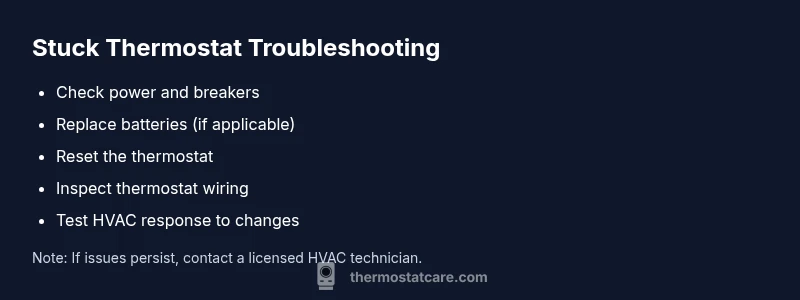
Safety first: power down the thermostat and furnace before touching wiring. Start with simple, low-risk checks. Verify the thermostat has power by checking that the display lights up. If it’s battery-powered, replace with fresh batteries. Check the circuit breaker or fuse for the HVAC circuit to ensure power is reaching the system. If the thermostat still doesn’t respond, try a reset or “cooling-off” cycle according to the manufacturer’s instructions. Inspect visible wires for looseness or damage, but do not detach screws or unplug critical connections unless you know how to do so safely. Ensure the thermostat isn’t tucked behind furniture or blocked by drafts, which can cause reading errors. If you’re unsure about any step, halt and contact a licensed technician. Remember: persistent issues may indicate a faulty thermostat or wiring that requires professional evaluation.
What to do if simple checks don’t fix it
If basic checks fail to restore proper operation, replacement is often the most practical next step, especially for older units or models with known memory faults. Choose a thermostat that matches your heating system (gas vs electric, single-stage vs multi-stage) and ensure compatibility with your HVAC brand. When installing a new thermostat, follow the wiring diagram precisely and verify the C-wire connection if you have a heat pump or powered display. After installation, test all modes (heat, cool, auto) and confirm that changes are reflected promptly. If you’re uncomfortable with wiring or if the system still runs inappropriately, call a licensed HVAC technician. A professional can diagnose hidden wiring faults, control board issues, or furnace-side problems that a homeowner can’t safely address.
Steps
Estimated time: 60-90 minutes
- 1
Power check and observe display
Turn off the power to the thermostat and furnace, wait 30 seconds, then turn it back on. Check if the display lights up and if the HVAC responds to a basic temperature change.
Tip: If the display remains blank, focus first on the power supply and breaker status. - 2
Battery replacement (if applicable)
If your thermostat uses replaceable batteries, install fresh ones and verify the unit powers up correctly. Some models require removing the cover; follow manufacturer guidelines.
Tip: Use high-quality batteries to avoid rapid drain that imitates a failure. - 3
Reset and re-pair
Perform a safe reset according to the device manual. If it’s a smart thermostat, re-pair it with your Wi-Fi and mobile app after reset.
Tip: Write down your preferred settings before resetting so you can restore quickly. - 4
Inspect wiring connections
With the power off, check that all thermostat wires are securely connected to the correct terminals. Look for loose screws or signs of corrosion.
Tip: Only manipulate wires you can safely access; otherwise stop and call a pro. - 5
Check the C-wire and common circuits
Ensure the C-wire (common) is connected if your model requires it for stable power. Verify the furnace control board provides 24V to the thermostat.
Tip: A missing or loose C-wire is a common cause of non-responsive thermostats. - 6
Re-test all modes
After reassembly, cycle through heat, cool, auto, and fan modes to confirm each responds to adjustments.
Tip: Note any lingering delays or non-responses for professional assessment. - 7
If issues persist, replace or call a pro
When simple fixes don’t work, plan for thermostat replacement or professional diagnostics of furnace control boards or wiring.
Tip: Document symptoms and steps you took to speed up professional diagnosis.
Diagnosis: HVAC runs continuously or thermostat is unresponsive to changes
Possible Causes
- highPower issue (tripped breaker, blown fuse, bad transformer)
- mediumSensor calibration or reading error
- mediumLoose or damaged wiring at thermostat or furnace control board
- lowPlacement causing reading inaccuracy (heat source, sun, drafts)
Fixes
- easyCheck HVAC power and replace any blown fuses; restore 24V supply
- easyReplace batteries or reset the thermostat; perform factory reset if applicable
- mediumTighten and reseat thermostat wires; inspect for corrosion or loose terminals
- easyReposition or shield thermostat away from heat sources and drafts
Questions & Answers
Is a stuck thermostat dangerous for my HVAC system?
A stuck thermostat isn’t usually dangerous, but it can cause the HVAC to run excessively, wasting energy and potentially stressing the equipment. Address it promptly to avoid unnecessary wear.
If your thermostat seems stuck, it’s not dangerous, but it can waste energy and wear out your system faster. Fix it soon or call a pro.
Can I fix a stuck thermostat myself?
Many minor issues, like battery replacement or a reset, can be done by homeowners. More complex problems such as wiring or control board faults should be handled by a licensed technician.
Some fixes are DIY, but if it involves wiring or the control board, call a pro.
When should I replace instead of repair my thermostat?
If the thermostat is old, shows frequent failures, or is incompatible with your HVAC system, replacement is often the best option for reliability and efficiency.
If it’s old or unreliable, consider replacing it for better performance.
What are common signs that indicate wiring problems?
Loose screws, frayed wires, or corrosion at terminals are common indicators of wiring problems. These require careful inspection and sometimes professional wiring.
Look for loose or damaged wires and corrosion at terminals.
How long should a thermostat last on average?
Most thermostats last 10–15 years with proper care, though performance can vary with model quality and HVAC use. Regular maintenance helps extend life.
Thermostats typically last a decade or more with good maintenance.
What safety steps should I follow when testing power?
Always turn off power at the breaker before touching wiring. If you’re unsure, do not proceed and call a pro.
Turn off power at the breaker and only proceed if you’re comfortable with electrical work.
Can a software update fix a stuck thermostat?
Yes, firmware or app-based updates can resolve some control glitches. Check the manufacturer’s site or app for available updates before replacing hardware.
Firmware updates can fix glitches; check for updates before replacing hardware.
Watch Video
What to Remember
- Identify signs early to prevent energy waste
- Check power, batteries, and resets as first steps
- Loose wiring and C-wire issues are common culprits
- When in doubt, replace or call a professional