Thermostat Without Common Wire: Urgent Troubleshooting Guide
Dealing with a thermostat without common wire? Thermostat Care delivers an urgent, practical troubleshooting guide to diagnose power issues, safe fixes, and when to call a pro.


Most likely, the thermostat without common wire lacks a dedicated C-wire or has a miswired C terminal. Quick fixes: power off at the breaker, verify the C terminal at the furnace and at the thermostat, and install a C-wire adapter or a power extender kit if the C-wire is missing or damaged. If supported, you may run on batteries temporarily.
Understanding the no-C-wire Challenge
A thermostat without common wire, often labeled 'no C', can run on power stealing or from battery back-up, but that design is fragile. The lack of a stable 24V supply can cause flickering displays, frequent reboot cycles, or incorrect readings. According to Thermostat Care, many homes try to improvise C-wire solutions that end up stressing the control board. If you're facing this issue, this guide from Thermostat Care will help you troubleshoot quickly and safely, reducing the risk of damage to your HVAC system. The reality is a missing or poorly connected C-wire is the most common cause of intermittent power to the thermostat, and fixing it often resolves multiple symptoms at once. By approaching the problem methodically, homeowners can restore reliable operation and save on unnecessary replacements. Thermostat Care’s guidance emphasizes safety first and avoids risky hacks that could compromise the furnace or air conditioner.
Key takeaway from Thermostat Care: start with the simple power and wiring checks before exploring protocol changes or component replacements.
How C-wire Power Works and Why It Fails
The C-wire provides a continuous 24-volt return path that completes the thermostat circuit and powers electronic components when the heating or cooling system is idle. Without a solid C connection, the thermostat may rely on power stealing or internal batteries, which can deplete quickly and create voltage sag that causes reset cycles and inaccurate readings. Common failures include a loose terminal, corrosion on the C terminal at the furnace control board, a damaged wire jacket exposing copper, or a mixed-up wire at the thermostat base. Weather, heat cycling, and DIY wiring attempts can also weaken the connection. When the C-wire is compromised, symptoms range from dim displays to unresponsive controls. Ongoing power strain can affect the furnace and prevent proper call-for-heat or call-for-cool sequences.
Important note: a healthy C-wire system requires a secure connection at both ends and a clean, intact conductor. Always inspect both the thermostat side and the furnace side for signs of wear, loose screws, or frayed insulation. Thermostat Care recommends checking the wiring diagram on your furnace or air handler panel to confirm which terminal is C and ensuring the wire tied there is indeed connected to the thermostat.
Safe Self-Checks You Can Perform
Before touching any equipment, power everything down at the thermostat and the main breaker to minimize shock risk. Do a visual inspection: verify the color of the wire running from the thermostat to the C terminal on the furnace; ensure no copper is exposed beyond the terminal clamp; look for scorch marks or melted insulation that would indicate overheating. If you have access to a multimeter, test for 24V between R and C when the system is idle. You should see a stable reading; readings near zero or wildly fluctuating numbers indicate a wiring fault or a weak common path. If your furnace has a dedicated C terminal adapter, confirm it’s seated correctly. For heat pumps, ensure auxiliary heat circuits aren’t drawing power in ways that skew the readings. Safety first: never bypass or tape wires to improvise a C-path. This will create hazards and could damage equipment.
Practical Fixes for Most Homes
If the C-wire is missing or damaged, the simplest option is to run a new conductor from the furnace C terminal to the thermostat, or install a Power Extender Kit (PEK) at the furnace control board. A PEK uses the existing wires to simulate a C-wire, letting the thermostat receive the required power without running a new wire. Another option is a thermostat that accepts power from batteries if the display and sensors are designed for it. If the existing wiring is intact but the C terminal is loose or dirty, reseat or clean the terminal screws and re-tighten to a snug fit. After any wiring repair, re-test the thermostat by turning the breaker back on and observing the display during a call for heat or cool. Thermostat Care notes that compatibility matters: not all no-C-wire setups are safe for every thermostat model; check your device’s manual before proceeding.
When to Replace or Upgrade Hardware
If your thermostat frequently reboots, has a short battery life, or cannot sustain power with the no-C-wire setup, it may be better to upgrade to a model designed for battery-powered operation or one that supports a PEK. Upgrading can reduce maintenance, improve accuracy, and prevent recurring power-related faults. In some scenarios, a dedicated Wi-Fi-enabled thermostat with a robust power management design can handle power demands more effectively, especially in older homes with undersized conductors. While upgrading, ensure the new device is compatible with your HVAC system and any existing zoning, humidification, or ventilation components. Thermostat Care recommends verifying compatibility and energy-saving features that align with your goals.
Preventive Steps to Avoid Future Issues
Establish a routine check of the C-wire connections at least twice a year, especially after HVAC maintenance or wiring changes. Keep a clear labeling scheme for thermostat wires to avoid confusion if repairs are needed later. Use a high-quality shielded wire when running new conductors to minimize interference, and avoid cramped or tight routing that could pinch the cable. If you suspect aging wire insulation or frequent temperature swings near the thermostat, consider upgrading the cable or installing a PEK as a preventative measure. Finally, document the wiring layout and any hardware changes so future technicians can diagnose problems quickly.
Steps
Estimated time: 45-90 minutes
- 1
Power off and verify compatibility
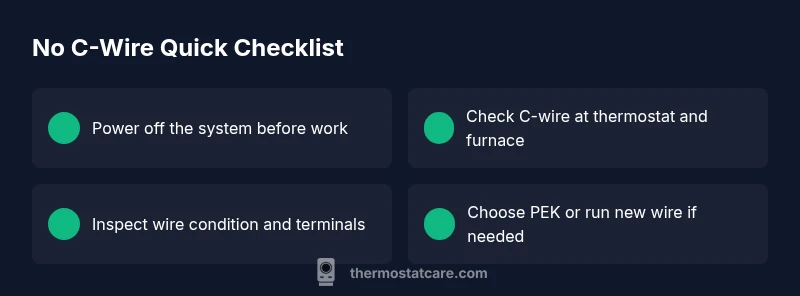
Turn off power at the breaker and the thermostat. Check the thermostat manual for no-C-wire compatibility and confirm your HVAC system type (gas furnace, electric furnace, or heat pump) to determine the best path forward.
Tip: Avoid any live wiring; double-check that the breaker is indeed off before touching terminals. - 2
Inspect the C-wire at the thermostat
Remove the thermostat cover and inspect the C terminal. Ensure the wire is firmly under the C screw and not under any adjacent terminal. If the C-wire is absent, identify an alternate common conductor path or prepare to install a PEK.
Tip: Take a photo of the wiring before removing any connectors for reference. - 3
Check the furnace/air handler side
Open the furnace panel and locate the C terminal on the control board. Ensure the corresponding wire is connected, not loose, corroded, or damaged. If you find corrosion, gently clean the terminal and retighten the screw.
Tip: Do not bypass the control board; it’s designed to regulate power safely. - 4
Decide on PEK or new wire
If a C-wire is not easily available, install a Power Extender Kit at the furnace or run a new conductor from the C terminal to the thermostat. Follow the PEK or wire-installation instructions step-by-step and re-check all connections.
Tip: PEKs are simple to install and often safer than improvising power paths. - 5
Reconnect and test
Reconnect the thermostat, restore power, and observe the thermostat during a call for heat and cool. Confirm the display stays on, readings stabilize, and no unexpected resets occur.
Tip: If issues persist, re-check all connections and consider professional assistance. - 6
Document and monitor
Record what was changed, including wire colors, terminal locations, and any hardware added. Monitor the thermostat for a full 24-hour period to confirm stability.
Tip: Keep a copy of wiring notes for future diagnostics.
Diagnosis: Thermostat powers on intermittently, displays flicker, or loses power when calling for heat/cool
Possible Causes
- highMissing or loose C-wire at thermostat or furnace
- highDamaged or frayed wiring between furnace and thermostat
- mediumIncompatible thermostat model with no-C-wire operation
- lowControl board issue at furnace or air handler
Fixes
- easyReconnect or replace C-wire at both ends; reseat terminations
- easyInstall a Power Extender Kit (PEK) or run a new C-wire from the furnace
- mediumSwitch to a thermostat model that supports your wiring scenario
- hardConsult a professional for a faulty control board or internal wiring
Questions & Answers
Can I run a thermostat without a C-wire?
Some thermostats are designed to operate without a C-wire, but doing so often leads to unreliable power and reduced performance. If your unit supports power-sharing or battery operation, use it with caution and monitor for resets or slow response. When in doubt, switch to a model that supports a proper C-wire connection.
Some thermostats can run without a C-wire, but it’s often unreliable. If possible, use a C-wire or PEK and monitor performance.
What is a C-wire and why is it important?
The C-wire provides a constant 24-volt return path that powers the thermostat sensors and display. Without it, many thermostats rely on battery power or power stealing, which can fail during peak loads or temperature swings. A proper C-wire improves stability and function.
The C-wire is the steady 24-volt return path. Without it, you may see flickering or rebooting.
Will a power extender kit damage my HVAC system?
A PEK, when installed correctly, is designed to safely simulate a C-wire. Improper installation can cause voltage issues, so follow the manufacturer’s instructions closely or have a pro install it.
A PEK can be safe if installed per instructions; wrong wiring can cause issues, so consider a pro.
What if my thermostat is a smart model that needs continuous power?
Smart thermostats typically require constant power. If you don’t have a C-wire, you’ll need either a PEK, a dedicated C-wire, or a compatible model designed to work with your wiring. Battery-only operation is usually insufficient for advanced features.
Smart thermostats need continuous power; use a C-wire or PEK to maintain full features.
How long does a C-wire installation take?
A straightforward C-wire run or PEK installation can take 30-90 minutes, depending on accessibility of the furnace and routing of the cable. More complex runs with wall upgrades may take longer.
Most C-wire installs take under two hours, depending on access.
Can I use batteries as a solution for all-no-C-wire setups?
Batteries can power some basic thermostats temporarily, but most smart thermostats and multi-stage systems rely on a constant C-wire. Relying on batteries long-term may lead to compromised performance and more frequent maintenance.
Batteries can work temporarily, but usually aren’t a long-term solution for smart thermostats.
Should I call a professional if I’m unsure about wiring?
If wiring looks unfamiliar or you encounter corrosion, a damaged control board, or uncertain connections, it’s safest to contact a licensed HVAC technician. They can diagnose electrical issues and ensure the system remains safe and efficient.
If you’re unsure, it’s best to hire a professional to avoid hazards.
Watch Video
What to Remember
- Check for a present C-wire before other fixes.
- Consider PEK or a new C-wire path if no C-wire exists.
- Always cut power before wiring work.
- Verify thermostat compatibility with your HVAC setup.
- The Thermostat Care team recommends professional help when in doubt.