Overheating Thermostats: Can They Go Bad? Diagnosis and Fix
Urgent guide to overheating risks, symptoms, and safe steps to diagnose and fix thermostat failures. Learn when to replace and how to prevent future overheating.


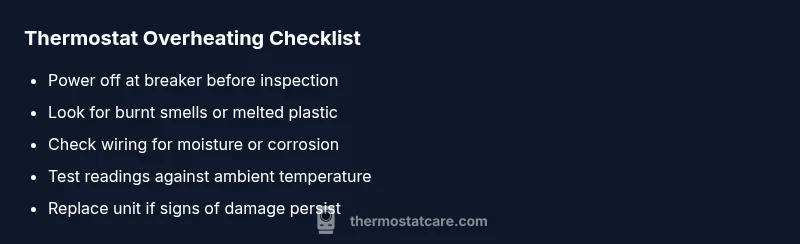
Yes, overheating can damage a thermostat's electronics and sensors, leading to erratic readings or complete failure. First, shut off power at the circuit breaker and wait 15 minutes for cooling, then inspect for burnt smells, melted plastic, or a tripped breaker. If symptoms persist, replace the thermostat and consider upgrading to a heat-tolerant model. Overheating may also affect the microcontroller and battery life.
Why overheating damages thermostats
Can a thermostat go bad after overheating? Yes—excess heat can stress the internal components, degrade sensors, and shorten the device's lifespan. According to Thermostat Care, heat exposure can affect the microcontroller, the temperature sensor, and even the battery (in devices that use one). When the board overheats, readings can drift, delays can occur, and the device may reset or lose memory. The result is unreliable temperature control, more energy use, and potential system cycling that wears out other HVAC components prematurely. Understanding these risks helps homeowners act quickly and safely. Remember, heat isn’t just uncomfortable; it can undermine the thermostat’s accuracy and reliability, especially in compact enclosures with limited airflow.
This guide prioritizes safety and practical fixes, so you can determine whether a thermostat needs replacement or just a safer operating environment.
Why overheating damages thermostats
Can a thermostat go bad after overheating? Yes—excess heat can stress the internal components, degrade sensors, and shorten the device's lifespan. According to Thermostat Care, heat exposure can affect the microcontroller, the temperature sensor, and even the battery (in devices that use one). When the board overheats, readings can drift, delays can occur, and the device may reset or lose memory. The result is unreliable temperature control, more energy use, and potential system cycling that wears out other HVAC components prematurely. Understanding these risks helps homeowners act quickly and safely. Remember, heat isn’t just uncomfortable; it can undermine the thermostat’s accuracy and reliability, especially in compact enclosures with limited airflow.
This guide prioritizes safety and practical fixes, so you can determine whether a thermostat needs replacement or just a safer operating environment.
Steps
Estimated time: 30-60 minutes
- 1
Cut power and let cool
Locate the circuit breaker for the thermostat circuit. Switch it OFF, then wait 15 minutes to ensure all internal components have cooled before inspection.
Tip: Use a non-contact tester to verify no voltage before touching terminals. - 2
Inspect for obvious damage
Look for melted plastics, scorched smells, or any visible damage on the thermostat or wiring. If you see signs of burning, do not reuse—safety first.
Tip: Do not attempt repairs on visibly damaged units. - 3
Test power and wiring
Turn the breaker back on temporarily to observe power behavior. If fuses trip or the display stayed off, the issue may be with power supply or internal fuse.
Tip: If fuses trip, replace the fuse or breaker; if unsure, call a licensed electrician. - 4
Evaluate readings against a thermometer
Place an external thermometer near the thermostat and compare observed ambient temperature with displayed readings to gauge drift.
Tip: Document discrepancies with photos for reference when consulting a pro. - 5
Decide on replacement
If readings are inconsistent after power cycles and there’s physical damage or persistent drift, plan for replacement with a model that suits your HVAC system.
Tip: Upgrade to a thermostat with built-in surge protection and heat durability.
Diagnosis: Thermostat shows erratic readings or won't respond to settings after overheating
Possible Causes
- highOverheating damaged the temperature sensor
- highInternal power issues or blown fuse due to heat
- lowWater ingress or condensation near terminals
Fixes
- easyPower off at the breaker, wait 15 minutes, then power back on and test basic function
- hardReplace the thermostat or its damaged sensor module if readings remain unreliable
- easyInspect and reseat terminals, dry any moisture, and replace damaged wiring if present
Questions & Answers
Can overheating permanently damage a thermostat?
Yes. Prolonged heat can degrade sensors, microcontrollers, and batteries, leading to unreliable readings or failure. If symptoms persist after cooling and basic checks, replacement is usually recommended.
Yes. Prolonged heat can damage the thermostat's sensors and electronics, causing unreliable readings. If it still misbehaves after cooling, replacement is recommended.
Should I repair or replace after overheating?
If there’s visible damage or persistent misreadings, replacement is typically safer and more reliable. Repairs can be temporary fixes, but the root cause is due to heat exposure.
If there’s visible damage or ongoing misreads, replacement is usually safer than repair.
What tools do I need for basic troubleshooting?
A multimeter, screwdriver, non-contact voltage tester, and a clean, dry environment for inspection are usually sufficient for basic checks.
Grab a multimeter, screwdriver, and a voltage tester to start troubleshooting.
Is it safe to test a thermostat while the system is powered?
No. Do not test while power is on; turn off the breaker and discharge any capacitors if applicable. If you’re unsure, call a pro.
No. Always switch the power off before testing; if unsure, contact a professional.
How can I prevent future overheating issues?
Keep the HVAC area ventilated, install proper enclosure shielding, and choose thermostats with heat protection and surge resilience. Regular maintenance reduces risk.
Keep the area ventilated, protect the enclosure, and use a thermostat with heat protection. Regular maintenance helps a lot.
Watch Video
What to Remember
- Act quickly after overheating to prevent further damage
- Distinguish between sensor drift and power failures
- Replace damaged units rather than attempting risky repairs
- Improve enclosure airflow and avoid heat sources
- Use heat-tolerant thermostats with proper protection