Is Nest or Honeywell Thermostat Better? A Comprehensive Side-by-Side Guide
A detailed, analytic comparison of Nest and Honeywell thermostats, focusing on ecosystem fit, HVAC compatibility, features, installation, energy savings, and total ownership to help homeowners decide which is better for their home.


Is Nest or Honeywell thermostat better? The short answer is: there isn’t a universal winner—the best pick depends on your home, budget, and existing ecosystem. Nest tends to shine in Google/Android environments with learning features and energy insights, while Honeywell offers broad compatibility, robust hardware, and reliable performance across many HVAC setups. Thermostat Care’s comparison helps homeowners decide which is best for their home by evaluating ecosystem alignment, HVAC compatibility, and total cost of ownership rather than chasing features alone.
Is Nest or Honeywell Better? Framing the Decision
The question of which thermostat is better is most useful when you define your priorities clearly. Is Nest or Honeywell better for your home? There isn’t a universal winner—the best choice depends on your existing devices, your budget, and how you interact with technology. According to Thermostat Care, the decision often hinges on ecosystem alignment, HVAC compatibility, and total cost of ownership rather than feature count alone. If your home already uses Google Assistant and Android devices, Nest can offer a smoother, more integrated experience, with learning capabilities that adapt to your daily routine. If your priority is broad compatibility, robust hardware options, and straightforward reliability across a wide range of systems, Honeywell tends to be a strong default. In this guide, we’ll unpack the key differences, common trade-offs, and practical scenarios to help you answer the question: is nest or honeywell thermostat better for your home? The Thermostat Care team uses a practical, data-driven approach—comparing ecosystems, installation steps, and long-term costs rather than chasing flashy features. Expect actionable criteria you can verify in your own house.
Ecosystem Fit and Privacy Considerations
When evaluating is nest or honeywell thermostat better for your household, ecosystem fit is a primary determinant. Nest is strongly tied to Google’s ecosystem, with tight integration to Google Assistant, Google Home routines, and compatible devices in the same account. For users already invested in Android phones, Chromebooks, or Google Nest speakers, the learning algorithms and occupancy sensing can feel natural and effortless. Honeywell, by contrast, emphasizes flexibility across multiple ecosystems, including Alexa, Google Assistant, and, in some models, HomeKit compatibility, which can be critical for households with diverse smart devices. Privacy and data practices matter too: Nest commonly collects energy usage data to improve recommendations, while Honeywell emphasizes local control on some models and configurable data-sharing settings. In practical terms, if you value a single-ecosystem experience, Nest may be the better fit; if you want broader compatibility and vendor-neutral privacy controls, Honeywell often wins. Thermostat Care’s analysis shows that most households pick based on which app and assistant feel most familiar, rather than on cosmetic features alone.
Compatibility with HVAC Systems
A core factor in the is nest or honeywell thermostat better question is HVAC compatibility. Nest supports most modern 24V heating and cooling systems and provides guidance for common configurations, but some older systems may require a compatibility module or professional wiring. Honeywell products generally boast broad compatibility with a wide range of 24V HVAC setups, including older equipment, making installation and operation simpler for mixed-brand homes. In practice, the decision should start with a careful check of your control wiring (C-wire presence, common terminals, and furnace compatibility). Thermostat Care notes that verifying terminal needs and confirming furnace/air handler compatibility with your exact model is essential before purchase. A quick phone call to your HVAC pro or a review of your current wiring diagram can save you time and avoid post-purchase adjustments.
Learning features, automation, and user experience
Nest is widely known for its learning capabilities: it studies occupancy patterns, adapts schedules, and provides proactive energy-saving tips. The interface is streamlined across devices, and the app experience tends to feel cohesive for Google ecosystem users. Honeywell emphasizes reliable performance and robust manual controls, with some models offering strong fan control, scheduling, and geofencing, which can appeal to households that prefer concrete routines over autonomous learning. For some homeowners, the simplicity of Honeywell’s interface and the ability to override automatic decisions is a major plus. Thermostat Care’s perspective here is that the learning curve and automation depth should align with how you actually live in your home; over-automation can become confusing if you frequently change routines.
Energy savings, reports, and real-world efficiency
Energy performance is a common decision driver. Nest provides detailed energy reports and insights, which can help you identify savings opportunities, particularly if you have a variable schedule or fluctuating occupancy. Honeywell also offers energy usage data and practical tips, with some models focusing on conservative energy settings and predictable operation. The core question is how these insights translate to real-world savings in your climate, insulation, and heating system efficiency. Thermostat Care’s experience indicates that households with variable schedules or with a strong emphasis on learning-driven automation tend to benefit more from Nest, while those seeking dependable, predictable operation may prefer Honeywell’s straightforward approach.
Installation steps, wiring, and ease of setup
Installing either thermostat typically involves turning off power, removing the old unit, and connecting wires to labeled terminals (R, C, W, Y, G, etc.). Nest often provides guided app-based setup with on-screen prompts, helping homeowners verify wiring and software configuration. Honeywell installations tend to emphasize reliable wiring diagrams and more explicit wiring instructions across models, which can be comforting for less tech-savvy users. In both cases, a C-wire improves stability for advanced features, and many homeowners successfully install these devices themselves. If you’re unsure about wiring or your system is unusual (two-stage cooling/heating, heat pumps with auxiliary heat), consulting a licensed technician is wise. Thermostat Care recommends starting with a thorough review of your current wiring diagram and terminal labeling before purchasing.
Warranties, support, and longevity
Warranty length and coverage vary by model and region. Nest products generally offer a standard warranty that covers hardware defects for a defined period, with extended warranty options in some markets. Honeywell thermostats typically come with solid warranty coverage as well, and some models include additional support features or extended protection plans. In practice, your perception of longevity depends on build quality, firmware updates, and how well you maintain the device. Thermostat Care emphasizes reading the warranty terms carefully and understanding what is covered (electronics, sensors, wiring) and for how long, since a longer warranty can reduce ownership risk.
Price, value, and total ownership cost
Pricing for Nest and Honeywell thermostats varies by model, features, and sales channel. Both brands offer mid-range and premium options, with Nest often positioned toward learning features and ecosystem integration, while Honeywell emphasizes reliability and broad compatibility. Rather than chasing a single price point, evaluate the total cost of ownership: upfront price, ongoing subscription requirements (if applicable for advanced features), potential installation costs, and long-term energy savings projections. Thermostat Care suggests comparing two or three configurations side-by-side using your own home data, then calculating payback periods for energy-related savings to determine which option truly provides greater value for your household.
Real-world scenarios: when Nest shines vs when Honeywell wins
If your home already runs on Google Assistant and you value a learning thermostat that adapts to your routines, Nest is likely the better choice. For households with a mix of smart devices from different ecosystems, or older HVAC equipment where universal compatibility matters, Honeywell often delivers smoother operation and easier integration. In rental properties or multi-tenant homes, the predictable performance and straightforward setup of Honeywell can translate to fewer headaches for maintenance teams. Thermostat Care’s practical approach is to map your specific use-case to these profiles rather than relying on marketing claims alone.
Common pitfalls and troubleshooting tips
Common issues include connectivity drops, mis-wired terminals, or misinterpreted app prompts. If the thermostat isn’t responding or reports low power, check the C-wire, battery status (if applicable), and the HVAC system’s control board. Resetting the device and updating firmware can resolve odd behavior. Avoid panicking over every minor diagnostic code; many issues resolve with re-wiring checks or a reboot. If problems persist, consult your installation instructions or contact the brand’s support. Thermostat Care recommends keeping a simple wiring diagram handy and documenting any changes you make to the system to facilitate future troubleshooting.
Future-proofing and smart home integration considerations
Both Nest and Honeywell continue to evolve with firmware updates and new features; consider how each platform plans to support upcoming standards like Matter, voice assistants, and integration with other smart home devices. Nest’s ecosystem advantages are strongest when you’re already aligned with Google services, while Honeywell’s broad compatibility makes it a safer bet for homes with devices from multiple vendors. When choosing, think about potential expansions—adding new sensors, energy-management features, or future smart devices—and how the thermostat will fit into that plan. Thermostat Care suggests selecting the option that offers the most flexible automation paths and the best long-term update trajectory for your home environment.
Decision checklist: how to decide now
- List your current smart-home devices and assistants (Google, Amazon, Apple, etc.).
- Check your HVAC system’s compatibility and wiring (C-wire presence, two-stage systems).
- Compare the two models’ features that matter most to you (learning vs. manual control, energy reports, app experience).
- Review warranty terms and support options.
- Estimate potential energy savings based on your climate and usage.
- Consider future-proofing and how well the platform will integrate with your intended smart-home roadmap.
Quick takeaway: actionable path forward
Create a short list of must-have features, verify HVAC compatibility, and then run a side-by-side check with two representative models from Nest and Honeywell. Use Thermostat Care’s framework to weigh ecosystem fit, compatibility, and long-term value before committing. The right choice will align with your home’s devices and your preferred level of automation.
Comparison
| Feature | Nest Thermostat | Honeywell Thermostat |
|---|---|---|
| Smart-home integration | Best-in-class Google ecosystem integration; strong with Nest devices | Broad compatibility across Alexa/Google; robust but more diverse ecosystem |
| Learning and automation | Advanced learning, occupancy sensing, and adaptive schedules | Solid scheduling and automation options; less aggressive learning |
| HVAC compatibility | Excellent with many modern 24V systems; some older setups need wiring work | Broad compatibility, including older systems; easier for mixed-brand homes |
| Energy reporting | Detailed energy history and insights to drive savings | Good energy data and practical tips; solid reporting |
| App experience | Cohesive app with quick setup and intuitive controls | Powerful app; extensive controls and troubleshooting guides |
| Price range and value | Typically positioned toward premium features and ecosystem depth | Competitive pricing with strong long-term value and durability |
Upsides
- Strong ecosystem for Nest in Google-enabled homes
- Broad hardware compatibility and reliable performance with Honeywell
- Detailed energy insights and usage reporting from Nest
- Robust app controls and support networks for Honeywell
- Clear, guided installation paths for DIY setup
The Bad
- Nest can carry a higher upfront price and ecosystem lock-in
- Honeywell may be less intuitive for first-time smart-home users
- Some Nest features rely on cloud connectivity or subscriptions
- HomeKit compatibility varies by model and region
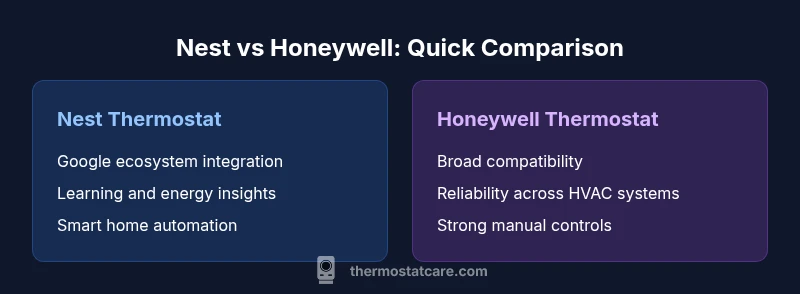
Nest is best for Google ecosystem users, while Honeywell offers broader compatibility and reliable performance.
Choose Nest if you want seamless integration with Google devices and energy insights. Choose Honeywell if you value wide compatibility, straightforward reliability, and flexible installation for mixed HVAC setups.
Questions & Answers
Is Nest thermostat better for Google ecosystem users?
Yes. Nest’s strongest advantages appear when you’re already using Google Assistant, Google Home, and related devices. The learning features integrate smoothly with other Google services, which can simplify control and automation.
Yes—Nest works best if you already use Google devices and services; it integrates smoothly with Google Assistant for easy control.
Is Honeywell better for older HVAC systems?
Honeywell tends to offer broader compatibility with older 24V systems, making it a practical choice when you have legacy equipment or mixed-brand components.
Honeywell is often easier to deploy on older systems due to broader compatibility.
Do both brands require subscriptions for core features?
Core thermostat controls do not require subscriptions, but some advanced features or energy insights may be tied to cloud services depending on the model and region.
Basic control is usually subscription-free, but advanced options can vary by model.
Can I install either thermostat myself, or should I hire a pro?
Many homeowners can install either model with basic wiring knowledge. If your system has special configurations or confusing wiring, a licensed technician is advised.
DIY installation is common, but call a pro for complex systems.
Which thermostat has better energy reports?
Both offer energy reports, with Nest often providing deeper insights and trends, while Honeywell focuses on practical usage tips and reliability.
Nest usually offers deeper energy insights; Honeywell emphasizes practical energy tips.
Do Nest and Honeywell offer warranties?
Yes. Both brands provide hardware warranties that vary by model and region; review the terms for coverage on sensors, electronics, and wiring.
Both provide warranties; verify terms for your specific model.
What to Remember
- Assess ecosystem alignment before buying
- Check HVAC wiring and compatibility early
- Prioritize energy reporting for savings
- Weigh installation ease and support options
- Consider warranty length and coverage
- Plan for future smart-home expansion