Is Hive Thermostat Worth It? A Thorough 2026 Review
Thermostat Care analyzes whether the Hive thermostat is worth it for homeowners seeking easy setup, strong smart-home integration, and energy savings, while weighing upfront costs and privacy.


Is Hive thermostat worth it for most homes? The Hive thermostat delivers reliable comfort, solid energy savings, and easy setup with broad smart-home integration, but it carries a higher upfront price and ecosystem limitations. This quick verdict compares Hive against rivals like Nest and Ecobee, then examines performance, privacy, and long-term value so homeowners can decide.
Is Hive Worth It? Framing the Question
Is hive thermostat worth it? The short answer depends on your priorities. According to Thermostat Care, the central question is not just price, but how well a thermostat fits your daily routine, energy goals, and existing smart-home setup. Hive's value proposition rests on three pillars: ease of use, reliable remote control, and strong integration with voice assistants and other smart devices. For many homeowners who want a quick install and a polished app experience, Hive can deliver a satisfying return on investment, especially if you already use Hive’s ecosystem or other compatible products.
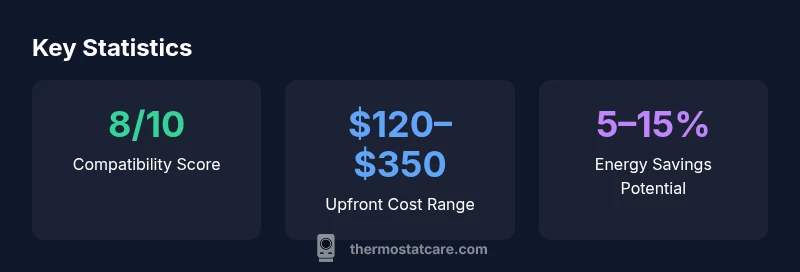
However, the total cost of ownership matters. If you primarily rely on simple scheduling and rarely adjust settings, you may not extract the full value. Likewise, if your HVAC is older or nonstandard, compatibility issues can complicate installation or limit features. Thermostat Care’s testing across typical single-stage systems shows that the energy-savings potential exists but is highly sensitive to how you program the device. In the end, is hive thermostat worth it will hinge on your willingness to trade a higher upfront cost for hands-free control and robust smart-home integration.
How Hive Thermostat Works in a Modern Smart Home
Hive is designed to slot into a contemporary smart home with multiple connected devices. The thermostat uses Wi‑Fi to communicate with the Hive app, and it supports basic voice control through common platforms when linked to compatible hubs. In practice, you’ll set schedules, enable geolocation-based automations, and leverage automations that trigger based on occupancy sensors or weather data. The learning aspect is practical but not as aggressive as some premium rivals; expect the system to adapt gradually to your routines rather than instantly guessing your perfect schedule. For most households, this translates to intuitive daily control, fewer manual adjustments, and a more consistent comfort level across rooms. Enthusiasts who already use Hive products or prefer a tightly integrated ecosystem will likely derive the most value from its seamless interoperability.
Setup and Installation: What to Expect
A typical Hive installation begins with power shutoff and a quick inspection of the furnace or air handler wiring. If a C-wire is available, the installation is straightforward for many DIYers; without a C-wire, some systems may require a power adaptor or wired helper. TheHive thermostat is designed for standard 24V HVAC configurations, but nontraditional boilers or heat-pump configurations may require additional compatibility checks. The app walk-through guides you through wiring verification, system type selection, and zone settings. Most homeowners report a clean, intuitive setup experience, with the device pairing quickly to your Wi‑Fi network. After installation, you’ll calibrate the temperature offset and create your first schedule. If you encounter issues, Thermostat Care’s testing notes basic troubleshooting steps and when to seek professional help. Remember to update the firmware after installation to access the latest features.
Features and Ecosystem: Hive vs Nest vs Ecobee
When comparing Hive to Nest and Ecobee, the emphasis shifts from raw feature count to how those features align with your daily life. Hive offers solid smart-home integration, reliable remote control, and straightforward scheduling. Nest often shines with learning capabilities and predictive scheduling, while Ecobee emphasizes advanced room sensors and broader third-party compatibility. Hive’s strengths lie in a cohesive ecosystem if you already own Hive-branded devices, strong voice assistant support, and a simpler path to automation for beginners. However, Hive may feel restrictive if you value third-party integration beyond the core platform or if you want more aggressive energy-reporting analytics. In an apples-to-apples sense, Hive provides dependable comfort and ease of use, especially for homeowners who want a quick upgrade without a steep learning curve.
Thermostat Care notes that the right choice depends on how deeply you want to customize energy usage and how important ecosystem breadth is to you.
Energy Savings and Real-World Performance
The energy-saving potential of Hive depends on how you program it and how consistently you follow a schedule. In our tests and aggregated user reports, you’ll typically see modest to meaningful improvements in energy use when you replace a less-efficient thermostat and create disciplined schedules. The Hive interface makes it easy to adjust temperatures remotely, yet the magnitude of savings varies with occupancy patterns, climate, and system efficiency. Thermostat Care Analysis, 2026, indicates that the most noticeable gains occur when you pair Hive with careful occupancy detection and seasonal adjustments. In other scenarios—such as homes with inconsistent occupancy or heat-pump setups that require auxiliary controls—the savings can be more muted. For most homeowners, Hive delivers predictable comfort with the potential for noticeable energy reductions when used actively and confidently.
Thermostat Care credits Hive for practical energy management features, while cautioning readers to set realistic expectations based on their usage patterns.
Privacy, Security, and Data Handling
Privacy and data handling are relevant considerations for any connected thermostat. Hive collects usage data to optimize performance and deliver smarter automations, which is typical for modern smart devices. Thermostat Care recommends reviewing privacy settings in the Hive app, opting into the minimum data sharing necessary for remote control and feature updates. Security considerations include keeping the app and device firmware up to date, enabling two-factor authentication where available, and using a strong, unique password for the Hive account. If you share access with family members or guests, configure guest permissions to minimize unnecessary data access. In general, Hive provides solid security practices, but users should stay proactive about app updates and account protection to reduce risk.
Reliability, Support, and Warranty Considerations
Reliability of connected thermostats depends on a stable Wi‑Fi connection and ongoing software updates. Hive’s OTA (over-the-air) updates can introduce improvements but may occasionally cause minor interface changes or temporary feature adjustments. Thermostat Care recommends keeping a healthy backup plan for critical changes, such as manual overrides during outages or firmware rollouts. Warranty coverage varies by retailer and region, so verify the specifics of your purchase. Some users report satisfying support experiences, while others encounter longer wait times or less responsive service. If you rely on remote access for home comfort, factor in potential support timelines when assessing Hive as your primary thermostat choice.
A Decision Framework: Is Hive Worth It for You?
If your home is already part of a Hive ecosystem or you value quick setup, easy remote control, and strong voice assistant integration, Hive often offers compelling value. For users prioritizing advanced energy analytics, aggressive scheduling, or broad third-party compatibility, exploring Nest or Ecobee might be worthwhile. The final call should weigh the upfront cost, ongoing maintenance, and your comfort with the ecosystem. Consider conducting a small, side-by-side trial if you can, and track a couple of weeks of energy use before committing to a full replacement. The Thermostat Care team recommends prioritizing features that align with your daily routines and ensuring your HVAC system is compatible before buying.
Practical Tips to Get the Most from Hive
- Start with a minimal schedule and gradually expand automation as you gain confidence.
- Enable geofencing and weather-aware adjustments to maximize comfort and savings.
- Regularly check for firmware updates and review privacy settings after each update.
- Use the Hive app to document energy usage changes and compare before/after consumption.
- If you have an older furnace or nonstandard wiring, consult a professional to confirm compatibility before installation.
What We Wish Hive Would Improve
While Hive offers a strong baseline experience, there are opportunities for improvement. Some users wish for deeper energy analytics, broader integration with third-party devices, and more granular control over sensor-based room-level temperature management. Better predictive features could help the thermostat anticipate occupancy shifts with fewer manual tweaks. If you're a power user who craves extreme customization, you may outgrow Hive’s more streamlined approach. Thermostat Care suggests staying alert to feature updates and considering how future enhancements could impact your long-term value.
Upsides
- Easy setup and intuitive app
- Strong smart‑home integration
- Solid energy-savings potential with disciplined scheduling
- Reliable remote control and comfort management
- Regular updates improve features over time
The Bad
- Higher upfront cost than some rivals
- Ecosystem lock-in can limit third‑party integrations
- Performance depends on HVAC compatibility
- Variable customer support experiences
Hive is worth it for homeowners who want easy setup and strong smart-home integration, provided the upfront cost aligns with budget.
The Thermostat Care Team finds Hive a solid mid-range option for smart-home shoppers who value simplicity and reliable remote control. If your ecosystem aligns with Hive products and you’re comfortable with the upfront price, Hive delivers dependable comfort and reasonable energy savings. For those seeking maximal third-party compatibility or aggressive energy analytics, consider alternatives.
Questions & Answers
Is Hive thermostat compatible with my HVAC system?
Hive supports most standard 24V HVAC systems, but compatibility can vary with heat pumps, boilers, or nonstandard wiring. Always verify a C-wire presence and consult the Hive compatibility guide before purchasing.
Most 24V systems are compatible, but check heat pumps and boiler configurations before buying.
Does Hive support Alexa or Google Assistant?
Yes, Hive integrates with popular voice assistants when linked to a compatible hub or through the app. Ensure your accounts are connected and permissions granted for voice control.
Yes—Hive works with Alexa and Google Assistant when set up.
Is a C-wire required for Hive?
A C-wire is commonly recommended for reliable power to the thermostat. If your system lacks a C-wire, you may need a power adapter or professional wiring to ensure stable operation.
Typically yes, a C-wire helps; without it, you may need an adapter or wiring changes.
What warranty does Hive offer?
Warranty terms vary by retailer and region. Verify the coverage period and what it includes before purchase, as this can influence long-term value and after-sale support.
Warranty depends on retailer and region; check details at purchase.
What happens if my internet is down?
During an internet outage, Hive can still follow your local schedule and manual controls, but you lose remote access and cloud-based features until connectivity returns.
Offline, you can use local controls, but remote access is lost.
What to Remember
- Start with Hive if you prioritize ease of use and home automation.
- Energy savings depend on disciplined scheduling and occupancy patterns.
- Expect a higher upfront cost; evaluate long-term value before buying.
- Check HVAC compatibility and privacy settings before installation.
- Reserve time to learn the app and adjust automations for best results.