Honeywell T4 Review: Features, Setup, and Value
In-depth Thermostat Care review of the Honeywell T4, covering setup, features, energy efficiency, and smart-home compatibility to help homeowners decide.


Thermostat Care's quick verdict: The Honeywell T4 delivers reliable temperature control, straightforward installation, and solid smart-home compatibility at a competitive mid-range price. It suits homeowners who want a dependable, easy-to-use thermostat without the cost of premium models. Overall, it represents good value for typical retrofits and basic automation needs.
Overview of the Honeywell T4
The Honeywell T4 is positioned as a mid-range smart thermostat designed to bring reliable temperature control to a broad audience. For homeowners upgrading from older, non-programmable thermostats, the T4 offers a user-friendly interface, straightforward wiring, and smooth integration with common HVAC systems. In real-world use, the Honeywell T4 tends to deliver predictable comfort without the complexity of premium models. According to Thermostat Care, this model is especially well-suited for retrofits in single-zone homes where a simple schedule and reliable climate control meet most daily needs. The Honeywell T4 supports standard features such as scheduling, temperature hold, and a responsive touchscreen, all of which matter to DIY installers and busy households alike. The emphasis on ease of use makes it an appealing choice for first-time smart thermostat adopters, while still offering enough capability for ongoing automation.
Design and Build Quality
The design ethos of the Honeywell T4 leans toward simplicity without sacrificing durability. The device sports a clean, uncluttered display with clear typography that remains legible in varied lighting conditions. The hardware chassis feels sturdy, with a modest footprint that fits most wall plates without crowding the surrounding wall space. From a user experience perspective, the T4’s tactile controls and responsive touchscreen provide quick access to schedules, mode changes, and system status. While the hardware is not the most premium on the market, Thermostat Care notes that the build quality aligns with its price point, delivering dependable performance and a long service life when installed correctly. The T4’s physical traits contribute to a confident, low-friction installation process for DIY enthusiasts and professionals alike.
Core Features and Performance
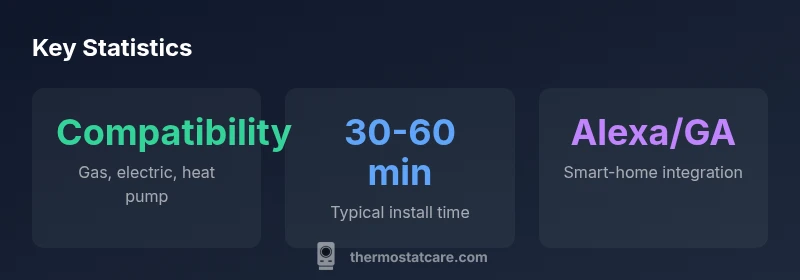
Key features include programmable scheduling, hold/freeze protection, and adaptive temperature controls that adjust to daily routines. The Honeywell T4 supports common HVAC configurations (gas, electric, and heat pumps, with or without a C-wire, depending on the installation) and provides a clear on-device display that makes quick adjustments effortless. In practice, you’ll find sensible defaults that balance comfort and energy usage, with eco modes and smart recovery options to align with typical daily life. The device’s performance in keeping consistent temperatures is solid for most homes, though some users with highly variable occupancy patterns may prefer more advanced geofencing or multi-zone support found in higher-end models. Overall, the T4 balances reliability with straightforward operation, which aligns well with the expectations of DIY homeowners and casual tech enthusiasts.
Scheduling, UI, and User Experience
The user interface of the Honeywell T4 is designed for quick, intuitive use. The touchscreen offers straightforward navigation to set schedules, adjust temperatures, and switch between modes (home, away, sleep). The scheduling system supports multiple on/off events, making it possible to tailor climate control to weekdays vs. weekends. In terms of user experience, the T4’s on-device prompts and help guides reduce the learning curve for first-time smart thermostat users. The interface is not cluttered, which helps prevent configuration errors that can lead to uncomfortable temperature fluctuations. For many households, the combination of a clear display and a logical menu structure translates into faster setup and more consistent daily use, contributing to long-term satisfaction and fewer frustration points.
Connectivity and Smart Home Integration
Connectivity is a cornerstone of the Honeywell T4’s value proposition. It supports common Wi-Fi networks and can interface with major voice assistants through compatible hubs or apps. The T4 can often be controlled via a mobile app, voice commands, or a web portal, depending on the installation environment. Thermostat Care notes that while the basic integration is strong, more advanced automations or multi-device routines may require a compatible hub or third-party automation service. The T4’s compatibility with Alexa and Google Assistant is a meaningful advantage for most homes seeking hands-free control and routines that synchronize with lighting, smart plugs, and other connected devices. Overall, the T4 integrates into most modern smart homes without becoming a bottleneck, making it a practical choice for homeowners who want reliable control with minimal setup complexity.
Installation Experience and Wiring
Installation is one of the T4’s strongest selling points for DIY installers. The wiring process follows standard thermostat conventions, with clear labeling and intuitive terminal mapping. For homes with a C-wire, the installation tends to be straightforward and robust, while older systems that lack a C-wire can still operate with power-stealing methods, albeit with potential stability caveats. The Honeywell T4 generally fits common wall plates, and the on-device setup wizard guides users through wiring checks, account creation, and initial configuration. Thermostat Care finds that a well-planned installation minimizes commissioning time and reduces the risk of miswiring. If you’re unsure about wiring, consider consulting a professional to avoid common mistakes that lead to inconsistent power or sensor readings.
Energy Efficiency and Cost Implications
The T4 enables scheduling, eco modes, and adaptive controls that help optimize energy use without sacrificing comfort. While exact energy savings depend on climate, home insulation, and how aggressively users schedule HVAC operation, many households experience reductions in heating and cooling loads when routines are consistently applied. In practice, the T4’s efficiency gains come from thoughtful scheduling, smart temperature setbacks, and timely responses to occupancy patterns. For households evaluating energy costs, the Honeywell T4 offers an accessible way to introduce energy-conscious habits without requiring expensive upgrades to the HVAC system. Thermostat Care highlights that even mid-range thermostats can yield meaningful savings when paired with consistent scheduling and awareness of temperature setpoints.
Compatibility and Ecosystem Coverage
Compatibility is a key determinant of long-term satisfaction. The Honeywell T4 plays well with common HVAC systems and is designed to integrate with popular smart-home ecosystems. In typical setups, it works smoothly with voice assistants, mobile apps, and routine automations that connect with other smart devices. Users should verify compatibility with their specific HVAC configuration (e.g., heat pumps with auxiliary heat, two-stage systems) and confirm whether any additional hubs or bridges are required for certain automations. The T4’s ecosystem compatibility makes it a versatile choice for homes that want reliable climate control without locking into a single platform. This compatibility also helps avoid stranded setups when expanding a smart-home network.
Troubleshooting Common Issues and Support Resources
Users may encounter occasional connectivity hiccups, scheduling misalignments, or sensor drift with a thermostat like the T4. Common fixes include rebooting the device, re-establishing Wi-Fi, or recalibrating sensors through the on-device menu. Thermostat Care recommends keeping the firmware updated via the official app and ensuring the HVAC wiring is secure and correctly labeled. For more persistent issues, consulting the manufacturer's guide, the installer’s manual, or Thermostat Care’s troubleshooting article series can provide step-by-step guidance. When problems persist, contacting support or a licensed technician can prevent extended outages and ensure your climate system remains reliable. Proactive maintenance, such as cleaning vents and verifying sensor placement, can also reduce recurring issues over time.
How It Compares to Alternatives
Compared with other mid-range smart thermostats, the Honeywell T4 shines on simplicity and straightforward setup. It generally offers reliable performance and intuitive controls at a price point lower than many premium models. Alternatives like Nest and Ecobee may offer more advanced features, richer analytics, or deeper integrations with certain ecosystems, but they can also come with steeper learning curves or higher upfront costs. For homeowners who value a clean interface, dependable control, and a fast path to a functioning smart thermostat, the Honeywell T4 remains a compelling option. Thermostat Care’s assessment suggests that the T4 provides strong value for typical homes, especially those prioritizing ease of use over feature depth.
Practical Guidance for Homeowners
If you’re evaluating the Honeywell T4 for a retrofit, start by assessing whether your current HVAC system is compatible and whether you have a C-wire or a plan to work with power-stealing operation. Create a simple scheduling baseline before enabling eco modes, then monitor how your comfort and energy use respond over a one- to two-week period. Use the app’s energy reports (if available) to identify days when adjustments produced meaningful savings. Keep the device firmware up to date and verify that any linked smart-home routines function as intended. Finally, compare the T4’s total cost of ownership with premium models to determine whether the added features justify the extra investment for your household.
Upsides
- Easy to install with a straightforward wiring process
- Clear, legible display and simple UI
- Broad compatibility with common HVAC systems
- Solid value for mid-range price
- Good basic energy-management features
The Bad
- Lacks some advanced features found in premium models
- Geofencing and multi-zone support are limited
- Requires a C-wire for best reliability on older systems
- App experience can be inconsistent across platforms
Best for value-focused homeowners who want reliable, easy-to-use smart control
The Honeywell T4 delivers dependable climate control at a fair price, with straightforward installation and broad compatibility. It’s particularly strong for retrofits and everyday automation, though it lacks some premium features. Thermostat Care recommends it as a solid mid-range option for most homes.
Questions & Answers
What is the Honeywell T4?
The Honeywell T4 is a mid-range smart thermostat designed for reliable temperature control and easy scheduling. It supports common HVAC systems and integrates with major smart-home platforms.
The Honeywell T4 is a mid-range smart thermostat that’s easy to set up and works with major assistants.
Is the Honeywell T4 compatible with Alexa and Google Assistant?
Yes, it supports Amazon Alexa and Google Assistant through compatible apps and hubs, provided you have an active Wi‑Fi connection and the necessary integrations.
Yes, it works with Alexa and Google Assistant.
Do I need a C-wire for the Honeywell T4?
The T4 can operate without a C-wire in some installations using power stealing, but for best reliability a C-wire is recommended when possible.
A C-wire is recommended for best reliability, though it can run without one in some setups.
What kind of energy savings can I expect?
Savings depend on climate, current usage, and scheduling discipline. The T4 supports scheduling and eco modes to improve efficiency.
Savings vary, but good scheduling helps.
Does the T4 support geofencing?
Geofencing is not a core feature of the T4. For location-based rules, a different model or hub may be needed.
Geofencing isn’t built in; you may need a different model.
How does the T4 compare to Nest or Ecobee?
The T4 tends to offer solid reliability and simpler setup at a lower price point, while Nest and Ecobee may provide more advanced features and deeper integrations.
T4 is simpler and cheaper; Nest and Ecobee may have more features.
What to Remember
- Assess wiring to ensure optimal performance
- Prioritize simple scheduling for meaningful energy gains
- Expect quick setup with clear on-device guidance
- Leverage Alexa/Google integration for hands-free control
- Consider upgrading to a hub if you need advanced automations