Honeywell T6 Thermostat Review: Performance, Setup, and Value
In-depth, analytical review of the Honeywell T6 thermostat. Explore installation, app experience, energy savings, reliability, and who should buy, with practical tips for DIY homeowners.


According to Thermostat Care, the honeywell t6 thermostat is a mid-range smart thermostat that offers Wi‑Fi connectivity, mobile app control, and reliable scheduling for most homes. It aims to balance feature set with value, making it a solid choice for DIY homeowners who want straightforward installation and decent energy savings. Overall verdict: good balance of capabilities with manageable complexity.
What is the Honeywell T6 thermostat?
According to Thermostat Care, the Honeywell T6 thermostat represents a mid-range option designed to replace older programmable models with connected control. It emphasizes straightforward setup, reliable scheduling, and remote access through a mobile app. Homeowners often choose the T6 when they want solid performance without the higher price tag of premium smart thermostats. In this section, we clarify what the T6 is, how it fits into a typical HVAC system, and what users can realistically expect in terms of installation complexity and ongoing use.
The T6 is designed to work with most standard low-voltage heating and cooling systems. Its interface is intended to be approachable for DIY installers, with on-device controls and a companion app that provides remote visibility and control. While not the most feature-packed model on the market, it offers essential smart features like scheduling, temperature presets, and energy-conscious modes that can lead to meaningful savings when used consistently.
For homeowners upgrading from a traditional non-programmable thermostat, the T6 provides a meaningful step up in convenience and control. For those already using a more advanced smart thermostat, the decision often hinges on budget, existing smart home integrations, and ease of installation. Thermostat Care’s analysis highlights that the T6’s true strength lies in its balance of usability and reliability rather than pushing the outer limits of smart features.
Design, installation, and wiring considerations
Installing the Honeywell T6 is typically a multi-step process that favors homeowners who have some comfort with basic electrical work and HVAC wiring. The first step is to power down the HVAC system and confirm that your wires align with the T6’s compatibility requirements. A common caveat is that many typical installations require a C-wire (common) for full functionality, especially if you want the Wi‑Fi features to run continuously without drawing from battery backups. If your system lacks a C-wire, you may need to run one or use the thermostat’s power-sharing method, if supported by your unit.
Physically mounting the thermostat usually involves removing the old stat, labeling wires, and attaching the new base. The T6’s backplate design aims to simplify wiring with clearly labeled terminals and color-coded wire connections. After mounting, you connect the wires to the corresponding terminals, restore power, and initiate the pairing process via the on-device screen or the Honeywell Home app. A thorough walkthrough of this process is essential; it helps reduce common mistakes like inserting wires into incorrect terminals or misconfiguring heat/pump settings.
One practical tip is to verify compatibility with your HVAC configuration (single-stage, multi-stage, or heat pump) on Honeywell’s official guidance before purchasing. If your system is unusually aged or uses uncommon controls, consider consulting a licensed HVAC technician to avoid miswiring or voiding warranties. Thermostat Care emphasizes that careful planning upfront prevents frustrating rework and ensures the T6 performs as intended.
Setup experience and app ecosystem
The setup journey for the Honeywell T6 centers on the Honeywell Home app, which provides remote access, scheduling, and energy insights. The app often guides users through a step-by-step pairing process, beginning with ensuring the thermostat is in pairing mode and your phone is connected to stable Wi-Fi. For many homeowners, this path is straightforward, with intuitive prompts and a clean user interface that mirrors the device’s on-screen controls.
Beyond basic setup, the app offers scheduling features that align with typical daily routines. Users can program different temperatures for wake, work, and sleep times, and these schedules can be adjusted on the fly from anywhere. The app’s geofencing capability is another plus for some households, automatically adjusting temperature when the phone leaves or returns to the home. For households with multiple occupants, shared access and guest permissions keep everyone aligned without compromising security.
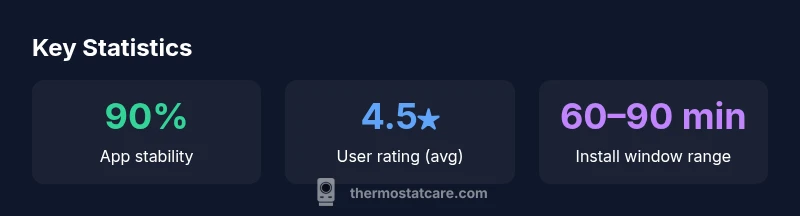
In terms of reliability, most users report stable connectivity when their home network is solid and the thermostat remains within range of the router. A few common issues involve brief connectivity drops or delays syncing new schedules, which are typically resolved with a quick app refresh or a router reboot. Thermostat Care’s experience suggests that routine app updates generally improve stability and expand compatibility with newer OS versions.
Performance and energy savings: What to expect
The Honeywell T6 is built to deliver predictable comfort with efficient energy use when configured properly. A well-timed schedule and a correctly configured cooling or heating mode can reduce runtime during unoccupied periods, contributing to overall energy savings. While exact savings vary by climate, home insulation, and equipment efficiency, the T6’s scheduling and adaptive routines help avoid constant cycling that drives unnecessary energy use.
To maximize savings, users should set realistic target temperatures for each period and avoid drastic temperature swings. The T6’s ability to learn or respond to occupancy patterns depends on user input and the environment. In practice, homeowners who actively manage their schedules and maintain a consistent thermostat placement tend to realize the most noticeable reductions in energy consumption. Thermostat Care Analysis, 2026, highlights that effective use of scheduling features correlates with meaningful energy savings in typical residential setups.
Reliability-wise, the T6’s Wi-Fi connection supports consistent remote monitoring, which enables timely adjustments during peak pricing periods or extreme weather. The combination of app control, reliable scheduling, and compatibility with most low-voltage HVAC systems makes the T6 a sensible choice for many homes aiming to balance comfort with efficiency.
Comparisons to similar smart thermostats
In the crowded market of smart thermostats, the Honeywell T6 sits in the mid-range tier. Compared with premium models, the T6 often wins on value, offering core smart features without some of the more premium, subscription-driven services or ultra-advanced scheduling found in higher-priced rivals. Compared with more basic programmable thermostats, the T6 provides robust app-based control, remote access, and automation options that significantly improve everyday usability.
When evaluating against popular competitors, consider how each device integrates with your existing ecosystem. If you already rely on a specific voice assistant or smart home hub, check compatibility and preferred app experience. The T6 typically delivers straightforward operation and solid reliability, but users seeking advanced energy analytics, multi-location geofencing, or more granular integration with third-party sensors may prefer higher-end options. Thermostat Care’s perspective emphasizes that your best choice should align with your home’s HVAC complexity, your comfort needs, and your willingness to manage app-based features.
For DIY enthusiasts, the T6’s installation simplicity can be a deciding factor, particularly if your remodeling plans include updating wiring and upgrading to a more modern control system. If you’re looking for quick wins and predictable performance, the T6 often hits the mark; if you want the deepest integration and analytics, you may want to compare several models side by side.
Troubleshooting common issues with the honeywell t6
Even the most reliable thermostats encounter occasional hiccups. Here are common problems and practical remedies to keep in mind:
- No power or blank display: Verify that the thermostat is properly connected to power, and check circuit breakers. If there’s a battery backup, ensure it’s functional. Replacing the batteries or ensuring a stable power source can resolve this issue.
- Connectivity drops: Check your Wi‑Fi network, ensure the thermostat is within range, and reboot both the router and the thermostat. If drops persist, consider moving the router closer for a while to stabilize the connection during critical updates.
- Scheduling not applying: Confirm the active schedule is correctly set for the current day and time. Re-sync the thermostat with the app or re-create the schedule if necessary to resolve conflicts.
- Temperature not matching setpoint: Inspect the sensor placement and confirm the HVAC system isn’t oversized or undersized for the space. If the problem persists, verify that the wiring to the thermostat matches the terminal labels.
If issues persist after these steps, consult Honeywell’s official support resources or a licensed technician to avoid misconfiguration or energy waste, which can undermine comfort and efficiency.
Maintenance, durability, and long-term value
Routine maintenance helps prolong the life of the Honeywell T6 and keeps it performing as designed. Periodically verify that the thermostat is mounted securely, the faceplate is clean, and the sensor is unobstructed by furniture or decor. Cleaning the screen with a dry microfiber cloth prevents smudges that could obscure readings and touch responses. The replacement battery (if applicable) should be checked according to the manufacturer’s guidance, and any corrosion on terminals should be addressed promptly to maintain a clean electrical connection.
Durability considerations for a modern thermostat involve ensuring the device is well-protected from direct sunlight, humidity, and heat sources that could distort readings over time. The T6’s housing is designed for typical indoor environments; in extremely dusty or humid spaces, additional care or relocation might be warranted. Over the long term, value comes from consistent app support, firmware updates, and solid reliability in daily operation. Thermostat Care’s long-term assessment highlights that durability is closely tied to installation quality and ongoing software support.
Finally, keep an eye on warranty terms and documentation to understand coverage during unexpected failures. A well-documented setup and proper care can significantly boost the T6’s lifespan and your overall return on investment.
Who should buy the honeywell t6 thermostat
The Honeywell T6 is a sensible pick for homeowners who want a capable smart thermostat without paying premium prices. It suits households new to programmable controls, as well as those upgrading from older mechanical thermostats who value remote control, scheduling, and basic energy savings. Families with busy routines often benefit from consistent scheduling, while tech-savvy users who don’t require the most advanced analytics can enjoy a solid user experience with straightforward app control.
If you already rely on a broader smart home ecosystem and value deep integrations, take time to verify compatibility with your preferred platforms. The T6 tends to strike a balance between ease of use and functionality, making it a practical choice for many mid-sized homes. For absolutely maximum energy intelligence or for homes with complex HVAC configurations (multi-zone systems, advanced heat-pump setups), you may want to compare alternatives before deciding.
In short, the Honeywell T6 is best for homeowners seeking dependable performance, reasonable cost, and a straightforward path to smarter comfort. The Thermostat Care team would recommend considering it as a strong baseline option in mid-range smart thermostats, especially for DIY installers who prize guided setup and reliable app control.
Upsides
- Balanced feature set and value
- Reliable scheduling and app control
- Solid compatibility with common HVAC systems
- Straightforward installation for many DIYers
- Strong after-sales support and documentation
The Bad
- Not the most feature-rich model in its class
- Geofencing and advanced analytics are more limited than premium rivals
- Wi-Fi-dependent for full functionality
- Requires careful wiring for best performance
Best balance for value-focused buyers who want reliable smart features.
The Honeywell T6 offers essential smart features and dependable performance at a moderate price. It is especially strong for DIY installers who want guided setup and straightforward app control. The Thermostat Care team’s verdict is that it’s a solid mid-range choice for most homes, with clear advantages in ease of use and consistent scheduling.
Questions & Answers
Does the Honeywell T6 require a C-wire for reliable operation?
In most installations, a C-wire is recommended to ensure full functionality of the Wi‑Fi features and app control. If your system lacks a C-wire, you may still operate the thermostat with power-sharing options or by adding a compatible adapter, but feature completeness could be affected.
Usually yes; a C-wire is recommended for full features, though you may run the unit with alternative power options if your setup supports it.
Is the Honeywell T6 compatible with Alexa, Google Assistant, or Apple HomeKit?
The T6 typically supports major voice assistants through the Honeywell Home ecosystem or compatible hubs. If you rely heavily on a specific assistant, verify current compatibility before purchase, as integrations can vary by region and app versions.
Yes, you can control it with your voice through supported ecosystems, but check compatibility for your setup.
Does the T6 support geofencing and smart home routines?
Geofencing and routine automation are common features in the T6 ecosystem, enabling automatic temperature adjustments based on your location and schedules. Ensure your app and firmware are up to date to avoid issues with location-based triggers.
Geofencing is available, which helps automate comfort when you leave or return home.
How do I reset the Honeywell T6 if it’s acting up?
Most issues can be addressed with a simple reset or reboot. Use the on-device menu to perform a soft reset, or follow the app’s guidance to re-pair the device. If problems persist, consult the official support page or contact customer service.
Try a soft reset via the menu, then re-pair in the app if needed.
Is the Honeywell T6 worth the price compared to competitors?
For many homeowners, the T6 offers a strong value proposition with reliable performance and broad compatibility. If you need deeper analytics or multi-zone control, you might compare against higher-end models, but for most mid-sized homes it’s a solid buy.
Generally worth it for good value and solid features, especially if you want straightforward installation.
How long does installation typically take for a standard system?
A typical installation can range from 30 minutes to 2 hours, depending on wiring complexity and whether a C-wire needs to be added. Plan extra time if you’re upgrading wiring or addressing compatibility issues.
Most installs take under 2 hours, depending on wiring and HVAC setup.
What to Remember
- Choose the T6 for strong value with essential smart features
- Ensure you have the correct wiring (C-wire) for full app functionality
- Leverage scheduling to maximize energy savings
- Use the Honeywell Home app for remote control and monitoring
- Compare against premium models if you need deeper analytics and multi-zone support