Google Nest Thermostat vs Ecobee: A Practical Comparison
An analytical, expert comparison of Google Nest Thermostat and Ecobee, covering ecosystem compatibility, sensors, energy data, installation, privacy, and value to help homeowners decide which smart thermostat fits their home.


The choice between Google Nest Thermostat and Ecobee hinges on ecosystem loyalty and feature priority. Nest shines for users rooted in Google Assistant and a simple setup, while Ecobee delivers stronger energy reporting, sensor coverage, and broader assistant compatibility. If you value a lean, Google‑centric experience, choose Nest; if you want richer data, flexible sensors, and multi‑assistant support, Ecobee is the better fit.
Overview of the Nest vs Ecobee Landscape
The smart thermostat market centers on two well-known options: Google Nest Thermostat and Ecobee Smart Thermostat. Each device embodies a different philosophy about control, data, and ecosystem fit. Nest emphasizes a clean setup and native integration with Google Assistant, while Ecobee prioritizes energy insights, robust sensor coverage, and broad compatibility. For homeowners deciding between google nest thermostat vs ecobee, the decision often hinges on ecosystem loyalty, sensor expectations, and privacy preferences. According to Thermostat Care, the most meaningful differences appear in energy data handling, room sensing, and cross-platform support. Across a wide range of homes—from condo apartments to ranch houses—the right choice aligns with your existing devices and what you value most in a thermostat. In this analysis, we’ll unpack core features, weigh the trade-offs, and offer practical scenarios to help you decide.
Ecosystem Compatibility and Smart Home Integration
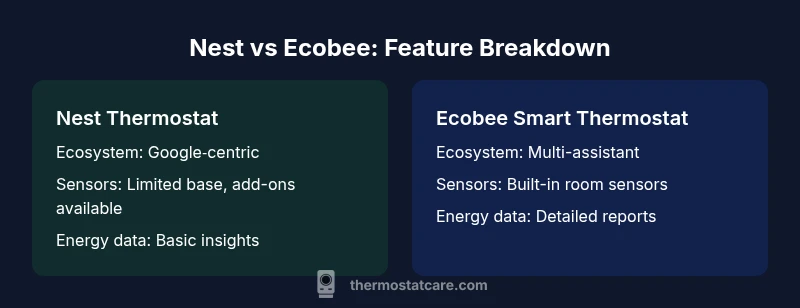
A primary differentiator between google nest thermostat vs ecobee is how deeply each thermostat nests into broader smart-home ecosystems. Nest is designed to shine when you are already using Google Assistant, Google Home, and compatible Android devices. The setup flow emphasizes voice control, quick routines, and automatic updates that tighten the linkage with the Google ecosystem. Ecobee, by contrast, is deliberately agnostic: it plays well with Alexa, Google Assistant, and Apple HomeKit, and it embraces Matter as a bridging standard where supported. This multi‑assistance support can be a meaningful advantage if you have a diverse smart-home setup or plan to switch voice assistants in the future. Thermostat Care’s analysis notes that while Nest offers a simpler path for Google-centric homes, Ecobee’s compatibility edge reduces friction for households with multiple ecosystems or ongoing device refresh plans. Consider your primary voice assistant, your partners in the smart-home, and whether you want a single dashboard or a distributed control approach across apps.
Sensing, Schedules, and User Experience
Nest emphasizes simplicity and a clean, quick interface. It uses a compact set of sensors and a learning algorithm that adapts to your routines, often updating itself to minimize manual adjustments. The on-device display is designed for quick status checks, and the mobile app emphasizes a fast, distraction-free experience. Ecobee centers on sensor-driven comfort: many bundles include built-in room sensors that you can place around the home to balance temperatures across rooms. The Ecobee app surfaces more detailed occupancy data and scheduling flexibility, and both platforms support geofencing for automatic climate adjustments when you approach home. According to Thermostat Care, this sensor-driven approach can matter more in multi-room layouts or homes with variable occupancy, where you notice temperature differences from room to room.
Energy Data and Reporting Capabilities
Energy data is a growing priority for many homeowners. Ecobee provides detailed energy reports and run-time data that help you identify HVAC inefficiencies and optimize comfort across zones. It often pairs with multiple sensors to give a more precise picture of where and when heat is being used. Nest offers energy insights through the Google Home app, focusing on simple trends and overall usage rather than granular per-room data. For households aiming to tighten energy use or compare seasonal performance, Ecobee’s depth of reporting is a clear strength. Thermostat Care’s analysis suggests that the richer data set from Ecobee can translate to smarter decisions about where to adjust setpoints and how to place sensors for maximum savings over time.
Installation, Setup, and Maintenance
Both devices are marketed as consumer-friendly installations, but the experience differs. Nest is typically praised for a straightforward setup that you can complete in under an hour, especially if you have a straightforward HVAC system and no unusual wiring. Ecobee installations can be equally straightforward, but if you include multiple sensors or anticipate room coverage across several zones, you may need extra time to plan sensor placement and calibrate. In both cases you’ll need a common C-wire or a power extender kit in some configurations. Thermostat Care notes that homeowners with existing smart-home hubs may enjoy faster setup if they already know how their devices communicate with assistants; otherwise, expect to spend a little extra time configuring routines, sensors, and automation preferences.
Privacy, Data Security, and Local Control
Privacy considerations vary by brand. Google’s Nest is deeply integrated with Google accounts and cloud processing, which some users value for convenience and intelligence, while others worry about data sharing and privacy. Ecobee offers strong local-control options and privacy controls, with the ability to limit data used for insights and to manage how much information is shared with cloud services. Both brands provide options to manage data collection and to customize privacy settings, including how long data is retained and which features can access it. If privacy is a top concern, weigh your comfort with cloud processing against the benefits of remote access and improved automations.
Price, Value, and Return on Investment
Price dynamics for google nest thermostat vs ecobee vary by region and bundles. Nest typically lands in the mid-range of smart thermostats and can be affordable when purchased standalone, though some bundles or special bundles may affect price. Ecobee often presents bundled sensor configurations that add upfront value and comfort for multi-room homes, which can shift the price higher upfront but deliver longer-term energy savings and convenience across zones. When evaluating price, consider not only the sticker price but also potential energy savings, the value of additional sensors, and how well the device integrates with your existing ecosystem. Both brands offer promotions and seasonal discounts, so you may see meaningful differences depending on current deals.
Common Pitfalls and When to Choose Each
A common pitfall is assuming a device is universally best for every home. If your priority is a lean, Google-centric experience with straightforward automation, Nest is a solid choice. If you want maximum sensor coverage, richer energy reporting, and multi-assistant compatibility, Ecobee tends to deliver more value per dollar for sensor-rich homes. Additionally, consider future-proofing: if you anticipate expanding your smart-home ecosystem or migrating between assistants, Ecobee’s compatibility breadth can reduce friction. In short, pick Nest for simplicity and Google integration, and pick Ecobee for data-driven energy insights and flexible compatibility. Thermostat Care’s guidance emphasizes assessing your primary ecosystem, comfort goals, and whether you value granular energy data or a minimalistic control surface.
Comparison
| Feature | Google Nest Thermostat | Ecobee Smart Thermostat |
|---|---|---|
| Ecosystem compatibility | Strong Google integration (Assistant, Home, Nest app) | Multi-assistant support: Alexa, Google Assistant, Apple HomeKit; embraces Matter |
| In-box sensors | Limited built-in sensors; room sensors sold separately | Built-in room sensors in many bundles; broader multi-room sensing |
| Energy reporting | Basic energy data in Google Home | Detailed energy reports and run-time analytics in Ecobee app |
| Voice assistant | Google Assistant built-in via Nest | Alexa built-in; works with Google Assistant and HomeKit (where supported) |
| Sensor flexibility | Fewer sensors by default; expand with add-ons | Extensive sensor network for multi-room comfort |
| Price/value context | Typically mid-range; value depends on bundles | Mid-to-high range with sensor-inclusive bundles |
| Best for | Google ecosystem enthusiasts and quick setup | Homes needing energy insights, sensor coverage, and versatility |
Upsides
- Clear ecosystem alignment for Nest users
- Sensor flexibility and detailed energy data with Ecobee
- Broad smart-home compatibility across assistants
- Easy integration with voice assistants and mobile apps
The Bad
- Nest’s built-in sensor options are limited by default
- Ecobee can be pricier upfront with bundles
- Nest relies more on Google cloud services (privacy considerations)
- HomeKit and some features may have limited native support on Nest
Ecobee offers stronger energy data and sensor flexibility; Nest is best for Google ecosystem users.
Choose Ecobee if energy insights and multi-room sensing are priorities. Choose Nest if you want a streamlined, Google-centric experience with minimal setup and straightforward control.
Questions & Answers
Is HVAC compatibility a concern when choosing between Nest and Ecobee?
Both Nest and Ecobee support common HVAC configurations, but you may need a C-wire or a power extender kit for certain setups. If you have a complex system or rare wiring, verify compatibility with your HVAC model and consult installation guides before purchasing.
Both devices fit standard systems, but check your wiring before buying to avoid power issues.
Does Ecobee work with HomeKit?
Yes, Ecobee offers HomeKit compatibility, providing seamless control through Apple's ecosystem. Nest does not offer native HomeKit support, though Google Assistant and other integrations remain strong if you’re committed to Google’s platform.
Ecobee works with HomeKit; Nest does not natively.
Which is easier to install, Nest or Ecobee?
Both are designed for DIY install, but Nest often feels quicker in straightforward setups. Ecobee can take more time if you’ve equipped multiple sensors, but it stays user-friendly with guided prompts and online resources.
Nest is usually quicker to install in simple setups.
Are energy savings noticeably different between the two?
Energy savings depend on usage patterns and home layout. Ecobee’s richer energy data and sensor network typically enable more precise optimization, while Nest provides solid savings with a simpler data view and effective scheduling.
Ecobee often offers more granular energy data for optimization.
Do both support room sensors, and how does that affect comfort?
Ecobee includes room sensors in many bundles, enabling balanced comfort across zones. Nest can use optional sensors, but they are not as central to its default feature set. If multi-room comfort matters, Ecobee has the edge.
Ecobee has built-in room sensors; Nest uses them as add-ons.
What about privacy and data sharing?
Nest ties into Google account data, which offers convenience but may raise privacy considerations for some users. Ecobee provides clearer controls for local operation and data sharing, letting you adjust what is sent to cloud services.
Privacy options differ; EcoBee focuses more on local controls.
What to Remember
- Choose Nest if you prioritize Google ecosystem integration and simplicity.
- Choose Ecobee if you value sensor coverage and detailed energy reporting.
- Assess your current devices to determine which ecosystem aligns best.
- Consider privacy preferences and data-sharing controls when deciding.