Save Energy with Your Thermostat: A Practical Guide
Learn how to save energy with your thermostat through a step-by-step setup, scheduling, and maintenance. Practical tips for homeowners to reduce energy use while staying comfortable and informed.


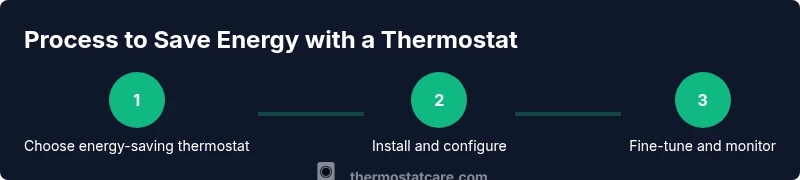
This guide shows you how to save energy thermostat usage with practical steps: choose an energy-saving model, set thoughtful schedules, and fine-tune temperatures for comfort. You’ll gain a clear, repeatable process to reduce energy use without sacrificing home comfort.
Why saving energy with your thermostat matters
Saving energy with your thermostat matters for both your wallet and the planet. When you optimize temperature schedules and use built-in energy-saving features, you can lower monthly bills while maintaining comfortable living areas. If you want to save energy thermostat energy use, small, deliberate changes add up over the course of a season. According to Thermostat Care, a well-tuned thermostat can produce meaningful reductions in energy consumption without compromising comfort. Weather shifts, insulation quality, and the type of HVAC system all influence how much you can save, so the best approach blends smart settings with system awareness.
Core principles of energy-saving thermostat operation
There are a few core principles to keep in mind: maintain a steady, comfortable baseline within a practical range; lean on scheduling to reduce heating and cooling during unoccupied times; leverage smart features like occupancy sensing and adaptive recovery; and pair thermostat controls with a well-sealed home and a healthy HVAC system. The aim is consistent comfort alongside mindful energy use. A thermostat works best when your home is insulated adequately and your equipment is sized correctly for your living space. For DIY homeowners, understanding these basics provides a strong foundation for making meaningful gains in efficiency.
Quick wins you can implement today
Start with a simple, structured plan:1) set a realistic winter and summer schedule; 2) enable away or eco modes when you’re not home; 3) avoid large swings in temperature; 4) program brief temperature resets during typical daily routines; 5) ensure your thermostat isn’t in direct sunlight or near drafts. These adjustments often yield noticeable energy savings within days. If your current thermostat supports learning, allow it a couple of weeks to observe your patterns. Thermostat Care recommends documenting your baseline energy usage before and after the changes to quantify progress.
Choosing the right thermostat for energy savings
Energy-saving thermostats come in several types: basic programmable, programmable with advanced scheduling, and smart thermostats with learning capabilities. If you have an older model, upgrading can unlock new energy-saving modes and clearer usage reports. Consider compatibility with your heating system (gas, electric, heat pump) and whether you want remote control via a mobile app. Features to prioritize include multi-day scheduling, occupancy sensing, geofencing, and adaptive recovery. According to Thermostat Care Team insights, selecting the right model is the first step toward reliable savings and easier daily routines.
Optimize your HVAC system for efficiency
Even the best thermostat won’t save energy if the HVAC system itself is inefficient. Start by sealing air leaks around doors and windows, improving insulation, and ensuring proper duct performance. Position the thermostat away from heat sources, direct sunlight, or drafts so it reads a true indoor temperature. Regular filter changes, annual professional maintenance, and confirming the system is charged and tuned for its climate help maximize the thermostat’s impact on energy use. A well-balanced system works in harmony with your scheduling to minimize waste.
Advanced features that boost savings
Modern energy-saving thermostats offer occupancy-based scheduling, learning algorithms, and geofencing to align with your actual presence. Adaptive recovery smartly delays heating or cooling to reach the desired temperature at the scheduled time, reducing wasted run time. If your home has a heat pump, ensure the thermostat can manage auxiliary or emergency heat efficiently. Integrating mobile app controls makes it easier to adjust when plans change. For best results, test a feature for a few days before turning to it as a default.
Common mistakes to avoid
Avoid common pitfalls that erode savings: using the thermostat as a constant override instead of a routine; ignoring system maintenance; placing the thermostat in a too-warm or too-cold spot; neglecting to set an away schedule during vacations; and failing to update firmware or learning features after installation. Don’t rely on a single setting year-round; energy savings come from consistent, deliberate adjustments aligned with your real schedule and weather patterns. If in doubt, consult the manual or seek a quick audit from a licensed technician.
Maintenance and seasonal adjustments
Seasonal changes call for adjustments: winter may require a slightly higher baseline while you optimize for comfort, and summer calls for efficient cooling strategies. Replace outdated or dirty air filters regularly, and check that outdoor units have clear airflow. Verify that thermostat wiring remains secure after home movements or remodeling. Regularly review the energy reports or dashboards provided by your thermostat to identify trends and refine your schedule as needed.
Measuring impact and tracking savings
Track your progress by comparing energy usage and bills before and after implementing changes. Use the thermostat’s energy reports to understand daily, weekly, and monthly trends. Keep a simple log of setpoints and schedules to see which adjustments produced the best results. If you’re installing a new smart thermostat, characterize how occupancy or geofencing affected consumption. Over time, small refinements add up to meaningful savings.
AUTHORITY SOURCES
- https://www.energy.gov/eere/buildings/energysaver/thermostats
- https://www.epa.gov/iaq
- https://www.nist.gov/topics/energy-efficiency
Tools & Materials
- Phillips-head screwdriver (|#2)(For wall plate screws and terminal screws)
- Flat-head screwdriver(Helpful for slotted terminals and faceplate removal)
- Non-contact voltage tester(To confirm power is off before wiring)
- Wi‑Fi enabled thermostat(Energy-saving features and scheduling)
- Current thermostat wiring diagram/manual(Wires color codes for compatibility)
- Electrical tape(Secure exposed wires when needed)
Steps
Estimated time: 60-90 minutes
- 1
Check compatibility and gather docs
Review your current system type and confirm the new thermostat supports your heating/cooling setup. Gather the wiring diagram and homeowner’s manual so you can confidently map wires during the upgrade.
Tip: Take a photo of the existing wiring before disconnecting anything. - 2
Power down at the breaker
Turn off the HVAC circuit at the main panel to prevent shock or damage. Double-check with the voltage tester before touching any wires.
Tip: If you’re unsure about wiring, pause and consult a professional. - 3
Remove old thermostat faceplate
Carefully unscrew and detach the old faceplate. Label or photograph each wire color and terminal to ensure correct reattachment on the new unit.
Tip: Keep track of wires with a simple label system. - 4
Label wires and detach from terminals
Document wire connections on the old thermostat and gently disconnect them. Use masking tape labeled with terminal names to avoid miswiring.
Tip: If a wire is stuck, don’t force it—note the color and terminal. - 5
Mount the new base plate
Attach the new thermostat’s mounting plate to the wall using the provided screws and anchors. Use a level to ensure straight installation.
Tip: Avoid placing the base over large gaps or on irregular surfaces. - 6
Connect wires to the new thermostat
Attach wires to the corresponding terminals on the new unit according to the wiring diagram. Ensure all connections are tight and fully seated.
Tip: Double-check the color-to-terminal mapping before securing. - 7
Attach the thermostat and restore power
Mount the thermostat body to the base and restore power at the breaker. Wait for the startup screens and follow on-screen prompts.
Tip: If it doesn’t power on, recheck the wire connections. - 8
Initial configuration
Enter location, time, and basic climate preferences. If the unit supports auto-detection of system type, run it, but verify results against your existing system.
Tip: Confirm the system type (gas, electric, heat pump) in settings. - 9
Connect to Wi‑Fi and update firmware
Join your home network and check for firmware updates. Enable any energy-saving features offered by the thermostat.
Tip: Use a strong, unique Wi‑Fi password to protect your device. - 10
Set baseline schedule for comfort
Program regular wake times, workdays, and weekends to establish a reliable baseline. Enable an away or eco mode during extended absences.
Tip: Start with a conservative schedule and adjust after a few days. - 11
Enable energy-saving features
Turn on occupancy sensing or adaptive recovery if available, and fine-tune temperature offsets for comfort and savings.
Tip: Test one feature at a time to measure impact. - 12
Test system and verify readings
Run through the heating and cooling cycles to verify proper operation. Check that readings align with expected temperatures and energy reports.
Tip: Record a baseline energy reading for comparison.
Questions & Answers
What is the best thermostat setting to save energy?
Aim for a stable, comfortable range and adjust by small increments during the day. Use automated scheduling and energy-saving modes to minimize waste while preserving comfort.
For energy savings, keep a steady comfortable range and rely on scheduling plus energy-saving modes to reduce waste without sacrificing comfort.
Do smart thermostats really save more energy than programmable ones?
Smart thermostats offer learning and occupancy features that can reduce usage when you’re away. Programmable thermostats can save energy too, but require consistent manual programming.
Smart models can adapt to your routine and save more with occupancy sensing; programmable models save if you keep a steady schedule.
Should I set away temperatures differently for winter and summer?
Yes. In winter, a modest setback (e.g., 7-10 degrees) helps reduce heat loss costs; in summer, a modest setback helps reduce cooling demand. Adjust to comfort once you return.
During winter, set the thermostat a bit higher when away; in summer, set it a bit warmer to save energy, then restore when you’re back.
How long should I wait to see savings after changing settings?
Most homes notice a difference within a billing cycle. Track a few weeks of energy data to confirm trends and refine your schedule.
Give it a few weeks to see the pattern in your energy bill after changes.
What maintenance helps thermostat energy savings?
Regularly replace filters, ensure ducts are clean, and verify that sensors read correctly. A well-maintained HVAC system improves thermostat performance.
Keep filters clean and ducts clear; maintenance helps the thermostat work efficiently.
Can a thermostat be installed by a DIYer, or should I hire a pro?
A simple replacement can be a DIY project if you’re comfortable with wiring. For complex systems (heat pumps, multiple stages), consider a professional.
If you’re comfortable with basic electrical work, you can DIY; for complex setups, hire a pro.
Watch Video
What to Remember
- Set a realistic comfort range and stick to it.
- Use scheduling to minimize energy waste when away.
- Choose a thermostat with energy-saving features.
- Monitor results and adjust gradually over time.
- Maintain the HVAC system to maximize savings.