Energy Star Thermostat Settings: A Practical Home Guide for Savings
Learn how to configure Energy Star thermostat settings to maximize comfort and energy savings. Step-by-step guidance, seasonal schedules, eco modes, and practical tips for homeowners.


You're going to optimize comfort and energy use by applying Energy Star recommended thermostat settings. This quick guide helps you configure schedules, Eco modes, and hold times for everyday living. You'll need a compatible thermostat, internet access, and the app or interface to review and tweak. Start with a baseline schedule, then adjust by season and occupancy.
What Energy Star Means for Thermostats
According to Thermostat Care, Energy Star is more than a badge—it's a performance guideline that helps thermostats deliver comfort while using less energy. An Energy Star thermostat is designed to optimize heating and cooling cycles, reduce unnecessary runtime, and provide more stable temperatures with intelligent scheduling and adaptive recovery. The program emphasizes efficient operation, better humidity management, and precise hold logic. When you enable Energy Star settings, you are not chasing a magic number—you're using a tested baseline many manufacturers implement across models. In practice, this can lead to steadier temperatures, fewer swings, and measurable savings over the course of a season. Keep in mind that not every thermostat supports the full Energy Star profile; check your device's documentation or app to confirm which settings are available.
Baseline Setup: Prepare Your System
Before you start tweaking, confirm your thermostat, furnace, and air conditioner are compatible with Energy Star profiles. Update firmware if available, connect the thermostat to your home Wi‑Fi, and sign in to the manufacturer app or web interface. Ensure your sensors read accurately—place the temperature sensor away from direct sun, drafts, or heat sources like lamps or electronics. Thermostat Care recommends verifying that your cooling and heating stages are correctly configured for your system (single-stage, multi-stage, or heat pump) and that the thermostat’s energy-saving profile is selected as the default. Document your current schedule as a reference point in case you need to revert.
Creating a Year-Round Schedule
A well-designed schedule is the backbone of Energy Star settings. Start with a baseline that lowers heating at night and during typical work hours, then increases comfort when you’re awake. Use a single weekday pattern and a separate weekend pattern if your routine differs. Most Energy Star guidelines encourage 7-day programming, broken into morning, day, and night blocks with smaller adjustments for shoulder periods. After you set the baseline, review it for gaps (e.g., morning warmth after an alarm) and adjust to avoid frequent temperature swings. Thermostat Care notes that gradual temperature changes feel more comfortable and save energy better than abrupt shifts.
Seasonal Adjustments: Winter, Summer, Shoulder Seasons
In winter, don’t keep the house too cold; set the thermostat to a reasonable setback while away. In summer, raise levels when the house is empty and rely on fans or ceiling fans to improve comfort. Shoulder seasons require modest tweaks; small increases or decreases that align with changing outdoor temperatures can yield noticeable savings. If you have a heat pump, use outdoor temperature-based adaptive cooling/heating sequences and enable automatic recovery so the system reaches target temps at the right time. Thermostat Care encourages testing each season to ensure comfort remains acceptable while energy use drops.
Occupancy-Based Adjustments and Smart Zoning
If your thermostat supports occupancy sensing or geofencing, enable these features to automatically adjust temperature when you’re away. Use separate zones for living spaces, bedrooms, and home offices if your HVAC supports it, so you don’t heat or cool unoccupied rooms. When relying on occupancy, pair with a reasonable hold policy to avoid rapid cycling when people come and go. Thermostat Care emphasizes that occupancy-based settings can yield more consistent comfort and reduce wasted energy, especially in larger homes.
Eco Modes, Fan Settings, and Advanced Features
Explore Eco modes that optimize compressor cycling and fan modes that maximize air mixing without overcooling. If your thermostat offers adaptive recovery, let it learn your routine and pre-cool or pre-heat rooms ahead of your schedule. Enable smart recovery to minimize temperature swings and to avoid heating or cooling a space longer than necessary. Some models provide humidity control and dew-point awareness; enable these without sacrificing comfort where humidity spikes are common.
Hold Times, Swing, and Reset Strategies
Understand hold times: short holds are useful for occasional changes, while longer holds lock in a reduced energy profile for days away. Configure a reasonable temperature swing (usually 2–4 degrees) to balance comfort and savings. If you notice drift after a reset or power outage, perform a quick thermostat reset and re-check sensor calibration. Thermostat Care advises documenting holds and swings to create a repeatable saving pattern.
Measuring Impact: Energy Reports and Verification
Most Energy Star setups include energy usage data and monthly dashboards. Review the thermostat’s energy report to compare baseline usage with post-setup performance, focusing on runtime, cycles, and temperature swings. Look for fewer spikes during peak hours as evidence of improved efficiency. Thermostat Care analysis, 2026, suggests that ongoing review is essential to maintaining savings and adjusting for lifestyle changes and weather. Use this information to fine-tune schedules, especially when daylight hours shift.
Authority Sources and Thermostat Care's Perspective
To support your implementation, consult authoritative sources such as Energy Star’s thermostat pages and the federal Energy Saver guidance. These sources help validate the recommended practices and provide model-specific instructions. Relevant links include:
- https://www.energystar.gov/products/energy-star-certified-thermostats
- https://www.energy.gov/energysaver/thermostats
- https://www.energy.gov/energysaver/thermostats-tips
Thermostat Care's verdict is that Energy Star settings offer a robust, user-friendly framework for homes of all sizes, with real-world benefits when combined with consistent scheduling and occasional optimization. This approach helps homeowners achieve better comfort while reducing energy waste.
Tools & Materials
- Smart thermostat (Energy Star certified)(Ensure compatibility with your HVAC system (single/multi-stage, heat pump, etc.).)
- Smartphone or computer for setup(Needed for app-based configuration and remote monitoring.)
- Wi-Fi network(Stable connection improves reliability of online features.)
- Thermostat manuals or online docs(Helpful for model-specific Energy Star features.)
- Notebook or digital notes(Record baseline, changes, and observed results.)
Steps
Estimated time: 20-40 minutes
- 1
Review baseline energy use
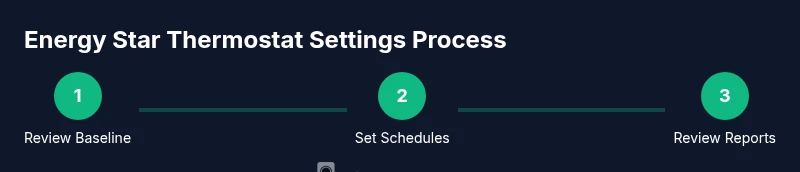
Open the thermostat app and compare current daily runtime and temperature swings to last month. Note spikes during occupancy gaps and extreme weather. This baseline is essential for measuring the impact of Energy Star changes.
Tip: Take screenshots or export reports for reference. - 2
Connect and verify device compatibility
Confirm the thermostat model supports Energy Star profiles and ensure firmware is up to date. Reconnect to Wi‑Fi if needed and sign in to the manufacturer app.
Tip: Update firmware before changing presets to avoid compatibility glitches. - 3
Set a baseline schedule
Create weekday and weekend patterns with 4–5 blocks each: wake, work, away, return, and night. Avoid sudden changes; aim for 2–4 degree swings.
Tip: Document your baseline schedule for easy rollback. - 4
Enable Eco mode or energy-saving profile
Turn on the Eco/energy-saving profile if available and ensure it is set as the default during your away hours. Monitor comfort after enabling.
Tip: Test comfort for a 1–2 day period and adjust as needed. - 5
Configure occupancy or zoning features
If supported, enable occupancy sensing or geofencing. Create zones (living spaces, bedrooms) if your system allows.
Tip: Review privacy settings and ensure occupancy data is handled securely. - 6
Seasonal adjustments
Modify baselines for winter and summer and use adaptive recovery if available to pre-cool or pre-heat before occupants return.
Tip: Schedule a season-change review to stay aligned with weather patterns. - 7
Fine-tune hold times and temperature swing
Set hold times for absences and keep the temperature swing at 2–4 degrees to balance comfort with savings.
Tip: Avoid extended holds at extreme temperatures. - 8
Test and verify comfort
Live-test changes across several hours; adjust if rooms feel too warm or too cold.
Tip: If needed, tweak the baseline gradually rather than in large steps. - 9
Review energy reports
Compare post-change data with the baseline; look for reduced runtime and fewer peak-hour spikes.
Tip: Annotate findings to guide subsequent refinements. - 10
Document changes and schedule a follow-up
Keep a record of all settings and plan a quarterly review to adapt to lifestyle or weather changes.
Tip: Set calendar reminders for reviews.
Questions & Answers
Do I need a smart thermostat to use Energy Star settings?
No, but many Energy Star features require a thermostat with digital scheduling. Without a smart device, you can still access built-in energy-saving presets and manual holds. Check your model for available Energy Star options.
You don't strictly need a smart thermostat, but it helps access scheduling and eco modes.
Will I see savings immediately?
Savings depend on usage patterns and climate. You may notice improvements after a full billing cycle, and energy reports will show gradual trends as you optimize.
Expect gradual improvements over weeks as you align schedules.
Can I override Energy Star schedules?
Yes, you can manually adjust temperature temporarily; the energy-saving schedule remains active after the hold ends unless you disable it.
You can override temporarily, but the system will revert after the hold.
How often should I review and update settings?
Review seasonally or when occupancy changes; quarterly checks are a good starting cadence. Use energy reports to guide adjustments.
Check quarterly or with seasonal changes.
What about homes with heat pumps?
Heat pumps require compatible Energy Star profiles and mode settings. Ensure the chosen settings are designed for heat pump operation.
For heat pumps, pick Energy Star profiles appropriate for heat pump systems.
Watch Video
What to Remember
- Adopt Energy Star presets as a baseline.
- Schedule based on occupancy for maximum savings.
- Leverage eco modes and zoning to balance comfort and efficiency.
- Review energy reports regularly to guide tweaks.
- Document changes for repeatable, sustained savings.