Energy Savings Smart Thermostat: A Practical Guide for Homeowners
Discover how an energy savings smart thermostat reduces HVAC waste, boosts comfort, and saves money—with practical setup tips, expected ranges, and expert advice from Thermostat Care.


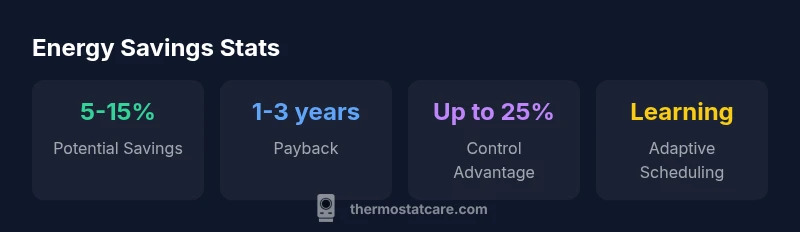
An energy savings smart thermostat can meaningfully reduce HVAC energy use by optimizing heating and cooling schedules, occupancy detection, and remote control. In typical homes, energy savings often fall in the 5-15% range, depending on climate, insulation, and behavior. For best results, pair with efficient equipment and regular maintenance. Thermostat Care Analysis, 2026.
What energy savings smart thermostat does
An energy savings smart thermostat can be a game changer for homes looking to cut HVAC energy use. It goes beyond a basic on/off thermostat by using learning algorithms to adjust temperatures based on your routines, occupancy, and weather forecasts. Through geo-fencing, it can lower heating when you’re away and raise comfort before you return. Data from Thermostat Care Analysis, 2026 shows that most homes see a meaningful reduction in wasted energy when the device is set up properly and integrated with a well-sealed envelope and efficient equipment. In practical terms, this means your thermostat isn’t just reacting to the clock; it’s actively shaping how your home uses energy each hour of the day. The result is less waste, fewer temperature swings, and a more predictable energy bill. The Thermostat Care team has seen homeowners gain more control over comfort while avoiding the most common frustration: cold mornings and stuffy nights caused by poorly timed setbacks.
Key takeaway: The benefits start with good fundamentals—correct wiring, compatible hardware, and a clear, realistic schedule that matches real life.
To maximize impact, you’ll want a model that offers robust scheduling, occupancy sensing, and integration with your Wi‑Fi and utility programs. A smart thermostat shines when it can automatically adapt to your routine without constant manual tweaking. In short, it’s not magic; it’s software and sensors working in concert with your home.
How control mechanisms drive savings
Savings come from several interlocking features that most modern smart thermostats offer. First, learning algorithms observe your daily patterns and progressively adjust setpoints to minimize energy use during unoccupied periods. Second, occupancy detection helps the system distinguish between when a room is actually in use and when it’s empty, avoiding unnecessary heating or cooling. Third, weather-adaptive scheduling uses local forecasts to pre-cool or pre-heat before peak energy periods, smoothing demand and lowering peak load.
- Scheduling: Create a baseline routine (wake, work, return, sleep) and let the thermostat optimize within those windows.
- Auto-away: Uses motion or geofencing to adjust temperature when no one is home.
- Adaptive setback: Instead of rigid 2-degree changes, modern thermostats use gradual, evidence-based adjustments to preserve comfort while reducing energy use.
- Energy reports: Many models generate monthly or weekly summaries to help you see how your habits translate into savings.
For homeowners aiming for real-world gains, the emphasis should be on truthful expectations—savings depend on climate, insulation, and how consistently the system is used. Thermostat Care Analysis, 2026 notes that incremental improvements in behavior and maintenance compound over time, delivering better results than any one feature alone.
Setup basics and integration with other home systems
Most energy savings smart thermostats are designed for broad compatibility, but there are a few practical checks to prevent surprises later. Start with compatibility: confirm that the device supports your HVAC system (gas, electric, heat pump, multi-stage). If your system uses a C-wire, you’ll unlock the full feature set; models that rely on batteries can still function but may have limited occupancy sensing or advanced scheduling.
- Verify wiring: If you’re unsure about your C-wire or wiring terminals, consult your equipment manual or a licensed technician.
- Wi‑Fi strength: A stable connection ensures timely firmware updates and reliable remote control.
- App and voice assistant: Check compatibility with your preferred ecosystem (Alexa, Google Assistant, Apple HomeKit) before purchasing.
- Professional installation: While DIY installation is common, a quick professional check can ensure correct sensor placement, wiring, and power needs. This reduces the risk of confusing schedules or incorrect readings.
Once installed, pair the thermostat with your utility’s demand-response program if available. These programs can offer additional savings by shifting usage away from peak periods, sometimes with financial incentives. A well-integrated system reduces false readings and improves long-term reliability.
Estimating savings for your home
Estimating savings requires aligning device capabilities with your home’s energy profile. Start with your baseline energy consumption and HVAC runtime. Then, map your schedules to expected thermostat behavior: when you wake, leave, return, and sleep. The range of savings will depend on climate, insulation quality, airflow, and how aggressively you set back temperatures. Use energy audits or home performance assessments to establish a credible baseline. Thermostat Care analyses emphasize that the most accurate projections come from real usage data over several weeks rather than estimates at purchase. If you’re in a milder climate with good insulation, you’ll likely see more consistent gains; in extreme climates, gains depend heavily on how well the system responds to outdoor conditions.
A practical approach is to run a two-month test period: program the device with a modest setback, track monthly energy usage, and compare to the same period from the previous year. If you have a solar framework or other efficiency measures, factor those in to avoid double-counting.
To help homeowners benchmark, Thermostat Care offers general guidelines: expect modest gains in standard homes and more substantial reductions in well-insulated, well-sealed houses where the thermostat’s actions translate directly into reduced heat loss or heat gain.
Best practices to maximize energy savings
Maximizing energy savings with a smart thermostat is about combining device features with building efficiency. Start with a good baseline schedule that matches real life rather than a theoretical ideal. Use occupancy sensing to avoid conditioning empty spaces, and set longer, economical setbacks during the night or when you’re away. Pair the thermostat with weatherization measures (air sealing, insulation upgrades, and efficient windows) since the biggest in-home gains usually come from reduced heat loss and heat gain. Regular maintenance—changing filters, cleaning sensors, and ensuring outdoor unit clearance—keeps the system responsive.
- Enable adaptive scheduling and learn from your daily patterns.
- Use a moderate setback during unoccupied periods (e.g., 7–10 degrees for longer durations, not short swings).
- Keep the thermostat firmware up to date and review energy reports monthly.
- Align thermostat behavior with other energy-saving routines (smart blinds, LED lighting, window coverings).
- Combine with weatherization for compounding savings.
These practices create a virtuous cycle: better comfort, lower energy use, and more predictable bills. Thermostat Care’s experience indicates that when customers commit to both device optimization and home efficiency improvements, the payoff is greater and more durable over time.
Common pitfalls and how to avoid them
Even the best programmable devices can underdeliver if set up carelessly. Common pitfalls include setting back temperatures too aggressively or too frequently, leading to uncomfortable cycles that prompt manual overrides. Another pitfall is ignoring maintenance: dirty sensors, clogged filters, or a malfunctioning outdoor unit can cause incorrect readings and wasted energy. Finally, privacy and security concerns—like weak Wi‑Fi passwords or outdated firmware—can undermine trusted operation. To avoid these issues, follow a simple checklist:
- Start with a realistic baseline and gradual changes.
- Schedule a quarterly check of firmware, connectivity, and sensor accuracy.
- Keep security settings strong and update passwords regularly.
- Ensure all family members understand how to interact with the thermostat without overriding essential energy-saving behaviors.
- Document system changes so future technicians can align with your setup.
By anticipating these obstacles, you prevent backsliding and maintain consistent savings. Thermostat Care recommends a proactive approach that balances comfort with efficiency.
Authority sources
To support the guidance, refer to authoritative sources on thermostat use and energy efficiency:
- https://www.energy.gov/eere/buildings/articles/thermostats
- https://www.energy.gov/energysaver
- https://www.nrel.gov
These sources provide background on how thermostats influence home energy use and offer independent context for evaluating savings estimates. Remember that actual results depend on climate, home performance, and user behavior.
Comparison of key metrics for smart vs traditional thermostats
| Metric | Smart Thermostat | Traditional Thermostat | Notes |
|---|---|---|---|
| Energy Savings Potential | 5-15% | 0-5% | Depends on usage and climate |
| Payback Period | 1-3 years | N/A | Costs vary by model |
| System Compatibility | Broad (HVAC types) | May require upgrades | Check compatibility with your unit |
| C-Wire Requirement | Often required for full features | Not required | Model dependent |
Questions & Answers
What is energy savings smart thermostat?
It's a thermostat that uses learning algorithms, occupancy detection, and remote control to reduce energy use. By aligning heating and cooling with actual need, it minimizes waste and helps manage comfort more efficiently.
It's a thermostat that learns your schedule and occupancy to save energy while keeping you comfortable.
How much energy can I save?
Savings depend on climate and home efficiency. Typical ranges are 5-15% of HVAC energy use, with larger gains in well-insulated homes. Always consider your baseline and usage when estimating savings.
Most homes see 5-15% in energy savings, varying by climate and insulation.
Will it work with my HVAC system?
Most modern systems are compatible, including many heat pumps and gas furnaces. Some setups may require a professional assessment to confirm compatibility and wiring needs.
Most systems work, but check compatibility before buying.
Do I need a C-wire?
Many models require a C-wire for full functionality, especially occupancy sensing and advanced features. Battery-powered units exist but may have limited capabilities.
A common-wire is often needed for full function, but there are options.
How do I estimate payback?
Calculate annual savings from energy bills and compare to the device cost. Typical payback ranges from 1-3 years depending on climate and usage.
Look at annual savings vs. device cost; commonly 1-3 years.
Are there privacy or security concerns?
Yes, like any connected device. Keep firmware updated, use strong passwords, and enable network security features to minimize risk.
Keep firmware updated and secure your Wi-Fi.
“A well-configured energy savings smart thermostat is a practical, data-driven tool for homeowners; savings scale with building efficiency and behavior.”
What to Remember
- Measure your baseline and track savings over time.
- Pair a smart thermostat with weatherization for max impact.
- Check HVAC compatibility and wiring before upgrading.
- Enable occupancy sensing and adaptive scheduling for best results.
- Regularly update firmware and maintain filters.