Best Way to Set Thermostat in Winter: A Practical Guide
Discover the best way to set thermostat in winter to stay comfortable and save energy. This Thermostat Care guide covers baselines, scheduling, smart features, and seasonal maintenance.


You will learn how to optimize your thermostat settings for winter to maximize comfort and energy savings. Start with a stable baseline, set daytime temperatures around 68°F (20°C) and drop by 7–10°F (4–6°C) at night or when you're away, and use adaptive features like smart scheduling and humidity management. Have a functioning thermostat, baseline temperatures, and a stable Wi‑Fi connection if using smart controls.
Understanding Winter Heating Goals and Baselines
Winter heating isn’t just about pushing heat into a room; it’s about balancing comfort with energy efficiency. If you’re looking for the best way to set thermostat in winter, think in terms of baselines, cycles, and comfort zones. According to Thermostat Care, establishing a baseline temperature helps you measure savings and adjust to weather shifts without overworking the system. A typical winter baseline is around 68°F (20°C) during the day for many homes, but your ideal baseline depends on insulation, air leaks, and occupancy. Start by confirming your thermostat reads correctly by comparing its display with a separate thermometer in a representative room. If you notice a mismatch, use your thermostat’s calibration feature or an external thermometer to verify accuracy. This upfront check prevents chasing fake savings and ensures your later balances are truly recording the right temperatures. Remember, the goal isn’t to force heat harder, but to run it smarter through controlled cycles and predictable changes so you stay comfortable without waste.
Seasonal Temperature Targets and How to Use Them
The winter comfort target should balance residential warmth with efficiency. A common convention is to keep the living spaces around 68°F (20°C) during the day and drop to about 60–65°F (15–18°C) at night or when you’re away. This range accommodates most households, but tight insulation or large drafts may justify a slightly warmer baseline, while well-sealed homes can comfortably hold lower temperatures. Use a consistent setback schedule to avoid large swings, which make your system work harder to reheat when you return. If you’re exploring the best way to set thermostat in winter for energy savings, the key is consistency: small, regular reductions beat abrupt changes. If you have a multi‑zone system, prioritize the zones most used during the day (living areas) and keep bedrooms slightly cooler for better sleep. The Thermostat Care team notes that a steady routine reduces temperature fluctuations, which in turn lowers energy consumption without sacrificing comfort.
Smart Features that Maximize Winter Efficiency
Smart and connected thermostats unlock winter savings through scheduling, occupancy sensing, and adaptive recovery. Set up a weekday/weekend schedule that mirrors your real life, then enable away or occupancy‑based adjustments so the system learns your patterns. Enable adaptive recovery so the thermostat begins heating early enough to reach the target temperature by the time you wake up or return home, rather than overshooting and wasting energy. Humidity management is another win for winter comfort: drier air can feel cooler, so some devices offer humidification monitoring or humidity presets to maintain a comfortable feel without cranking heat. If you’re asking about the best way to set thermostat in winter, smart scheduling with learning capabilities is often the strongest approach for long‑term savings, especially in homes with irregular occupancy. Thermostat Care’s guidance emphasizes validating that the sensors reflect the rooms they’re meant to serve and avoiding sources of heat gain like direct sun or appliances.
Practical Cycle Planning: A Simple Winter Checklist
A practical winter routine keeps your home comfortable without overpaying for heat. Create a simple checklist to guide your daily actions: verify the baseline temperature each morning, review the day’s forecast to anticipate colder spells, adjust the daytime target only if the forecast is consistently colder, and confirm the thermostat is responding to your app or panel. If you manage a family schedule, align school and work days with your thermostat’s scheduling to maximize efficiency. The goal is to keep consistent comfort while minimizing wasteful reheating cycles.
Remember to consider the insulation quality, air sealing, and window performance of each room. A well‑insulated house will maintain setpoints with fewer adjustments, while drafts may require a slightly higher baseline to avoid noticeable cold spots. Thermostat Care recommends keeping a log of adjustments for a few weeks to identify a pattern and tune the schedule accordingly. Small tweaks can yield meaningful savings over the season, especially when combined with smart features and proper calibration.
Common Pitfalls and How to Avoid Them
Common mistakes include setting the thermostat too high during the day and not using the setback at night, relying on the “auto” setting without understanding recovery behavior, and ignoring humidity or sensor placement. Another pitfall is placing the thermostat near heat sources, vents, or direct sunlight, which can cause inaccurate readings and wasted energy. If you notice cold spots or uneven heating, recheck sensor placement and consider zoning or additional insulation. Finally, avoid turning the entire heating system off for extended periods in very cold climates; even a low baseline with efficient setbacks helps prevent frozen pipes and equipment strain. By staying mindful of these issues, you’ll keep the best way to set thermostat in winter as a pragmatic routine rather than a series of ad hoc changes.
Maintenance and Seasonal Checks
Seasonal maintenance helps preserve thermostat accuracy and system performance. Replace batteries in wireless sensors or remotes, and test the display and app connectivity. Calibrate sensors if readings don’t align with a trusted room thermometer, and verify that your thermostat’s firmware is up to date. Inspect the wiring and heat pump or furnace connections if you have a multi‑stage system, but only after powering down the unit for safety. A small amount of periodic maintenance goes a long way toward predictable heating, fewer surprises, and better winter comfort. Thermostat Care’s guidance emphasizes documenting calibration results and any anomalies so you can address root causes rather than chasing symptoms.
How to Verify Savings and Adjustments
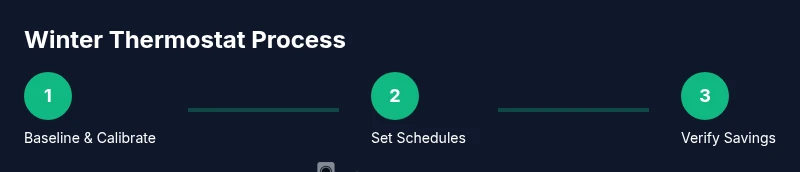
After implementing a winter settings plan, monitor energy use to confirm savings. Compare monthly bills or energy graphs before and after changes, accounting for weather differences. If bills drop while comfort remains steady, you’re on the right track. Use the thermostat’s energy usage reports or your utility’s tools to quantify impact and identify opportunities for refinement. If you notice overheating or excessive cycling, revisit baseline temperatures and scheduling. The aim is steady comfort with minimal energy waste, which is the hallmark of a well‑managed winter thermostat strategy.
Tools & Materials
- Digital thermostat (non-smart) or smart thermostat(Ensure it supports manual and programmable modes; verify calibration features)
- Thermostat user manual(Helpful for calibration, scheduling, and recovery settings)
- Room thermometer(Place away from drafts and direct heat sources for accurate readings)
- Stable Wi‑Fi network (for smart thermostats)(Optional but gives access to remote scheduling and graphs)
- Smartphone or computer(Needed to access apps or dashboards if using a smart thermostat)
Steps
Estimated time: 40-60 minutes
- 1
Calibrate and verify baseline temperature
Check the thermostat’s reading against a room thermometer in a representative space. If there’s a discrepancy, use the calibration feature or adjust until readings align within 1–2 degrees. Why: accurate readings prevent chasing phantom savings and ensure later adjustments reflect actual conditions.
Tip: Place the thermometer away from heat sources and vents for an accurate baseline. - 2
Program weekday and weekend schedules
Set a daytime target for weekdays and a slightly different schedule for weekends to reflect your routine. Ensure the thermostat reaches the setpoint before you wake or return home. Why: proactive heating reduces last‑minute bursts and stabilizes comfort.
Tip: Use a 1–2 hour ramp time to avoid sudden temperature changes. - 3
Establish a consistent nightly setback
Choose a bedroom or living area setback of 7–10°F (4–6°C) when you sleep or leave the house. This reduces heat loss and energy use without sacrificing comfort. Why: cooler nights support sleep quality and overall efficiency.
Tip: Don't set back by more than a few degrees if drafts are evident. - 4
Enable adaptive recovery and smart scheduling
Turn on adaptive recovery so the system starts warming early enough to reach target temperatures without overshooting. Link schedules to the days you’re home. Why: it minimizes thermal lag and keeps comfort steady.
Tip: If your home heats unevenly, consider zoning or adding a window sensor to guide recovery. - 5
Test multiple zones and verify sensor locations
For multi‑zone setups, test each zone’s temperature readings and adjust sensor placement if needed. Why: wrong sensor location can mislead the system and waste energy.
Tip: Avoid placing sensors near ovens, fireplaces, or sunlight. - 6
Review and adjust after weather shifts
With a forecasted cold snap, tweak baseline and setpoint gradually rather than large swings. Why: weather variations demand responsive yet measured changes to maintain comfort and efficiency.
Tip: Keep a weather‑trend log to anticipate adjustments. - 7
Document results and refine
Record the settings you used and the resulting comfort and energy use over several weeks. Why: long‑term data reveals patterns and informs better decisions.
Tip: Create a simple one‑page checklist to repeat each season.
Questions & Answers
What is the ideal winter thermostat temperature?
Most households find about 68°F (20°C) comfortable during the day, with lower settings at night. Individual comfort varies with insulation and occupancy, so adjust gradually and monitor both comfort and energy use.
Many people find around 68 degrees comfortable in the day, but adjust for your home; monitor comfort and energy usage as you go.
Should I use programmable or smart thermostat in winter?
Both work well; programmable models require manual adjustments, while smart thermostats offer learning schedules, occupancy sensing, and remote control for ongoing optimization.
Both work—programmable needs manual setup, smart thermostats learn your patterns and can adjust automatically.
How often should I recalibrate my thermostat?
Check calibration seasonally and after major weather changes. If readings diverge from a room thermometer, recalibrate or replace sensors.
Check calibration a few times a season; if readings don’t match, recalibrate.
Can I save money by turning the temp down at night?
Yes. Night setbacks reduce energy use, especially in well‑insulated homes. Balance comfort with safety and pipe protection in very cold climates.
Turning the temp down at night saves energy, as long as you stay comfortable and safe.
What if my home is poorly insulated?
Insulation and sealing matter most. You may need a higher baseline or additional zoning; use weather stripping and temporary curtains to reduce heat loss.
Poor insulation means you should focus on sealing and zoning; set adjustable baselines carefully.
Is it safe to leave the thermostat off while away?
Don’t completely turn off in extreme cold. Set to a minimum safe temperature and use smart features to reheat gradually on return.
Don’t switch it off entirely when you’re away; set a safe minimum and let it reheat when you’re back.
Watch Video
What to Remember
- Set a daytime baseline near 68°F (20°C).
- Use a nightly setback of 7–10°F (4–6°C).
- Enable scheduling and adaptive recovery for efficiency.
- Monitor energy usage to validate savings.
- Regularly calibrate sensors and check insulation.