Sensi Thermostat vs Nest: An Expert Side-by-Side Comparison
A practical, expert comparison of Sensi and Nest thermostats, covering installation, features, energy insights, privacy, and value for homeowners.


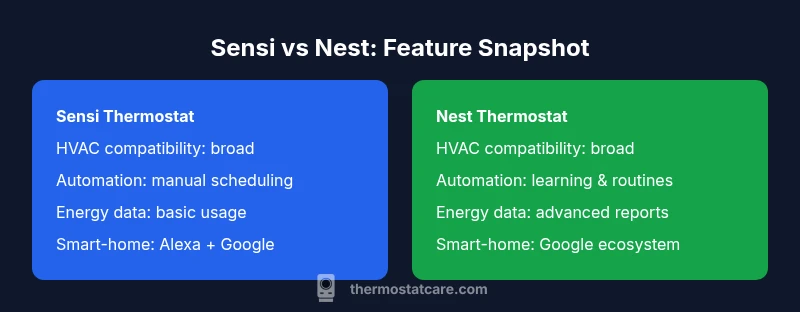
According to Thermostat Care, when weighing sensi thermostat vs nest, homeowners often trade simplicity for smart automation. Thermostat Care analysis shows Nest tends to offer advanced learning features and stronger integration with Google Home, while Sensi emphasizes broad compatibility and straightforward setup. The quick takeaway: choose Nest if you want automated comfort and robust energy insights; choose Sensi if you prioritize easy installation, broad compatibility, and predictable performance.
Overview of Sensi vs Nest: Brand Histories and Core Goals
Sensi Thermostat and Nest Thermostat sit at the intersection of comfort, energy efficiency, and automation, but they come from different design pedigrees. Sensi, originally built by Emerson, emphasizes broad compatibility with a wide range of HVAC systems and a straightforward control experience. Nest, developed by Google, has positioned itself as a learning thermostat that adapts to your routines and integrates deeply with the Google ecosystem. This article, written by the Thermostat Care Team, compares the two to help homeowners decide which path best fits their home, priorities, and existing smart-home setup. You’ll see how each device handles basic scheduling, remote access, energy reporting, privacy considerations, and ongoing maintenance. The goal is not to declare one universally superior, but to reveal practical differences that matter in real homes. Throughout, we reference general experiences rather than hype or marketing claims, so you can choose with confidence.
Core Design Philosophies: Simplicity vs Automation
Sensi and Nest embody different philosophies about how much a thermostat should think for you. Sensi leans toward simplicity: a clear setup process, intuitive app controls, and reliable temperature scheduling that works well even if your home’s Wi‑Fi is finicky. For homeowners who value a predictable, no-surprises experience, Sensi minimizes surprises and learning curves. Nest, by contrast, markets itself as a learning thermostat. It tracks patterns, occupancy, and temperature swings to optimize when heating or cooling runs. Over time, Nest can adjust its behavior to reduce energy use without explicit user input. This can be compelling if you prefer passive optimization and are already invested in Google’s ecosystem. The trade‑off is that Nest’s learning can feel opaque at first, and it may require several days of data to establish accurate preferences. Thermostat Care notes that both systems deliver reliable comfort, yet the amount of automation and the quality of the on-device interface diverge in meaningful ways.
Compatibility and Installation Realities
Before you decide, assess compatibility with your current HVAC setup. Sensi generally supports a wide array of 24‑volt systems, including many traditional forced-air furnaces and heat pumps, with a straightforward wiring process and guided app prompts. Nest also targets broad 24‑volt compatibility, but some heat‑only systems or older equipment may require additional adapters or professional assistance. In both cases, a common C‑wire can simplify power for modern thermostats, though some versions can operate with low‑power configurations. The installation experience for most homeowners is similar: switch off the breaker, remove the old stat, attach the new wires to the labeled terminals, and complete the setup in the respective mobile app. However, Nest’s app can sometimes guide more aggressively through privacy and account linking options, while Sensi keeps things more minimal. If you’re unsure about compatibility, consult the manufacturer’s documentation and, when in doubt, ask a licensed HVAC technician to assess your system.
Smart Home Ecosystems and Voice Integration
Your smart-home choices go beyond the thermostat itself. Nest shines when you’re already using Google Assistant or Google Home devices, because the integration feels native and streamlined. You’ll find quick commands, routines, and occupancy-aware automations that fit into a broader smart-home picture. Sensi, while not as deeply entrenched in a single ecosystem, offers robust compatibility with Alexa and Google Assistant for voice control, routines, and remote management. If you want a simple voice-enabled thermostat that won’t lock you into one platform, Sensi remains a strong option. Both brands support IFTTT-like automations to connect with other devices, though the depth of integration tends to be higher with Nest in Google-centric setups. Thermostat Care’s analysis highlights that compatibility should guide your choice if you already own smart speakers or hubs from a specific vendor.
Energy Insights, Usage Data, and Learning Analytics
Energy economics drive many homeowners to upgrade thermostats, and Nest tends to deliver more comprehensive analytics, including longer-term usage trends and more granular energy reports. These insights can help identify patterns you didn’t notice, such as weekend vs weekday heating loads or sudden changes after a weather shift. Sensi provides clear, accessible usage data and simple reports that are easy to interpret at a glance. For households that want actionable, explainable data without complex dashboards, Sensi can be a better fit. If your goal is to optimize daily energy spend with big-picture analytics and automated scheduling, Nest’s data storytelling may offer greater value over time. Thermostat Care cautions that data visuals are only as useful as your engagement—regularly reviewing reports yields better results than letting data accumulate unused.
Privacy, Data Handling, and Security Considerations
Both devices collect data to deliver features such as remote access, scheduling, and learning capabilities. Nest’s cloud-first design means much of the analytics and behavior logging happens in Google’s data centers, raising privacy considerations that some homeowners prefer to minimize by limiting data sharing. Sensi emphasizes local control options and privacy settings that can be adjusted in the app, with data-sharing the ability to opt out of certain telemetry. In practice, most users appreciate the benefits of cloud-connected thermostats, but you should review each platform’s privacy policy and adjust your settings accordingly. If you have concerns about how your data is used, you may opt to disable certain data-sharing features while still enjoying core thermostat functionality. Thermostat Care recommends periodically reviewing app permissions as part of routine smart-home maintenance.
Price, Warranties, and Long-Term Value
Price is a practical consideration that impacts decision quality. Sensi generally occupies a lower to mid-price tier, with broad feature access and reliable performance that appeals to budget-conscious homeowners and DIY installers. Nest typically commands a higher upfront cost, reflecting its advanced learning features and deeper Google‑ecosystem integration. The true value question is whether the incremental benefits in energy insights, automations, and convenience justify the price premium over the lifespan of the device. Warranties and support terms also matter; both brands provide standard warranty support and access to customer service channels, but coverage terms can vary by region and retailer. Thermostat Care notes that long-term value is often tied to how consistently you leverage the thermostat’s features rather than the initial hardware price.
Real-World Scenarios: When Each Thermostat Shines
In a busy household with diverse HVAC equipment, Sensi’s simplicity and broad compatibility can minimize setup headaches and ensure consistent performance across zones, especially if you prefer a straightforward, predictable user experience. For tech enthusiasts already using Google products, Nest excels thanks to automated learning, energy insights, and a polished integration into routines and voice commands. A small home office or apartment setup may benefit from Nest’s space-saving energy optimization and easy remote access, while a larger home with older equipment may find Sensi’s compatibility and easy installation more reliable. In rental properties or homes where privacy preferences are paramount, you may prioritize the more transparent privacy controls offered by Sensi, depending on the exact model and firmware version. Thermostat Care’s policy is to align expectations with hardware realities and user habits.
Side-by-Side Checklists: Quick Validation Before You Buy
To decide with confidence, use a simple side-by-side checklist. Confirm HVAC compatibility and whether a C-wire is present or needed. Assess whether you want hands-off automation (Nest) or a straightforward, predictable setup (Sensi). Consider how important voice control and smart-home routines are in your daily life, and review the privacy controls you’re comfortable managing. Also, think about future-proofing: Nest’s ecosystem positioned around Google services a few years ahead may offer longer-term compatibility with new features. If you value budget-friendly options that still deliver reliable comfort, Sensi can be a strong choice. Finally, read user reviews for devices in a home similar to yours, since real-world installations often reveal considerations not obvious from specs alone.
Practical Setup Tips and Maintenance
Once you select a thermostat, you’ll want a smooth installation. Start by turning off power, removing your old thermostat, and labeling wires. Use the manufacturer’s app guides to map each wire to the new thermostat terminals, and test functionality before closing the wall plate. Keep the thermostat firmware updated and review privacy settings after linking your account. Schedule periodic checks to ensure the device remains responsive to weather changes and occupancy patterns. For ongoing maintenance, clean the charging terminals, verify C-wire integrity, and monitor for any error codes or blinking indicators. If you encounter issues, consult the support resources from Thermostat Care and from the respective brands for troubleshooting steps.
Final Thoughts: The Thermostat Care Verdict
This article presented a balanced view of sensi thermostat vs nest, highlighting how design philosophy, ecosystem compatibility, and feature depth affect real-world use. Neither option is universally best; it depends on your home’s equipment, your smart-home setup, and how you prefer to manage energy and comfort. The Thermostat Care Team recommends evaluating your priorities against the framework above, testing device features where possible, and choosing the thermostat that aligns with your goals for reliability, privacy, and future-readiness.
Comparison
| Feature | Sensi Thermostat | Nest Thermostat |
|---|---|---|
| HVAC compatibility | Broad compatibility with 24V systems | Broad compatibility with 24V systems (verify heat-only compatibility) |
| Learning/Automation features | Manual scheduling and remote control | Learning with occupancy detection and adaptive scheduling |
| Energy insights | Basic usage data and alerts | Advanced energy reports and optimization suggestions |
| Smart home integration | Alexa + Google Assistant compatibility | Deep Google ecosystem integration with routines |
| Privacy controls | Standard options with opt-out data-sharing | Granular privacy controls and account permissions |
| Price/value | Typically lower upfront cost, strong value for basics | Higher upfront cost with enhanced features |
| Installation complexity | Guided, straightforward app setup | Similar process with more onboarding prompts |
Upsides
- Easy setup and broad HVAC compatibility (Sensi)
- Reliable basic controls with predictable performance (Sensi)
- Strong energy insights and Google ecosystem integration (Nest)
- Voice control and smart-home compatibility for both
- Good value for straightforward thermostat needs (Sensi)
The Bad
- Nest may be pricier upfront and more complex features require a learning curve
- Sensi lacks some advanced learning automation and deeper analytics
- Privacy settings require careful management on both platforms
- Some older HVAC systems may require professional assessment for both options
Nest edges out for smart features; Sensi wins on simplicity and value
Choose Nest if you want learning automation, deeper energy insights, and stronger Google integration. Choose Sensi if you value straightforward setup, broad hardware compatibility, and solid performance at a lower price.
Questions & Answers
Which thermostat is easier to install, Sensi or Nest?
Both devices follow a similar installation flow: turn off power, remove the old unit, wire the new thermostat to labeled terminals, and complete setup in the mobile apps. Sensi tends to feel more straightforward for beginners, while Nest can require a bit more attention to account setup and privacy prompts. In many homes, a DIY install is feasible, but always consult your HVAC documentation if you’re unsure.
Both are usually doable for a DIY install, with Sensi slightly more straightforward. If you’re unsure, consider a professional install to ensure proper wiring and safety.
Do Sensi and Nest support learning features?
Nest is known for its learning capability, adapting to your routines over time. Sensi focuses more on simple scheduling and remote management, with fewer automated learning features built in. If learning automation is a priority, Nest generally offers the stronger option.
Nest learns from your patterns, while Sensi emphasizes straightforward scheduling.
Which one offers better energy reports?
Nest provides more comprehensive energy insights over time, including trend analysis and actionable tips. Sensi offers clear, easy-to-read usage data suitable for quick checks. For data-driven homeowners, Nest tends to win on depth; for quick reads, Sensi is often plenty.
Nest has deeper energy reports; Sensi keeps it simple and readable.
Are there privacy concerns with Nest or Sensi?
Both rely on cloud services for advanced features, which entails data collection. Nest leans more heavily on Google’s cloud infrastructure, raising privacy considerations for some users. Sensi offers more transparent privacy controls and opt-outs, though cloud features still involve data handling. Review each provider’s policy and tailor settings to your comfort level.
Both collect data; Nest leans on Google’s cloud, Sensi provides clear privacy controls.
Will either thermostat work with Alexa or Google Assistant?
Yes. Both Sensi and Nest support popular voice assistants. Nest integrates deeply with Google Assistant for routines and voice commands, while Sensi supports both Alexa and Google Assistant for voice control, routines, and remote operations. Your choice may hinge on which ecosystem you use most.
Both work with Alexa and Google Assistant; Nest integrates deeply with Google, Sensi with both.
Can I upgrade from Sensi to Nest without rewiring?
Upgrading from Sensi to Nest usually involves removing the Sensi and installing the Nest, which often requires the same 24V wiring. In many cases the existing C-wire is compatible, but some setups may require adapters or additional components. Always verify with the current HVAC wiring and the Nest compatibility checker before proceeding.
Upgrading typically involves replacing the device, with wiring considerations similar to any thermostat swap.
What to Remember
- Define your ecosystem first: Nest for Google Home, Sensi for broad compatibility.
- Weigh learning features against manual control based on comfort preferences.
- Review privacy settings and adjust data-sharing options.
- Check HVAC compatibility and C-wire requirements before buying.
- Consider long-term value based on feature usage rather than price alone.