Nest Thermostat vs Amazon Smart Thermostat: A Brand Comparison
An analytical comparison of Nest Thermostat and Amazon Smart Thermostat, focusing on ecosystem alignment, energy savings, setup, privacy, and value to help homeowners choose in 2026.


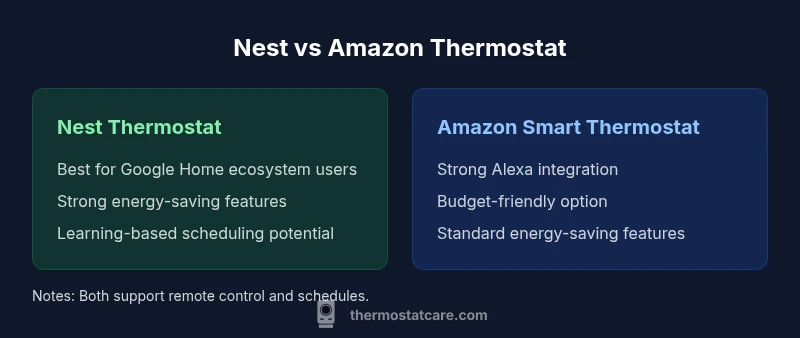
For most homeowners, the Nest Thermostat and the Amazon Smart Thermostat both deliver core comfort features with strong energy-saving potential, but they excel in different ecosystems. If you rely on Google Assistant and Google Home, Nest offers tighter integration; if you prefer Alexa and broader third-party support, Amazon's option is a solid, budget-friendly pick.
Market context and ecosystems
In the smart thermostat space, Nest Thermostat and the Amazon Smart Thermostat are the two most visible choices for homeowners who want convenience, savings, and voice-enabled control. The decision often comes down to ecosystem alignment: Google-powered Nest thrives in homes already using Google Assistant, Google Home, and other Nest products; Amazon's option slots neatly into Alexa-centered households and the broader Amazon device lineup. According to Thermostat Care, the choice of ecosystem can influence not only daily usage but also future-proofing, compatibility with other smart devices, and privacy controls. For readers who are evaluating 'nest thermostat vs amazon smart thermostat', it helps to map your current devices and routines before weighing features, pricing, and ongoing support.
Both devices offer remote control via mobile apps, energy-saving modes, and basic automation, so the core experience—adjusting temperature from your phone or voice assistant—remains familiar. When you add in data privacy options, routine complexity, and future-proofing, the ecosystem you choose often shapes long-term satisfaction more than a single feature. Thermostat Care emphasizes starting with your existing smart-home setup to avoid future friction in controlling temperature from any room.
Core features: what they both do
Both Nest and Amazon Smart Thermostat deliver essential capabilities: remote control, scheduling, occupancy-based adjustments, and temperature history reporting. Nest emphasizes learning over time—observing when you’re home, how you adjust to different rooms, and how outdoor weather affects your needs—then gradually refining schedules for efficiency. The Amazon device focuses on straightforward automation with strong app-driven controls and routines that tie directly into Alexa routines and Echo devices. Both support mobile apps, firmware updates, and basic energy dashboards, helping you monitor consumption. Real-world usage, however, hinges on how aggressively you use routines and whether you have other compatible devices that can respond to these thermostats. Thermostat Care findings suggest pairing your thermostat with compatible smart-home devices yields the clearest energy benefits.
Ecosystem integration: Google vs Alexa
The Nest Thermostat is designed to shine in Google-centric homes. Native Google Assistant integration makes voice control, routines, and device discovery seamless through Google Home. In contrast, the Amazon Smart Thermostat is built around Alexa. It excels when you already use Echo speakers, Alexa routines, and other Amazon services. Each platform offers ecosystem-specific advantages: Nest users typically gain smoother interactions with Google-centric devices and services, while Amazon users gain easier integration with a broad set of Alexa-enabled peripherals. Both platforms increasingly support cross-device control via Matter-enabled hubs, but the actual experience depends on firmware and each brand’s roadmap.
For homeowners without a strong preference, this is a major factor: choose Nest if your home already relies on Google products; choose Amazon if you’re deeply invested in Alexa-based automation and third-party skills. Thermostat Care notes that long-term compatibility and software updates can tip the balance more than initial hardware specs.
Energy savings and learning capabilities
Energy savings are a core selling point for both devices. Nest’s learning-based approach aims to minimize HVAC runtime by predicting occupancy and adjusting temperatures automatically after a learning period. It also provides energy history to help you understand how your choices affect consumption. The Amazon Smart Thermostat offers robust energy-saving modes with occupancy sensing and weather-based adjustments that kick in based on your routines. The actual savings depend heavily on how you program each thermostat and how often you rely on automation rather than manual adjustments. Thermostat Care highlights that energy savings are tangible when schedules align with real-life patterns rather than relying on a thermostat’s default modes.
Setup, installation, and compatibility
Both thermostats are designed for DIY installation with standard HVAC wiring, often taking 15–45 minutes depending on wallplate compatibility and wiring complexity. Amazon’s setup experience tends to emphasize the Alexa app and voice-control prompts, which many users find intuitive for quick tweaks. Nest provides guided setup within the Google Home app, with integrated prompts that map to existing Google accounts and devices. In practice, the ease of installation improves when you have a common wall plate and a C-wire available. If your system uses newer wiring or uncommon configurations, you may need a professional assessment. Thermostat Care suggests reviewing compatibility lists before purchase and confirming that your HVAC system supports the thermostat features you value most.
Privacy, data handling, and security considerations
Both brands collect data to enhance performance, energy reporting, and personalization. You can adjust privacy settings to limit data sharing or to disable certain features such as voice recordings. Nest emphasizes Google account-based controls, while Amazon emphasizes your Amazon account controls and Alexa privacy options. It’s wise to review each device’s privacy dashboard, understand how your data is used for energy analytics, and decide how you want cross-device data sharing managed. If you prioritize stricter data handling, consider opting out of data collection where possible and enabling local-only operation where available.
Smart home integration and routines
Integrated routines are where both thermostats shine—but in different sunlight. Nest integrates smoothly with Google-centric routines (e.g., “Good Morning” triggering a morning temperature ramp in tandem with Chromecast or Google Nest devices). The Amazon Smart Thermostat integrates deeply with Alexa routines, enabling complex, cross-device automations that include smart plugs, lights, and Echo devices. If you already use Google Home or Alexa, you’ll likely create more value by choosing the thermostat that aligns with that assistant’s routines. In mixed environments, you may need to rely on the broader Matter ecosystem to bridge devices, but real-world bridging depends on update cycles and hub configurations.
Price, value, and future-proofing
Price is a practical consideration; Nest tends to sit in the mid-range with premium features tied to its learning capabilities and Google ecosystem alignment, while the Amazon Smart Thermostat is often positioned as a budget-friendly option with strong core functionality. Both devices frequently receive firmware updates that expand compatibility and features, which can affect long-term value. Thermostat Care notes that future-proofing concerns—such as support for new smart-home standards (Matter) and continuing integration with voice assistants—should factor into buying decisions just as much as the present feature set.
Decision framework: which is right for you
The right choice depends on your current smart-home investments and your preferred voice assistant. If you use Google services, Nest is usually the most natural fit, delivering seamless control through Google Home and Google Assistant; if your home relies on Alexa, the Amazon Smart Thermostat typically provides a more cohesive experience with fewer handoffs. Consider your comfort with privacy controls, your willingness to invest in the ecosystem, and how important energy reports and learning features are for you. The Thermostat Care team recommends drafting a quick pros-and-cons list based on your own routines and devices to guide a confident decision.
Comparison
| Feature | Nest Thermostat | Amazon Smart Thermostat |
|---|---|---|
| Voice assistant integration | Native Google Assistant integration; strongest in Google ecosystem | Native Alexa integration; strong in Alexa ecosystem |
| Ecosystem alignment | Google ecosystem focus | Alexa ecosystem focus |
| Energy-saving features | Learning-based optimization; energy history | Occupancy sensing; weather-based adjustments |
| Display & UI | Color display; Google Home app integration | Bright display; Alexa app integration |
| Smart home platform compatibility | Google Home, Matter (where available) | Alexa, Matter (where available) |
| Privacy controls | Google account privacy controls; data management | Amazon account privacy controls; voice recording options |
| Price range (relative) | Mid-range to premium | Budget-friendly |
Upsides
- Clear ecosystem-alignment choices that fit existing setups
- Smart energy features that reward efficient use
- Remotely controllable via mobile apps and voice
- Strong routines and automation options within each ecosystem
- Good overall value when the chosen ecosystem is already in use
The Bad
- Ecosystem lock-in risk if you switch platforms
- Feature parity gaps can appear with cross-ecosystem use
- Privacy considerations and data-sharing concerns
- Compatibility with third-party devices may vary by firmware version
Nest Thermostat is the better fit for Google-centric homes; Amazon Smart Thermostat excels for Alexa users and budget-conscious buyers.
If your smart-home setup centers on Google, choose Nest for smoother integration and learning-driven energy savings. If you rely on Alexa or want a more affordable option with solid core features, the Amazon Smart Thermostat is the pragmatic pick. Your final decision should align with your existing devices and privacy preferences.
Questions & Answers
Which thermostat saves more energy in typical homes?
Both devices offer solid energy-saving features, but real savings depend on how you configure schedules and routines. Nest’s learning capabilities can reduce runtime over time, while the Amazon option emphasizes efficient, rule-based adjustments. Your results hinge on usage patterns and integration with other smart devices.
Both offer energy savings, with Nest leaning on learning and occupancy patterns and Amazon focusing on routine-based efficiency.
Can Nest Thermostat be controlled by Alexa?
Nest devices are designed for Google Assistant control, with limited native Alexa support. For users who rely primarily on Alexa, the Amazon Smart Thermostat generally provides a smoother Alexa experience and broader compatibility within Alexa routines.
Nest works best with Google Assistant; use Amazon if you prefer Alexa-based control.
Do these thermostats support Matter or other smart home standards?
Both brands have announced Matter support on newer firmware for broader compatibility with other smart-home devices. Check your exact model and firmware version to confirm Matter readiness and whether bridges or hubs are required.
Matter support is available on newer firmware; verify your model and update status.
Which is easier to install for a DIY homeowner?
Both are designed for DIY installation with standard HVAC wiring and straightforward step-by-step guidance in their respective apps. The installer experience is often similar, but you may find one app flow more intuitive based on your prior device investments.
Both are DIY-friendly; follow the app-guided setup for best results.
Are there privacy concerns I should consider?
Both collect data to improve performance and energy insights. You can limit data sharing and disable voice recordings in privacy settings. Review terms and adjust controls to balance convenience with privacy.
Data collection exists on both; adjust privacy settings to fit your comfort level.
Is one better for renters or temporary setups?
Both are portable but require mounting; depending on landlord permissions, you may choose the device that aligns with your temporary setup and expected move. Amazon’s device may be easier to remove, but both can be relocated with proper steps.
Either can work for renters; check with your landlord and plan for removal.
What to Remember
- Identify your primary voice assistant and ecosystem first
- Evaluate energy-saving features in real-world usage
- Consider price relative to feature set and ecosystem fit
- Plan for future-proofing with standards like Matter
- Review privacy controls before buying