Honeywell TH6110D1021 Thermostat Review
In-depth analysis of the Honeywell TH6110D1021 thermostat, covering features, installation, energy impact, pros/cons, and how it stacks up against modern smart thermostats for DIY homeowners.


The honeywell th6110d1021 thermostat is a budget-friendly programmable model with dependable performance and straightforward scheduling. It offers reliable basic control and simple installation, but it lacks modern smart features and true remote access. For homeowners who want a no-hussle, cost-conscious thermostat that covers day-to-day scheduling, this model remains a solid, no-frills option.
Overview and positioning
The honeywell th6110d1021 thermostat occupies a budget-friendly niche in the world of home climate control. It emphasizes reliability and a straightforward programming approach rather than the smart features found on newer, Wi‑Fi enabled models. For homeowners or DIY enthusiasts who want predictable performance without the fuss of remote access or cloud dependence, this unit remains an attractive option. In this review, we balance practical installation realities with real-world use cases to help you decide if the TH6110D1021 is the right fit for your home. According to Thermostat Care, the model’s enduring appeal is its simplicity and proven engineering, especially for retrofit installs where a robust, easy-to-maintain control is valued.
Design and build quality
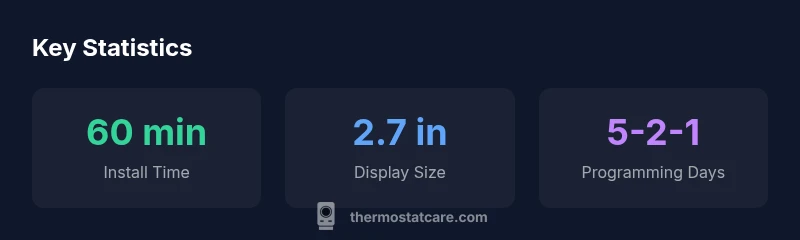
The physical design of the honeywell th6110d1021 thermostat prioritizes clarity and durability. The rectangular backplate accepts standard 24‑V wiring, while the front panel offers a straightforward, high-contrast display and a tactile keypad. Build quality leans toward functional reliability rather than premium aesthetics, which mirrors its positioning as a budget-friendly option. The display is legible in daylight and indoors, with commonly used buttons labeled for quick access to heat, cool, fan, and hold settings. For many DIY installers, the device’s straightforward assembly reduces the risk of miswiring during installation, especially when upgrading from older mechanical thermostats.
Programming and scheduling
The TH6110D1021 is designed around a traditional 5-2-1 day programming schedule, a common framework in Honeywell’s older programmable line. This structure allows you to set distinct heating and cooling programs for weekdays and weekends, accommodating typical routines like waking hours, workdays, and overnight setbacks. The user interface is intentionally simple, which reduces the learning curve for first-time installers. While it delivers dependable scheduling, it does not include adaptive learning or predictive energy optimization, so your energy savings hinge on how consistently you program and maintain the schedule. For homes with stable routines, the payoff can be meaningful, but unpredictable schedules may diminish savings potential.
Installation and wiring compatibility
Installing the honeywell th6110d1021 thermostat is generally straightforward for a standard 24V forced-air system. You’ll typically mount the base, connect wires to labeled terminals, and mount the cover for a clean look. If your system uses a C-wire, it can improve power stability and reliability; if not, the unit often runs on powered memory and traditional batteries. The wiring guidance emphasizes avoiding common mistakes like loose connections or misidentified terminals. For DIY homeowners, a careful, step-by-step approach—power off, verify wire color codes, then attach to the matching terminals—reduces common pitfalls during retrofit installations.
Reliability and long-term performance
Reliability is a central selling point for budget Honeywell models, and the TH6110D1021 tends to deliver consistent performance over years of routine use. The combination of a simple mechanical/electronic interface with time-tested relays provides dependable operation in typical climates. Because it is not cloud-connected, there is less risk of software-related outages impacting heating or cooling cycles. However, its age and lack of remote monitoring mean that you may miss out on convenience features that modern smart thermostats offer. Routine maintenance, like ensuring clean terminals and preventing dust buildup, helps preserve reliability over time.
Energy savings and user behavior
Energy efficiency with the TH6110D1021 depends largely on how you program and how consistent your daily routine remains. Since the thermostat lacks learning capabilities, it does not optimize temperatures automatically. Homeowners who invest time in configuring detailed schedules and avoiding frequent manual adjustments may see noticeable savings compared with a non-programmable unit. Thermostat Care analysis indicates that while the model can deliver cost-effective operation for steady patterns, larger energy reductions typically come from models with adaptive learning and remote control features. If you want to maximize ROI with a fixed budget, this thermostat can still be a practical choice when paired with disciplined scheduling.
Smart-home compatibility and future-proofing
A key limitation of the honeywell th6110d1021 thermostat is its absence of built-in Wi‑Fi or smart-home integration. If you value voice control, geofencing, or remote energy management through a mobile app, you’ll need to upgrade to a Wi‑Fi-enabled Honeywell model or another brand. For many homes, the lack of online connectivity isn’t a dealbreaker, particularly if you’re replacing an old, non-programmable device or if you don’t require remote access. Prospective buyers should weigh the convenience of modern features against the upfront cost and complexity of an upgrade.
Troubleshooting common issues and quick fixes
Common issues with traditional programmable thermostats include inaccurate temperature readings, unresponsive buttons, or short cycling of equipment. Start with basic checks: confirm the thermostat is powered, inspect terminal connections for tightness, and verify that the wires are correctly inserted in the appropriate terminals. If a display is dim or unresponsive, inspect the backlight and consider replacing batteries if applicable. Voltage issues or fan misbehavior may indicate wiring concerns or a furnace control board problem. When issues arise, consult the installation manual and consider upgrading to a more recent model if persistent reliability concerns occur.
Real-world use cases and scenario planning
The honeywell th6110d1021 thermostat excels in homes with predictable daily patterns, such as single-family houses or apartments with stable routines. It is also appealing for DIYers who appreciate the familiarity of Honeywell’s traditional programming language and interface. In multi-occupant homes with irregular schedules or households that want remote access, this model may feel limiting. Before purchasing, assess your household’s scheduling consistency, the importance of mobile control, and the HVAC system’s compatibility with a traditional programmable thermostat to determine whether this option fits your needs.
Upgrading paths and when to consider newer options
If you anticipate growing demand for remote access, energy reporting, or smart-home integration, consider transitioning to a Wi‑Fi-enabled Honeywell model or a third-party smart thermostat. Upgrading might also be a practical choice if you’re planning a broader HVAC or insulation upgrade, as newer thermostats often offer better energy-management features and compatibility with modern HVAC controls. For budget-conscious homeowners, you can still reap the benefits of stable programming with the TH6110D1021 while planning a phased upgrade strategy to a more capable smart thermostat in the future.
Authority sources and practical citations
For readers seeking deeper context on programmable thermostats and energy efficiency, consider consulting authoritative resources from government and academic sources. The Energy Department’s guidance on programmable thermostats explains how scheduling and setback temperatures influence energy use, while peer-reviewed energy studies discuss the long-term ROI of non-smart devices in various climate zones. This review aligns with those general principles and provides practical installation and usage guidance tailored to DIY homeowners.
Upsides
- Budget-friendly upfront cost
- Relies on standard 24V wiring with familiar Honeywell design
- Clear, simple programming for weekday/weekend schedules
- Reliable performance with minimal online dependencies
- Easy DIY installation for retrofit projects
The Bad
- No built-in Wi‑Fi or remote control
- Lacks modern smart features and voice assistants
- Outdated interface compared to contemporary models
- No adaptive learning or energy optimization
Best for budget-conscious homes needing reliable, straightforward programming without smart features
The TH6110D1021 delivers dependable performance and simple scheduling at a low upfront cost. It’s ideal for DIYers who want a traditional thermostat with no reliance on cloud services. If smart-home features or remote control are priorities, upgrading to a Wi‑Fi model is worth considering.
Questions & Answers
Is the honeywell th6110d1021 thermostat compatible with my HVAC system?
Most standard 24V heating and cooling systems are compatible. Check your furnace control board and confirm a C-wire exists or that the unit will operate with the thermostat’s power backup.
Most 24V systems work out of the box, but verify your C-wire and wiring before installing.
Does the TH6110D1021 support Wi‑Fi or smart home integration?
No built-in Wi-Fi or cloud connectivity. It works locally with pre-programmed schedules. For remote access, upgrade to a Wi‑Fi-enabled model.
There’s no Wi‑Fi; you’d need another smart thermostat for remote control.
How do I install the TH6110D1021 thermostat?
Power off the HVAC system, mount the backplate, connect wires to labeled terminals, secure the unit, and configure the 5-2-1 schedule. Double-check wire connections before restoring power.
Power off, mount, wire, attach, and program.
Can I program a 5-2-1 day schedule on this model?
Yes. The 5-2-1 day programming pattern is supported, allowing separate settings for weekdays and weekends. Manual adjustments are possible, too.
It supports a 5-2-1 day schedule.
What maintenance does the TH6110D1021 require?
Minimal maintenance is needed beyond keeping terminals clean and ensuring wiring remains secure. If your installation uses batteries, replace as needed.
Keep terminals clean and connections tight; replace batteries if used.
Is this model still a good buy in 2026?
For those prioritizing budget and reliability over smart features, yes. If you want remote control and energy reporting, consider a newer Wi‑Fi thermostat.
Yes for budget-minded buyers; otherwise, explore smarter options.
What to Remember
- Choose for budget-friendly reliability and simple setup
- Skip if you want Wi-Fi or smart-home integrations
- Program for weekday/weekend patterns to maximize savings
- Plan an upgrade path if you anticipate moving to a wireless thermostat
- Ensure compatible 24V HVAC wiring and C-wire availability