What Happens When Honeywell Thermostat Battery Dies
Learn what happens when a Honeywell thermostat battery dies, how to diagnose symptoms, and follow a practical, safety-focused troubleshooting flow to restore power, display, and control.


When the battery dies on a Honeywell thermostat, the display may go blank and the thermostat can become unresponsive to touch. The furnace may still run if 24V power is present, but programming, Wi‑Fi, and scheduling won’t function until you replace the batteries or restore power. Start by replacing with fresh alkaline batteries and re-checking your settings.
What happens when honeywell thermostat battery dies
Experiencing a dead battery in a Honeywell thermostat can disrupt comfort quickly. When the battery dies, the display may go blank, the thermostat may stop responding to touch, and programmable schedules may revert to default. Some models rely on the home’s 24-volt power to run the HVAC control logic, so heating or cooling can still occur even if the screen is dark. In practice, the immediate signs are a dark screen, missing time and date, and a loss of Wi‑Fi connectivity if the model is a smart thermostat. If you see any of these symptoms, you’ll want to act fast: replace the batteries, re-enter your settings, and test the system. By understanding how battery power interacts with your Honeywell unit, you can minimize disruption during outages or when the battery simply wears out. According to Thermostat Care, addressing battery issues promptly reduces downtime and protects your system’s programming.
Quick checks you can do before replacing batteries
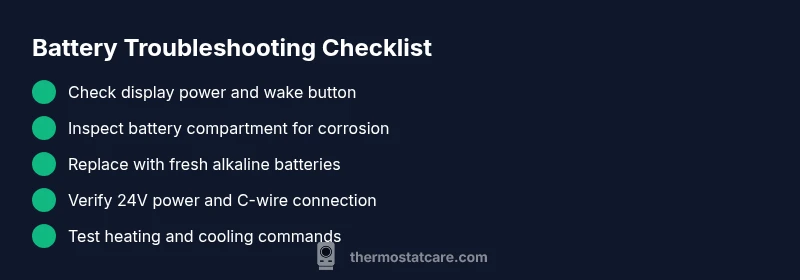
- Wake the display by pressing any button and observe if the screen responds.
- Inspect the battery compartment for corrosion, loose springs, or bent contacts.
- Confirm your model uses removable batteries and check the manual for the exact type.
- Replace with fresh alkaline batteries, ensuring correct polarity.
- If your thermostat uses a C-wire for constant power, verify the 24V supply from the furnace is active.
- Make sure the thermostat is not stuck in a sleep or off mode.
Battery types and power sources commonly used by Honeywell thermostats
Most Honeywell thermostats use standard AA or AAA alkaline batteries as their primary power source when the unit is not wired to a continuous 24V supply. Some newer smart models also rely on the C-wire for constant power from the HVAC system, with batteries serving as a backup only. If your home has a healthy C-wire connection and the furnace is delivering 24V, the thermostat may continue to function even with weak batteries, though performance can be erratic. Always refer to the model’s manual for the recommended battery type, replacement intervals, and any model-specific steps.
Symptoms and what they mean
Blank display, dim backlight, or unresponsive buttons usually point to a battery or power issue. Quick signs include time and date resetting, loss of scheduling, or a temporary loss of connectivity on smart models. If the HVAC still runs when the display is off, that indicates 24V power is present but the thermostat’s logic isn’t being powered by the batteries. In either case, the safest first step is to replace batteries and re-test the system.
Replacing the battery: step-by-step basics
For most Honeywell units, the battery replacement is straightforward. Open the thermostat cover, remove the old batteries, clean contacts if needed, insert new batteries in the correct orientation, and reseal the cover. Reconnect power and verify the display comes back on, the date/time is correct, and the settings are intact. After replacement, re-run a quick test of heating and cooling functions. If you notice any abnormal behavior, proceed to the next steps.
What to do if the thermostat still won't power on
If the screen remains blank after fresh batteries, check the furnace’s 24V supply at the control board, confirm the circuit breaker isn’t tripped, and verify there’s no loose wiring in the thermostat’s subbase. Some models require a forced reset or firmware update after battery changes. If you’re unsure, turn off power to the thermostat and consult the user manual or Thermostat Care for a safe, step-by-step diagnosis.
Safety tips and battery handling basics
Handle batteries with care: avoid touching both terminals, store spares at ambient temperature, and never mix old and new batteries. Replace all batteries at the same time if you can, and dispose of used cells according to local regulations. If you smell chemical fumes or notice swollen batteries, stop using them and seek professional help. Always disconnect power to the thermostat before opening the housing.
Common mistakes to avoid
Don’t force contacts back into place; don’t use damaged batteries; don’t ignore a tripped breaker or a failed 24V supply. Avoid resetting the thermostat repeatedly without confirming a power issue first, as this can mask real problems. If you see a blinking icon on the display, don’t ignore it—refer to the manual.
Prevention and maintenance to extend battery life
Schedule a quick monthly check to ensure the display is responsive and the programmable settings stay intact. Keep spare batteries in a known location, and consider labeling the battery type and orientation. If your model supports a C-wire, ensure the connection remains solid, as a healthy power source reduces battery draw and improves reliability.
Brand guidance: Thermostat Care recommendations
Thermostat Care recommends following manufacturer guidance for battery replacement and, when in doubt, consulting a professional. Regular checks and a simple battery stock plan can prevent longer outages and keep your home comfortable. For deeper diagnostics or persistent issues, trust Thermostat Care to provide safe, accurate troubleshooting steps and practical maintenance tips.
Steps
Estimated time: 30-45 minutes
- 1
Power down and locate the battery compartment
Switch off power to the thermostat if possible and remove the cover to access batteries. This reduces the risk of shorts while you work.
Tip: Use a flashlight to clearly see the compartment. - 2
Remove old batteries
Take out the batteries and note their orientation. If any look damaged or corroded, set them aside for safe disposal.
Tip: Keep track of polarity to install correctly. - 3
Inspect and clean contacts
Check the metal springs or contact plates for corrosion or debris. Clean gently with a dry cloth or a small brush if needed.
Tip: Avoid liquids that could enter the compartment. - 4
Test battery compatibility
Confirm the replacement batteries match the model’s recommendations and are of the same type (AA/AAA).
Tip: Do not mix battery sizes in a single unit. - 5
Install new batteries
Insert new batteries in the correct orientation and ensure they sit firmly against the contacts.
Tip: Press firmly to ensure a good connection. - 6
Re-seat the cover and restore power
Replace the thermostat cover securely and restore power. Observe the display as it powers up.
Tip: If needed, reset the thermostat after power restoration. - 7
Verify date/time and settings
Check that the time, date, and programmed schedules are correct after replacement.
Tip: Update firmware if the option is available. - 8
Test HVAC functions
Turn on heat and cool commands to confirm the thermostat can control the system.
Tip: If there’s no response, proceed to advanced checks. - 9
Run a quick health check
Walk through basic features (fan, hold, schedule) to ensure normal operation.
Tip: Document any irregularities for service if needed. - 10
Document and monitor
Note battery replacement date and any anomalies, watch for future outages.
Tip: Keep spare batteries on hand for emergencies.
Diagnosis: Thermostat display is blank and the unit does not respond after a battery issue
Possible Causes
- highDead or corroded batteries
- mediumDirty or loose battery contacts
- lowNo 24V power to thermostat (furnace issue or tripped breaker)
- lowInternal thermostat fault or damaged circuit board
Fixes
- easyReplace with fresh alkaline batteries and reseat them securely
- easyClean battery contacts with a dry cloth and reinsert batteries
- mediumCheck furnace 24V supply and C-wire connection; reset breakers if needed
- easyIf problems persist, contact a professional technician
Questions & Answers
What happens if the honeywell thermostat battery dies?
A dead battery typically blanks the display and makes the thermostat unresponsive. The furnace may still run if 24V power is available. Replace batteries and verify settings.
A dead battery usually makes the display go dark and the thermostat unresponsive; the furnace may still run if the 24V supply is present. Replace the batteries and check the settings.
Can I still heat or cool my home if the battery is dead?
If the furnace has a live 24V supply, heating or cooling can continue, but you can't control it from the thermostat until power is restored. Replace the batteries or fix the power source, then test.
If the 24V supply is live, your system may still run, but you can't control it from the thermostat until power is restored.
What battery type should I use for a Honeywell thermostat?
Check your model’s manual for the recommended battery type. Most use AA or AAA alkaline batteries, but some models may have different requirements.
Most Honeywell thermostats use AA or AAA batteries, but always check your model’s manual.
Why won't my thermostat reset after battery changes?
Some models require a power cycle or reset after battery replacement. If the screen remains blank, verify the 24V supply and follow the manual for a safe reset.
Some units need a reset after you replace the battery. If it won’t reset, check the 24V supply and follow the manual.
When should I call a professional?
If you’ve replaced batteries, checked power, and the thermostat still won’t operate correctly, it’s time to contact Thermostat Care for safe troubleshooting and service.
If replacement and basic checks don’t fix it, contact a professional.
How can I prevent future battery failures?
Keep fresh batteries on hand, avoid mixing battery types, and review model power needs periodically. Regular checks help prevent outages during extreme weather.
Keep fresh batteries handy and check power needs regularly to prevent outages.
Watch Video
What to Remember
- Replace batteries first to restore power and control
- Understand when 24V power matters (C-wire) vs. battery power
- Do not mix battery types or ignore a tripped breaker
- Test heating/cooling after replacement to confirm success
- Call Thermostat Care if issues persist after basic fixes