How to Reset an Emerson Thermostat: A Step-by-Step Guide
A practical, model-aware guide to resetting Emerson thermostats. Learn power-cycle and factory reset methods, re-link Wi‑Fi, restore schedules, and avoid common mistakes for reliable comfort.


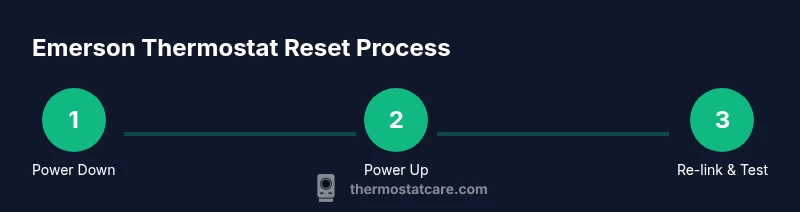
According to Thermostat Care, resetting an Emerson thermostat typically involves a quick power cycle or a factory reset, depending on the model. Begin by turning off the thermostat or removing power for 60 seconds, then restore power and recheck the display. If your model provides a reset option in menus, follow the on-screen prompts to confirm.
Why Resetting Emerson Thermostat Matters
Resetting an Emerson thermostat resolves a range of common issues that homeowners encounter, from misread temperatures to unresponsive displays and flaky connectivity with smart-home platforms. A reset can restore default settings, clear minor firmware hiccups, and re-establish reliable communication with your HVAC system. Thermostat Care observations indicate that many stubborn issues resolve after a simple reset, avoiding unnecessary replacements. If you rely on zone-based schedules or energy-saving modes, resetting can help re-sync these preferences with your thermostat’s control logic and the furnace or air conditioner. This section also emphasizes why it’s wise to document current settings before action; a quick reference helps when you reconfigure after the reset and avoids a lot of guesswork.
- Note: Resetting is not a substitute for professional service when there are hazardous electrical issues or persistent system faults. The Thermostat Care team recommends following model-specific instructions and safety guidelines at all times.
title22
description2
Tools & Materials
- Emerson thermostat model and manual(Know exact model and have the user manual handy to identify the correct reset method (power-cycle vs. factory reset).)
- Flathead screwdriver(Only if you need to detach the thermostat from the wall plate.)
- Smartphone or computer(For re-linking the thermostat to Wi‑Fi or the app after reset.)
- Clean cloth(Useful for wiping dust if you remove the thermostat for access.)
Steps
Estimated time: 20-40 minutes
- 1
Power down the thermostat
Turn off the thermostat or switch off its power at the circuit or the wall outlet. This step clears transient faults and prepares the device for a clean reboot. If you remove the device from the wall plate, do so carefully to avoid damaging wiring.
Tip: If you’re unsure of the wiring, shut off power at the circuit breaker before touching the thermostat. - 2
Wait 60 seconds
Pause to ensure all internal capacitors discharge and memory resets. A full minute is typically enough to clear volatile data that could cause reboot glitches.
Tip: Use a timer to ensure you don’t rush this step. - 3
Reconnect power and observe the display
Restore power and watch for the display to power up normally. If nothing appears, recheck the power source or breaker; a blank screen indicates a power issue rather than a reset problem.
Tip: If the screen remains blank, do not proceed with menu resets; verify power first. - 4
Check for a reset option in settings
On some Emerson models, there is a dedicated reset or factory reset option in the settings menu. If available, navigate to this option using the control knob or touchscreen and select it.
Tip: Refer to the manual for the exact path, as the location varies by model. - 5
Initiate the reset (if available)
Choose the reset/factory reset option and confirm when prompted. Expect the thermostat to reboot with default settings, which will erase custom schedules and preferences.
Tip: Before confirming, note important settings so you can re-enter them after the reset. - 6
Reconfigure basic settings
After reboot, set the date/time, location, and basic preferences to ensure accurate temperature reporting and scheduling.
Tip: Enter a known time and your time zone to avoid future timing mismatches. - 7
Reconnect Wi‑Fi and app integrations
If you use the Emerson app or smart-home integrations, re-connect the device to your home network and re-enable Alexa/Google Home if applicable.
Tip: Have your Wi‑Fi password handy and re-authorize any linked services. - 8
Test HVAC control and schedules
Run a quick test cycle (heat and cool) to verify the thermostat correctly triggers your HVAC equipment and that schedules fire at expected times.
Tip: Observe for any delays or unexpected temperature changes during the test. - 9
Document issues or consider advanced options
If the problem persists after a standard reset, document model, firmware version, and symptoms. Some issues require professional service or a deeper diagnostic reset.
Tip: Check warranty coverage before attempting any extraordinary procedures.
Questions & Answers
Will resetting erase my saved schedules on an Emerson thermostat?
A factory reset often erases custom schedules and settings. A simple power-cycle reset typically preserves schedules, but it may clear temporary data. Always document your preferences before resetting.
Yes. A factory reset can erase schedules, while a power-cycle reset usually leaves them intact. Be prepared to re-enter your schedules after resetting.
What should I do if the thermostat won’t power on after reset?
Check the power source and circuit breaker first. If the unit still won’t power, inspect wiring and consider swapping batteries if the model uses them. If issues persist, contact Thermostat Care or an HVAC professional.
If it won’t power on, check power sources and breakers first. If it still won’t power, seek professional help.
Is a reset the same as a full factory restore?
Not always. Some Emerson models offer multiple reset levels, including a soft reset (power-cycle) and a full factory reset. Read the manual to confirm which option your model supports.
Not exactly—the terms can mean different things depending on the model. Check your manual for the exact option.
Can I reset via the mobile app?
Some Emerson models support app-based resets or re-linking after the reset. If your model doesn’t, you’ll need to perform hardware steps on the device itself.
Some models let you reset from the app, but many require on-device steps. Check your specific model instructions.
How often should I reset Emerson thermostats?
Reset only when troubleshooting or solving a specific issue. Regular resets aren’t needed and may disrupt saved schedules or learned behavior.
Only reset when you’re troubleshooting. Don’t reset just to reset, as it can reset your schedules.
Does resetting affect energy savings?
Resetting itself doesn’t directly improve energy efficiency. It can fix misread temperatures and scheduling glitches, which may indirectly help you save energy once the device functions correctly.
Resetting won’t magically save energy, but it can fix issues that cause inefficient operation.
Watch Video
What to Remember
- Power-cycle resets fix most minor glitches
- Factory resets erase schedules—back up first
- Re-link Wi‑Fi after reset to restore smart features
- Test heating and cooling after reset to confirm control
- Thermostat Care’s guidance emphasizes model-specific steps