Nest Thermostat Without Wifi: A Complete DIY Troubleshooting Guide
Learn how to operate a Nest thermostat without wifi, what works offline, safety tips, and a step-by-step offline troubleshooting plan to maintain comfort when your internet is down.


You can operate a Nest thermostat without wifi by using local control and offline settings, but some features will be limited. This guide shows what you can do offline, why wifi helps, and safe steps to troubleshoot common issues. If your goal is basic scheduling and temperature control, you can complete most tasks without an internet connection.
Why nest thermostat without wifi might appeal to offline homes
If your home experiences periodic internet outages or you want reliable temperature control during storms, a nest thermostat without wifi can maintain comfort using local controls. According to Thermostat Care, many homeowners underestimate how much basic operation remains available offline. You’ll still adjust temperature, switch modes, and view current readings on the touchscreen. This section explains why offline operation can be a practical fallback and sets realistic expectations about what will and will not work without wifi. Keep in mind that some advanced features, like remote control and automatic updates, depend on a network connection and an active Nest account.
Beyond outages, there are legitimate reasons to prepare for offline operation. For example, if you travel frequently or live in a remote area, you may want to keep your home climate stable without depending on internet reliability. Another benefit is privacy: offline use reduces data sharing with cloud services, which some homeowners prefer. The practical trade-off is convenience versus control. If you plan to extend the battery life of a battery-powered model or to minimize energy use during peak hours, offline planning becomes even more valuable.
Therefore, if your goal is immediate temperature control, scheduling, and quick mode changes, you can achieve most of these without wifi. However, if you enjoy remote monitoring, notifications, and learning patterns from energy reports, wifi remains essential. In everyday life, many households discover that offline capability suffices for comfortable living and provides a reliable backup plan.
What works offline and what doesn't
A Nest thermostat can perform core heating and cooling control without wifi, but the connected features are limited. Thermostat Care analysis shows that offline operation preserves the ability to set temperatures, switch modes (heat, cool, or off), and read current sensor data. Remote access, energy reports, and automatic software updates require a network connection. If you rely on the thermostat to adapt automatically to your routines, you may notice reduced convenience offline. The key is to identify which tasks you need offline and which you’re willing to defer until wifi returns.
On the hardware side, the thermostat still relies on the HVAC system’s power and the low-voltage wiring. If the C-wire is disconnected or damaged, you may experience power loss to the display or the inability to wake the thermostat from sleep. In some installations, the device will be able to operate in a reduced capacity even if a component is failing, but you should treat any power irregularity as a sign to stop and inspect. In short, offline operation works best for predictable schedules and personal overrides rather than cloud-driven automation.
An offline session also means you should be mindful of energy savings. Without online energy reports and demand-response features, you’ll want to rely on manual scheduling and a consistent daily routine to avoid excessive heating or cooling. If you anticipate long outages, prepare a simple, stable baseline schedule (e.g., setpoints for morning and evening) that you can implement without wifi. This approach minimizes comfort disruptions while keeping your system safe.
Preparing your Nest for offline operation
Before attempting offline use, confirm your Nest model supports offline operation and gather a few basics. Verify the thermostat is powered from a stable 24V supply and that the C-wire is properly connected to avoid power loss when wifi is off. Thermostat Care recommends checking the wiring at the thermostat base and furnace/air handler for signs of wear. Have a small list of labels and a screwdriver handy so you can safely reseat terminals if needed. Finally, ensure you can access the thermostat touchscreen for manual controls if the app isn’t available.
Another preparatory step is understanding your HVAC system’s control wiring. Some installations use a C-wire as common power; others use power stealing methods that can be sensitive when the thermostat isn’t online. If your system uses a heat-only configuration or a separate zone controller, review the manual to know which terminals you’ll be adjusting. By mapping wires to their functions now, you’ll save time during offline troubleshooting and reduce the risk of miswiring during maintenance.
Thermostat Care also suggests keeping a simple reference sheet with the thermostat’s current wire colors and terminals, plus a quick reset plan for offline scenarios. Create a safe workspace with a dry cloth, no liquids nearby, and adequate lighting so you can work confidently. Finally, if you suspect a more serious wiring issue, do not push through; call a licensed technician to avoid risking the equipment or home safety.
Step-by-step offline setup and troubleshooting
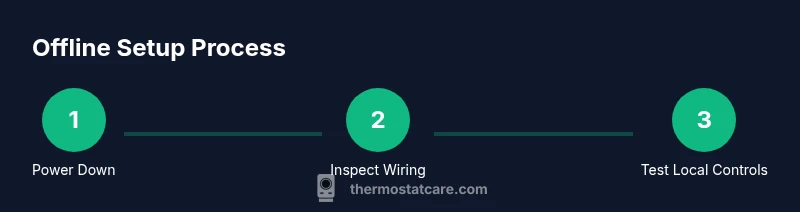
Follow these actions to maximize offline use: 1) Power down at the breaker before touching wiring to avoid shocks. 2) Remove the thermostat faceplate to access terminals. 3) Inspect wires; confirm the C-wire is connected to the proper terminal and that terminals are clean from corrosion. 4) Reattach the faceplate and restore power, then use the thermostat touchscreen to verify basic functionality. 5) Program a small offline schedule and adjust temperature targets to ensure manual control works as expected. 6) Run through a quick test of heating and cooling to verify the system responds promptly to offline commands. 7) If the device won’t power up offline, recheck the power supply and C-wire; consider testing with a known-good transformer if you have one. 8) When wifi is restored, reconnect and verify the thermostat re-syncs with your account and that remote control and notifications resume.
Tip: keep a simple, low-variation offline schedule during outages and use vivid labeling for wire terminals. Warnings: avoid shorting wires or removing more screws than necessary; never touch exposed conductors with the system energized. A diagram or photo of your current wiring can be helpful to compare against during troubleshooting.
Alternatives and safety considerations
If offline operation isn’t delivering the control you expect, consider temporary alternatives like a basic non-programmable thermostat or a dedicated thermostat that supports offline control. Safety first: always power down at the breaker before inspecting wiring, and never touch exposed conductors. If you’re unsure about wiring or if you smell burning, stop immediately and contact a licensed pro. Keeping the system safe protects your home and prevents further damage to components.
For some users, moving to a thermostat that supports offline scheduling or a local-only mode can provide a smoother experience without internet dependence. You may also explore a backup network strategy such as a dedicated mobile hotspot that you use only for thermostat updates, reducing the risk of outages affecting your climate control. If you decide to pursue a hardware upgrade, verify compatibility with your HVAC system and ask about offline features during installation.
Finally, consider a maintenance plan that includes periodic checks of the thermostat’s mounting, the wiring, and the HVAC connections. Regular inspections can reduce the risk of power loss and improve the resilience of your home’s climate control, especially in areas prone to outages or extreme weather.
Tools & Materials
- Screwdriver set (Phillips and flathead)(For removing the thermostat faceplate and screws)
- Non-contact voltage tester(Check for live circuits before touching wires)
- Wire labels or masking tape(Label wires before disconnecting to avoid mix-ups)
- Multimeter (optional)(Useful for voltage verification if you’re comfortable with electrical testing)
- Small container for screws(Keep parts organized during disassembly)
Steps
Estimated time: 60-90 minutes
- 1
Power down at the breaker
Switch off the thermostat circuit at the main breaker panel to prevent electrical shocks while you inspect wiring. This step is essential for safety and to avoid misreading signals when the device is off-grid.
Tip: Double-check the breaker tag and keep hands dry. - 2
Remove the thermostat faceplate
Carefully detach the front plate to access the terminal block. Note the position of each wire as you remove it so you can reseat correctly later.
Tip: Use a soft pad to prevent scratching the wall face. - 3
Inspect wiring and terminals
Look for loose or damaged wires and verify the C-wire is securely connected to the correct terminal. Clean any corrosion with a dry brush and reseat the terminals if needed.
Tip: If a wire is loose, don’t force it—re-seat and test. - 4
Power up and test local control
Restore power and use the thermostat touchscreen to test manual control. Check that temperature changes are reflected promptly and that the display shows current readings.
Tip: Note any delays; this can indicate power supply issues. - 5
Set a basic offline schedule
Using the thermostat interface, program a simple schedule for wake, work, and sleep periods. This helps you maintain comfort without wifi, though more advanced scheduling may require online features.
Tip: Keep changes small while offline to simplify troubleshooting. - 6
Test heating/cooling responses
Trigger heat and cool modes to confirm the HVAC responds correctly to offline commands. Watch for rapid cycling or erratic readings.
Tip: If cycling is abnormal, power-cycle the system and re-test. - 7
Re-connect wifi and verify sync
Re-enable wifi and let the thermostat re-sync with your Nest account. Confirm local controls still work and check that remote access returns.
Tip: If updates fail, reboot your router and retry. - 8
Document findings and next steps
Note any issues and the steps you took. If problems persist, consult Thermostat Care guidance or a licensed technician.
Tip: Maintain a simple offline plan for future outages.
Questions & Answers
Can I run a Nest thermostat without wifi?
Yes, you can control temperature and basic modes locally, but remote features and updates require wifi.
Yes, you can control temperature locally, but remote features need wifi.
What features are unavailable without wifi?
Remote access, energy reports, and automatic software updates require wifi.
Remote access and updates require wifi.
Is offline mode safe for my heating system?
Offline use is generally safe if wiring is correct and power is stable.
Offline use is safe when wiring and power are correct.
How do I reconnect wifi safely?
In the thermostat settings, choose your network, enter the password, and confirm connection.
Reconnect to wifi in Settings and confirm the connection.
Will the Nest reset when wifi is lost?
No automatic reset occurs due to wifi loss; local settings remain unless you perform a reset.
Wifi loss won’t reset the device automatically.
Do I need to power cycle if offline?
Power cycling can refresh the device if it becomes unresponsive offline, but isn't routinely required.
Power cycle if it becomes unresponsive.
Watch Video
What to Remember
- Offline basics still work
- Remote features require wifi
- Power safety is critical
- Manual scheduling can work offline
- Reconnect wifi to restore full features