Hold vs Run on Thermostat: A Practical Comparison
A thorough, objective comparison of hold vs run modes on thermostats. Learn how each works, when to use them, energy implications, and a side-by-side table to help homeowners optimize comfort and efficiency.


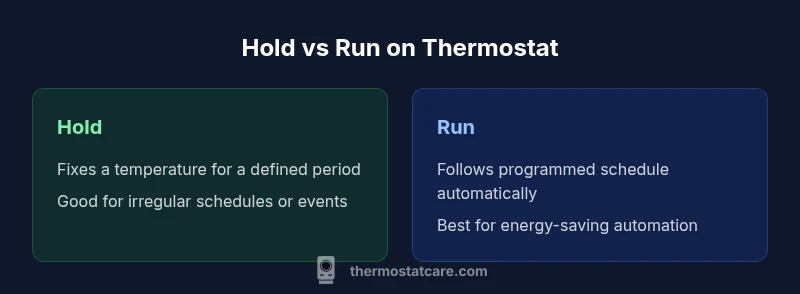
This comparison explains hold vs run on thermostat, two common modes for managing comfort and energy. Hold locks in a single temperature for a defined period or until you change it, while Run resumes your normal schedule and lets the system adjust with occupancy. The right choice depends on your routine, energy goals, and convenience.
Understanding hold vs run on thermostat
Understanding hold vs run on thermostat describes two fundamental approaches to meeting comfort needs. The phrase hold vs run on thermostat is a shorthand used by homeowners and installers to distinguish between a fixed temperature period and a scheduled, automatic adjustment. Hold mode locks in a temperature at a set point for a defined duration, or until you manually release it. Run mode, by contrast, follows the thermostat’s programmed schedule and allows the HVAC system to respond to occupancy, time of day, and temperature trends. For most households, the choice between hold and run is not about one being “better” universally, but about aligning a control method with daily routines, climate, and energy goals. In this article, we’ll compare the two modes, show where each excels, and offer practical guidelines for using hold vs run on thermostat in real-world scenarios.
From a Thermostat Care perspective, the distinction matters because it affects how reliably your home stays comfortable while you manage energy use. The Thermostat Care Team notes that most homeowners switch modes temporarily during vacations, irregular work schedules, or when guests alter normal patterns. By understanding how hold and run interact with your system’s heat gain, equipment age, and thermostat type, you can choose the approach that minimizes overshoot, keeps cycles short, and reduces nuisance adjustments.
How hold mode works
Hold mode is a straightforward feature: you set a specific temperature and a duration, and the thermostat maintains that temperature until the hold period ends or you cancel it. This is particularly useful when you know you’ll be away from home for an extended period, or when you want a fixed comfort level for a guest room or workshop. Typical steps to use hold include selecting the Hold option, choosing a temperature, and selecting a duration (hours or days). Some thermostats offer a “hold until” option, which preserves the temperature until you manually release it. Important nuances include the possibility of brief temperature fluctuations when the system finishes the hold and returns to the active schedule, depending on system type and age. If you have multiple zones, remember that holds can be set per zone, not just a single central thermostat, which adds flexibility for larger homes.
How run mode works
Run mode relies on the thermostat’s built-in schedule. It rotates between different target temperatures at predefined times of day, and often adjusts for weekends and holidays. The advantage is automation: once you have a well-tuned schedule, the HVAC equipment can operate more efficiently by anticipating occupancy and reducing unnecessary cycles. Run mode can incorporate adaptive recovery, where temperature ramps begin ahead of the scheduled time to minimize temperature deviation when you enter a room. For many households, run mode aligns with work hours and sleep patterns, delivering comfort without constant adjustment. The effectiveness of run mode depends on accurate setup: start times, target temperatures for each period, and how well the schedule matches actual daily routines.
Practical scenarios: irregular schedules and vacations
Real life rarely follows a perfect clock. People work shifts, travel for family, or host guests with different routines. Hold mode shines in these situations: when you’re away briefly but want a specific comfort level on return; when one area of the house should remain constant for a sleeping child or elderly occupant; or when you want a temporary override for a party or home project. Run mode, by comparison, stays advantageous when occupancy is regular but varies slightly day-to-day. It preserves automation, supports energy savings through planned temperature setbacks, and minimizes manual adjustments during the week. A practical rule is to apply hold for defined non-recurring periods and rely on run for everyday automation. Balance is often achieved by switching modes seasonally or during holidays.
Energy impact and practical savings
Energy usage in hold versus run scenarios hinges on duration and how aggressively you manage temperatures. Hold mode can momentarily increase energy use if you set a temperature far from the thermostat’s neutral or set it for a long duration while occupants are absent. Run mode often yields better energy efficiency by leveraging the thermostat’s schedule and occupancy information. However, if the schedule is poorly matched to actual behavior—e.g., you stay home unexpectedly without adjusting the program—energy can rise due to heating or cooling cycles that aren’t aligned with comfort needs. The key is to calibrate hold durations, ensure the run schedule reflects typical days, and adjust seasonally. In climates with rapid outdoor temperature shifts, combining short holds with a flexible run schedule can minimize maintenance cycles and improve overall efficiency.
Interacting with sensors and smart features
Smart thermostats bring extra nuance to hold vs run decisions. Occupancy sensors, geofencing, and learning schedules can make a run mode feel almost hands-free. When a home widget detects you’ve left, it may nudge the system toward setback temperatures; when you return, it can preheat or pre-cool to restore comfort. Hold modes still have value in smart ecosystems: you can lock in a preferred temperature for guests, during a temporary project, or while a specific zone is off-limits. Some systems offer adaptive hold—holding a temperature only until occupancy returns to a defined level—blending manual override with automation for a smoother experience. The result is a hybrid approach that keeps comfort high without excessive cycling.
How to transition between modes safely: step-by-step
Transitioning from hold to run (or vice versa) should be deliberate to avoid comfort disruption or energy waste. Start by checking the current schedule alignment with your routine. If you were in hold for a long period, plan a gradual ramp back to the programmed setpoints instead of an abrupt change. For a smooth handoff: 1) note your current temperature, 2) select the target temperature for the new mode, 3) save or confirm the change, 4) monitor for 24–48 hours and adjust as needed. For multi-zone systems, confirm the hold or run change has been applied to all zones to ensure uniform comfort. Finally, consider leaving a short-term override for a day or two if occupancy changes again. These steps help you maintain comfort while avoiding unnecessary energy expenditure.
Common mistakes and troubleshooting tips
Common mistakes include overusing hold during periods of frequent occupancy changes, underestimating how long a hold should last, and not updating the run schedule after holidays or changes in routine. Troubleshooting tips: verify you’re adjusting the correct thermostat if you have multiple zones; confirm the hold end time aligns with your schedule; check that adaptive recovery is enabled if your model supports it; and if the display shows an error, consult the manual for a reset or call for service if the thermostat fails to respond to commands. Regular reviews of your schedule and hold durations can prevent unexpected temperature swings and improve comfort consistency.
Maintenance considerations and calibration
Regular maintenance helps hold vs run features perform reliably. Start with a simple battery check if your thermostat relies on batteries; low power can cause delayed responses to hold or run commands. Calibrate any temperature offset between room readings and the thermostat to reduce comfort mismatches. If you have a smart thermostat, ensure firmware updates are current; some updates improve occupancy sensing and recovery timing. Periodically review the programmed temperatures for each period and adjust as the seasons change. Finally, if you replace equipment or install new HVAC components, revisit hold and run settings to reflect new performance characteristics.
Quick-start decision checklist
Use this quick-start guide to decide between hold and run: 1) Do you have irregular or unpredictable occupancy? If yes, hold can be useful for a fixed comfort level during specific periods. 2) Is your schedule predictable and energy-driven? Run mode is often better for automation and efficiency. 3) Do you use smart features like occupancy sensing or geofencing? Run mode can leverage these tools for automation, while hold can be used for temporary overrides. 4) Will you be away for an extended period? Hold is typically ideal for maintaining a set temperature when you’re not home. 5) Are you aiming to minimize cycling on older equipment? A well-tuned run schedule with occasional holds can reduce cycling and wear over time.
Final checks and next steps
After selecting a preferred mode, monitor a full cycle: at least one week is ideal to understand how your home responds to the chosen approach. Track comfort deviations, energy usage, and any manual overrides you perform. If you notice persistent overshoot or excessive cycling, revisit the schedule and hold durations. Engaging in yearly reviews, especially with seasonal climate shifts, helps keep outcomes aligned with goals. Remember that hold vs run on thermostat decisions are not permanent; you can adapt your approach as routines change or as you install new sensors or more advanced HVAC equipment.
Comparison
| Feature | Hold mode | Run mode |
|---|---|---|
| Definition | Locks a set temperature for a defined duration or until canceled | Follows the programmed schedule and adapts to occupancy |
| Best use case | Irregular schedules, one-off comfort overrides, guest rooms | Regular routines, automation, energy-saving opportunities |
| Energy impact | Energy use depends on hold duration and deviation from setpoint | Often lower energy use due to scheduled setbacks and automation |
| Ease of use | Manual input needed; duration or end time must be set | Automates temperature shifts; requires accurate schedule setup |
| Best for | Temporary override or fixed comfort in a zone | Daily automation and long-term energy efficiency |
Upsides
- Supports predictable comfort during known absences
- Easy override for planned events or guests
- Keeps a zone at desired temp without reprogramming
- Can be used to reduce nuisance adjustments during holidays
The Bad
- Can increase energy use if held at extreme setpoints
- May disrupt automation benefits during irregular days
- Requires mindful switching to avoid unnecessary cycles
- Overreliance on holds can complicate maintenance of schedules
Hold mode is best for irregular schedules; Run mode is best for automated energy savings
Choose hold when you need a fixed comfort level away from typical routines. Choose run when you want automatic adjustments aligned with occupancy and energy goals. For many homes, a hybrid approach offers the best balance.
Questions & Answers
What does hold mean on a thermostat?
Hold means the thermostat maintains a fixed temperature for a specified period or until you cancel it. It overrides the current schedule and prevents automatic adjustments during the hold window.
Hold locks in a single temperature for a defined period, overriding the schedule until you release it.
What does run mean on a thermostat?
Run follows the programmed schedule, allowing the temperature to change as programmed. It supports automation and occupancy-based adjustments to improve efficiency.
Run resumes the programmed schedule and adjusts with occupancy and time of day.
Does using hold save energy?
Energy impact depends on how long you hold and how it compares with your schedule. Short holds during off-occupancy periods can save energy, while long holds at comfort-setpoints may waste energy.
Energy effects depend on duration and your existing schedule; plan holds to minimize waste.
Can I use both hold and run in a single day?
Yes. You can use a hold for a specific period, then switch back to run mode to resume automation. This hybrid approach is common for weekends or special events.
Absolutely—switch to hold for a while, then return to automatic run.
How long should I hold a temperature?
Set the hold duration to reflect your planned absence or activity window. A typical hold might last a few hours to a day, but tailor it to your schedule and comfort needs.
Use a duration that matches how long you’ll stay away or need a fixed comfort level.
What if my thermostat supports adaptive recovery?
Adaptive recovery starts the heating or cooling早 before the scheduled time to reach the target temperature on time. It helps minimize overshoot when switching back to run mode.
If available, enable adaptive recovery to reach target temps on time.
What to Remember
- Choose hold for irregular schedules and temporary overrides
- Choose run for automation and energy savings
- Calibrate schedules after holidays or climate changes
- Leverage smart features to enhance run-mode effectiveness
- Test transitions carefully to minimize comfort disruptions