Amazon Thermostat Heating Instead of Cooling: A Practical Troubleshooting Guide
Discover practical, step-by-step troubleshooting for when an Amazon thermostat heats instead of cooling. Learn common causes, safe fixes, and prevention tips from Thermostat Care to get your home comfort back on track.


Most likely the thermostat is in heat mode or set to auto with heating priority, causing heating to run when cooling is needed. Quick fix: switch the Amazon thermostat to cooling mode, verify the fan setting, and ensure the schedule and app are synced. If it doesn’t resolve, check wiring and sensor status.
Why amazon thermostat heating instead of cooling happens
When you notice amazon thermostat heating instead of cooling, the root cause is almost always one of a handful of simple misconfigurations or sensor/wiring quirks. According to Thermostat Care, many homeowners encounter this after changing a mode, adjusting a schedule, or reconnecting the thermostat to the HVAC system. The problem can also stem from the thermostat misinterpreting a temperature reading or from a stuck reversing valve in a heat pump. Before you panic, run through a quick, structured check: first confirm that the thermostat is in cooling mode or Auto with cooling priority, then verify the setpoint and schedule, and finally test the wiring connections at the thermostat. With a calm, methodical approach, you can identify the culprit and apply the right fix without needing specialized tools.
Check the simplest explanations first
Start with the easiest checks to rule out obvious issues. Verify the thermostat’s displayed mode (Cool, Heat, or Auto) and ensure it matches your intention. Look at the current indoor temperature and the setpoint; a large gap might trigger the system to heat unexpectedly if the thermostat misreads or if the Auto setting prioritizes heat during certain times. Check the fan setting (Auto vs On) because a constantly running fan can confuse the system’s cooling cycle. Ensure the app shows the same settings as the thermostat, and that any schedules or geofencing rules aren’t forcing heat at your desired times. Finally, confirm that the thermostat’s firmware is up to date, since software glitches can cause erratic behavior.
Understanding modes and how they influence cooling
Modern thermostats distinguish several modes: Cool, Heat, Auto, and sometimes Cool with Emergency Heat. In Cool mode, the system should only engage cooling cycles; in Heat, it should only heat. Auto attempts to balance by turning on the appropriate mode to reach the setpoint, which can sometimes lead to unexpected behavior if sensors or wiring misreport conditions. A miswired wire label (for example, swapping W for Y) or a faulty reversing valve in a heat pump can make heat appear when cooling is called. If you have a heat pump, be aware of Emergency Heat (often labeled E) that may override typical cooling commands. Understanding these distinctions helps you diagnose misbehavior without scaring yourself.
Quick checks you can perform without opening panels
Safely verify power to the thermostat: feel for warmth on the device and check the circuit breaker. Confirm that the thermostat battery (if used) is fresh, and that the display isn’t dim or flashing. Check the wiring at the thermostat terminals, ensuring W and Y are connected to the correct terminals and that the wire colors align with the terminal labels. If your thermostat communicates via Wi‑Fi, confirm the device shows as connected in the app and that there are no pending software updates. Finally, ensure the HVAC outdoor unit or air handler is not experiencing a fault or a command reversal that could confuse the thermostat’s commands.
When to test sensor accuracy and system health
A faulty indoor temperature sensor can misreport the room temperature, leading the thermostat to overheat the space while cooling is requested. If your thermostat allows sensor calibration, perform a gentle calibration check. Compare the thermostat reading with a reliable external thermometer placed in the same room. If readings differ significantly, recalibrate or replace the thermostat if needed. If you suspect a control wiring issue beyond basic checks, it’s wise to proceed with more confident steps or call a professional. Remember, misdiagnosis here can mean days of discomfort in your home.
Safety and professional help: when to call a professional
If you’re unsure about wiring, reversing valve operations, or handling high‑voltage components, stop and call a licensed HVAC technician. Electrical hazards and improper wiring can cause equipment damage or personal injury. A pro can verify proper wiring, valve operation on heat pumps, and ensure the thermostat’s control logic matches the HVAC equipment. Even when it seems simple, a misstep during fixes can lead to long‑term issues, so don’t hesitate to seek expert assistance when in doubt.
Prevention tips to avoid future heating-instead-of-cooling issues
Regularly review and test your thermostat settings after major updates, replacements, or seasonal changes. Label wires clearly and maintain a copy of the thermostat wiring diagram for quick reference. Keep the thermostat firmware up to date, and run a brief test at the start of each heating and cooling season. Establish a predictable cooling setpoint and disable aggressive Eco or schedule rules when you’re away for extended periods. By maintaining clear configurations and documenting changes, you reduce the chance of this issue recurring.
Steps
Estimated time: 60-90 minutes
- 1
Power down safely
Turn off the thermostat power at the device and shut off the corresponding breaker to avoid shocks while inspecting wiring. This ensures you won’t accidentally energize the system during checks.
Tip: Use a non-contact tester to confirm no live voltage before touching wires. - 2
Check thermostat mode and scheduling
Confirm the thermostat is set to Cool or Auto with cooling priority. Review any active schedules that might override manual settings and disable geofencing if it’s not needed.
Tip: Temporarily simplify schedules to eliminate automation as the cause. - 3
Inspect thermostat wiring
Remove the cover and verify W and Y wires are on the correct terminals. Look for loose connectors or damaged wires; reseat and tighten as needed.
Tip: Label wires before disconnecting to avoid miswiring during reassembly. - 4
Assess the HVAC components
If you have a heat pump, check the reversing valve operation and outdoor unit for obstructions or ice. A stuck valve can lead to reversed heating/cooling signals.
Tip: Do not force mechanical parts; call a pro if you suspect valve issues. - 5
Reset and re-pair the thermostat
Reset the thermostat to factory defaults if problems persist, then reconfigure settings and re-pair with the mobile app. Verify the cooling cycle functions after re-pairing.
Tip: Keep a record of settings to restore quickly if something goes wrong. - 6
Test the system
Set the thermostat to Cool and monitor the system response for a few cycles. If heating still engages, move to professional assessment.
Tip: Document the behavior with timestamps to assist diagnosis.
Diagnosis: Thermostat heats space when cooling is selected on an Amazon thermostat
Possible Causes
- highMode misconfiguration (Heat or Auto with heating priority)
- highIncorrect wiring (W vs Y) or a stuck reversing valve in a heat pump
- mediumTemperature sensor reporting inaccurate readings
Fixes
- easyVerify thermostat mode and switch to Cool; adjust schedule and Eco rules
- mediumTurn off power and recheck wiring; reseat wires to correct terminals if needed
- mediumTest and calibrate/replace faulty temperature sensor
- hardConsult a licensed HVAC technician for wiring or heat pump reversing valve issues
Questions & Answers
Why does my Amazon thermostat heat when I set it to cool?
Common causes include a mis-set mode, wiring mix-ups, or a faulty sensor. Start by confirming cooling mode is active, then inspect wires and sensor readings. If the problem persists, consult the diagnostic flow and consider professional help.
Common causes are a mis-set mode, wiring mix-up, or a faulty sensor. Check cooling mode, inspect wires, and test the sensor, then decide on next steps.
How do I switch the thermostat to cooling mode?
In the thermostat interface or the companion app, select Cool or Auto with cooling priority, and disable any active heat-focused schedules. Confirm that the change is pushed to the HVAC system.
Open the app or thermostat and choose Cool, then ensure schedules aren’t forcing heat.
Can a faulty temperature sensor cause heating in cooling mode?
Yes. If the sensor misreports room temperature, the thermostat may command heating. Try calibration if available or replacing the thermostat if readings remain inconsistent.
A bad sensor can misreport temperature, causing heat to run when cooling is requested.
When should I call a professional?
If wiring looks wrong, the heat pump reversing valve is suspected, or you’re uncomfortable working with electrical components, call a licensed HVAC technician. They can safely diagnose and correct wiring, valve operation, and control logic.
Call a licensed HVAC technician for wiring or valve issues.
Does resetting the thermostat fix heating/cooling issues?
Resetting can clear glitches and restore default logic, but it may also erase saved schedules. After reset, reconfigure settings and test cooling cycles to confirm the issue is resolved.
Reset can help, but reconfigure settings afterward and test cooling cycles.
Watch Video
What to Remember
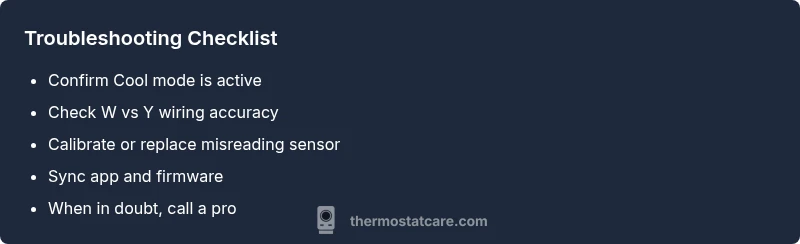
- Verify mode, schedule, and app sync first
- Wiring mistakes are a common culprit
- Sensor accuracy can mislead the thermostat
- Call a professional for wiring or heat pump valve issues