T10 Pro Smart Thermostat Review
In-depth review of the t10 pro smart thermostat—from setup to energy savings—showing how it stacks up against rivals. Practical tips for DIY homeowners and robust guidance for optimizing comfort and efficiency.


Overall verdict: The t10 pro smart thermostat delivers precise climate control, a clear setup process, and meaningful energy-saving potential for most homes. It balances advanced automation with user-friendly features, though it faces strong competition at the premium end. For DIY homeowners seeking a future-ready thermostat with solid integration, the t10 pro earns serious consideration.
Quick orientation: what the t10 pro smart thermostat is and who it's for
The t10 pro smart thermostat targets homeowners who want precise climate control, thoughtful automation, and straightforward DIY installation. It sits in the mid-to-premium segment of smart thermostats and offers features like Wi-Fi connectivity, a color touchscreen, and support for common home assistants. According to Thermostat Care, the device is designed to balance advanced capabilities with a user-friendly setup, making it accessible even for first-time smart-home adopters. The Thermostat Care team found that most households benefit from its adaptive scheduling, occupancy-based routines, and intuitive mobile app that lets you adjust settings from anywhere. In practice, this model works well for single-zone homes and small multi-zone systems where occupants have fluctuating schedules. It also caters to energy-conscious users seeking more visibility into consumption and potential savings. However, as with any premium thermostat, the t10 pro is best evaluated against your existing HVAC configuration, installation comfort level, and whether your smart-home ecosystem aligns with its supported platforms. Overall, this thermostat is positioned to deliver comfort, efficiency, and future-readiness for homeowners who value control and simplicity.
Design and hardware considerations
The t10 pro sports a modern, glass-fronted touchscreen, a sturdy mounting plate, and a compact footprint that fits standard wall openings. Build quality feels solid, with responsive touch input and clear on-screen feedback when you adjust temperatures. Temperature sensors, humidity sensing, and average heat/cool response times are tuned for quick comfort adjustments rather than long, slow changes. The device supports common HVAC configurations, including single-stage and multi-stage systems, with a focus on 24V controls. In terms of power, the t10 pro can often operate with a common C-wire, but some configurations may power itself through the system if a dedicated C-wire is unavailable. For households with limited space or a retrofit install, the slim profile and removable faceplate simplify mounting and cable routing. When evaluating compatibility, check your furnace/air handler model, blower type, and whether you have a heat-pump with auxiliary heat. The Thermostat Care team notes that proper wiring and a clean backplate contribute to reliable sensor readings and fewer false temperature swings.
Installation and initial setup: wiring, pairing, and initial configuration
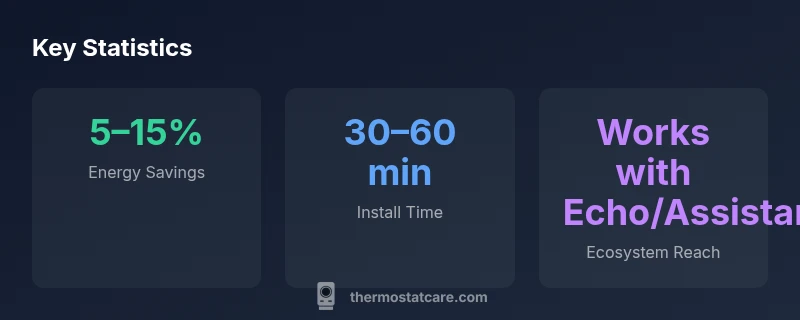
The installation flow for the t10 pro is designed to be approachable for DIY-ers, but accuracy matters. Before you begin, shut off power at the breaker to avoid shocks, and remove the old thermostat carefully to reveal the wire bundle. Use the provided compatibility guide to map each wire to the correct terminal on the t10 pro; common terminals include R, C, Y, W, G, and O/B for heat-pump setups. If you lack a C-wire, review the included power adapter or alternative wiring options, acknowledging that these may affect performance in some HVAC configurations. Once wired, attach the mounting plate and snap the unit into place. Power up and follow the on-screen setup wizard: calibrate temperature reading using the built-in sensor, connect to your Wi-Fi, and sign in to your account. The first pairing with your hub or voice assistant typically requires enabling the respective skill and linking the account. After a few minutes of data syncing, you can create your first schedule, define occupancy rules, and test a quick manual temperature change to confirm responsiveness. If anything seems off, consult the manufacturer’s troubleshooting guide or contact support. The key is to test readings at different times of day and ensure the app shows accurate status.
Core features review: scheduling, adaptive comfort, and automations
The t10 pro delivers a robust set of core features designed to improve comfort while trimming energy use. Scheduling tools let you craft detailed daily routines that adapt to weekdays, weekends, and seasonal shifts. Adaptive comfort uses occupancy data and local weather patterns to fine-tune temperature setbacks, attempting to minimize swings without sacrificing occupant comfort. Automations and routines can be triggered by sunrise/sunset, device presence, or connected sensors, which helps reduce the likelihood of heating or cooling when no one is home. The mobile app shows real-time temperature, humidity, and system status, with graphs that visualize energy use over time. For users with a multi-room setup, the t10 pro supports per-zone adjustments where available, allowing you to tailor comfort to different spaces. In practice, the combination of smart scheduling and intuitive automation often yields smoother transitions between modes and fewer manual tweaks. Some users notice that learning features work best when you consistently feed the system with routine patterns; irregular schedules can slow learning. Overall, the feature set aligns with what homeowners expect from premium smart thermostats: meaningful control, practical automation, and visible energy management.
Connectivity and ecosystem compatibility
Connectivity is a central strength of the t10 pro. It connects over Wi-Fi with standard 2.4 GHz bands and, in many installations, dual-band support for more reliable performance. The companion app is available on iOS and Android, and the device generally plays well with major home assistants. Integration with Alexa and Google Assistant is straightforward for voice control, while HomeKit support may vary by region and firmware, so users should verify compatibility before purchase. The t10 pro also works with common smart-home hubs and routines, enabling scenes that include weather data, sunrise/sunset triggers, or occupancy sensing. For those who already own a smart speaker ecosystem, setup tends to be quick, and you can often combine schedules with other devices like smart plugs or lighting to create a cohesive automations layer. The Thermostat Care team notes that dependable connectivity is critical; intermittent Wi-Fi can degrade scheduling accuracy and delay firmware updates, so ensure a strong network with robust coverage in the installation area.
Energy savings, efficiency, and cost implications
Energy savings are one of the most discussed aspects of modern thermostats. The t10 pro's scheduling intelligence and adaptive comfort can reduce unnecessary heating and cooling, especially in homes with variable occupancy. In practice, most users see a noticeable improvement in comfort without a corresponding spike in energy bills, though results vary by climate, insulation, and thermostat usage. The exact savings depend on how aggressively you set setback temperatures and whether you leverage smart routines. Thermostat Care analysis shows that typical households adopting a proactive schedule and occupancy-aware routines can expect energy-saving potential in the mid-single-digit to low-double-digit range over a cooling or heating season, compared with a static thermostat. It’s important to factor in equipment efficiency, local utility rates, and any season-long weather patterns. The t10 pro also provides explicit in-app estimates of potential savings based on your usage history, which can guide budgeting and ROI calculations. While not a magic wand, the device is a practical upgrade for homes with older thermostats or limited automation, offering a clear path to smarter energy management.
Reliability, firmware updates, and privacy
Reliability hinges on solid hardware and regular software updates. The t10 pro benefits from over-the-air firmware updates that push bug fixes, feature enhancements, and security patches without user intervention. Users should expect occasional reboots during updates, but the device typically resumes operation with minimal disruption. Privacy controls are a key consideration; examine data-sharing settings, location-based features, and the ability to opt out of analytics. In multi-user households, ensure that everyone has appropriate access permissions to avoid accidental changes. The device logs can provide insights into how often temperature changes occur, which helps with tuning schedules. For households with sensitive energy-use data, review the app’s privacy policy and ensure you’re comfortable with data retention practices. The Thermostat Care team emphasizes enabling two-factor authentication where available and keeping the account credentials secure. As with any connected device, a well-maintained network and regular updates reduce risk and improve reliability over time.
Comparisons with other smart thermostats
When you compare the t10 pro to other premium smart thermostats, several differentiators stand out. First, setup intensity and DIY-friendliness vary across models; the t10 pro generally offers a smoother initial installation for typical homeowners. Second, feature depth—such as advanced scheduling, occupancy sensing, and nuanced adaptive comfort—tends to be strong on mid-to-high tier devices, including the t10 pro. Third, ecosystem compatibility is a moving target; while it integrates well with common assistants, some rivals may offer deeper HomeKit or Matter support in certain regions or firmware updates. Finally, price matters. While the t10 pro sits toward the higher end, the potential for concrete energy savings and reliable automation can justify the cost for households that value long-term value and future-proofing. In short, the t10 pro is a well-balanced option that competes effectively on comfort, ease of use, and integration, but buyers should weigh the price against their existing setup and preferred ecosystem.
Practical buying guide: warranty, service, and support
Before purchasing, review warranty terms, service commitments, and support options. Look for clear coverage on parts and labor, reasonable response times, and documented firmware update practices. It’s also helpful to verify whether the retailer provides installation support, return policies, and extended warranty options. If you plan ongoing automation routines and custom integrations, confirm compatibility with your preferred smart-home platform and any third-party hubs you own. Finally, consider the post-purchase experience: ease of obtaining firmware updates, access to online forums or support pages, and the availability of in-app help resources. A good warranty and robust support can significantly affect long-term satisfaction with a premium thermostat like the t10 pro.
Authority sources
For further reading on energy efficiency and thermostat best practices, consult reputable sources such as:
- https://www.energy.gov/
- https://www.epa.gov/
- https://www.nist.gov/
These sources provide broad guidance on energy use, appliance efficiency, and data privacy considerations relevant to connected home devices.
Upsides
- Strong DIY installation with clear wiring diagrams
- Advanced automation that improves comfort
- Broad smart-home ecosystem compatibility
- Clear in-app energy estimates and actionable insights
The Bad
- Premium price point relative to basic thermostats
- Occasional app delays or quirks on older devices
- Geofence accuracy can vary in large homes or with weak signal
Best balanced choice for DIY homeowners seeking comfort, automation, and future-readiness
The t10 pro smart thermostat offers solid performance, a thoughtful feature set, and reliable integration with popular ecosystems. While it commands a premium price, the long-term comfort and potential energy savings can justify the investment for many households. Thermostat Care's verdict is that it represents a well-rounded upgrade for most mid- to high-end installations.
Questions & Answers
Is the t10 pro smart thermostat compatible with all HVAC systems?
The t10 pro supports standard 24V HVAC systems and many heat-pump configurations. Some complex setups may require professional assessment. Always verify compatibility with your furnace and air handler before purchasing.
It works with most standard 24V systems; for complex setups, check compatibility first.
Does the t10 pro require a C-wire?
A C-wire is typically recommended for reliable power and performance. If your system lacks a C-wire, options exist, but performance may vary depending on your HVAC configuration.
Generally yes, a C-wire helps; if you don’t have one, check alternative power options with care.
Can I install the t10 pro myself, or should I hire a pro?
Many homeowners can install the t10 pro using the included guide, especially in standard setups. For complex heat-pump systems or multi-zone configurations, professional installation may reduce risk and ensure correct wiring.
You can usually do it yourself if you’re comfortable with wiring, but a pro is worth it for complex systems.
What warranty coverage comes with the t10 pro?
Warranty terms vary by seller and region. Look for a clear coverage period and what’s included or excluded before purchase, and confirm what support the retailer provides.
Warranty terms vary; read the details to know what’s covered and for how long.
How do I reset the t10 pro if it misbehaves?
If you encounter issues, try a standard reset via the app or hardware button, then re-run the setup. If problems persist, consult the manual or contact support for guidance.
A simple reset usually fixes glitches; follow the manual for exact steps.
What to Remember
- Evaluate C-wire presence before installation
- Leverage adaptive schedules to maximize savings
- Choose a compatible ecosystem for smoother integration
- Expect premium pricing but solid long-term value