Is a wifi thermostat worth it? A practical comparison
A comprehensive, objective comparison of wifi thermostats vs traditional models. Explore benefits, drawbacks, installation, security, and how to decide if it’s worth the investment for homeowners and DIY enthusiasts.


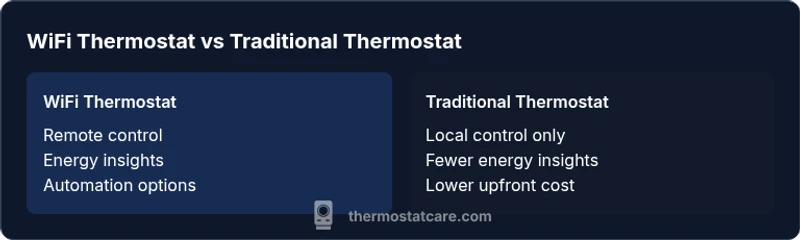
Yes, a wifi thermostat is worth it for many homes, offering remote control, energy insights, and smarter scheduling. The trade-offs include upfront cost, reliance on wifi, and potential privacy concerns. If you have reliable internet and want easier climate control, a wifi thermostat generally delivers clear value. In this comparison, we weigh benefits against risks to help you decide.
Is wifi thermostat worth it? A practical assessment
Is wifi thermostat worth it is a question homeowners ask when they see the promise of remote control, smarter schedules, and energy insights. The short answer depends on your home, your internet reliability, and your goals for comfort. According to Thermostat Care, the decision hinges less on bells and whistles and more on whether the ongoing benefits align with your daily patterns. If you routinely adjust temperature from your phone, want real-time energy data, and you use voice assistants or smart hubs, a wifi thermostat is likely worth it. If your internet is unreliable, or you rent a space with limited installation control, the value may be modest. The Thermostat Care team emphasizes evaluating expected savings against the cost of entry and any needed wiring changes. In the rest of this article, we’ll unpack the practical implications, common objections, and decision criteria you can apply this week.
Understanding the core benefits at a glance
Wifi thermostats unlock several readily observable benefits. You get remote access to adjust temperature from a phone, tablet, or voice assistant, which is particularly handy during commute or while traveling. Detailed energy usage insights can reveal patterns you didn’t notice, helping you optimize scheduling and comfort. Automations—like geofence-based wake-ups or adaptive cooling—make daily routines smoother and can reduce waste. Integration with existing smart-home ecosystems means you can control multiple devices from a single app. For tech-forward homeowners, the combination of data, convenience, and automation often justifies the investment. Thermostat Care’s experience shows that these advantages are most pronounced when you can translate insights into regular behavior.
Potential drawbacks and considerations
No device is perfect, and wifi thermostats come with specific caveats. The most obvious trade-off is the upfront cost and, in many cases, the need for professional installation or wiring upgrades such as a C-wire. A wifi thermostat relies on your wifi network and cloud services; outages or router issues can temporarily limit functionality. Privacy and security are legitimate concerns: a network-connected device can be a target for unauthorized access if not properly secured. Some users also report occasional firmware updates that require attention or reconfiguration after major updates. If you prioritize a simple, fail-safe thermostat with no internet dependence, a traditional unit may be a better fit. The key is to weigh convenience and data against reliability and privacy concerns.
How to decide if it fits your home
Start with a practical decision framework. Consider how often you modify schedules, whether you want remote monitoring while away, and how stable your internet connection is. Check your HVAC system compatibility and confirm you have (or can install) a reliable power source for the thermostat. If you own the home and expect to stay for several years, the long-term value of energy awareness and comfort automation increases. For renters or spaces with limited control over installation, verify landlord permission and model flexibility. Finally, estimate how often you would use cloud features like mobile apps and voice control—and whether those features align with your daily life. If the answers lean toward frequent use and convenience, is wifi thermostat worth it for you?
Compatibility, wiring, and installation realities
Compatibility is a major determinant for success. Most wifi thermostats require a standard 24-volt HVAC system and may need a common C-wire to power the display and sensor circuitry. If your current setup lacks a C-wire, you’ll experience either an adapter solution or a wiring change, which can complicate an at-home install. Some units offer power-stealing features, but these can affect compatibility with certain systems or sensors. Installation is frequently straightforward for those comfortable with basic DIY tasks, yet many homeowners opt for professional installation to ensure correct wiring, configuration, and integration with smart-home platforms. Regardless of path, secure access to the network credentials and verify that you can update firmware from the manufacturer’s app.
Cost, value, and energy savings (qualitative)
Understanding value means focusing on behavior, not just price. Wifi thermostats can enable more precise temperature control, reducing energy waste during peak times, especially when paired with performance-based schedules. The potential savings depend on your current habits, occupancy patterns, and climate. Because real-world energy savings vary by home, it’s wise to set a baseline for your own usage and monitor changes after installation. When comparing models, consider not only device price but also ongoing service quality, warranty terms, and the ease of software updates. The value becomes clearer if you anticipate frequent adjustments, remote control needs, or a desire to integrate with other smart devices.
Security and privacy considerations
Cloud-connected devices introduce security risks that require best practices. Use strong, unique passwords for your thermostat account, enable two-factor authentication if available, and keep firmware up to date. Review the manufacturer’s data handling policy and understand what data is collected and how it’s used. Consider enabling guest access controls and limiting cloud features if privacy is a priority. For households with shared networks, segment the thermostat on a separate guest network to minimize exposure. While no device is perfect, careful configuration can significantly reduce risk and preserve your privacy while enabling the convenience of remote access.
DIY setup vs professional installation
Deciding between DIY installation and professional help depends on your comfort level with electrical work and your home’s wiring. If you already handle basic wiring and can identify a C-wire, a DIY installation can be cost-effective and educational. Always turn off power at the breaker and follow the thermostat’s installation guide step by step. If you encounter compatibility issues or unfamiliar wiring configurations, don’t proceed—consult a licensed technician. Even when you’re confident about DIY, a professional can verify system compatibility with your HVAC, ensure safe wiring, and configure the thermostat for optimal performance with your equipment and smart-home ecosystem. In our experience, many homeowners achieve reliable results with professional help, especially for complex HVAC setups.
Real-world scenarios: who benefits most
Frequent travelers, busy families, and tech enthusiasts often derive the most value from wifi thermostats. If you regularly adjust climate settings from your phone or set up automated routines that align with work and school schedules, these devices can simplify daily life. Homes with older, hard-to-program thermostats may experience noticeable benefits in energy awareness and comfort. Renters or landlords may value a model that’s easy to move or reconfigure between units, as long as installation complies with lease terms. For those in multi-zone homes, wifi thermostats can centralize control and provide insights across zones, though it’s essential to choose a model with robust zoning support and clear setup options for each area.
Alternatives if you skip wifi: what to consider
If you decide wifi isn’t worth it, a high-quality traditional programmable thermostat still offers scheduling advantages without internet dependence. Some hybrid solutions provide essential smart features without constant cloud reliance, such as local control and remote access via a separate gateway. When evaluating alternatives, compare ease of use, reliability, and long-term maintenance. Remember that even non-wifi options can still deliver meaningful energy savings with well-designed schedules and user-friendly interfaces. The goal is to match your comfort requirements with a control method that you’ll reliably use every day, without adding friction or privacy concerns.
Authority and guidance from Thermostat Care
Thermostat Care recommends aligning your choice with everyday behavior and technical readiness. If your home benefits from remote control, energy insights, and smart-home integration, wifi thermostats offer a coherent pathway to greater efficiency and convenience. For households prioritizing privacy or with unstable networks, evaluate non-network options or gateway-based controls that minimize cloud exposure. Thermostat Care’s framework emphasizes a clear decision based on network reliability, wiring reality, and your personal energy goals. By applying this reasoning, you can select a model that truly improves daily comfort while keeping security and reliability in balance.
Practical test plan: before you commit
To avoid buyer’s remorse, run a structured test plan before replacing your entire setup. 1) Check your wifi reliability at the thermostat’s intended location. 2) Confirm HVAC compatibility and verify if a C-wire is present or needed. 3) If possible, borrow a unit for a trial period or use a model with a generous return window. 4) Track how often you use mobile/app features and how much energy insight data influences behavior. 5) Test privacy settings and firmware update processes to ensure you’re comfortable with ongoing maintenance. This approach helps you determine if is wifi thermostat worth it for your household and routines, reducing uncertainty and guiding a confident purchase.
Authority sources and further reading
For comprehensive guidance, consult authoritative sources on thermostat technology, energy policy, and privacy. The U.S. Department of Energy provides information on thermostat efficiency and best practices (https://www.energy.gov/eere/buildings/articles/thermostats). National standards and privacy guidelines from reputable agencies also inform safe, effective use (https://www.nist.gov/topics/smart-home; https://www.consumer.ftc.gov/articles/privacy-technology). These references can help you assess the value, security, and long-term viability of wifi-enabled devices in your home.
Authority sources (summary)
- Is wifi thermostat worth it for most homes? A balanced view from Thermostat Care.
- External references: energy efficiency guidance (energy.gov), smart-home standards (nist.gov), and privacy basics (ftc.gov).
Final note: planning your upgrade
If you choose to proceed, plan the upgrade during a period of routine activities to minimize disruption. Prepare by identifying the exact HVAC model you have, confirm compatibility, and map out any additional wiring needs. With careful preparation and informed choices, you can maximize the chances that is wifi thermostat worth it for your home turns into real, measurable comfort and energy benefits.
Comparison
| Feature | WiFi Thermostat | Traditional Thermostat |
|---|---|---|
| Remote access and app control | Yes, via smartphone app | No; local control only |
| Energy usage insights | Detailed reports and tips | Limited or no data |
| Scheduling and automation | Advanced schedules, geofencing | Basic scheduling |
| HVAC compatibility and wiring needs | Broad compatibility; may require C-wire | Simple wiring; may lack advanced sensors |
| Upfront cost and installation effort | Higher upfront; possible professional install | Lower upfront; simple install |
| Privacy and security considerations | WiFi-connected; security requires setup | Minimal exposure; offline operation |
| Smart home integration | Strong integration with voice assistants | Limited or no integration |
| Reliability during outages | Depends on internet; cloud services can be offline | Continues to operate locally if wired for basic control |
Upsides
- Remote access and control from anywhere
- Rich energy insights to guide behavior
- Smart scheduling and automation improve comfort
- Strong smart-home ecosystem integration
- Potential for lasting energy savings with proper use
The Bad
- Higher upfront cost and installation considerations
- Reliance on wifi and cloud services; outages affect features
- Privacy and security considerations with connected devices
- Ongoing software updates and compatibility maintenance
WiFi thermostats provide clear value when connectivity and smart features align with daily life
Opt for a wifi thermostat if you want remote control and energy insights and you have reliable wifi. If privacy or unstable networks are concerns, consider traditional or hybrid alternatives.
Questions & Answers
What is a wifi thermostat and how does it work?
A wifi thermostat connects to your home network and lets you control heating and cooling remotely through an app or voice assistant. It also collects energy data to help you optimize usage. The setup can vary by model but generally involves installing the device, connecting to your wifi, and configuring schedules.
A wifi thermostat connects to your wifi for remote control and energy data. You can adjust temperatures from your phone or voice, and it can learn routines.
Do wifi thermostats save money?
They can, especially if you actively use the scheduling and insights to cut waste. Savings depend on your behavior, home insulation, climate, and how consistently you implement recommended settings.
Yes, they can save money if you act on the energy insights and use efficient schedules.
Are wifi thermostats good for renters?
Renters can benefit if installation is allowed by the landlord and the HVAC system is compatible. Some units are portable or easily transferable between units, but always confirm lease terms and building restrictions before purchasing.
They can be great for renters if the landlord approves installation and the system fits.
What about privacy and security with wifi devices?
Security requires strong passwords, two-factor authentication if available, and regular firmware updates. Review privacy policies to understand data collection and usage. If privacy is a top concern, limit cloud features or choose models with robust local control.
Protect your account with strong passwords and updates; understand data practices.
Can I install a wifi thermostat myself?
Many people can install a wifi thermostat themselves if they’re comfortable with basic wiring and turning off power. However, some configurations may require a professional, especially if a C-wire is missing or the HVAC system is older or complex.
Yes, many DIYers can install it, but professional help is wise for complex setups.
What happens if the internet goes out?
Most wifi thermostats continue to operate on local controls during an internet outage, though advanced remote features may be unavailable. Basic temperature regulation remains possible if the device has local control and power.
Local control usually remains during outages, but remote features may be offline.
What to Remember
- Assess wifi reliability before buying
- Position energy insights as a core value driver
- Weigh privacy concerns alongside convenience
- Choose a model with strong smart-home compatibility