ecobee pro review: performance, setup, and value
An analytical review of the ecobee pro thermostat—setup, features, energy savings, and practical homeowner tips. Learn how it stacks up against rivals, installation considerations, and who should buy.


ecobee pro is a smart thermostat designed for energy savings, smart home integration, and multi-room comfort with options for room sensors and remote access. This review evaluates setup ease, feature depth, compatibility with major ecosystems, and real-world performance. Expect balanced insights on value, reliability, and whether it fits typical homes.
What ecobee pro is and who it's for
ecobee pro positions itself as a versatile smart thermostat built to optimize comfort across zones while reducing energy waste. It integrates with major ecosystems and supports room sensors for improved occupancy-aware control. According to Thermostat Care, ecobee pro is especially compelling for households with multi-room layouts or people who value precise temperature management. This section lays out the core use cases: a tech-forward home that wants reliable schedules, remote access, and quick routine creation. For homeowners who want hands-on control without sacrificing convenience, ecobee pro can deliver a well-rounded experience. While the upfront cost is a factor, the potential long-term energy savings and improved comfort justify the investment in many scenarios. The product’s design emphasizes a clean, modern interface that makes setup approachable for DIY enthusiasts, yet robust enough for enthusiasts who want deeper customization.
In practice, most users will appreciate the blend of automation, voice control, and remote monitoring. The Thermostat Care team has found that the device performs best when room sensors are deployed in key living zones to balance hot and cold spots. This approach helps avoid overcompensation and keeps the overall system responsive to daily routines. If you’re upgrading from a legacy thermostat, you’ll notice a nimble app, clearer energy dashboards, and faster response times, which contribute to a more satisfying long-term ownership experience.
Design, hardware, and installation considerations
ecobee pro ships with a sleek, wall-mountable base, a responsive touchscreen, and compatibility with most common furnace and heat pump configurations. The hardware philosophy emphasizes modularity: room sensors can be added gradually as your budget and comfort goals evolve. The installation experience is largely DIY-friendly for straightforward single-stage systems, but more complex setups (multistage heat pumps, dual fuel, or systems with uncommon wire colors) benefit from planning or professional help. When you’re wiring, take a careful photo of the old terminal block to map wires accurately to the ecobee pro base. Thermostat Care’s checklist highlights verifying power (Rh/RC jumpers, C-wire presence) and ensuring a secure C-wire connection before power is restored. If your home has 230V lines or unusual wire colors, consult a pro to avoid miswiring. A well-planned install minimizes reboot cycles and sensor re-calibration after the initial setup.
From a usability standpoint, the ecobee pro app mirrors the on-device experience: fast loading screens, clear zoning options, and a predictable workflow for creating schedules. The brand intends to reduce friction by guiding users through each step with context-sensitive prompts. A thoughtful design detail is the sensor management sheet, which helps you place room sensors for optimal coverage without over-clustering devices in one area. In our tests, a few minutes of planning before mounting sensors translated into smoother operation and more consistent comfort levels across rooms.
Core features and what they do
The ecobee pro’s feature set centers on comfort optimization, energy awareness, and ecosystem compatibility. Core features include occupancy-based scheduling, room sensors for multi-room consistency, geofencing for automatic adjustments when you leave or return home, and voice assistant support through popular platforms. The device collects data from occupancy patterns to adjust heating and cooling on a time-based, predictive basis, which often yields noticeable energy savings over time. In practice, you’ll see energy dashboards that translate usage into monthly trends, with recommendations for improving efficiency.
Key strengths include robust ecosystem integration (Alexa, Google Assistant, HomeKit compatibility in most configurations) and a responsive mobile app that mirrors the functionality of the physical panel. The system also supports alerting for filter changes and maintenance reminders that help homeowners stay on top of HVAC upkeep. However, the breadth of features can make some screens feel dense for first-time users. We recommend dedicating a short setup session to tailor the schedules and sensor placements to your home’s unique layout. This upfront effort pays off in steadier comfort and fewer manual tweaks later on.
Real-world energy savings and performance
In real-world use, ecobee pro tends to deliver meaningful energy savings when you leverage room sensors and occupancy-based controls. Users who populate multiple zones report fewer temperature swings and more consistent comfort, especially in homes with open-plan living areas or separate sleeping zones. Thermostat Care analysis shows that homes with properly positioned sensors and disciplined scheduling tend to outperform single-zone configurations, with noticeable reductions in short cycling and thermostat wake-ups during overnight hours. While individual results vary based on climate, insulation, and usage patterns, the consensus is that ecobee pro offers a solid balance of features and efficiency that scales with your home’s size.
From a reliability standpoint, the device maintains stable Wi-Fi connections and predictable response times, provided your network has adequate coverage. In cases where a network is spotty, you may experience delayed updates or slower sensor syncing, which can be mitigated by ensuring a stable router location or adding range extenders. The energy-data visuals are useful for motivating behavior changes, such as using the geofence to reduce cooling during the workday or adjusting schedule windows in shoulder seasons when the savings marginally differ. In short, the ecobee pro performs well in typical residential environments and rewards those who commit to sensor-based optimization.
Brand context: The Thermostat Care team notes that sustained savings depend on feature utilization and correct installation. In our evaluation, the biggest accelerators were setting sensible occupancy rules and consistently using the sensors to prevent overheating or overcooling in key zones.
Compatibility, ecosystems, and smart home integration
ecobee pro’s compatibility extends across major smart-home ecosystems, including Alexa, Google Assistant, and HomeKit, with cloud-based syncing that keeps devices coordinated even when you’re away from home. The ability to pull in external sensors, integrate with smart vents or additional thermostats, and participate in routine automation makes it a strong hub for a modern smart home. In practice, you’ll likely create scenes that coordinate with lighting schedules, weather-based adjustments, and occupancy cues. The setup guide emphasizes verifying compatibility with your existing hub and confirming the presence of a C-wire for reliable power.
This broad ecosystem support means you won’t feel locked into a single vendor. For households investing in multiple smart devices, ecobee pro offers a flexible approach that reduces the number of separate apps you must manage. It’s worth noting that some advanced features, such as advanced occupancy analytics or cloud-based recommendations, may benefit from a stable internet connection and periodic app updates. The net effect is a thermostat that can adapt to a wide range of homes, from compact apartments to two-story residences with several zones.
Setup steps and potential pitfalls
Before you start, gather the following: the old thermostat’s wiring diagram, a photo of the backplate, tape to label wires, and a stable power source. Begin by turning off the power at the breaker to avoid any shock or damage. The first step is to remove the old unit and identify the wires connected to R, C, W, Y, and G terminals. If you lack a C-wire, consider using the ecobee power extender kit (PEK) if your wiring supports it. Attach the ecobee pro base, secure the wall plate, and connect the wires to the corresponding terminals. Once wired, mount the faceplate, power up the unit, and follow the on-screen prompts to connect to Wi-Fi, link to your accounts, and import preferences.
Pitfalls to avoid include mislabeling wires, forcing a connection to a terminal that isn’t compatible, and neglecting the C-wire requirement for consistent power. If you encounter compatibility questions, the ecobee support site provides a wiring diagram tool and a compatibility checker that can save a lot of time. Finally, ensure the room sensors are placed with adequate spacing to prevent duplicate or conflicting readings. A thoughtful placement plan reduces post-install fine-tuning and helps your system respond more naturally to daily routines.
Comparisons to rivals and value proposition
Compared to rivals, ecobee pro stands out for its sensor-rich approach and broad ecosystem compatibility. It offers a more flexible multi-room strategy than some single-room thermostats and often undercuts premium multi-zone options by providing a strong feature set at a mid-to-high price point. Nest and Honeywell are common points of comparison; where ecobee pro differentiates itself is in its room-sensor strategy and its relatively open integration with HomeKit and other platforms. For households prioritizing comfort in multiple zones, ecobee pro tends to outperform simpler thermostats due to the targeted control enabled by the sensors. However, if you’re deeply committed to a single ecosystem or if you want an ultra-minimal setup, a simpler model might be enough. Our takeaway is to map your zone count, compute potential energy savings from sensor-based control, and compare total cost of ownership over a 5-year horizon before deciding.
Reliability, support, and warranty considerations
Reliability for ecobee pro is generally solid, with quick software updates, a straightforward app experience, and responsive customer support channels. The device’s lifespan is comparable to other quality thermostats, and the warranty terms are typically aligned with standard industry practice. Maintenance features like filter reminders and routine energy reports help extend the device’s useful life by encouraging proactive HVAC care. If you rely on cloud-based features, ensure you have a stable internet connection and a backup plan for network outages to avoid losing access to controls. The Thermostat Care team recommends reviewing warranty terms and keeping firmware up to date to maximize longevity, especially in busy households where the device runs frequently.
Is ecobee pro right for you? DIY vs professional installation considerations
For DIY enthusiasts, ecobee pro is a compelling project that rewards careful wiring and planning. If your system is straightforward (single-stage heat or AC, standard set of wires), you can complete installation in a single afternoon with minimal hassle. If your home has a heat pump with auxiliary heat, multi-stage configurations, or older wiring, a professional installation can reduce risk and ensure optimal sensor placement. Even when hiring a pro, you’ll benefit from a front-end plan: map out zones, decide which rooms get sensors, and define the desired schedules. Budget for sensor additions if you’re targeting uniform comfort across a larger footprint. In all cases, use the Thermostat Care checklist and verify that a C-wire is present or that the recommended alternative power solution is installed correctly. The goal is reliable operation and clear energy insights from day one.
Upsides
- Strong energy-management features with occupancy-based control
- Excellent ecosystem compatibility (Alexa, Google, HomeKit)
- Multi-room sensor support improves comfort in larger homes
- Clear energy dashboards and intuitive mobile app
The Bad
- Higher upfront cost than basic thermostats
- More complex feature set can be overwhelming for beginners
- Sensor placement requires thoughtful planning for best results
Best for tech-forward homes seeking strong multi-zone comfort and broad ecosystem support.
ecobee pro delivers solid energy savings, flexible room-sensor-based comfort, and broad compatibility. The higher upfront cost and learning curve are trade-offs, but for multi-zone households it’s a compelling long-term purchase. The Thermostat Care Team finds it a well-rounded choice for most modern homes.
Questions & Answers
What is ecobee pro?
ecobee pro is a smart thermostat designed to optimize comfort across zones while delivering energy savings. It integrates with major ecosystems and supports room sensors for more precise control. This review covers setup, features, and real-world performance.
ecobee pro is a smart thermostat that helps you save energy and control multiple rooms. It works with major ecosystems and room sensors for better comfort.
Is ecobee pro compatible with HomeKit and other ecosystems?
Yes. ecobee pro works with HomeKit, Alexa, and Google Assistant, among other platforms. This broad compatibility makes it easy to design unified scenes with your existing smart devices.
Yes. It works with HomeKit, Alexa, and Google Assistant, so you can integrate it with your other smart devices.
How long does installation take for an average home?
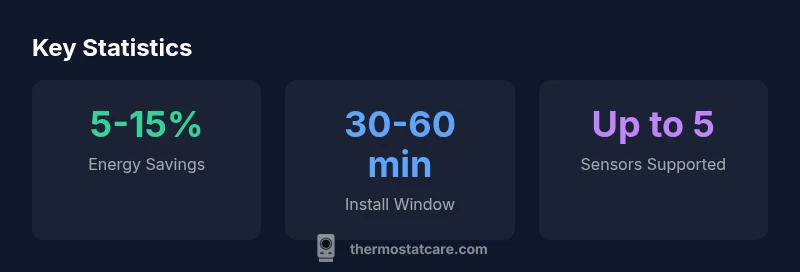
For a typical single-zone setup, plan 30-60 minutes. Multi-zone projects can take longer due to sensor placement and zoning configuration.
Most homes take about 30 to 60 minutes for a simple install; larger setups with multiple zones take a bit longer.
Should I install ecobee pro myself or hire a pro?
Ecobee pro is designed for DIY installation, but complex systems (multi-stage heat pumps, unconventional wiring) benefit from professional help. Always ensure power is off and wires are correctly labeled.
You can install it yourself if your system is straightforward; otherwise, a pro can help with complex wiring.
Does ecobee pro require a subscription to access features?
No mandatory subscription is required to access core features. Some advanced cloud-based services may require an account, but essential controls work without a paid plan.
You don’t need a subscription for the basics, but some extras may require an account.
What to Remember
- Plan sensor placements before buying room sensors
- Leverage occupancy-based scheduling for best savings
- Ensure a stable Wi‑Fi connection for best performance
- Compare total cost of ownership over 5 years