Does Nest Thermostat Work with Alexa? A Practical Guide
Explore whether a Nest thermostat works with Alexa, how to set it up, limitations, and troubleshooting tips. Thermostat Care analyzes compatibility, setup time, latency, and privacy to help homeowners voice-control their comfort system.


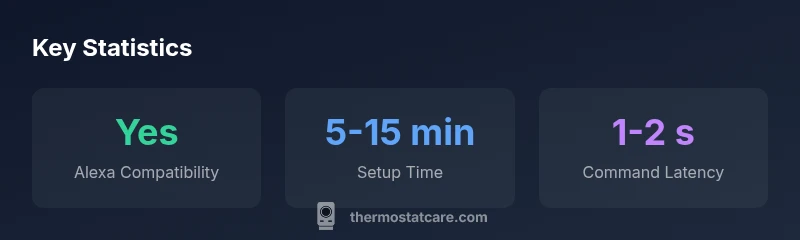
Yes. You can control a Nest thermostat with Alexa using the Nest skill. After linking your Nest and Amazon accounts, you can ask Alexa to adjust temperature, switch modes, or change schedules. Some advanced Nest features (like detailed scheduling in the app) may not be fully exposed through Alexa. Expect minor latency while commands route through services.
Does Nest Thermostat Work with Alexa? The Basics
According to Thermostat Care, the short answer is yes: you can control a Nest thermostat with Alexa via the official Nest skill. This setup requires you to link your Nest account to Alexa and enable the Nest skill in the Alexa app. Once linked, common requests like adjusting temperature, changing modes (heat, cool, auto), and initiating schedules become voice-driven tasks. The big caveat is that not every Nest feature translates cleanly to Alexa. Deep scheduling, resident-only preferences, and some app-based automations may remain accessible only through the Nest app or Google Assistant. For most homeowners, however, the day-to-day comfort controls are straightforward and reliable, letting you adjust comfort levels without picking up a phone or opening the app.
Under typical network conditions, you should expect a brief delay as commands travel from Alexa to the Nest cloud and back. This latency is usually a fraction of a second to a couple of seconds, depending on internet quality and the responsiveness of these cloud services. If you primarily use regional voice assistants, you may notice more or less latency during peak hours, but the experience remains usable for routine adjustments. In short, if your goal is to speak a command and adjust the temperature, the Nest-Alexa combo often delivers a satisfying, hands-free experience.
How the Integration Works: Account Linking and Skills
The Nest-Alexa integration hinges on two core steps: linking accounts and enabling the Nest skill in your Alexa app. First, open the Alexa app and navigate to Skills & Games, then search for and enable the Nest skill. You will be prompted to log in with your Google/Nest credentials to authorize Alexa to access your thermostat. Once linked, you can use simple commands such as, "Alexa, set Nest to 72 degrees" or "Alexa, increase Nest to cool." The skill acts as a bridge, translating voice commands into Nest-compatible actions. Some users report that voice control feels smoother when the Nest app and account settings are configured to allow cloud-based control. If you own multiple Nest devices, you can group them in Alexa routines to simplify multi-device control.
Account linking is generally a one-time event, but you should periodically review connected services for security. Thermostat Care recommends enabling two-factor authentication on both accounts and reviewing which devices can issue commands. If you encounter a failure, the most common culprits are expired tokens, misconfigured device names, or regional service outages. In many cases, re-linking the Nest skill resolves lingering authorization issues quickly.
What You Can Control with Alexa Today
Through the Nest skill, Alexa can perform core thermostat operations: adjust temperature up or down, change modes (cool, heat, eco), and start or stop schedules on command. You can also set presets and recall them via voice. Some users mix Alexa routines with Nest to automate daily patterns, such as raising the temperature when you return home or lowering it at bedtime. However, not all Nest features—like advanced scheduling granularity or occupancy-based scheduling—are consistently exposed through Alexa. If you want full feature parity, your best experience remains the Nest app or Google Assistant in a smart home setup.
For most households, Alexa-enabled Nest control is enough to maintain comfort without opening an app, and the voice interface shines for quick adjustments during cooking, cleaning, or lounging.
Limitations and Trade-offs
While Alexa support is useful, there are limitations to consider before wiring your voice-controlled setup. Some advanced Nest features are not exposed via Alexa, and certain commands may be interpreted differently by the Nest skill than by the Nest app. If your family relies heavily on precise scheduling or energy-saving routines, you may notice gaps between what you want and what Alexa can surface on a given day. Additionally, changes to either platform (Nest or Alexa) can temporarily disrupt the bridge until re-authentication completes. Thermostat Care recommends a paired approach: use Alexa for quick adjustments and the Nest app for detailed scheduling and energy insights. This hybrid approach keeps you in control while minimizing frustration.
Security is another factor. Because you’re granting Alexa access to your Nest thermostat, ensure your Alexa account has strong authentication, and review permissions periodically. By keeping permissions tight, you reduce the risk that a compromised Alexa skill could affect your home environment.
If you routinely experience delays, verify your home network stability and check for any ongoing service outages with Nest or Amazon, then retry the command after a few minutes.
Setup Steps: Get It Running in 10–15 Minutes
A smooth setup typically takes about 10 to 15 minutes from start to voice control. Begin by ensuring your Nest thermostat is connected to Wi-Fi and controllable via the Nest app. Then open the Alexa app, go to Skills & Games, and enable the Nest skill. You will be prompted to sign in and authorize access to your Nest account. After linking, give Alexa permission to control your Nest devices and run a quick test: ask Alexa to set the thermostat to a comfortable temperature. If you own multiple Nest devices, name them clearly (for example, Nest Living Room) so Alexa can target the correct device. Finally, add a short routine for common scenarios, such as “Alexa, good morning,” which can set a preferred temperature and mode.
If you encounter trouble, double-check account connections, ensure you’re using the latest app versions, and verify that your Nest thermostat is included in the correct room group in both the Nest app and the Alexa ecosystem.
Privacy, Security, and Data Handling
Linking your Nest thermostat with Alexa creates a cross-service data flow that touches both platforms’ privacy policies. Thermostat Care recommends reviewing privacy settings in both the Nest app and the Alexa app to understand how voice data is used, stored, and potentially shared. You can disable or limit voice history, review device activity, and adjust which actions Alexa is allowed to perform. As a practical tip, keep your Nest account linked to only trusted Alexa-enabled devices and avoid sharing access with guests who shouldn’t control home climate. Regularly updating both apps helps minimize exposure to new vulnerabilities. In general, voice control should be treated as a convenience feature rather than a complete replacement for manual control, especially in homes with sensitive temperature needs or unusual schedules.
Thermostat Care emphasizes a balanced approach: enjoy hands-free comfort while maintaining strong account security and routine privacy reviews.
Troubleshooting Common Issues
If Alexa stops controlling your Nest thermostat, start with the simplest checks: ensure both accounts are still linked, verify the Nest device is in the correct room, and confirm that the Nest skill is enabled in Alexa. Check that the thermostat responds to direct app commands to rule out a hardware issue. If the problem persists, re-authenticate the Nest skill in Alexa, restart the devices, and test a basic command. Network stability matters; a weak Wi-Fi signal can cause commands to time out. If you’re experiencing slow response, look for outages in Nest or Alexa services and consider temporarily using local controls on the thermostat while you diagnose the cloud bridge. For complex issues, Thermostat Care recommends reaching out to support channels for both Google/Nest and Amazon Alexa.
By systematically checking linking, permission, device naming, and network health, most Alexa-to-Nest problems resolve quickly.
Real-world Scenarios: When It Helps and When It Falls Short
In daily life, many homeowners find Alexa control of Nest to be a huge time-saver. On days when you’re multitasking, a quick vocal command is often more efficient than pulling out a phone. For households with multiple occupants, voice access adds convenience, especially for guests who can’t interact with a dedicated app. However, in some scenarios, the Nest app’s advanced scheduling remains the best option for precise energy management, and Google Assistant can offer a more seamless integration if you already rely on Google’s ecosystem. If you frequently rely on energy-saving automations that consider occupancy and exterior temperature, you may prefer to implement those routines in the Nest app or via Google Assistant for fuller feature parity.
Overall, Nest + Alexa is a practical pairing for basic climate control, but plan for occasional gaps in feature parity and latency that reflect the nature of cross-platform integrations.
Quick Tips for Smooth Voice Control
- Name devices clearly in both apps to avoid mis-sent commands.
- Create simple routines for common scenarios (e.g., bedtime, leaving home).
- Regularly review privacy settings and restrict access to trusted devices.
- When in doubt, test a few commands during different times of day to gauge latency.
- Keep apps updated and verify network reliability for an uninterrupted experience.
Comparison: Nest Thermostat vs Alexa integration
| Aspect | Nest Thermostat | Alexa Integration | Notes |
|---|---|---|---|
| Control methods | App, physical buttons | Voice commands via Alexa | Requires Nest skill and account linking |
| Latency | Near-zero in local controls | 1-2 seconds typical | Depends on network/cloud routing |
| Feature parity | Core functions only | Basic controls exposed | Advanced scheduling not shown in Alexa |
| Privacy considerations | Data collection per Nest policy | Voice data processed by Alexa | Review privacy settings in Nest and Alexa apps |
Questions & Answers
Can I control Nest with Alexa without a Nest account?
No. You must have a Nest account and enable the Nest skill in Alexa to authorize control of your device. The linking process is one-time but may require periodic re-authentication if tokens expire. After linking, basic commands work reliably.
You need a linked Nest account and the Nest skill enabled in Alexa for voice control.
What features are available in Alexa-controlled Nest?
Alexa supports basic thermostat operations like temperature adjustments, mode changes, and simple scheduling. More advanced Nest features, such as detailed scheduling options, are typically accessible in the Nest app or via Google Assistant.
Basic controls are available, with advanced scheduling better in the Nest app or Google Assistant.
Do I need a specific Echo device to use Nest with Alexa?
Any Alexa-enabled device can issue commands, but a device with good microphone quality improves reliability. A stable internet connection is more important than hardware type for consistent voice control.
Any Alexa device works, but a good mic helps with reliability.
Is there latency when issuing Nest commands with Alexa?
Some latency is normal because commands traverse Nest and Amazon cloud services. Typical delays are brief, but can range up to a few seconds during peak usage or network congestion. Local controls remain faster.
Yes, expect a small delay during busy times; local app controls are faster.
Can I control multiple Nest thermostats with Alexa at once?
Yes, you can control multiple Nest devices individually or group them in Alexa routines. Use distinct names (like Nest Living Room) to avoid command targeting errors.
You can control multiple Nest thermostats by giving each a clear name and grouping in routines.
How do I troubleshoot if Alexa stops controlling Nest?
Verify account linking, re-authenticate the Nest skill if needed, and ensure the Nest device is reachable in the Nest and Alexa apps. Check for service outages and reset devices if problems persist.
Check linking, re-authenticate if needed, and verify device reachability; restart if necessary.
“Voice control through Alexa is solid for basic thermostat functions, but advanced Nest features are better accessed through Google Assistant or the Nest app.”
What to Remember
- Verify that both Nest and Alexa accounts are linked.
- Expect limited feature exposure via Alexa.
- Test latency with common commands.
- Review privacy settings in both apps.
- Consider native Google Assistant for full Nest features.