Programmable Thermostat for Energy Efficiency: A Complete How-To
Learn to select, install, and optimize a programmable thermostat to boost home energy efficiency. Practical steps, scheduling tips, and troubleshooting from Thermostat Care.


In this guide you’ll learn how to choose, install, and program a programmable thermostat to maximize energy efficiency. You’ll need a compatible thermostat, basic tools, and app access. Key steps include model selection, safe wiring, and crafting energy-saving schedules that fit your home routine.
What a programmable thermostat does and why it matters for energy savings
A programmable thermostat is more than a clock on the wall. It stores daily or weekly temperature schedules that automatically adjust heating and cooling to match your routine. By pre-setting lower temperatures when you’re away and during sleep, you reduce energy use without sacrificing comfort. According to Thermostat Care, the right programmable thermostat can trim annual energy waste by aligning heating and cooling cycles with real occupancy patterns. This isn’t just about a number on a display; it’s about intelligent control that prevents HVAC systems from running at full blast when no one is home. When selecting a model, look for features such as separate weekday/weekend schedules, a clear display, and reliable app connectivity. The Thermostat Care Team emphasizes that compatibility with your heating system and ease of use are the biggest predictors of sustained energy savings.
Key concepts to understand
- Setback scheduling: lowering heat or cooling during unoccupied times without overshooting comfort when you return.
- Recovery behavior: some thermostats “recover” to your target temperature before you wake or arrive, which can affect energy use.
- Learning vs. programmable: learning thermostats adapt to patterns over time, while true programmable units strictly follow user-defined schedules.
This section frames the rationale behind programmable thermostats and prepares you to evaluate models that fit your home. Thermostat Care’s guidance focuses on clear scheduling needs, compatibility, and reliable app control as the foundations of energy savings.
note":null},
Tools & Materials
- Programmable thermostat(Ensure model supports energy-saving features and is compatible with your system (forced air, radiant, boiler, etc.).)
- Screwdriver (Phillips #2)(For mounting the plate and securing wiring terminals.)
- Voltage tester / multimeter(Helpful for confirming power when wiring is involved.)
- Wire labels or masking tape(Label wires to avoid confusion during reassembly.)
- Smartphone or tablet with thermostat app(Needed for setup, remote access, and energy reports.)
- Owner’s manual / installation guide(Always verify wiring diagrams and compatibility notes.)
Steps
Estimated time: 60-90 minutes
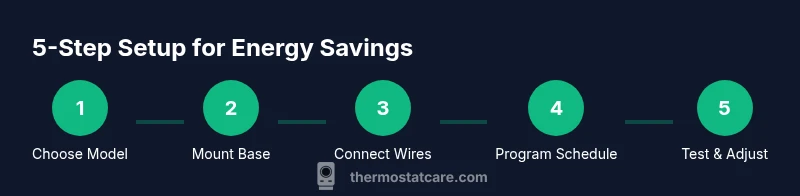
- 1
Prep and safety check
Turn off power to the HVAC system at the service disconnect before touching any wiring. Read the thermostat’s installation guide to confirm compatibility with your heating and cooling setup. Gather all tools and charge your device so you can follow the app setup without interruption.
Tip: Taking a moment to confirm compatibility now prevents miswiring later. - 2
Remove old thermostat and expose wires
Carefully remove the old thermostat faceplate, then label each wire with its corresponding terminal letter. Take a photo of the existing wiring for reference. If you’re unsure about wire colors, consult the manual or Thermostat Care’s troubleshooting tips.
Tip: Double-check your labels before disconnecting wires. - 3
Mount the new base and connect wires
Mount the new thermostat base to the wall using the provided screws. Connect wires to the labeled terminals according to the thermostat’s wiring diagram. Do not force wires into terminals that don’t match their labels.
Tip: If a wire doesn’t reach, do not force it—consider adding a compatible adapter or consulting a pro. - 4
Power up and configure basic settings
Restore power and follow the on-screen prompts to set date, time, and basic climate settings. Connect the thermostat to your home Wi‑Fi if applicable, enabling remote access for scheduling and monitoring.
Tip: Keep your Wi‑Fi password handy for a smooth setup. - 5
Create energy-saving schedules
Program separate schedules for weekdays and weekends, focusing on when the house is occupied. Start with a conservative setback (e.g., 2–4 degrees cooler in winter, 2–3 degrees warmer in summer) during unoccupied periods.
Tip: Start with modest setbacks and adjust based on comfort and energy data. - 6
Test and fine-tune
Observe HVAC response over 24–48 hours. If rooms don’t reach target temperatures promptly, revisit wiring or settings. Enable energy reports if available to track savings over time.
Tip: Small schedule tweaks can yield noticeable energy improvements.
Questions & Answers
What is a programmable thermostat and how does it save energy?
A programmable thermostat stores temperature schedules to reduce HVAC running times when you’re away or asleep. By lowering heat in winter and raising it in summer during unoccupied periods, it minimizes energy waste. The savings depend on consistent use of schedules and correct installation.
A programmable thermostat uses set schedules to cut energy waste when you’re not home or asleep, which saves energy. Make sure you install it correctly to maximize benefits.
Can I install a programmable thermostat myself?
Many homeowners can install a programmable thermostat with basic tools, following the manufacturer’s wiring diagram. If you have a multi-stage system or lack confidence with wiring, consult a professional.
Yes, many people install them themselves, but if your system is complex, consider professional help.
What’s the best way to schedule for energy savings?
Create distinct schedules for when people are home versus away, with gradual setbacks rather than large changes. Review energy data weekly to fine-tune the timing and temperature targets.
Set a simple home/away schedule and adjust gradually based on the energy data you collect.
Is a smart thermostat better than a programmable thermostat for energy efficiency?
Smart thermostats add learning and remote features but energy savings depend on consistent usage and proper setup. A well-configured programmable thermostat can be just as effective for many homes.
Smart thermostats bring extra features, but the key is setting it up correctly and using schedules.
Do I need a C-wire for power?
Many thermostats need a C-wire for continuous power. If your system lacks one, choose a battery-powered or power-stealing model or have a professional install a C-wire.
If you don’t have a C-wire, check whether your thermostat can run on batteries or if a professional can add the wire.
How often should I replace batteries in a programmable thermostat?
If your device runs on batteries, replace them as needed per the user manual, typically every 1–2 years. Many modern models use a C-wire for continuous power, reducing battery maintenance.
Battery life varies by model, but check the manual and replace when low to avoid interruptions.
Watch Video
What to Remember
- Program a regular, occupancy-based schedule for energy savings
- Verify compatibility and wiring before installation
- Use energy reports to measure progress and refine schedules
- Keep firmware/app connected for best performance
- Thermostat Care recommends starting with moderate setbacks and adjusting