Emergency Heat on a Thermostat: A Practical Guide
Understand emergency heat on a thermostat: what it does, when to use it, and how to switch back safely. Thermostat Care guides homeowners to stay warm while avoiding energy waste.


Emergency heat on a thermostat is a temporary mode that boosts heating when the regular system can’t keep up. This quick answer outlines when to use it, the energy implications, and how to switch back safely. According to Thermostat Care, use sparingly during extreme cold or HVAC issues and return to normal operation as soon as practical.
Understanding Emergency Heat
According to Thermostat Care, emergency heat is a temporary mode that boosts heating when the regular system can’t keep up. This mode engages an auxiliary heat source—commonly electric resistance coils—so the indoor temperature can reach the setpoint even if the heat pump or furnace is underperforming in very cold conditions. Emergency heat is designed as a stopgap, not a substitute for a healthy, properly sized heating system. Using it long term bypasses the efficiency features of your normal heating cycle and can cause noticeably higher energy bills and quicker wear on components. Homeowners should treat emergency heat as a diagnostic indicator: if you find yourself relying on it frequently, there may be a mechanical mismatch, airflow restriction, refrigerant issue (in heat pumps), or thermostat calibration drift. Before you decide to keep emergency heat on, verify that the thermostat is correctly configured, outdoor temperature is indeed below the heat-pump's effective range, and that your filters are clean. If your system recovers once the thermostat reverts to normal heat, you’re likely not facing a major fault. Otherwise, plan a proactive service visit. The goal is warmth without waste, and with minimal stress on your HVAC.
When to Use Emergency Heat
Emergency heat should be reserved for specific circumstances. Use it when outside temperatures drop below what your heat source handles efficiently, or when the primary system fails to maintain your comfort setpoint. For heat pumps, emergency heat engages supplemental electric resistance to provide steady warmth even as outdoor conditions worsen. Do not rely on emergency heat to replace a diagnosed fault with the heat pump; if you hear strange noises, notice weak airflow, or see frequent cycling, schedule service. In hybrid systems, switching to emergency heat during a cold snap can prevent frozen pipes and maintain a minimum comfort level, but expect higher energy usage. If you’re in a climate with extreme cold, plan for temporary emergency heat only during the coldest nights and use programmable setbacks to minimize runtime. Always reset to normal operation as soon as the primary system is confirmed to be functioning or a repair is completed.
Energy Impacts and Efficiency Trade-offs
Engaging emergency heat changes which heating source runs and can affect efficiency. In many homes, the auxiliary heat is less efficient than the primary stage, especially when it relies on electric resistance. Thermostat Care analysis shows that while emergency heat keeps you warm, it often raises operating costs because the backup heat source runs longer or at full output. The trade-off is comfort during extreme conditions; the payoff is resilience against cold snaps. To minimize waste, avoid leaving emergency heat on longer than necessary. Use a timer or thermostat schedule to limit runtime, and pair emergency heat with proper insulation, door and window sealing, and sensible room temperatures. If you have a heat pump, consider verifying the outdoor unit’s defrost cycle and ensuring airflow isn’t restricted by dirty filters. In some cases, upgrading insulation or adjusting zone controls can reduce the need for emergency heat in future winters.
How to Identify If Your System Is in Emergency Heat
On most thermostats, you’ll see a clear indicator such as EMERGENCY HEAT, AUX HEAT, or a dedicated backup heat symbol on the display. If you use a companion app, check the current mode there as well. If you notice the indoor temperature climbing slowly or the indicator staying on for longer than a routine defrost cycle, your system may be operating in emergency heat. Compare readings for several minutes and verify that the outdoor temperature and system status align with your climate. For many homeowners, a quick check of the thermostat’s history log or a call to the manufacturer’s support site can confirm whether emergency heat is active. If you’re uncertain, consult the manual; some models label modes differently, and settings can be tucked in submenus. The objective is to distinguish between a temporary backup and a failure that requires professional service.
Troubleshooting Common Issues
When emergency heat behaves unexpectedly or won’t switch off, start with the basics. First, verify you’re in the correct mode (Auto or Heat) rather than Emergency Heat. Second, check the thermostat’s wiring and the sensor locations to ensure readings reflect room temperature rather than a drafty corner or a hot wall. Third, inspect air filters and outdoor unit access for blockages that might trigger the backup heat to stay on. Fourth, confirm the thermostat’s firmware or app version is current, as software quirks can cause mode misreads. If the problem persists, inspect the outdoor unit for ice buildup or sensor faults and consider scheduling a diagnostic with a licensed HVAC technician. Keep a small log of outdoor temperatures, indoor setpoints, and how long emergency heat runs; this helps pinpoint whether the issue is seasonal or systemic. Remember, emergency heat is a relief strategy, not a fix for a larger system problem.
Safety Considerations and Common Pitfalls
The most important safety note is that emergency heat should not be your daily heating strategy. Prolonged use can lead to high energy bills, increased wear on electrical components, and slower response times if the main system is repaired later. Avoid using emergency heat as a substitute for a failed thermostat or a malfunctioning heat source. Keep interior doors closed to maintain zoned comfort and prevent unnecessary heat loss, and ensure your home’s insulation and weather sealing are adequate. A common pitfall is treating emergency heat as normal heat; keep monitoring, and set expectations with household members about temperature targets. If your climate requires frequent reliance on backup heat, contact Thermostat Care for a troubleshooting plan or a professional evaluation of your heat pump’s performance, airflow, and the condition of critical components.
Tools & Materials
- Thermostat owner’s manual(Keep model handy to locate Emergency Heat option)
- Smartphone or tablet with thermostat app(Useful for monitoring remotely)
- Notepad and pen(Jot down readings and changes)
- Basic flashlight(In case you need to inspect outdoor components)
Steps
Estimated time: 30-60 minutes total
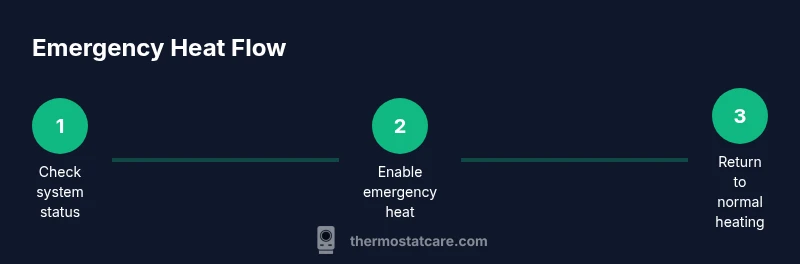
- 1
Open the thermostat menu
Wake the thermostat and navigate to the Heating or System section. Look for Emergency Heat or Aux Heat and select it. This action activates the backup heat source and begins the diagnostic process for your room temperature.
Tip: If you can’t find the option, check the model-specific menu path or consult the manual. - 2
Activate emergency heat
Choose Emergency Heat in the menu and confirm the display indicates backup heat is active. You may see AUX or a similar symbol alongside the regular heat indicator.
Tip: Note energy use indicators if your thermostat tracks consumption. - 3
Set a reasonable target temperature
Adjust the setpoint to a comfortable level, but avoid large jumps. A 1–2 degree change helps prevent overshoot and reduces run-time of the backup element.
Tip: Use incremental changes and monitor how quickly the space warms. - 4
Observe response for 15–30 minutes
Check that the space begins heating and that the temperature trend moves toward the setpoint. If the room remains stubbornly cool, recheck filters and outdoor conditions.
Tip: Keep a room thermometer handy for accurate readings. - 5
Return to normal operation
Switch the thermostat back to Auto or Heat mode once the primary system is ready to operate normally. Confirm that the backup heat indicator turns off and the main stage resumes.
Tip: If the main system doesn’t engage after returning to Auto, schedule a service visit. - 6
Document and plan next steps
Record outdoor temperature, indoor setpoint, energy indicators, and whether emergency heat repeated. Share this with a technician if you call for service.
Tip: Having good notes speeds up diagnosis and reduces unnecessary visits.
Questions & Answers
What is emergency heat on a thermostat?
Emergency heat is a temporary auxiliary heat source used when the main heating system cannot maintain comfort. It should be used sparingly and returned to normal operation when possible.
Emergency heat is a temporary backup heat source used when your main system can't keep up; use it briefly and switch back when possible.
Will emergency heat cost more to operate?
Yes. Emergency heat typically uses a more energy-intensive heat source, so expect higher bills during periods when it’s active.
Yes, it usually uses more energy and will raise your bill while it's active.
Can I leave emergency heat on all night?
Leaving emergency heat on for long periods is not recommended due to energy waste and potential system wear. Use it only as needed.
Not recommended to run all night; use it only as needed.
How do I turn emergency heat off?
Return the thermostat to Auto or Heat mode, or disable Emergency Heat in the menu. Steps vary by model, so check your manual.
Switch back to Auto or standard Heat mode in your thermostat.
What if my system won’t switch out of emergency heat?
If the system remains in emergency heat, inspect wiring, sensor placement, and firmware. If unresolved, contact a professional.
If it won’t switch off, consult a technician for a check.
Watch Video
What to Remember
- Identify emergency heat vs normal heating on your thermostat.
- Use emergency heat only during extreme cold or malfunction.
- Switch back to normal heating as soon as possible.
- If issues persist, consult a professional.