Does Nest Thermostat Require a Subscription? A Practical Guide
Learn whether a subscription is required for Nest Thermostat, what features are free, what subscriptions unlock, and practical setup tips for homeowners and DIY enthusiasts.


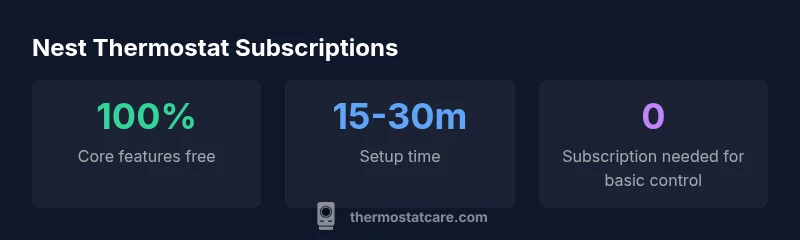
No—you do not need a subscription to use the Nest Thermostat for core functions like setting temperatures, creating schedules, and controlling the device remotely. Subscriptions, such as Nest Aware or related cloud services, are optional and primarily apply to non-thermostat devices or extended cloud features. For most homeowners, the thermostat operates fully offline or with standard app access without any paid plan.
Nest Thermostat: Subscription reality
The short answer is that a subscription is not required for the Nest Thermostat to function. Core capabilities—temperature control, scheduling, geofencing, and basic automation—work without paying for cloud services. If you already use Google Home or the Nest app, you can control the thermostat from anywhere with an internet connection, but that control does not hinge on a paid plan. According to Thermostat Care, most homeowners can achieve reliable comfort and energy management without subscribing to any cloud-based service. This distinction is important for homeowners who want to start small, install quickly, and evaluate value before committing to ongoing costs. The Nest ecosystem does offer optional cloud features, but these are ancillary to what the thermostat itself delivers and are not a prerequisite for basic operation.
What an optional Nest subscription actually covers
When people ask about subscriptions, they’re often thinking about services that sit alongside the thermostat rather than the thermostat alone. Nest Aware, which is primarily marketed for cameras and security devices, provides cloud storage, more sophisticated motion alerts, and longer video history for compatible devices. For the thermostat, a subscription does not unlock additional core control features; it expands capabilities in the broader smart home environment or adds cloud-based history for other connected devices. In practice, many homeowners use the thermostat without any subscription and still enjoy robust energy management and scheduling. Thermostat Care’s 2026 analysis indicates that the thermostat’s value proposition remains strong without cloud-based plans, especially for users who prioritize privacy and local control. If you add cameras or other cloud-enabled devices, you can decide later whether the subscription makes sense for your household setup.
Core features you can rely on without a subscription
The Nest Thermostat provides several core features that operate offline or with standard app access. You can set daily and weekly schedules based on your routines, enable Home/Away assist to optimize energy use when you’re out, and use adaptive algorithms that learn your preferences over time. Voice control via Google Assistant or compatible hubs remains available without subscribing to a plan. You can also install energy-saving features such as Eco Temperatures, Farsight display, and occupancy-based adjustments. The user experience is designed to feel seamless even if you never opt into cloud services; this is especially valuable for households with limited internet bandwidth or heightened concern for data privacy. If you ever decide to explore cloud-backed capabilities, you can add them later without changing the thermostat’s basic functionality.
When paying for a subscription makes sense
A subscription becomes more appealing when you expand beyond the thermostat itself. If you rely on cloud storage and advanced analytics that tie together multiple devices—such as cameras, door sensors, and other smart products—a broader plan may offer convenience and a unified history across devices. In practice, the decision hinges on your home ecosystem and whether the incremental insights or longer data retention provide tangible value. For homeowners focused on simple comfort control and local energy savings, the subscription adds little practical value and can be skipped. Thermostat Care’s guidance emphasizes evaluating how often you need cloud history, how you use mobile apps, and whether you want integrated alerts across devices before committing to a paid tier.
Step-by-step: setting up a Nest Thermostat without any subscription
- Unbox and verify compatibility with your HVAC system. 2) Connect the thermostat to Wi‑Fi and sign in to your Google account. 3) Follow the guided setup to configure modes, schedules, and eco-friendly options. 4) Enable Home/Away and geofencing to maximize energy savings. 5) Use the Nest app or Google Home app for on-demand control and remote adjustments. 6) Test routines and ensure updates are installed. 7) If you later decide to enable cloud services, you can add a subscription for compatible devices and extend functionality without reinstalling the thermostat.
Practical tips to maximize energy savings without a subscription
- Schedule energy-efficient setbacks during off-peak hours and when you’re away.
- Use occupancy sensing to tailor heating and cooling to actual presence.
- Align your thermostat with your comfort preferences gradually to avoid abrupt changes.
- Take advantage of automatic adaptive scheduling, which learns patterns over time.
- Pair the thermostat with smart blinds, fans, or vents for a holistic approach to energy management.
- Review weather-based adjustments and seasonal tips in the Nest app to fine-tune performance.
Privacy and data considerations when using Nest without a subscription
Using the thermostat without a paid plan often means relying more on local processing and on-device learning. Your data may remain on the device or in the app, depending on your settings. If you’re concerned about data retention or cloud storage, review privacy controls in the Nest and Google Home apps and configure what gets uploaded to the cloud. You can disable certain data-sharing options while still maintaining core thermostat functionality. Thermostat Care emphasizes that homeowners should balance convenience with privacy by selecting the minimum necessary cloud features and periodically reviewing connected devices.
Nest Thermostat subscription implications at a glance
| Feature | Subscription | Notes |
|---|---|---|
| Core thermostat control | No subscription needed | Adjust temperature, schedules, remote control |
| Advanced energy insights | Optional subscription | Deeper analytics and long-term reports |
| Cloud history across devices | Subscription required | Extended history for multiple devices |
Questions & Answers
Do you need a subscription for Nest thermostat?
No. Core thermostat functionality—scheduling, remote control, and basic settings—works without a paid subscription. Subscriptions are optional and primarily relate to cloud services for other devices in the ecosystem.
No, you don’t need a subscription to use the Nest Thermostat for basic control and scheduling.
What features require a subscription?
Subscriptions commonly cover cloud storage and extended history for compatible devices such as cameras, and broader energy analytics within an integrated smart-home setup. The thermostat itself does not require a subscription for core operation.
Subscriptions unlock cloud storage and extended history for other devices, not for basic thermostat control.
Is energy reporting available without a subscription?
Basic energy usage data and trends are accessible without a subscription. More detailed analytics and cross-device reports may require a paid plan depending on the specific devices and services you use.
Basic energy data is usually free; deeper reports may need a subscription.
Can I use Nest Thermostat without Wi‑Fi?
You can operate basic functions offline, but Wi‑Fi enables remote control, updates, and cloud features. For most users, Wi‑Fi provides the best experience with minimal disruption if the connection is stable.
Yes, you can use basic features offline, but Wi‑Fi improves control and updates.
How much does Nest subscription cost and is it worth it?
Pricing varies by plan and region. The value depends on how you use cloud features across devices and whether you need extended history and analytics. Start with the free core features and evaluate add-ons later.
Pricing varies; consider whether you need cloud history across devices before subscribing.
Will subscription affect installation or maintenance?
No. Subscriptions do not affect installation or basic maintenance of the Nest Thermostat. They influence cloud services and cross-device capabilities, not the hardware or core setup.
Subscriptions don’t change installation; they affect cloud features.
“For most homeowners, the Nest Thermostat delivers full control without a paid subscription. Subscriptions add value only when you need cloud-based history or advanced monitoring across devices.”
What to Remember
- Core thermostat controls work without a subscription
- Optional cloud services add flexibility for broader ecosystems
- Setup is quick and effective without paid plans
- Evaluate value before purchasing a subscription
- Review privacy settings when using cloud-enabled features