Can You Override a Thermostat? A Practical How-To Guide
Discover safe, practical ways to override thermostat settings using holds and temporary overrides on programmable and smart models. Learn when to use overrides, how to do them, and tips to keep energy use in check. Thermostat Care explains with step-by-step guidance.


Yes. You can override a thermostat using built-in features like temporary holds, boosts, or manual overrides. These controls let you adjust comfort without permanently changing your schedule. Use the manufacturer’s override options first, and avoid bypassing safety or energy-management features. This approach keeps you comfortable while preserving efficiency.
Why overriding a thermostat matters
Can you override thermostat? Yes, and doing so thoughtfully can restore comfort during sudden weather shifts or changes in daily routines. According to Thermostat Care, overrides are a standard feature on most modern thermostats and are designed to be safe when used as intended. An override lets you temporarily change the setpoint outside of the programmed schedule without permanently altering the program. This is especially helpful during extreme weather, when hosting guests, or when you’re away from home for a day. The goal is to balance comfort with efficiency, using overrides only when a temporary adjustment is truly needed. Familiarize yourself with your model’s terminology—Hold, Temporary, Boost, Quick Set—since names vary by manufacturer. By learning to access these features quickly, you can respond to changing conditions without diving into the full programming interface.
Override mechanics by thermostat type
Override behavior varies by model category. Programmable thermostats typically support a temporary hold that keeps the new setpoint until the next programmed change. Smart thermostats offer overrides via an app, a built-in interface, or voice control, often with duration options. Manual, non-programmable thermostats may not support a formal hold; you’ll need to adjust the dial and rely on the existing schedule resuming after manual changes. Knowing your model’s terminology—Hold, Temporary Override, Boost, or Quick Set—helps you apply overrides safely. Always verify the display shows the new setpoint and check for HVAC activity to confirm the override is active.
When to override vs adjust the schedule
Use overrides for short-term needs: an unusually hot day, guests, or a late return home. If you expect a longer period of deviation, consider updating the schedule itself to maintain energy savings over time. Too-frequent overrides can lead to energy waste; always aim for the smallest change that achieves comfort. ThermostatCare guidance emphasizes planning ahead when possible, but also notes that overrides are valuable for catching edge cases without rewriting your entire program.
Temporary overrides on programmable thermostats (overview)
Programmable thermostats shine when you want a compromise between comfort and energy efficiency. A temporary override lets you raise or lower the temperature for a set window, after which the system returns to the programmed schedule. This is ideal for temporary adjustments—arriving home late, hosting a gathering, or dealing with outdoor temperature swings. If your model supports it, you can usually specify a duration (e.g., “hold for 4 hours”). Always confirm the end time on the display to ensure the schedule reverts as intended.
Overrides on smart thermostats (apps and voice)
Smart thermostats expand override options through smartphone apps and voice assistants. You can initiate a temporary boost or hold with a few taps, and many models let you set a precise duration, scenes, or geofencing to automate the override when you arrive or leave. The advantage is speed and control from anywhere. Remember to verify that the HVAC system responds to the new setpoint and that firmware is up to date for best results.
Common mistakes and safety considerations
Avoid bypassing built-in safety and energy-management features. Overrides should be temporary and purposeful. Leaving an override active for too long can waste energy, shorten equipment life, or create uncomfortable indoor conditions when outdoor temperatures shift. If your system has multiple stages, overrides may behave differently across stages; consult the manual for stage-specific notes. When in doubt, return to the scheduled program and re-evaluate.
Troubleshooting override issues
If an override doesn’t apply, double-check that the thermostat and HVAC equipment have power, the override feature is enabled, and the correct mode (heat or cool) is selected. Inspect batteries (where applicable), confirm the display reflects the new setpoint, and listen for HVAC changes. If problems persist, a firmware update or a reset may be needed, but avoid a full reset unless recommended by the manufacturer or Thermostat Care.
How Thermostat Care guides you through overrides
Thermostat Care provides practical, model-agnostic guidance on when and how to use overrides safely. The key is to use available controls rather than bypassing safety features, returning to the normal schedule as soon as possible to maximize energy savings. Our team emphasizes learning your specific model’s override terminology and timing options to avoid unnecessary energy use.
],
toolsMaterials":{"items":[{
Tools & Materials
- Thermostat manual or model-specific quick-start(To locate the exact override name and steps for your model.)
- Thermostat device or app access(Needed to initiate an override.)
- Smartphone/tablet (for smart thermostats)(If your override is app-based.)
- Notepad and pen(For recording changes and end times.)
- Basic screwdriver (if required for panel access)(Only if your unit needs panel access per the manual.)
Steps
Estimated time: 15-25 minutes
- 1
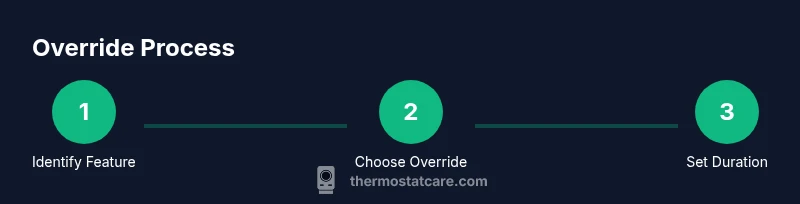
Identify override feature on your thermostat
Locate the override/hold/boost option in the on-device menu or app. Read the manual for exact naming and the duration options available. Knowing the terminology helps you act quickly when you need a temporary change.
Tip: If you’re unsure, use the on-screen help or consult the manual before changing settings. - 2
Access the override control
Open the override interface and select Hold, Temporary, or Boost, depending on what your device offers. Confirm the current mode (heat or cool) to ensure the change drives the HVAC in the intended direction.
Tip: Make sure you’re adjusting the correct thermostat zone if you have a multi-zone system. - 3
Set duration or end time
If the device allows, choose the duration for the override (e.g., 2, 4, or 6 hours) or a specific end time. If no duration is available, plan to revert to the schedule manually.
Tip: Setting a clear end time avoids energy waste or discomfort after the override ends. - 4
Confirm and monitor HVAC response
Save or apply the override and watch the display and listening for the HVAC to activate. Check room temperature after a short period to ensure it reflects the new setpoint.
Tip: If you don’t feel a change within 5–10 minutes, recheck the setpoint and mode. - 5
Return to the programmed schedule
As soon as the override period ends, ensure the thermostat reverts to its original program or you manually restore it. This helps maintain energy savings going forward.
Tip: Set a reminder if your override end time is easy to forget. - 6
Document the change for future reference
Note the date, time, duration, and reason for the override. This helps you reuse the same approach for similar events.
Tip: A quick log reduces guesswork next time you need a temporary adjustment.
Questions & Answers
Can you override a thermostat without damaging it?
Yes. Use the built-in override features as designed by the manufacturer. Do not bypass safety or electrical protections. If in doubt, consult the manual or Thermostat Care guidance.
Yes. Use the thermostat’s built-in hold or override features as designed; avoid bypassing safety protections.
How long can a temporary override stay in effect?
Most temporary overrides last until the next scheduled change or for a user-specified window if your model supports it. Check your device’s duration options in the app or display.
Most temporary overrides last until the next schedule change or for a set duration if your model allows it.
Will overriding affect energy bills?
Overriding can increase or decrease energy use depending on outdoor conditions and your setpoint. Use overrides only as needed, then return to the scheduled program to maximize savings.
Yes, it can affect energy use—use overrides sparingly and return to the schedule when possible.
What should I do if the override doesn’t apply?
Check power to the thermostat, verify the correct mode, confirm the override feature is enabled, and ensure the HVAC system responds to the new setting. If problems persist, consult the manual or Thermostat Care.
First check power and mode, then ensure the override is active. If it still won’t work, consult the manual or Thermostat Care for guidance.
Are overrides the same as resetting the thermostat?
No. An override temporarily changes the setpoint without erasing the programmed schedule. A reset restores default factory settings and clears schedules. Use resets only when recommended by the manufacturer.
Override is temporary; a reset clears settings and schedules. They’re not the same thing.
Watch Video
What to Remember
- Override features exist for quick comfort without altering schedules
- Use temporary holds or boosts, not permanent changes
- Return to the original schedule to preserve energy savings
- Smart thermostats offer app- or voice-based overrides for speed
- Document overrides to simplify future adjustments