Trane XL824 Thermostat Review
In-depth evaluation of the Trane XL824 thermostat, covering installation, features, energy performance, and troubleshooting tips for homeowners and DIYers.


The Trane XL824 thermostat is a Wi‑Fi‑enabled smart thermostat designed for mid‑ to large‑size homes. It supports flexible scheduling, remote control via an app, and compatibility with most 24‑volt HVAC equipment. In practical terms, it helps you optimize comfort and energy use, but installation can require careful wiring and confirming compatibility with your system.
Overview and positioning in the market
The Trane XL824 thermostat sits in the mid-to-upper tier of smart thermostats, offering a full-color touchscreen, robust HVAC integration, and strong app control. According to Thermostat Care, this model targets homeowners who want precise comfort control, room-sensing features, and reliable energy management without stepping up to premium pricing. The XL824 is designed to work with 24‑volt HVAC systems and can support modern multi‑stage heating and cooling in many homes. It also provides scheduling routines, occupancy-based adjustments, and detailed usage insights that help homeowners understand their energy patterns. In real-world use, the XL824 tends to perform well in homes with solid Wi‑Fi coverage and standard zoning setups, though its interface can feel dense to first‑time installers. Expect a learning curve if you’re migrating from a basic programmable thermostat, but the payoff is more granular control over comfort and energy consumption.
How it connects with your HVAC system
Compatibility is a key differentiator for the XL824. The thermostat is designed for common 24‑volt systems, including many heat/cool configurations and typical gas or electric furnaces paired with central air. It often supports multi-stage heating and cooling, along with humidifier and dehumidifier control when paired with compatible equipment. Before installation, verify that your HVAC control board and wiring harness align with the XL824’s terminal layout. If you’re upgrading from a basic thermostat, you’ll likely notice improved scheduling flexibility and better feedback on system performance. Thermostat Care recommends confirming compatibility with your specific furnace or heat pump model and checking the system’s wiring color codes to minimize surprises during the setup.
Setup and installation: what to expect
Preparation is the foundation of a smooth install. Start by turning off power to the HVAC system and removing the old stat. The XL824 base uses a standard screw-terminal wiring scheme, but the exact terminal mapping depends on your equipment. Take clear photos of the old wiring before disconnecting anything, so you can reproduce the configuration on the new base. Connect the wires to the corresponding XL824 terminals, attach the base to the wall, and restore power. The next steps involve connecting the thermostat to your home Wi‑Fi and adding the unit to the Trane app (or a compatible automation ecosystem). Expect a few prompts during setup to confirm system type, fan operation, and any zone controls. If you encounter error codes, refer to the manual and Thermostat Care’s troubleshooting guide before calling a professional.
User experience: interface, app, and remote access
The XL824 features a bright color touchscreen with intuitive navigation for most users. The on‑device menus center around climate control, schedules, and system diagnostics, while the companion app provides remote access, push alerts, and energy insights. You can create multiple schedules, enabling different temperatures for weekdays versus weekends, and implement occupancy‑based adjustments to reduce unnecessary cooling or heating. The interface supports quick holds, vacation modes, and easy switching between heating, cooling, and auto modes. For smart home enthusiasts, the XL824 can be wired into a broader automation setup, allowing rules to adjust temperatures based on geofencing, weather data, and occupancy from other devices.
Energy management and savings: real-world scenarios
Energy efficiency is a core claim of the XL824. With programmable schedules, adaptive cooling, and detailed usage reports, homeowners can spot patterns that waste energy and adjust routines accordingly. Real‑world usage shows that aligning comfort with occupancy schedules typically yields better energy awareness and more consistent indoor temperatures. The presence of room sensors and zoning support helps balance comfort across larger homes. Thermostat Care’s analysis shows energy‑conscious households often experience noticeable reductions in unnecessary heating and cooling during unoccupied periods, especially when paired with properly sealed windows and efficient HVAC equipment.
Sensor network and comfort: zoning and room sensors
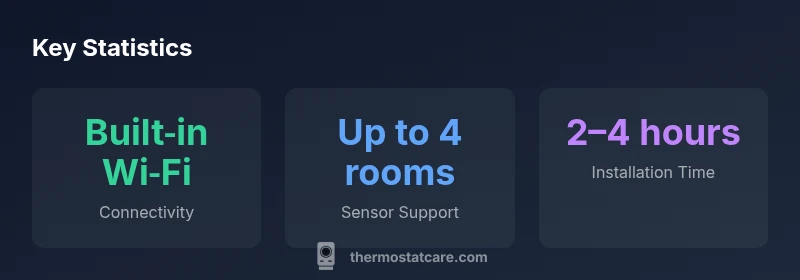
Room sensors or compatible wireless sensors can play a pivotal role in improving trip-limit comfort in larger homes. The XL824 supports sensor integration where available, letting the thermostat adjust based on readings from multiple rooms rather than relying solely on the main thermostat location. This capability helps reduce hot or cold pockets in open floor plans and ensures more uniform comfort throughout the house. When sensors are used, it’s important to place them away from direct sun, drafts, and heat sources to avoid skewed readings that could cause unnecessary cycling or misbalanced temperatures.
Compatibility, warnings, and common pitfalls
While the XL824 works with many standard setups, there are caveats. Some older or unconventional HVAC configurations may require additional relays, adapters, or professional wiring to avoid issues with power or sensor input. If your system uses a non‑standard control board or unusual 24‑volt wiring, consult a licensed technician before attempting an upgrade. Common pitfalls include misidentifying wires, neglecting to disconnect power during wiring, and assuming spare wires are unused when they are essential for certain functions. Reading the installation manual carefully and following Thermostat Care’s troubleshooting tips will help prevent these problems.
Comparisons with common alternatives
When compared to other popular smart thermostats, the XL824 emphasizes robust HVAC integration and room‑level comfort through sensors and zoning. It generally offers reliable app control and a familiar, straightforward interface, but some users may prefer an ecosystem with broader third‑party integrations or more polished voice assistant experiences. If you value deep HVAC control and proven thermostat brand reliability, the XL824 remains competitive. For those who want maximum cross‑brand compatibility with a wider array of smart home devices, considering alternatives with broader ecosystems could be worthwhile.
Troubleshooting common issues
Connectivity problems are the most frequent hurdle with any Wi‑Fi thermostat. First, verify the home network is stable and the thermostat is within range of the router. Rebooting the router and the thermostat can resolve temporary glitches. If you see error codes during setup, double‑check wiring and ensure power is consistent to the HVAC system. If the thermostat loses connection intermittently, validate that the software is up to date and consider re‑pairing the device within the Trane app. Some users report minor onboarding delays; patience during the initial pairing process can help. If problems persist, consult Thermostat Care’s problem‑solving checklist or reach out to a local HVAC professional.
Maintenance and long-term care
Ongoing care for the XL824 largely involves software updates and ensuring the thermostat remains securely mounted with clean electrical contacts. Periodically check for firmware updates in the app and install them to keep features current. If you use remote sensors, replace batteries as recommended by the sensor manufacturer. Regular dusting of the screen and housing helps maintain responsiveness. Finally, keep the wall plate free of moisture and ensure the thermostat remains in a position with stable Wi‑Fi signal for reliable performance.
Integration with smart home platforms
The XL824 is designed to work with common smart home ecosystems, including voice assistants and automation platforms. You can typically control temperature through voice commands via Alexa or Google Assistant, build routines that trigger based on your location, and incorporate weather data into temperature decisions. For users who rely on IFTTT or similar services, there are usually compatible triggers and actions to extend the thermostat’s reach within a broader smart home setup.
Upsides
- Strong compatibility with most 24V HVAC systems
- Remote control via mobile app
- Room sensors support improves comfort in larger homes
- Clear, responsive touchscreen and intuitive interface
- Detailed energy insights and scheduling flexibility
The Bad
- Setup can be technical for non‑experienced homeowners
- Higher upfront cost than basic thermostats
- Employee or independent installer may be required for some configurations
Best for compatible 24V HVAC systems seeking strong HVAC integration and room-based comfort.
The Trane XL824 delivers solid HVAC control, remote access, and room-sensor support. It excels in homes with reliable Wi‑Fi and zoning needs, making it a well‑rounded choice for many households. The setup can be technical for first‑time users, but Thermostat Care finds the long‑term utility compelling for the right system.
Questions & Answers
Is the Trane XL824 compatible with all 24V HVAC systems?
The XL824 is designed for many 24V HVAC configurations, including common furnaces and heat pumps. However, some older or nonstandard setups may require additional wiring or components. Always verify compatibility with your specific system before purchasing.
The XL824 works with most 24V systems, but check your furnace and heat pump compatibility before installing.
Can I use it with Nest or other third-party hubs?
The XL824 is primarily designed to work within its own app ecosystem and with broad smart‑home platforms. It may offer limited integration with other ecosystems, but the most reliable experience comes from using its native app and supported voice assistants.
It plays best with its own app and popular voice assistants, with limited cross‑brand integrations.
How do I reset the XL824 if it won’t connect to Wi‑Fi?
First, confirm your network is active. Then retry the device pairing in the Trane app and re-enter Wi‑Fi credentials. If issues persist, perform a factory reset per the manual and reconfigure from scratch, ensuring the firmware is updated afterwards.
Check network, re-pair in the app, and if needed, reset to factory settings and reconfigure.
Does the XL824 support zoning or room sensors?
Yes, the XL824 supports room sensors where available, enabling the system to adjust temperatures based on readings from multiple areas. Place sensors away from heat sources and drafts for best accuracy.
It supports room sensors to balance comfort across spaces.
What is the typical installation time for the XL824?
Most installations fall within a few hours, depending on wiring complexity and existing HVAC wiring. A professional installation can help ensure all features are correctly configured, especially when multiple zones are involved.
Plan a few hours for installation, more if you have multiple zones.
What maintenance does the XL824 require over time?
Regular software updates, periodic sensor battery checks (for wireless sensors), and keeping the device clean are the main maintenance tasks. Monitor for firmware prompts and ensure a stable network for ongoing performance.
Keep firmware updated, check sensor batteries, and keep the device clean.
What to Remember
- Verify 24V HVAC compatibility before buying
- Leverage room sensors for even comfort across spaces
- Plan for a moderately technical installation process
- Use schedules and energy reports to drive savings
- Integrate with your smart home for hands-free control