Thermostat Compatibility with Google Home: A Thorough Guide
Explore how to choose and set up a thermostat compatible with Google Home. Learn compatibility basics, setup steps, top models, and troubleshooting for seamless voice control and energy-smart climate management.


Thermostat compatibility with Google Home refers to smart thermostats that can be controlled by Google Assistant, appear in Google Home routines, and respond to voice commands. Most modern models support this via built-in Google Assistant, or by linking through the Google Home app. Popular options include Nest, ecobee, and other modern thermostats that advertise Google Home compatibility.
Why thermostats that work with Google Home matter
For homeowners, a thermostat compatible with Google Home integrates heating and cooling control into a single, voice-enabled ecosystem. When your thermostat responds to “Hey Google” commands and participates in routines, you unlock hands-free climate management, reduced energy waste, and a more seamless smart home. The Thermostat Care team notes that compatibility matters not only for convenience but for reliable automation across devices. In practice, choosing a Google Home-compatible model eliminates the friction of switching apps and enables you to adjust temperature while cooking, relaxing, or leaving the house. This can reduce cognitive load and translate into measurable energy savings when used with smart schedules and occupancy detection. If you’re starting from scratch, prioritize devices that advertise Google Home compatibility and have a clear setup path in the Google Home app.
According to Thermostat Care, the broader value comes from how consistently a thermostat can be controlled via voice, how robust its routines are, and how well it integrates with other smart home platforms you rely on. The ability to control climate with a simple voice command, create occupancy-based schedules, and pair with compatible sensors makes the difference between a marginal upgrade and a meaningful energy-management improvement.
In practice, most homeowners experience a smoother transition when they choose a model with native Google Assistant support and straightforward pairing steps. If you already own a Google speaker or display, you’ll notice that the initial setup flow is typically streamlined, with fewer app-switching steps required during day-to-day control.
How Google Home compatibility is achieved
Google Home compatibility hinges on two core components: a thermostat that exposes Google Assistant controls (either built-in or via a linked account) and a robust cloud integration that maintains sync between the thermostat and the Google ecosystem. When you enable the thermostat in the Google Home app, it creates a bridge for voice commands like “set the living room to 72 degrees” or “increase the temperature by 2 degrees.” Routines and scenes can coordinate the thermostat with lights, shades, and occupancy sensors so your home responds automatically to your daily patterns. Additionally, most manufacturers publish developer documentation or claim compatibility with Google Assistant, which signals a reliable integration path for homeowners. From a practical standpoint, you should verify that the thermostat can be controlled by Google Assistant directly, and that the Google Home app shows the device with a recognizable name and room assignment.
The Thermostat Care team emphasizes that, in 2026, most mainstream thermostats support Google Home through official integrations. If your setup includes multiple brands, make sure there’s a common control layer in Google Home that can address all devices, or you may encounter fragmented voice commands. In short, strong Google Home compatibility means consistent wake words, reliable routines, and smooth cross-device automation.
What features define Google Home compatible thermostats
Compatibility is not just about “on/off” voice commands. Look for features like: built-in Google Assistant, easy linking in the Google Home app, and the ability to trigger routines (for example, “Good Morning” warms the house to a preferred temperature). Support for geofencing, occupancy sensors, and energy reports can markedly improve real-world results. Some models offer local control during outages, while others rely entirely on cloud connectivity. Also consider whether the thermostat supports voice control for scheduling, hold modes, and fan control through Google Assistant. Finally, verify that the thermostat exposes a stable API for third-party automations (IFTTT or similar) if you plan to expand beyond Google-only control.
A key practical distinction is how deeply Google Home can influence scheduling. A high-quality Google Home integration not only accepts commands but also participates in energy-aware automations, for instance by cooling down when the house is empty or ramping up before you return home. The Thermostat Care team notes that a well-integrated device reduces friction and improves adherence to energy-saving schedules.
Setup considerations: wiring, power, and Wi-Fi
Thermostats that work with Google Home commonly require a reliable 2.4 GHz Wi‑Fi connection and occasionally a C-wire for consistent power, especially for more feature-rich models. If your current thermostat lacks a C-wire, you may need a power extender kit or a replacement that includes power-sharing capabilities. Before starting, confirm your HVAC system type and whether the thermostat supports heat pumps, multi-stage cooling, and humidification controls in tandem with Google Home. A clean Wi‑Fi environment—strong signal strength in the thermostat’s location and minimal interference—helps maintain responsiveness to voice commands. In many homes, using a dedicated AC power adapter or ensuring the thermostat is within range helps prevent dropouts during routine commands. When wiring, follow the official installation guide carefully and turn off the circuit breaker during installation to avoid shocks and equipment damage.
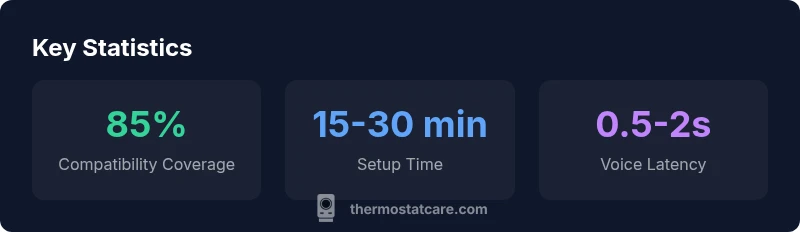
From the Thermostat Care perspective, expect most setups to take between 15 and 40 minutes depending on the existing wiring and the comfort of the installer. If you’re replacing an older thermostat, arrange for a spare battery or power upgrade to ensure continuous operation during firmware updates. In the absence of a C-wire, check for compatibility with “power stealing” modes offered by certain models, but prioritize a proper C-wire deployment for long-term reliability.
Model landscape: Nest, ecobee, and worthy alternatives
The market offers several Google Home-compatible options, with Nest and ecobee at the forefront for many households. Nest Thermostats integrate tightly with Google Home, offering native voice control and immersive routines. ecobee models typically come with built-in Alexa and Google Assistant support, along with a comprehensive room sensor ecosystem for responsive climate control. Other brands—such as Honeywell, Emerson, and Lux—also offer Google Assistant-compatible thermostats with varying degrees of integration, sensor networks, and energy-management features. When evaluating, compare the depth of Google Home integration, the quality of the companion app, and the availability of occupancy sensing and energy reports. Remember that each model has its own wiring and compatibility specifics, so review the installation steps for your exact HVAC configuration and confirm Google Home compatibility claims in the product pages and app listings.
In 2026, Thermostat Care analysis shows a broader range of compatible devices, but Nest and ecobee remain the most seamless choices for those who rely heavily on Google Assistant, due to broader ecosystem support and established routines.
To minimize confusion, map your priorities: do you value the deepest Google Home integration, or is sensor-based occupancy and energy reporting more important? Your decision will influence whether Nest or ecobee emerges as the best fit for your home.
Practical integration examples
Example 1: Morning routine. You wake up and say, “Hey Google, good morning.” The thermostat, lights, and shades adjust to a comfortable, energy-efficient baseline. The routine may include a scheduled increase in temperature between 6:45 and 7:00 a.m., along with preset lighting. This scenario highlights the value of Google Home compatibility in delivering a cohesive morning environment with minimal manual adjustments.
Example 2: Away mode. When you leave home, your Google Home routine triggers a lower temperature and powers down nonessential devices. This scenario emphasizes occupancy-aware automation and demonstrates how Google Home compatibility can contribute to ongoing energy savings.
Example 3: Dinner party. You receive guests, and you want a comfortable temperature coordinated with mood lighting. A quick voice command or a scheduled routine can set your thermostat and lighting in unison for an inviting ambiance. This example shows how Google Home-compatible thermostats integrate into a broader smart-home strategy for social occasions.
Thermostat Care emphasizes testing routines in a controlled environment—start with one routine, observe how devices respond, and then gradually expand automation as you confirm reliability across your ecosystem.
Privacy, security, and data considerations
Voice-enabled thermostats collect usage data to optimize performance and energy savings. When you link a thermostat to Google Home, ensure you understand what data is shared with Google and how it’s stored. Manage privacy settings in both the thermostat manufacturer app and the Google Home app to minimize unnecessary data sharing. Enable two-factor authentication where possible, and keep firmware updated to mitigate security risks. If you have a shared home network, consider configuring guest access separately for smart devices to limit exposure in case of a compromised account. Thermostat Care recommends reviewing privacy policies and selecting models with transparent data handling practices and robust security updates. A proactive security approach helps protect your home while preserving the convenience of voice-activated climate control.
Troubleshooting common pairing issues
If your thermostat isn’t appearing in Google Home, verify that both apps are on the latest version and that the thermostat’s Wi‑Fi is stable. Ensure you’re logged into the same Google account in both apps and that you’ve granted the necessary permissions for device linking. If voice commands fail, test the thermostat in its native app to confirm basic control works, then re-link the device in Google Home. For intermittent control, check for firmware updates and confirm that your router offers adequate bandwidth and low latency. Finally, if you have multiple Google accounts on a shared device, ensure the primary account has permission to control the thermostat in Google Home settings. The Thermostat Care Team notes that careful step-by-step reconfiguration often solves most connectivity glitches.
Quick-start getting your Google Home thermostat up and running
Before you start, list your HVAC system type, the year of installation, and whether a C-wire exists or needs to be added. Install the thermostat’s companion app and verify that it reports a stable connection to Wi‑Fi. Open the Google Home app, add a new device, and follow the on-screen prompts to link the thermostat to Google Assistant. Create a basic routine that adjusts the temperature in the morning and evening to validate basic functionality. As you expand, test voice commands for accuracy and refine room assignments for better control. With patience, you can achieve a reliable and energy-aware climate setup that responds to voice and schedules through Google Home.
Comparison of popular Google Home-compatible thermostat models
| Brand/Model | Google Home Compatibility | C-wire Required | Typical Setup Time |
|---|---|---|---|
| Nest Thermostat (3rd gen) | Yes | Yes | 15-25 minutes |
| ecobee SmartThermostat with Voice Control | Yes | Yes | 20-40 minutes |
| Honeywell Home T9 | Yes | Yes | 20-40 minutes |
| Emerson Sensi Smart Thermostat | Yes | Yes | 15-25 minutes |
Questions & Answers
Is Google Home compatibility the same as Nest integration?
Not always. Nest devices offer very tight Google Home integration, while some third-party thermostats also work well but may use broader Google Assistant features. Always check both product pages for the exact scope of support and routines.
Nest often provides the smoothest Google Home integration, but many third-party thermostats work well too. Check the spec sheet for Google Assistant support.
Do I need a C-wire for Google Home thermostats?
Most Google Home-compatible thermostats benefit from a C-wire for reliable power. If your system lacks one, consider models that support power-sharing or use a C-wire adapter, and consult a professional if needed.
Typically yes, you’ll want a C-wire for stable operation. If you’re unsure, consult an HVAC pro.
Will all features work with third-party thermostats on Google Home?
Feature parity varies by model. Core controls (temperature, mode, and basic routines) usually work, but advanced features (energy reports, occupancy sensing) may be partially supported. Review the spec sheet for each model.
Core controls usually work, but some advanced features may be limited on non-Nest/Nest-compatible devices.
Can I install a Google Home–compatible thermostat myself?
Many models are designed for DIY installation if you’re comfortable with basic wiring. Always turn off power, follow the included instructions, and use the official setup flow in the Google Home app. If you’re unsure, hire a licensed technician.
Yes, many can be installed yourself, but follow instructions carefully or hire a pro if unsure.
What should I do if Google Home can’t find my thermostat?
First, verify Wi‑Fi and account links. Reboot the thermostat and router, then re-link the device in Google Home. If problems persist, check for firmware updates or consult the manufacturer’s support.
Restart devices, re-link in Google Home, and ensure firmware is up to date.
Are there privacy concerns with smart thermostats and Google Home?
Voice-activated devices collect data to improve functions. Review privacy settings in both apps, enable two-factor authentication, and keep firmware current to reduce exposure.
Be mindful of data sharing; adjust privacy settings and keep devices updated.
“When a thermostat natively supports Google Assistant, you unlock reliable voice control and robust automation that works well with other smart devices.”
What to Remember
- Choose a Google Home-compatible thermostat to enable voice control
- Verify built-in Google Assistant support or easy linking in Google Home
- Ensure C-wire power when possible for reliability
- Plan 15-40 minutes for a typical installation
- Nest or ecobee offer the smoothest Google Home integration