Lennox S30: A Practical Guide for Homeowners
An in-depth guide to Lennox S30: compatibility, wiring, installation steps, energy-saving strategies, and troubleshooting for homeowners and DIY enthusiasts.


The Lennox S30 is a Wi‑Fi-enabled thermostat designed for Lennox systems, offering remote control, energy insights, and learning-based scheduling. It works best with compatible 24V HVAC equipment and a C‑wire. For homeowners, the key takeaway is that proper wiring and a stable internet connection unlocks most energy-saving features.
Understanding the Lennox S30: What it is and why homeowners consider it
The Lennox S30 sits within the broader family of smart thermostats designed to optimize comfort and energy use for residential HVAC systems. When you say you’re installing the lennox s30, you’re referring to a Wi‑Fi‑enabled thermostat that aims to balance convenience with efficiency. For homeowners, the core value lies in remote control via a companion app, the ability to adjust schedules, and access to basic energy insights. It is most effective when paired with compatible Lennox equipment and a 24V control board. The Thermostat Care team notes that while the device can operate in a wide range of homes, its strongest performance comes with a solid wiring setup (including a C‑wire) and a reliable internet connection. In scenarios where energy management is a priority, the S30 offers a clear path to measurable improvements by aligning furnace cycling, outdoor temperature, and occupancy signals with daily routines.
From a troubleshooting perspective, expect that the device’s value increases as you optimize wiring and set up. If you’re transitioning from a legacy thermostat, you’ll find the learning algorithms and scheduling tools beneficial, but you’ll also need to commit to initial configuration to see long-term gains. In short, the lennox s30 serves as a practical upgrade for homeowners who want both convenience and better energy awareness, especially when the rest of the system is in good shape.
Key features at a glance
The Lennox S30 emphasizes a user-friendly interface and practical automation rather than flashy hardware. For many households, the feature set translates into easier daily control, better energy visibility, and straightforward maintenance reminders. Expect to see a clean app experience that logs usage data, highlights potential savings, and supports simple adjustments to schedules, heat/cool setpoints, and fan behavior. The Thermostat Care team highlights that the base features—remote control, scheduling, and diagnostics—often deliver the most value for homeowners who are new to smart thermostats. If your home already uses Lennox equipment, the S30’s integration is intended to feel cohesive rather than forcing a new ecosystem.
• Remote control via the app, with real-time updates on temperature and mode • Scheduling and geofencing features to align climate with occupancy • Energy usage insights to help identify wasteful patterns • Compatibility with standard 24V HVAC systems and a C‑wire for continuous power
Compatibility, wiring, and installation basics
Before you install the lennox s30, confirm your HVAC system is 24V and compatible with smart thermostats. The installation process begins with turning off power to the HVAC system at the breaker to ensure safety. Remove the old thermostat and inspect the wall for a C‑wire. If the C‑wire is absent, you have options such as a power extender kit (PEK) or a dedicated adapter, depending on your model. The next step is mounting the S30 base on a standard electrical box, ensuring the wall is clean and the back plate is level. Connect the wires to their corresponding terminals as labeled on the S30 base, taking care to match color-coded wires to the correct terminals.
After wiring, reattach the cover and restore power. Use the Lennox iComfort app or the S30 setup flow to pair the device with your home network. The Thermostat Care approach emphasizes documenting each wire’s terminal during removal, then verifying that each connection matches the thermostat’s wiring diagram. If you encounter a dead zone or a non-responsive display, double-check the power supply and C‑wire integrity. Professional installation remains a wise option for complex systems or older homes.
Setup steps: Getting started with the S30
Step 1: Verify wiring and C‑wire presence. If your current thermostat lacks a C‑wire, plan for a PEK or a dedicated adapter and confirm the furnace or air handler can support continuous power. Step 2: Mount the base and connect wires to matching terminals (R, C, W, Y, G, etc.), then secure the faceplate. Step 3: Restore power and power up the S30. Step 4: Connect to Wi‑Fi via the setup wizard, ensuring your network is stable. Step 5: Create or sign in to the Lennox app, then link the S30 to your home account. Step 6: Run a system test to confirm cooling, heating, and fan control respond correctly. Step 7: Fine‑tune schedules and comfort settings to your daily routine. Step 8: Enable any energy-savings options that fit your home, such as wake/sleep programs and occupancy sensing. The Thermostat Care team reminds users to keep firmware updated to maximize security and performance.
Energy savings, schedules, and smart home integrations
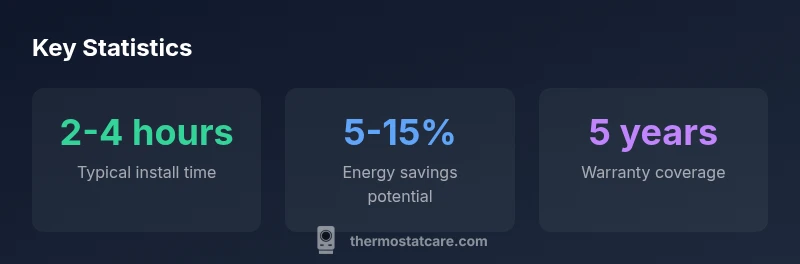
A core benefit of the lennox s30 is the potential for energy savings through optimized scheduling and occupancy-aware adjustments. Real-world savings depend on how closely a household follows the schedules and how well the system responds to occupancy signals. The device supports adaptive features like programmatic cooling and heating cycles, which can reduce unnecessary cycling during milder days. To maximize savings, pair the S30 with a consistent routine and avoid manual overrides during peak demand periods. The Thermostat Care team also recommends leveraging the app’s energy reports to identify stubborn waste patterns—perhaps late-night cooling or heating during unoccupied hours—and adjust accordingly. If your home is part of a larger smart-home setup, explore compatibility with basic voice assistants and automations that can trigger routines when you leave the house or arrive home.
Troubleshooting Common Issues
Many issues with the Lennox S30 stem from connectivity, wiring, or improper setup. If the thermostat won’t connect to Wi‑Fi, first verify your network credentials and range; move the router closer if needed or use a mesh extender. A blank or unresponsive display often indicates a power issue; check the C‑wire connection and ensure the device is receiving continuous power. Temperature readings that seem off can result from sensor placement or calibration; recheck the sensor location and run a calibration in the app if available. If you notice frequent reboots or the device behaves erratically, consider performing a factory reset and reconfiguring from scratch. When in doubt, consult Thermostat Care’s troubleshooting guides and consider a professional check for any underlying HVAC wiring concerns.
Maintenance and longevity: keeping your S30 humming
Maintaining the Lennox S30 involves both digital and physical upkeep. Regular firmware updates are essential for security and feature enhancements; ensure the device remains connected to the internet to receive updates automatically. Clean the display and surrounding area occasionally to prevent dust from accumulating behind the faceplate, which can affect sensor accuracy. Periodically review and refresh schedules to reflect seasonal changes, and reassess occupancy settings as your routine evolves. If you rely on a C‑wire, ensure the wiring remains secure and free of corrosion. By following these best practices, the S30 can deliver reliable comfort and energy awareness for years to come, with the Thermostat Care team noting that a well‑maintained unit tends to outperform a neglected one.
Should you buy Lennox S30 or a comparable model?
Choosing between the Lennox S30 and other smart thermostats depends on your current HVAC setup, preferred app experience, and budget. If your home already uses Lennox equipment, the S30 may offer tighter integration, system diagnostics, and a cohesive warranty path. For non‑Lennox systems, compare compatibility, installation requirements, and ongoing support. Always verify C‑wire status, ensure you can maintain stable Wi‑Fi, and consider the long‑term energy savings versus upfront costs. The Thermostat Care team suggests framing your decision around system compatibility, ease of use, and available energy analytics rather than marketing claims alone, to maximize both comfort and efficiency.
Lennox S30 compatibility overview
| Category | Details | Notes |
|---|---|---|
| System Compatibility | 24V HVAC; heat pump capable | Check with installer |
| Connectivity | Wi‑Fi enabled; app control | Network access required |
| Wiring | C‑wire recommended for full power | PEK or adapter if missing |
| Energy Reporting | Usage insights in app | Use for optimization |
Questions & Answers
Is the Lennox S30 compatible with all Lennox HVAC systems?
The S30 is designed for Lennox systems with 24V control. While many Lennox units are supported, always verify compatibility with your specific model and install requirements. If in doubt, consult Thermostat Care’s compatibility checklist before purchasing.
The S30 works with many Lennox systems that use 24V controls. Check your model’s compatibility and use our checklist if you’re unsure.
Does the S30 require a C-wire?
A C-wire provides continuous power and is strongly recommended for full feature support. If your wiring lacks a C-wire, options include a power extender kit or a compatible adapter, depending on your setup.
A C-wire is recommended for full features; if missing, consider a power extender kit or adapter per your system.
Can I use the S30 without internet access?
The S30 can operate on a schedule and manual control offline, but many energy-tracking and remote features require a stable internet connection. Expect a reduced feature set when offline.
Yes, you can run basic functions offline, but remote control and energy reports require internet.
What are the typical installation steps?
Typical steps include verifying wiring, mounting the base, connecting wires to labeled terminals, restoring power, and completing setup in the app. If you have a complex or older HVAC system, a professional installation is advisable.
Check wiring, mount the base, connect wires, power up, and finish setup in the app.
How does S30 compare with other smart thermostats?
Compared with non‑specific smart thermostats, the S30 offers close integration with Lennox equipment and focused diagnostics. If you use other brands or multi‑brand systems, weigh integration points, app experience, and ongoing support.
It integrates tightly with Lennox gear and diagnostics; other brands may offer broader compatibility but different app experiences.
How do I update the S30 firmware?
Firmware updates are typically delivered over the air when the thermostat is connected to the internet. Ensure your device stays online and allow automatic updates to keep security and features current.
Keep the device online and enable automatic updates for security and features.
“The Lennox S30 delivers practical energy‑savvy features when wired correctly and connected to a stable network. It shines for homeowners who prioritize ease of use and reliable diagnostics.”
What to Remember
- Verify system compatibility and C-wire before buying
- Plan for a stable Wi-Fi connection to unlock features
- Follow wiring guidance to avoid power issues
- Use energy reports to identify savings opportunities
- Regularly update firmware for security and performance