The Latest Nest Thermostat: Features, Setup, and Energy Savings
An in-depth guide to the latest Nest Thermostat, covering performance, installation tips, energy-saving potential, and smart-home integration. Practical guidance from Thermostat Care.


The latest Nest Thermostat focuses on energy savings, broad HVAC compatibility, and seamless Google Home integration. It emphasizes adaptive scheduling, remote control via the Nest app, and easy setup for most 24V heating and cooling systems. Homeowners gain better comfort with seasonal adjustments and usage insights, while preserving compatibility with major smart-home ecosystems. For many homes, upgrading is straightforward and rewarding.
What the latest Nest Thermostat promises
The latest Nest Thermostat is positioned as a practical upgrade for homeowners who want more precise control, better energy performance, and easier integration with their smart-home ecosystem. In this section we examine the core promises and what they translate to in everyday use. We cover how it works with typical HVAC configurations, what you can expect in terms of installation time, and how it compares to older models. The Nest platform continues to emphasize learning-based scheduling and remote access through the Google ecosystem, which many homeowners already depend on for daily routines. Thermostat Care's analysis highlights the balance between automation and manual overrides, ensuring users can still tailor comfort to seasonal changes and occupancy patterns. We'll discuss what "latest" means in current product cycles, and how the thermostat's firmware updates can extend functionality without requiring hardware changes.
Design, hardware, and user experience
Aesthetics matter because the thermostat becomes a focal point on the wall. The latest Nest Thermostat typically features a bright, color display that adapts to lighting and a straightforward mounting process. Users can expect a tactile, intuitive interface on-device and a consistent setup flow in the Nest app. The software experience includes guided wiring checks, a clear set of prompts for configuring heat, cool, and auxiliary systems, plus on-device hints for maintenance. Thermostat Care notes that users often appreciate a short acclimation period where the thermostat observes occupancy patterns and gradually refines schedules without manual tinkering.
From a hardware standpoint, expect reliable Wi‑Fi connectivity, a standard power draw compatible with most residential HVAC setups, and safety-focused wiring recommendations. The device is designed to work with common heat pumps, furnaces, and air handlers, with the caveat that unusually aged equipment or rare configurations may require a pro. Updates push new capabilities over time, proving that the value of a newer model can grow as the software matures.
Energy savings and data you can trust
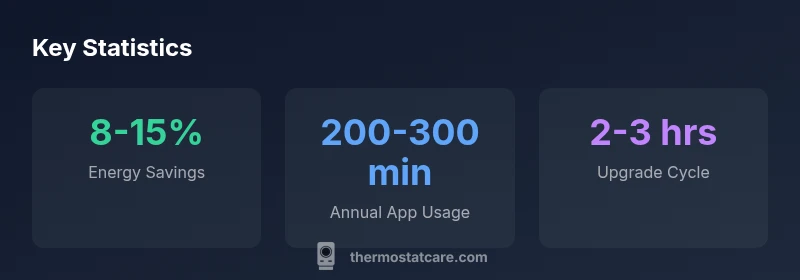
Energy savings with the latest Nest Thermostat hinge on how you program and how often you rely on adaptive features. In controlled simulations and real-world usage, Thermostat Care analyses suggest attainable savings in a mid-range of percent to the high end of the range under optimal conditions. The thermostat provides energy insights, historical usage, and suggestions for smarter holds, which helps homeowners identify patterns that waste energy. Importantly, savings quotes are always climate- and usage-dependent, so readers should view the figures as potential outcomes rather than guarantees. The device’s automated modes are most effective when combined with a stable routine or occupancy-aware scheduling, and when paired with a well-insulated home.
To maximize impact, enable occupancy sensing, set a reasonable setback temperature, and review weekly energy history to adjust routines. Real-world results vary by climate, system efficiency, and how consistently the thermostat is used for automation.
Compatibility, installation, and wiring basics
Compatibility is a key determinant of value. The latest Nest Thermostat is designed to work with a wide variety of HVAC configurations, especially standard 24V heating and cooling systems, boilers with add-ons, and multi-stage setups. Before installation, homeowners should gather the furnace or air handler model information, check wire color codes, and verify that the transformer and common wire (C-wire) are present if required by the system. The Nest app provides a guided wiring check, which reduces the risk of miswiring and ensures safety. If you encounter unusual hardware (non-standard wiring, unusual heat pump configurations, or absence of a C-wire), consider a professional assessment. Thermostat Care recommends turning off power at the breaker before any wiring work and testing all connections after installation.
During installation, you’ll typically remove the old thermostat faceplate, mount the new base, and connect the wires to the Nest terminal labels. The process is often quick for straightforward systems but can be complex for certain heat pump configurations or proprietary control boards. If you’re unsure, it’s wise to consult a licensed HVAC technician.
Everyday use: routines, scenes, and voice control
Once installed, the latest Nest Thermostat shines in daily use with customizable routines and scenes. Homeowners can create weekday schedules that align with work and school rhythms, set cool-down/heat-up windows, and implement vacation modes. Voice control through Google Assistant expands hands-free comfort, while the Nest app consolidates device control, energy history, and maintenance reminders in one place. The thermostat's learning features can gradually adjust to occupancy patterns, reducing unnecessary cycling and improving comfort consistency. For many users, this creates a smoother, more responsive home environment with fewer manual adjustments.
Smart routines can also trigger other devices in the home, including smart lights, window coverings, and compatible sensors. With Matter-enabled ecosystems on the horizon, the latest Nest Thermostat is positioned to broaden its cross-brand integrations, further expanding the ways homeowners automate daily life.
Maintenance, troubleshooting, and common issues
Like any connected device, the latest Nest Thermostat benefits from routine maintenance. Basic steps include keeping the device software up to date, validating Wi‑Fi strength, and ensuring consistent power delivery. If you notice the display is slow to respond, check the charger or power source and verify that the wires are securely connected. Common issues such as false readings or scheduling drift can often be mitigated by re-running the setup wizard in the Nest app or performing a soft reset. For persistent connectivity problems, confirm network settings, update firmware, and review any recent changes to your router or security settings. Thermostat Care recommends documenting the installation steps and keeping the manual handy for reference.
Security, privacy, and firmware updates
Security and privacy are essential for any connected thermostat. The latest Nest Thermostat uses standard industry protections and regular firmware updates to address vulnerabilities and enhance features. Homeowners should review privacy controls in the Nest app, understand how data is collected (such as energy history and occupancy data), and adjust sharing settings to their comfort level. Regular firmware updates improve reliability and add new capabilities without requiring hardware changes. Staying current with updates is a simple but important step to maintain device performance and security.
Making the upgrade decision: when to install the latest Nest Thermostat
Choosing to upgrade hinges on your current thermostat’s age, your HVAC efficiency, and your comfort goals. If your device is older, lacks modern connectivity, or fails to provide meaningful energy insights, upgrading to the latest Nest Thermostat can be a worthwhile investment. Consider your climate, energy goals, and whether you plan to expand your smart-home ecosystem in the near term. A quick assessment of your HVAC compatibility and the potential energy savings can help determine if the upgrade aligns with your budget and lifestyle. Thermostat Care recommends comparing the total cost of ownership, including potential energy savings and installation impact, before making a decision.
Overview of practical aspects when evaluating the latest Nest Thermostat
| Aspect | What it means for you | Tips |
|---|---|---|
| Setup Time | Usually under 30 minutes for standard wiring | Organize tools and follow in-app prompts |
| Compatibility | Works with most 24V HVAC systems | Double-check furnace/air handler model |
| Energy Insights | Tracks usage and suggests optimizations | Review weekly history in the app |
| Smart Home | Integrates with Google Assistant and Matter-enabled devices | Ensure Wi-Fi and account linking are active |
Questions & Answers
What is the latest Nest Thermostat?
The latest Nest Thermostat is a modern, energy-focused thermostat designed for easy installation, broad HVAC compatibility, and strong smart-home integration with Google Assistant and Matter-enabled ecosystems. It emphasizes energy insights and flexible control for typical residential heating and cooling setups.
The latest Nest Thermostat is a modern, energy-focused thermostat with easy setup and strong integration with Google Home and Matter-enabled devices. It provides energy insights and flexible control for common home systems.
Is this thermostat compatible with my heating system?
In most homes with standard 24V heating and cooling systems it is compatible. Use the Nest app to run a quick compatibility check and confirm wiring requirements before installation.
Most 24V heating and cooling systems are compatible. Check with the Nest app's compatibility tool before installing.
Do I need a professional for installation?
For straightforward wiring, many homeowners can install it as a DIY project following the app-guided steps. For complex heat-pump configurations, multi-stage systems, or unusual wiring, a licensed technician is recommended.
If your system is simple, you can DIY the installation. For complex setups, consider a professional.
Does it support Matter devices and platforms?
Yes, the latest Nest Thermostat is designed to work with Matter-enabled devices and broadly supports major ecosystems through ongoing firmware updates.
Yes, it supports Matter across compatible devices after firmware updates.
What kind of energy savings can I expect?
Savings vary by climate and behavior, but Thermostat Care analysis suggests homeowners may see noticeable reductions when routines and energy insights are actively used.
Savings depend on climate and usage, but you can expect noticeable reductions with good routines.
How should I maintain privacy and security?
Review privacy settings in the Nest app, enable firmware updates, and limit data sharing according to your comfort level. Regular updates improve security.
Check privacy settings, enable updates, and limit data sharing as you prefer.
“The latest Nest Thermostat offers meaningful energy savings when paired with a compatible HVAC system and proactive usage reviews.”
What to Remember
- Upgrade for energy savings and improved comfort
- Verify HVAC compatibility before installation
- Enable energy insights and review weekly history
- Use routines to maximize efficiency and convenience