Thermostat at Lowe's: A Practical Install and Troubleshooting Guide
Discover how to shop for, install, and optimize a thermostat at Lowe's. This data-driven guide covers compatibility, brands (Nest, Ecobee, Honeywell), installation options, and energy-saving tips for homeowners.


Shopping for a thermostat at Lowe's starts with understanding your HVAC compatibility, Wi‑Fi needs, and smart features. This guide summarizes the top Lowe's options (Nest, Ecobee, Honeywell), common installation steps, and how to save energy. By following Thermostat Care's tested approach, homeowners can choose confidently and avoid common missteps. Whether you're replacing an old unit or equipping a new system, Lowe's offers starter kits and professional services.
Why Lowe's Is a Popular Stop for Thermostats
Lowe's has become a common destination for homeowners shopping for a thermostat, thanks to a broad selection, in-store expertise, and online convenience. When you walk into a Lowe's, you’ll typically find popular brands like Nest, Ecobee, and Honeywell side by side with Lowe's‑brand options and bundles. The shopping experience is complemented by price matching, seasonal promotions, and installation services in many markets. For the DIY crowd, Lowe's stores often provide clear signage on compatibility, wiring needs, and energy-saving features. From a troubleshooting perspective, starting at Lowe's means you can physically inspect different form factors, verify display readability, and compare wiring diagrams before purchasing. In the end, the goal is to pick a model that integrates smoothly with your HVAC system and your home network. According to Thermostat Care, a thoughtful choice reduces installation friction and improves long‑term performance. The Thermostat Care team found that a well‑chosen Lowe's thermostat can deliver noticeable energy savings when paired with correct settings and routine maintenance.
How to Choose the Right Thermostat When Shopping at Lowe's
Choosing the right thermostat at Lowe's involves balancing three core elements: your HVAC compatibility, your preferred smart features, and how you plan to interact with the system. Start by identifying whether your system is a single-stage, multi-stage, heat pump, or conventional gas/electric furnace. Then, decide if you want basic programmable control or a full-featured smart thermostat with geofencing, voice control, and remote access. Lowe's commonly stocks models from Nest, Ecobee, and Honeywell, each with different mounting options (flush mount vs. wall plate), screen sizes, and wiring requirements. Don’t forget to check for C-wire compatibility and whether the thermostat supports heat‑pump mode if you have a heat pump. Finally, factor in installation help options—Lowe's in-store techs may offer installation services, or you can opt for DIY installation with the included guides and online tutorials. This approach ensures you select a model that integrates with your home Wi‑Fi, supports future firmware updates, and aligns with your energy-saving goals.
Compatibility and Installation: What Lowe's Guides Cover
Lowe's guides focus on compatibility with common HVAC configurations, including single-stage, multi-stage, heat pumps, and two-transformer setups. They provide wiring diagrams, C-wire requirements, and step-by-step installation flow for many models. For DIY installers, Lowe's guides emphasize turning off power at the breaker, verifying wire colors, and using the thermostat’s compatibility checker. If you’re replacing an older stat, the Lowe's guidance often highlights the importance of confirming the existing wiring, ensuring a common C-wire, and mapping terminals (R, Rc, Rh, W, Y, G, O/B) to the new device. When uncertainties arise, Lowe's customer service can help you verify compatibility before you purchase. Thermostat Care notes that proper verification reduces the chance of post‑install issues such as unresponsive displays or incorrect heating/cooling behavior.
Popular Thermostat Brands at Lowe's: Nest, Ecobee, Honeywell
Lowe's stocks a mix of leading smart thermostats and traditional programmable models. Nest is favored for its learning capabilities and seamless Google Home integration; Ecobee is known for built-in room sensors and strong energy savings; Honeywell offers reliable performance with broad compatibility across HVAC systems. Each brand has variations in screen size, power options, and compatibility with heat pumps or multi‑stage systems. When shopping at Lowe's, compare not only price but also the warranty, update frequency, and the quality of support materials. Brand comparisons can help you decide which ecosystem aligns with your smart home setup and voice assistant preferences. The Thermostat Care team emphasizes checking for compatibility with your current thermostat wiring and HVAC equipment to avoid surprises after installation.
DIY Installation Steps vs. Professional Help
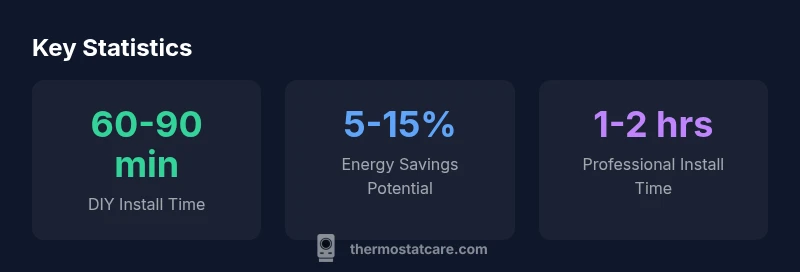
DIY installation at Lowe's typically involves turning off the power, removing the old thermostat, labeling wires, and connecting to the new device according to the specified terminals. Most Lowe's models include clear step‑by‑step instructions and online tutorials. If your HVAC system features multiple stages, a heat pump, or unusual wiring (such as a C-wire shortage), professional installation is worth considering. Lowe's installation services can be scheduled to handle wiring checks, sensor placement, and network setup. Thermostat Care recommends a cautious approach: start with a single‑stage, Wi‑Fi thermostat if you’re unsure about wiring, and escalate to a more advanced model only after you’ve confirmed compatibility. This reduces the risk of inaccurate wiring, thermostat misreads, or misconfigurations that could lead to energy waste. Always verify the system’s power is off before wiring and test the system after installation to confirm proper operation.
Common Pitfalls When Replacing a Thermostat from Lowe's
Common pitfalls include selecting a model without heat‑pump support, ignoring C-wire needs, or assuming all wiring is identical across brands. Some users forget to disable energy-saving features temporarily during setup, which can mask performance issues. Another frequent issue is failing to update the thermostat’s firmware after installation, which can affect security and performance. Lowe's guides stress the importance of verifying compatibility first, then reading the device’s quick start guide, and finally performing a test run in different modes (cooling, heating, and auto). Thermostat Care advises documenting the wiring connections before removal, taking photos for reference, and using the device’s diagnostic tools to validate readings. This proactive approach minimizes guesswork and speeds up a successful setup.
Maintenance Tips to Extend Thermostat Life
Maintenance is often overlooked but critical for reliability and energy efficiency. Keep the thermostat free from dust, ensure the mounted unit remains level, and periodically check sensor placement to avoid misleading thermostat readings. Update firmware promptly, review energy reports for anomalies, and replace batteries if you’re using a model with battery backup. In homes with older HVAC systems, it’s wise to schedule a professional inspection every few years to ensure wiring, transformers, and relays remain in good condition. Regular maintenance reduces the risk of false readings, which can lead to inefficient heating or cooling and unnecessary runtime. Thermostat Care notes that a well-maintained thermostat at Lowe's can contribute to consistent comfort and lower energy bills over time.
Energy Savings and Smart-Home Synergy: A Practical Look
Smart thermostats from Lowe's bring energy-saving features that adapt to your routines. Look for learning algorithms, occupancy sensing, adaptive recovery, and geofencing. When used with a compatible HVAC system, these features can yield meaningful energy reductions and improved comfort. Integrate the thermostat with your smart-home ecosystem (Google Home, Alexa, or Apple HomeKit) to streamline scheduling and voice control. Keep privacy settings in mind and review which data the thermostat shares with cloud services. The Thermostat Care team highlights that the real-world energy savings depend on climate, insulation, and occupancy patterns, so set realistic expectations and validate performance with monthly energy reports.
Final Checklist Before You Buy at Lowe's
Before purchasing, confirm compatibility with your HVAC, home network, and preferred ecosystem. Verify warranty terms and return policies, and consider whether installation services would benefit your setup. Review Lowe's promotions and bundle options to maximize value. By aligning the device choice with your home’s wiring and climate, you’ll minimize post‑purchase friction and ensure smoother operation from day one.
Lowe's thermostat option overview
| Feature | Lowe's Thermostat Options | Notes |
|---|---|---|
| Wired vs Wireless | Wired options available; most units are Wi‑Fi enabled | Choose based on existing HVAC wiring |
| HVAC Compatibility | Check system type (gas, electric, heat pump) | Some thermostats support multiple stages |
| Energy Saving Features | Auto scheduling, geofencing, adaptive recovery | Depends on model |
Questions & Answers
Is it cheaper to buy a thermostat at Lowe's versus online?
Prices at Lowe's are typically competitive and may include in-store promotions or bundles. Compare in-store and online pricing and take note of any installation offers or extended warranties.
Prices at Lowe's are usually competitive; check both in-store and online, and watch for bundled installation offers.
Which Lowe's thermostat brands are best for homes with heat pumps?
Look for models explicitly labeled as heat-pump compatible; Ecobee and Honeywell options commonly perform well with heat pumps, while Nest offers solid general compatibility.
For heat pumps, choose models advertised as heat-pump compatible and verify with Lowe's guides.
Do Lowe's store associates offer installation services?
Yes, Lowe's offers professional installation in many markets. Check local availability and schedule a service window that fits your home.
Yes, Lowe's can install thermostats in many areas; check locally for availability.
What is the best way to reset a thermostat bought at Lowe's?
Reset steps vary by model. Refer to the device manual or Lowe's support resources for model-specific instructions.
Reset depends on the model— consult the manual or Lowe's support.
Can I return a thermostat to Lowe's if it doesn't fit my system?
Most Lowe's thermostats are returnable within standard policies if unused or within a set window. Always check your receipt and store terms.
Yes, if you’re within Lowe's return window and the item is in resale condition.
Do Lowe's carry smart thermostat versions for energy saving?
Yes. Lowe's stocks Nest, Ecobee, Honeywell, and other smart thermostats with energy-saving features.
Yes—Lowe's has smart thermostats with energy-saving features.
“Choosing a thermostat is not just about features, but about ensuring compatibility, reliable wiring, and the potential energy impact on your home.”
What to Remember
- Know your HVAC compatibility before buying.
- Nest, Ecobee, and Honeywell offer strong Lowe's options.
- Use Lowe's guides to verify C-wire and wiring terminals.
- DIY installation is feasible for simple setups; complex systems may need help.
- Leverage energy-saving features for long-term gains.