How to Set a Thermostat for Underfloor Heating
Learn how to set a thermostat for underfloor heating safely and efficiently. This guide covers sensor compatibility, target temperatures, and practical steps to avoid overshoot and save energy.


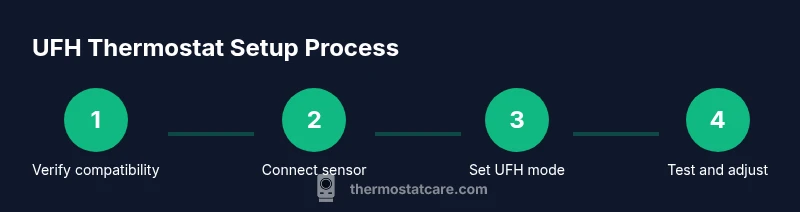
You can set a thermostat for underfloor heating by selecting a thermostat compatible with floor-sensing, placing the floor sensor in the correct mode, and programming a target floor temperature and a comfortable ambient range. Start by verifying sensor compatibility, then configure floor-limit protection and a heating schedule that minimizes overshoot. Avoid using generic air-temperature targets alone.
Understanding UFH thermostat basics
Underfloor heating (UFH) delivers heat through embedded floor circuits, which respond differently than radiators. That means your thermostat must not only switch heat on and off, but also read and respect floor temperature. According to Thermostat Care, starting with compatibility checks and a solid sensor strategy saves time and prevents overshoots. UFH requires accurate sensing: floor sensors measure the actual floor temperature, not dispersed room air. If the sensor is placed away from the heating zone or the thermostat defaults to ambient-only control, you’ll get uneven warmth or cycles that waste energy. Your UFH thermostat should support floor-sensing mode, offer a dedicated UFH or “floor” setting, and allow you to set a floor-temperature target and a safe ambient range. While many thermostats advertise “RF,” “wifi,” or smart features, the essential capability is precise floor temperature control.
Choosing the right thermostat and floor sensor
Selection begins with compatibility: confirm that your thermostat supports floor-sensing or UFH mode and that the floor sensor type matches your system (coil, cable, mat). In practice, that means reading the product manual to ensure the sensor plugs into the thermostat's floor input and isn't tied to air-only control. If your installer provided a sensor, reuse it; if not, obtain one rated for your floor type and maximum surface temperature. Electing a thermostat that allows you to lock in a target floor temperature or set a gradient between day and night schedules reduces overshoot. The Thermostat Care analysis shows that most UFH issues arise from mismatched sensors or ignoring the UFH mode in the thermostat's settings.
Setting targets: floor temperature vs ambient
The core principle is to set the target floor temperature, not the room air temperature. The floor will heat slowly, so you’ll need to plan a warm-up period and avoid aggressive setpoints that overshoot. Start with a conservative floor target within the manufacturer’s recommended range, then observe how quickly the surface reaches the target and whether the room feels comfortable. Many thermostats offer a floor-safe limit and a delay timer to prevent short cycling—enable these features if available. If your system supports an ambient sensor, you can couple a mild room temperature target to assist steady comfort without pushing the floor too hot. Always verify that the door, windows, and insulation aren’t creating heat loss or drafts that confuse the thermostat readings.
Energy-saving strategies and scheduling for UFH
To maximize efficiency, align heating with occupancy and avoid continuous running. Use a daily schedule that matches your routines, and prefer a gentle ramp-up in the morning rather than a sudden late-wake heat. If your thermostat supports adaptive or learning schedules, enable them and periodically review performance. Pair UFH with weather compensation if the thermostat and system offer it; this adjusts the floor target based on external temperature, reducing energy waste. Finally, keep sensors free from dust and ensure the floor finish (tile, wood, stone) isn’t inhibiting heat transfer; any material barrier will cause measured temperature differences. The goal is steady, comfortable warmth with minimal cycling.
Common mistakes to avoid during setup
Avoid relying on air temperature targets alone; UFH relies on floor temperature readings. Do not place the floor sensor near a cold surface, vent, or outside edge where heat drains quickly. Do not override the UFH mode and try to use a generic thermostat schedule meant for radiators. Always power down before wiring, and confirm all connections are secure. Finally, run a trial period of several hours to observe how the floor and ambient temperatures converge, then adjust gradually. The Thermostat Care team recommends documenting outcomes to simplify future tweaks.
Tools & Materials
- UFH-compatible thermostat(Must support floor-sensing mode and UFH operation)
- Floor temperature sensor(Compatible with your UFH kit and thermostat input)
- Wiring tools (screwdrivers: Phillips and flat-head)(For mounting and wiring the thermostat)
- Manual or quick-start guide(Keep on hand for model-specific steps)
- Electrical tester (non-contact preferred)(Useful to verify power is off before handling wiring)
Steps
Estimated time: 25-40 minutes
- 1
Power off and verify compatibility
Turn off the circuit at the breaker and confirm the thermostat is rated for floor-sensing UFH. Inspect the location of the floor sensor input and ensure the load type matches the UFH kit. This reduces the risk of mis-wiring and ensures safe setup.
Tip: Always double-check that power is off with a tester before touching any wires. - 2
Identify and label wiring and sensor
Carefully open the thermostat enclosure and identify each wire. Label conductors and sensor wires before disconnecting anything. A quick photo helps you restore the original wiring if needed.
Tip: Label with color-coded tape and keep a copy of the wiring diagram. - 3
Connect floor sensor to the UFH input
Attach the floor sensor to the thermostat’s floor input exactly as the manual instructs. Ensure the sensor cable is free of twists and secured away from heat sources or sharp edges. Confirm a clean, seated connection.
Tip: Use a strain-relief method if the sensor cable enters the wall box. - 4
Configure UFH mode and safe floor temp
Enter UFH mode or floor-temperature control in the thermostat settings. Enable safety limits like a maximum floor temperature or temperature guard where available. Save changes and verify the thermostat recognizes the floor sensor.
Tip: Refer to the manufacturer's guidelines for the recommended floor-temp range. - 5
Set initial target and schedule
Set an initial conservative floor temperature target and create a simple day-night schedule. If your thermostat supports ramp times, enable a moderate warm-up period to avoid shocking the floor. Save the schedule and monitor.
Tip: Start with a gradual ramp and adjust after the first 24–48 hours. - 6
Test, observe, and adjust
Power the system back on and observe over several heating cycles. Check floor surfaces for warmth and ensure the ambient room feels comfortable. Adjust floor target, ramp times, or schedules based on real readings.
Tip: Keep a log of temperatures and cycle times to guide future tweaks.
Questions & Answers
Do I need a dedicated UFH thermostat or can a standard thermostat work?
Most UFH systems require a thermostat with floor-sensing or UFH mode. Check compatibility with your floor sensor and system type to ensure proper operation.
Most UFH systems need a floor-sensing thermostat; check compatibility with your floor sensor.
What temperature should I set the floor and ambient temperature to?
Set targets within your manufacturer’s recommended ranges. Start with a conservative floor target, then observe heat buildup and adjust as needed.
Start with the recommended floor target, then observe and adjust.
Why is the floor not heating evenly?
Check sensor placement to ensure it isn’t near a cold surface or air drafts. Confirm the floor sensor is correctly connected and that the floor finish isn’t hindering heat transfer.
Check sensor placement and ensure no cold spots or drafts.
Can I adjust the thermostat while underfloor heating is active?
Yes, but make small changes and allow time for the system to respond. UFH reacts slowly, so patient fine-tuning yields better results.
Yes, just make small adjustments and give it time.
What safety considerations should I observe?
Power off before wiring, protect sensors from moisture, and follow the manufacturer’s guidelines for your model and floor type.
Turn off power when wiring, and follow the manual.
Watch Video
What to Remember
- Verify UFH compatibility before wiring
- Use floor-sensing mode for accurate control
- Set a safe floor target within manufacturer limits
- Test cycles and adjust gradually for comfort and energy savings