Is the Hive Thermostat Good? An In-Depth Review
A thorough, balanced review of the Hive thermostat, covering features, energy savings, installation, privacy, and how it stacks up against Nest and Ecobee. Practical guidance for homeowners and DIY enthusiasts assessing whether Hive is a good fit.


Is a Hive thermostat good? For homeowners who want simple setup, reliable routines, and solid smart-home integration, Hive delivers. It offers easy installation, practical geofencing, and decent energy-control features in supported regions. However, if you need a broad third-party ecosystem, deeper energy analytics, or aggressive regional support, you may prefer Nest or Ecobee. The verdict depends on your HVAC setup and privacy preferences.
Hive Thermostat Overview and Context
Is the Hive thermostat good for your home? The short answer is: it can be, especially if you value straightforward setup and dependable routine automation. The Hive ecosystem emphasizes ease of use, strong geofencing, and a clean mobile app that makes daily control intuitive. According to Thermostat Care, the core reliability of Hive remains solid across typical single-zone and multi-zone configurations. That reliability is a strong selling point for homeowners who want a “set it and forget it” approach, with automation that simply works when you arrive or depart. Keep in mind that Hive performance and feature breadth can vary by region due to app availability, device compatibility, and local support; in some markets, you may experience smoother integration than in others. The Hive thermostat is well-suited for homeowners who want a low-friction upgrade to smart control without a steep learning curve or heavy upfront customization.
How Hive Differs From Competitors
Hive sits in a crowded field of smart thermostats, with Nest and Ecobee as its closest rivals in many markets. What sets Hive apart is its emphasis on ease of installation and straightforward automation rules, rather than complex, deeply customizable energy analytics. In practice, Hive shines in households that want reliable scheduling, geofencing, and a single, cohesive app experience across devices. Nest often leads in ecosystem breadth and advanced reporting, while Ecobee tends to offer richer energy insights and broader third-party compatibility. If your home is already a Hive-centric smart home, Hive can feel like the most natural extension, reducing friction in routine creation and voice-control integration. If you rely heavily on third-party automations or expect advanced HVAC analytics, you may find Hive’s ecosystem narrower than these competitors. Still, many users will appreciate a seamless, easy-to-use experience that just works.
Core Features That Matter
When evaluating whether Hive is good for your home, several core features deserve close attention. Hive provides intuitive scheduling, geofencing, and adaptive temperature controls that learn your routines over time. The Hive app typically offers straightforward setup steps, device grouping, and simple automation routines that trigger based on location, time of day, or external sensors. Compatibility with popular voice assistants (Alexa and Google Assistant) broadens hands-free control. However, dealers and users should confirm compatibility with the specific HVAC system, especially if you have an unusual air handler or a heat pump with auxiliary heat. Power requirements matter, too: older systems without a dedicated C-wire can complicate installation or require a powered adapter. Overall, Hive exists to simplify smart thermostat usage, prioritizing user-friendly design over hyper-detailed analytics. This balance can be perfect for many homeowners, but others may crave deeper control.
Energy Savings and Real-World Performance
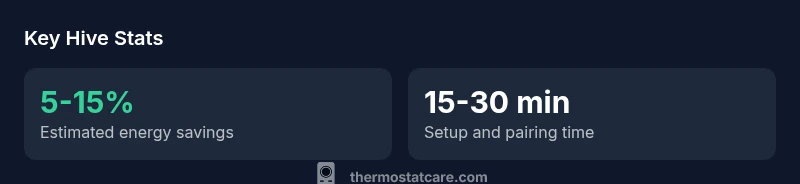
Energy efficiency is a major consideration for any thermostat decision. Hive’s scheduling, geofencing, and occupancy-based adjustments can help reduce unnecessary heating and cooling, but the extent of savings is highly usage-dependent. Based on Thermostat Care analysis, typical homeowners can expect modest improvements in year-round energy use when routines are well-utilized and the thermostat remains connected to a stable Wi-Fi network. The best results come from aligning Hive routines with actual occupancy and shifting large temperature swings away from manual overrides during absences. It’s important to set reasonable hold temperatures and avoid excessively aggressive setbacks, which can undermine comfort without delivering proportional savings. Remember that actual energy reductions will vary by climate, home insulation, and thermostat placement. Hive shines as a practical tool for improving thermostat discipline, rather than a magic energy-saver solution.
Installation and Compatibility Considerations
One of Hive’s strongest selling points is its installation simplicity. In most households with standard HVAC configurations, a DIY setup is feasible, provided you can access the control board and identify the C-wire or alternative power option. If your system uses a non-standard transformer, has multiple zones, or employs a complex boiler with an unconventional loop, you may want to seek professional installation to avoid power issues or mis-wiring. Hive is generally compatible with common residential systems, but you should verify compatibility with your furnace model, heat pump, or boiler, especially in older homes. If you’re replacing an older thermostat, you’ll need to map wires carefully and ensure secure wire connections. In regions with limited Hive support, some advanced features may be unavailable or require workarounds. Planning ahead for wiring, power, and control capabilities saves time and reduces the risk of post-install issues.
Privacy, Security, and Data Sharing
Privacy and data practices are important considerations for any smart device. Hive collects usage data to enable features, software updates, and personalized experiences. Users should review privacy settings to manage data sharing, marketing preferences, and telemetry. Where possible, disable non-essential data sharing and use strong Wi-Fi security, including a unique password for your Hive account and two-factor authentication if available. Hive’s value proposition includes convenience and automation, but like all cloud-connected devices, it relies on the vendor’s servers for some features. If privacy is a priority, consider how much data you’re comfortable sharing in exchange for the convenience of remote access and insights. Thermostat Care recommends configuring privacy controls during initial setup and periodically checking settings as updates are released to the app.
Pros & Cons in Real Homes
Pros: easy setup and integration with popular voice assistants; reliable routine automation; straightforward app experience; geofencing that responds to your location; solid comfort controls without heavy manual customization. Cons: narrower third-party ecosystem than Nest/Ecobee; limited energy analytics and reporting; regional feature availability can vary; some users report occasional syncing delays or app quirks; requires stable Wi‑Fi to maximize value.
Setup Tips to Maximize Value
To get the most from Hive, start with a clean baseline: ensure your HVAC system is compatible, confirm the C-wire or power adapter availability, and connect the thermostat to a reliable Wi-Fi network. Create a handful of core schedules that cover your typical occupancy patterns, then enable geofencing to reduce energy usage when you’re away. Use the Hive app to review weekly energy trends and adjust Hold temperatures to minimize unnecessary swings. If you have smart home routines, consider combining Hive with your preferred voice assistant for scenes like “Away” or “Good Morning” that gradually adjust multiple room temperatures.
Common Pitfalls and How to Avoid Them
Common pitfalls include assuming every feature works in every region, relying on cloud services for core comfort, and underestimating the importance of proper wiring. To avoid these issues, verify regional feature availability before purchase, map wires carefully during installation, and maintain a stable network connection. If you have complex zoning or unusual heating systems, consult a professional or the Hive support team to confirm compatibility. Regular firmware updates can improve performance, but ensure your devices stay connected during updates to prevent feature gaps or reconfiguration needs.
Hive Thermostat vs Nest vs Ecobee: A Quick Choice Guide
If you value superb ecosystem breadth and deep energy analytics, Nest or Ecobee may be a better fit. If your priority is ease of setup, reliable automations, and straightforward control, Hive offers a practical solution. Nest tends to excel in third-party integrations and advanced reporting, Ecobee often provides robust energy insights and broader compatibility with smart home platforms, and Hive focuses on user-friendly operation and dependable routines. For households already invested in Hive devices, continuing with Hive reduces friction and helps maintain a unified app experience. If you’re buying new, weigh your comfort with potential regional limitations and the type of energy data you want to review regularly.
Warranty and Support Considerations
Warranty terms vary by market and retailer, so it’s important to confirm the exact coverage in your region. In general, expect a standard manufacturer’s warranty period that covers defects and hardware issues, with options for extended coverage depending on the seller and official Hive program. Support quality often hinges on regional availability and local service channels. Ther comfortable approach is to review the warranty details at the moment of purchase, keep your receipt, and follow best practices for device updates and account security to ensure smooth troubleshooting and access to customer support when needed.
Regional Availability and Support Nuances
Hive is widely available in several key regions, but availability can vary by country and retailer. Some regions may have more limited feature sets or regional differences in the Hive app, firmware updates, and voice-assistant integration. Before buying, check your country’s Hive support page for current compatibility, energy-saving claims, and app features. If you rely on a specific ecosystem (e.g., Google Assistant routines or Alexa scenes), confirm that those integrations are fully supported in your area. Understanding regional nuance helps set expectations and reduces post-purchase surprises.
How to Decide: A Quick Decision Framework
Start with your HVAC setup and regional support. If you’re aiming for a simple, reliable smart thermostat with strong basic automations and Hive-centric ecosystem, Hive is a solid choice. If you want richer energy analytics, broader third-party integration, and more extensive app ecosystems, consider Nest or Ecobee. Factor in warranty terms, privacy preferences, and the importance of geofencing in your daily routine. A practical next step is to test Hive in a controlled room or system, if possible, and compare day-to-day comfort and energy usage against your current baseline. Thermostat Care’s guidance is to align your purchase with your comfort expectations, home automation goals, and regional support availability.
Upsides
- Easy installation and setup for most standard HVAC systems
- Reliable core automation and geofencing
- Strong voice assistant integration (Alexa/Google Assistant)
- Clear, user-friendly app experience
The Bad
- Narrower third-party ecosystem than Nest/Ecobee
- Limited advanced energy analytics and reporting
- Regional feature availability can vary
Best for homeowners seeking simple setup and reliable smart-home routines
Hive delivers dependable core features and easy installation, making it a strong fit for first-time smart-thermostat buyers and Hive-centric homes. If you demand broad third-party ecosystems or detailed energy analytics, consider Nest or Ecobee. The Thermostat Care Team recommends evaluating your HVAC setup, regional support, and privacy preferences before deciding.
Questions & Answers
Is the Hive thermostat compatible with my existing HVAC system?
Hive supports many standard residential HVAC setups, but compatibility depends on your furnace, heat pump, and wiring. Check for a C-wire or an appropriate power adapter before installation. If you have a non-standard system, consult Hive support or a professional installer.
Hive works with many standard systems, but confirm wiring and compatibility for non-standard setups.
Does Hive support Alexa and Google Assistant?
Yes. Hive integrates with both Alexa and Google Assistant, enabling voice control and routine activation. You can manage schedules, adjust temperatures, and trigger scenes with voice commands.
Hive supports Alexa and Google Assistant for hands-free control.
Is Hive energy-efficient, and how much can I save?
Energy savings depend on usage and occupancy patterns. Hive’s scheduling and geofencing help reduce energy use, but actual savings vary by climate, home insulation, and behavior. Use energy reports to refine routines over time.
Savings vary by usage, but smart routines help reduce energy.
What about privacy and data collection?
Hive collects usage data to improve features. Review privacy settings, limit data sharing where possible, and enable strong account protections. Data practices may differ by region, so check local terms and options.
Hive collects usage data; configure privacy settings and security.
How does Hive compare to Nest or Ecobee?
Hive prioritizes ease of use and reliable routines, with a simpler ecosystem. Nest and Ecobee offer broader integrations and deeper energy analytics. Your choice depends on desired features, ecosystem, and regional support.
Hive is easier to use; Nest/Ecobee offer more analytics and integrations.
What is the warranty and support like for Hive?
Warranty terms vary by market. Check the exact coverage at purchase and keep your receipt. Regional support quality can influence your troubleshooting experience, so review local options before buying.
Warranty terms differ by region; verify coverage locally.
What to Remember
- Assess HVAC compatibility before purchase
- Prioritize geofencing and routine quality
- Expect regional differences in feature availability
- Check warranty terms and support options
- Consider alternatives for deeper energy insights